# Edit Menu
The Edit menu holds the commands that change and search text. [Writing code](/tB/IDE/Code/index.md) explains them.
{:width="298" height="771"}
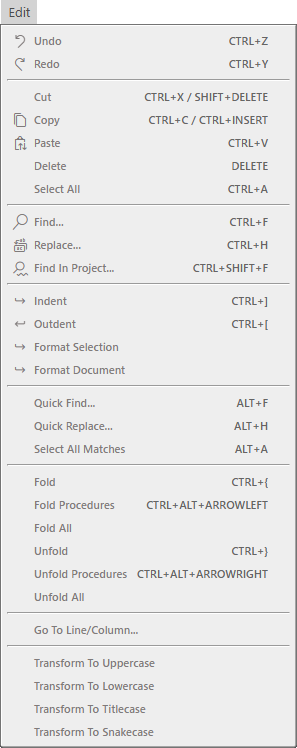
The picture shows the menu while the code editor has the focus. Most commands act on the code editor, so which ones are available depends on what has the focus.
Seven items are two commands each: **Undo**, **Redo**, **Cut**, **Copy**, **Paste**, **Delete** and **Select All**. One command is for the code editor and one is for the [form designer](/tB/IDE/Forms/Controls.md), and the menu shows the one that fits. While the code editor has the focus, they edit text. While the form designer, or the **PROPERTIES** pane, has the focus, they work on controls:
- **Undo**, **Redo**, **Paste** and **Select All** are available while a form is open in the designer.
- **Cut**, **Copy** and **Delete** are available only while at least one control is selected. The form alone does not count as a selected control.
- A key pressed in the **PROPERTIES** pane does not run them, because the key goes to the property box. The menu item does.
When none of the code editor, the designer and the **PROPERTIES** pane has the focus, these seven items are greyed out. **Paste As Comment** is missing whenever the code editor does not have the focus. Every other item of the menu, from **Find...** to the **Transform To** items, is a code editor command: it is greyed out while the form designer has the focus, and with nothing in focus. The one exception is **Find In Project...**, which is available whenever a project is loaded.
## Undo and the clipboard
**Undo** (Ctrl+Z) and **Redo** (Ctrl+Y)
: Step back and forward through the changes to the file. There is no second key for Redo. See [Undo and redo](/tB/IDE/Code/Editor.md#undo-and-redo).
**Cut**, **Copy** and **Paste**
: The editor's own clipboard commands, with the keys Shift+Delete, Ctrl+Insert and Ctrl+V as well as the usual ones. **Paste** re-indents the text to the code around it. See [Copy, cut and paste](/tB/IDE/Code/Editor.md#copy-cut-and-paste).
**Paste As Comment** (Ctrl+Alt+V)
: Pastes the clipboard text with `' ` before each line that is not blank.
**Delete** (Delete)
: In the code editor, deletes the selected text, or the character after the caret when nothing is selected. In the form designer, deletes the selected controls, and the controls inside any container among them. It is greyed out when no control is selected. See [Copy, cut, paste and delete](/tB/IDE/Forms/Controls.md#copy-cut-paste-and-delete).
**Select All** (Ctrl+A)
: In the code editor, selects the whole file. In the form designer, selects every control on the form, including those inside containers, but not the form itself. See [Select controls](/tB/IDE/Forms/Controls.md#select-controls).
## Find and replace
**Find...** (Ctrl+F) and **Replace...** (Ctrl+H)
: Both open the **FIND / REPLACE** panel and fill it with the word at the caret. See [Finding](/tB/IDE/Code/Finding.md).
**Find In Project...** (Ctrl+Shift+F)
: Opens the same panel with **Current Project** ticked. It has no list of results. See [Search the whole project](/tB/IDE/Code/Finding.md#search-the-whole-project).
**Quick Find...** (Alt+F), **Quick Replace...** (Alt+H) and **Select All Matches** (Alt+A)
: Search the current file with a small box over the code, and give a cursor to every match. Their names are in English whatever the IDE language is. See [Quick Find](/tB/IDE/Code/Finding.md#quick-find).
## Indent and format
**Indent** (Ctrl+]) and **Outdent** (Ctrl+[)
: Move the selected lines one level in or out. See [Indent and outdent](/tB/IDE/Code/Editor.md#indent-and-outdent).
**Format Selection** and **Format Document**
: Re-indent the selection or the file, four spaces to a level. They have no keys. See [Format the code](/tB/IDE/Code/Editor.md#format-the-code).
## Fold and unfold
**Fold** (Ctrl+{) and **Unfold** (Ctrl+})
: Fold and unfold the block at the caret.
**Fold Procedures** (Ctrl+Alt+Left) and **Unfold Procedures** (Ctrl+Alt+Right)
: Fold or unfold every procedure except the one the caret is in.
**Fold All** and **Unfold All**
: Fold or unfold every block in the file. These two have no keys. See [Folding](/tB/IDE/Code/Editor.md#folding).
## Go to and transform
**Go To Line/Column...**
: Opens a box that takes a line number, or `line:column`. It has no key. See [Go to a line](/tB/IDE/Code/Navigating.md#go-to-a-line).
**Transform To Uppercase**, **Transform To Lowercase**, **Transform To Titlecase** and **Transform To Snakecase**
: Change the case of the selected text. They have no keys. See [Change case](/tB/IDE/Code/Editor.md#change-case).