# Format Menu
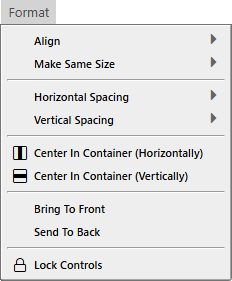
The Format menu holds the commands that line up and order the controls selected in the form designer. [Arranging controls](/tB/IDE/Forms/Arranging.md) explains them.
{:width="233" height="281"}
Every command acts on the selection in a form designer, so every command is greyed out until a designer is open with a selection. The commands need different numbers of controls: **Align**, **Make Same Size** and the two spacing submenus need two or more, **Make Equal** three or more, and the other commands one or more. The same commands are in the designer's [right-click menu](/tB/IDE/Forms/Controls.md#the-right-click-menu).
> [!WARNING] BETA 1042
> The spacing commands and **Make Same Size** can leave the new positions or sizes out of the saved form. [Arranging controls](/tB/IDE/Forms/Arranging.md) says what to do instead.
{:width="233" height="281"}
## Align
**Left** (Alt+Left), **Right** (Alt+Right), **Top** (Alt+Up) and **Bottom** (Alt+Down)
: Move every selected control to the leftmost, rightmost, topmost or lowest edge of the selection. See [Align](/tB/IDE/Forms/Arranging.md#align).
**Center (Horizontal)** and **Center (Vertical)**
: Centre each control on the left edge, or the top edge, of the selection. They have no keys. See [Align](/tB/IDE/Forms/Arranging.md#align).
**To Grid**
: Rounds the position and the size of each selected control down to the grid, whether or not **Align Controls To Grid** is on. It has no key. The right-click menu has **Align to grid**, which works for one control.
## Make Same Size
**Width (Widest)** (Ctrl+Shift+Right), **Width (Narrowest)** (Ctrl+Shift+Left), **Height (Tallest)** (Ctrl+Shift+Down) and **Height (Shortest)** (Ctrl+Shift+Up)
: Give every selected control the width or the height of the widest, narrowest, tallest or shortest one. See [Make the controls the same size](/tB/IDE/Forms/Arranging.md#make-the-controls-the-same-size).
## Horizontal Spacing and Vertical Spacing
**Make Equal**
: Places the controls between the first and the last so that the gaps are equal. It needs three controls.
**Increase** and **Decrease**
: Widen or narrow every gap by one grid width. The vertical commands use the grid height.
**Remove**
: Places each control against the one before it, with no gap.
The eight spacing commands, four on each submenu, have no keys. See [Space the controls evenly](/tB/IDE/Forms/Arranging.md#space-the-controls-evenly).
## Center In Container
**Center In Container (Horizontally)** and **Center In Container (Vertically)**
: Move the selection as a group to the middle of the container the controls share. They have no keys. See [Center in the container](/tB/IDE/Forms/Arranging.md#center-in-the-container).
## Order and lock
**Bring To Front** and **Send To Back**
: Move the selected controls to the top or the bottom of the order in which their parent draws them. They have no keys. See [Bring to front and send to back](/tB/IDE/Forms/Arranging.md#bring-to-front-and-send-to-back).
**Lock Controls**
: Locks each selected control that is unlocked, and unlocks each one that is locked. It has no key. See [Lock controls](/tB/IDE/Forms/Designer.md#lock-controls).