# View Menu
The View menu switches between a file's code and its designer, moves around the code, changes the zoom, and shows the panels of the IDE.
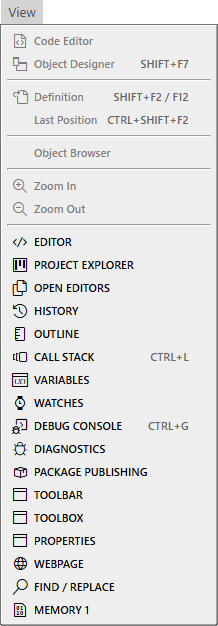{:width="218" height="626"}
The picture shows the menu while the code editor has the focus. The upper commands depend on what has the focus; the panel names are always available.
## Code and designer
**Code Editor**
: Shows the code of the current form or control. It is greyed out while the code has the focus.
**Object Designer** (Shift+F7)
: Shows the designer of the current form or control.
## Navigation
**Definition** (F12 or Shift+F2)
: Goes to where the name at the caret is declared. See [Go To Definition](/tB/IDE/Code/Navigating.md#go-to-definition).
**Last Position** (Ctrl+Shift+F2)
: Goes back to the place the caret was before. See [Last Position](/tB/IDE/Code/Navigating.md#last-position).
**Object Browser** (F2)
: Opens the Object Browser, which lists the components and members of the project and of its libraries, and goes to where each is declared. It needs a project open. See [Object Browser](/tB/IDE/Code/Object-Browser.md).
## Zoom
While the code editor has the focus, the menu shows **Increase Font Size** (Ctrl++) and **Decrease Font Size** (Ctrl+-) in place of the zoom commands. They change the editor's font by 1px and save the new size at once. See [Word wrap and zoom](/tB/IDE/Code/Editor.md#word-wrap-and-zoom).
While the form designer has the focus, the menu shows **Zoom In** and **Zoom Out**, which scale the form designer.
## Panels
{: index="restore [a] closed panel; reopen [a] closed panel; restore panel; panel missing; missing panel; panel disappeared; lost panel; toolbar missing" }
The last seventeen items show a panel. A panel that is in no layout in use comes up floating. See [Show, hide and focus a panel](/tB/IDE/Customising/Panel-Layouts.md#show-hide-and-focus-a-panel).
**EDITOR**
: The code editor. See [Writing code](/tB/IDE/Code/index.md).
**PROJECT EXPLORER**
: The files and objects of the project. See [Project Explorer](/tB/IDE/Projects/Project-Explorer.md).
**OPEN EDITORS**, **HISTORY** and **OUTLINE**
: The open files, the places where you edited, and the symbols of the current file. See [Navigating](/tB/IDE/Code/Navigating.md).
**CALL STACK** (Ctrl+L), **VARIABLES**, **WATCHES**, **DEBUG CONSOLE** (Ctrl+G) and **MEMORY 1**
: The debugging panels: the chain of calls, the variables in scope, your watch expressions, the program's output and commands, and raw memory. See [Call Stack](/tB/IDE/Debugging/Inspecting.md#call-stack), [Variables](/tB/IDE/Debugging/Inspecting.md#variables), [Watches](/tB/IDE/Debugging/Inspecting.md#watches), [Debug Console](/tB/IDE/Debugging/Debug-Console.md) and [Memory](/tB/IDE/Debugging/Memory.md). The Watches and Memory panels are not in the default layout.
**DIAGNOSTICS**
: The errors and warnings of the project. See [Diagnostics](/tB/IDE/Code/Diagnostics.md).
**FIND / REPLACE**
: The search panel. See [Finding](/tB/IDE/Code/Finding.md).
**PACKAGE PUBLISHING**
: The details of a project built as a package, and the button that publishes it. See [Package Publishing](/tB/IDE/Building/Package-Publishing.md).
**TOOLBAR**
: The row of buttons under the menu. See [Toolbar](/tB/IDE/Reference/Toolbar.md).
**TOOLBOX** and **PROPERTIES**
: The controls you can place on a form, and the properties of the selected one. See [Toolbox](/tB/IDE/Forms/Toolbox.md) and [Properties](/tB/IDE/Forms/Properties.md).
**WEBPAGE**
: A web browser pane inside the IDE. See [Webpage](/tB/IDE/Reference/Webpage.md).