Missing files and the install
This page describes the boxes that a damaged install gives, the licence and the package server when they fail, the folders the IDE uses, and how to put the IDE’s options back to their defaults.
A damaged install
The IDE is a folder of files: twinBASIC.exe, a bin folder with the IDE’s host and the compiler, an ide folder with the IDE’s page, and others. When a file the IDE needs is gone, the IDE does not start, or it starts without a compiler. Anti-virus software that quarantines a file, and an unzip that stopped halfway, can both do this. The FAQ says how to restore the files and how to tell the anti-virus software that they are safe, and Is twinBASIC safe? explains the false alerts. Extract a new IDE into an empty folder, not over an older one: How do I install twinBASIC? says why.
Each box below is a native Windows box with one OK button. The IDE ends when you choose it, unless the table says otherwise.
| The file that is gone | The box |
|---|---|
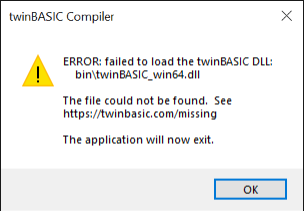
bin\twinBASIC_ide_win32.dll | Titled twinBASIC Compiler: ERROR: failed to load the twinBASIC DLL:, then a file name, then The file could not be found. See https://twinbasic.com/missing, then The application will now exit. |
bin\twinBASIC_win32.dll | Titled shutdown: Run-time error '-353703418', then Unable to load DLL. |
bin\twinBASIC_win32.exe and all its variants | Titled twinBASIC IDE: ERROR: failed to load the twinBASIC EXE:, then \bin\twinBASIC_win32.exe, then the same address and The application will now exit. The IDE checks for this file at its start. |
| The compiler variant that the IDE starts, and no other | The IDE opens. The box reads as the one above, names the variant’s file, and ends Please close the IDE, and restore any missing files. |
A box that begins failed to call TWINBASIC_INIT dll entry in the twinBASIC DLL: means the same: a file of the install is damaged or is the wrong one.
The compiler is not one file. It is a set of executables, twinBASIC_win32.exe and its variants with _noDEP and _LAA in the name, and the 64-bit ones. Which the IDE starts depends on the build configuration and on the DEP and large-address settings of the project.
Note BETA 1034
When bin\twinBASIC_ide_win32.dll is missing, the box names bin\twinBASIC_win64.dll, a file that is there. The launcher twinBASIC.exe names that file for every file it cannot load. Compare the whole bin folder with the IDE’s download, or extract the download again, rather than looking for the file the box names.
Note BETA 1034
When bin\twinBASIC_win32.dll is missing, the box is titled shutdown and names no file and no address. It means that the compiler’s file is missing or cannot be loaded. Restore the bin folder from the download.
Note BETA 1034
When the compiler variant that the IDE starts is missing, the IDE shows the box once and then goes quiet. After OK, the IDE has no project, tries nothing more, and writes nothing to the console. The badge reads UNAVAILABLE, with four Not initialized lines, for good. Restore the file, and start the IDE again.
The WebView2 runtime
The IDE’s page runs in the Microsoft Edge WebView2 control. If the Evergreen runtime is not installed, no page loads, and the host shows a box:
Failed to initialize the WebView2 control. Please check that the WebView2 runtime (Evergreen) is installed on this machine.
Open the WebView2 download page now?
If you agree, the host opens the download page of Microsoft’s runtime in your browser. Install the runtime, and start the IDE again. The FAQ lists the requirements, and How do I install twinBASIC on Windows 7? says which runtime to take on that system. The host’s other text, WebView2: Failed to find an installed WebView2 runtime or non-stable Microsoft Edge installation., means the same.
The licence
The licence box of the status bar reads tB Licence: NOT READY until the compiler has answered with the edition. It goes back to NOT READY at each restart of the compiler. First launch describes the editions and Enter Licence Key. When something fails:
| What you see | Meaning |
|---|---|
| The floating message Invalid licence key. Please try again., and the box reads COMMUNITY EDITION | The compiler did not accept the key. The change lasts for the session. |
| Licence key invalid., with no project loaded | The key does not have 32 characters. |
| A box titled Licence Problem!: This twinBASIC licence appears to have expired or may have been marked as revoked. | The compiler’s answer. The box tells you to write to sales@twinbasic.com. The IDE then behaves as for a Community licence. |
The console line [BUILD] failed due to licence error. Please try again., about six seconds after you pressed Build | Build waits up to five seconds for the compiler’s answer and then stops. Press it again when the licence box shows an edition. |
| A banner COMMUNITY LICENCE RESTIRCTION or PERSONAL LICENCE RESTIRCTION above the two Compiler Options rows of Project Settings | On a Personal edition the optimisations set there apply only to the built-in packages, and on a Community edition they are not applied. The IDE spells the word RESTIRCTION so. |
| The box Sorry, twinBASIC Personal Edition does not support command line builds. | --buildAndExit32 and --buildAndExit64 need a Professional licence. |
The package server
The IDE asks the online package server when you open the Packages tab, add a reference, and, with Check referenced packages are up-to-date on, when a project loads. If the server cannot be reached:
- A notification says Failed to connect to the online package server. Error code <n>. Check your internet connection, or try again later. The code can be absent. Choose OK.
- The console writes a
[PACKAGES]line:[PACKAGES] failed. HTTPS request to server (www.everythingaccess.com) failed. Try again later.,[PACKAGES] failed. Server returned HTTPS code <n>, or, for the check at load,[PACKAGES] version checks failed - server response invalid - try again later.or a line that saysCheck your internet connection, or try again later.
An error code of 552 does not mean an outage. It means that the session is not signed in, and the IDE opens the twinBASIC Publisher Login / Signup box instead. Package Publishing describes it.
WebView2’s folders
The IDE keeps the browser’s cache and storage in four folders under %LOCALAPPDATA%: twinBASIC, twinBASIC_Admin, twinBASIC_WebPanel and twinBASIC_WebPanel_Admin, each with a subfolder v0. Some may not exist. They are not a log. The IDE keeps no project and no setting in them; those are in the registry and in the project’s file. You can delete them with the IDE closed, and the IDE makes them again. The FAQ lists them with the IDE’s other folders.
Where the IDE keeps its settings
Customising the IDE lists the registry values and the folders in %APPDATA%\twinBASIC. Deleting a value puts back what it held:
| Delete | The IDE |
|---|---|
GENERAL | Puts every IDE Option back to its default, and starts again as for the very first start, with the IDE Options dialog and no Close button. |
LAYOUTv2 and the other layout values | Shows the default layout. |
ALLOWERRORREPORTINGV3 | Asks the error reporting question again. |
LICENCEAGREEMENTV3 | Asks for the licence agreement again. |
LicenceKey | Leaves the licence at Community. |
NEWFRONTPAGE | Opens the New / Open Project dialog on its default section. |
Close the IDE before you edit the registry.
The IDE has no command or menu item that resets all its settings. It has these resets:
- Window → Panel Layouts → Default Built-in Layout, and Window → Keyboard Shortcuts → Default Built-in Keyboard Shortcuts, which change the layout and the keys.
- The IDE Options dialog, in which each option is changed on its own.
--reset-ide-settingson the IDE’s command line. It writes empty options to the registry and loads them again, so every IDE Option returns to its default. It resets the IDE Options and nothing else: the panel layouts, the keyboard shortcut groups, the licence values, the recent projects and the window’s position stay as they are.
A folder in %APPDATA%\twinBASIC (themes, locale, packages, addins) holds what you added. Delete the file that is wrong, and the IDE makes the folder again if it is gone. A theme whose inherits: chain returns to itself gives the alert Invalid theme file detected: <file>, then (recursive inheritance) on the next line, and the IDE drops the theme from the list; Themes describes it.
See Also
- Compiler services – the services badge, restarts and Safe Mode
- Diagnostic tools – the console lines and error reporting
- Customising the IDE – the settings and the language packs
- FAQ – installing, system requirements and false alerts
- Opening projects – a project that will not open