Customising the IDE
The IDE lets you change its fonts and behaviour, its colours, the arrangement of its panels, the keys that run its commands and the language of its menus.
- IDE Options — the 32 options in the IDE Options dialog, and what each one changes.
- Themes — choose a theme, or write your own
.themefile. - Panel layouts — save and switch the arrangement of the panels, and control how panels can be moved.
- Keyboard shortcuts — add, replace or remove the keys of any IDE command.
The language of the IDE is described below, on this page.
Where the IDE keeps its settings
Every setting is kept per user. No project file holds an IDE setting. A project opened on another PC, or by another user, shows the IDE as that user has set it up.
The settings are in the registry, under this key:
HKEY_CURRENT_USER\Software\VB and VBA Program Settings\twinBASIC_IDE\IDESettings
Each setting is one text value under the key. These values hold the settings this chapter describes:
| Value | Holds |
|---|---|
GENERAL | All the IDE Options, as one JSON object, and the chosen theme and language. |
GENERAL2 | The five Panel Features switches, and whether the Project Explorer shows its file view or its object view. |
LAYOUTv2 | The current arrangement of the panels. |
ACTIVE_PANEL_LAYOUT_NAME | The name of the active panel layout. |
CUSTOM_PANEL_LAYOUTS | Your saved panel layouts. |
CUSTOM_KEYBOARD_SHORTCUT_GROUPS | Your keyboard shortcut groups. |
ACTIVE_KEYBOARD_SHORTCUT_GROUPS | The names of the shortcut groups that are switched on. |
The same key also holds the licence, the publisher name and other values that are not customising.
The folder %APPDATA%\twinBASIC holds the files you add yourself, and it survives deleting an old IDE folder. The IDE creates these folders in it at start-up:
| Folder | Holds |
|---|---|
themes | Your themes. |
locale | Your language packs. |
packages | Linked packages. |
addins\win32 and addins\win64 | Add-ins. |
The FAQ lists the other folders the IDE uses.
The language of the IDE
Choose the language of the menus and dialogs under Window → Language. The submenu lists every language pack, and a tick marks the one in use.
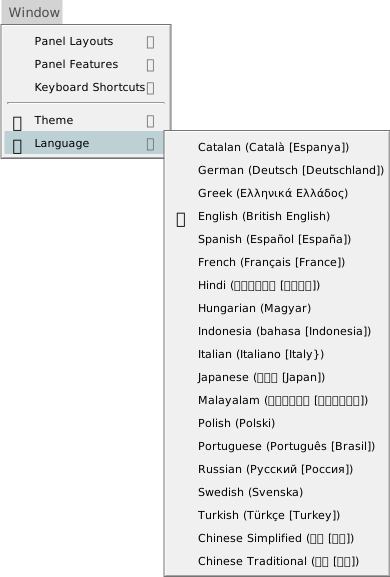
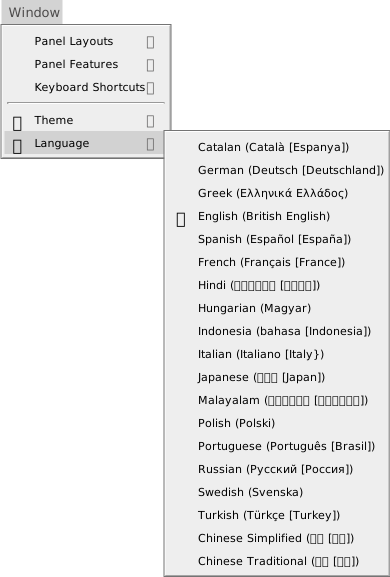
The submenu shows these names, in this order. Each name is the one its pack gives itself, so some differ from the usual English spelling: the Indonesian entry begins Indonesia, and the Italian one ends in a brace. The entries for Hindi, Japanese, Malayalam, Russian and the two Chinese packs also give the language’s own name, in its own script, in brackets. The table shows only their English names.
| Menu entry | Pack file |
|---|---|
| Catalan (Català [Espanya]) | ca-es.lang |
| German (Deutsch [Deutschland]) | de-de.lang |
| Greek (Ελληνικά Ελλάδος) | el_gr.lang |
| English (British English) | en-gb.lang |
| Spanish (Español [España]) | es-es.lang |
| French (Français [France]) | fr-fr.lang |
| Hindi | hi-in.lang |
| Hungarian (Magyar) | hu-hu.lang |
| Indonesia (bahasa [Indonesia]) | id-id.lang |
| Italian (Italiano [Italy}) | it-it.lang |
| Japanese | ja-jp.lang |
| Malayalam | ml-in.lang |
| Polish (Polski) | pl-pl.lang |
| Portuguese (Português [Brasil]) | pt-br.lang |
| Russian | ru-ru.lang |
| Swedish (Svenska) | sv-sv.lang |
| Turkish (Türkçe [Turkey]) | tr-tr.lang |
| Chinese Simplified | zh-cn.lang |
| Chinese Traditional | zh-tw.lang |
The default is British English. Its pack, en-gb.lang, is the base pack and holds every string. A string that another pack does not translate is shown in British English. Hindi, Indonesian, Russian and Malayalam translate only part of the strings.
What changes when you switch
Choosing a language applies at once, and the IDE keeps the choice. No restart is needed. The menu bar, most menu items, the panel titles and the dialogs change language.
These parts stay in English:
- the IDE Options dialog, including its title, labels, values and buttons, and its Change Licence… button;
- the menu items Quick Find…, Quick Replace…, Select All Matches, the Fold and Unfold items, Go To Line/Column… and the Transform To items on the Edit menu;
- Debugger Options on the Debug menu;
- Restart the compiler and Flush the LLVM compiler cache on the Tools menu;
- Automatic IDE Error Reporting… on the Help menu;
- most text in the Debug Console;
- the compiler’s messages and the hover text: they stay in English after a switch, and after a restart of the compiler.
Language packs
The IDE reads its language packs from two locale folders: the one in the IDE’s own folder, which holds the packs that ship with the IDE, and %APPDATA%\twinBASIC\locale, which starts empty. It reads them only at start-up. A pack you add or edit shows in the submenu after you restart the IDE. There is no Reload from disk for languages.
To write a pack, copy en-gb.lang and translate it. The README.txt in the IDE’s locale folder gives the rules:
- Name the file by the IETF language tag, such as
en-us.lang. - Save it as UTF-8.
- Start it with a
FriendlyName:line. Its text is the name the submenu shows. Without the line, the submenu shows the file name. - Follow with the properties, as in
en-gb.lang. You need only the strings you translate: the rest come fromen-gb.lang.
A pack is a text file of Name: value; pairs, as a theme is, with /* ... */ comments. Each value is a string in double quotes. Write two double quotes for one inside a string. A line break inside the quotes is kept. In a string, {%Name} stands for another string and {%1} and {%2} mark the places where the IDE fills in a value.
A line inherits: <pack>; makes the pack take its missing strings from another pack instead of from en-gb.lang.
Translators share new and updated packs in the #langpacks channel on the twinBASIC Discord server.