Running
Start runs the project inside the compiler, Break pauses it, and End stops it. This page describes what Start runs, the second way to run code (F6), the boxes the status bar shows for programs your program starts, and everything that ends a run.
Start, Break and End
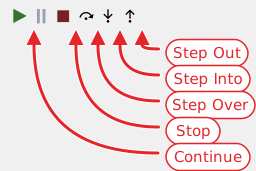
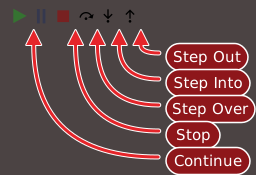
Three commands control a run. Each is in the Run menu and has a button in the toolbar.
- Start (F5)
- Starts the program when nothing runs, and continues it when it is paused. The menu calls it Start, and the toolbar button is titled Start / Continue. It does not ask to save the project, and it does not save it.
- Break (Ctrl+Break)
- Pauses a running program. The toolbar button is titled Break Into Code.
- End
- Stops the program, whether it is running or paused. It has no key. The toolbar button is titled Stop.
Which of them work depends on the state of the program:
- While the program is idle, only Start works.
- While it runs, Break and End work. Start is greyed out.
- While it is paused, Start (now continuing), End, the step buttons and Set Next Statement work. Break is greyed out.
The toolbar buttons and the menu items follow the same rules. Breakpoints and stepping describes the paused state.
At a run-time error, End ends only the procedure that failed; see Traps.
Break
Break stops the program at the line it is executing. In a loop that has a statement of its own, that line is in your code, and the DEBUG CONSOLE works as at any other stop.
In a form that is waiting for input, and in a loop that holds only DoEvents, there is no line of yours to stop at. The IDE opens a file of the VB package, IdleMessageLoopBreak.twin, and stops in its procedure IdleMessageLoopBreakpoint. With a form waiting for input, a line typed in the console works there. Press F5 and the program stops again in the same file. Press it once more to run on.
Warning BETA 1010
A program that is stopped by Break in a loop that holds only DoEvents ends with a native access violation as soon as the IDE evaluates anything. A line typed in the console does it, even ? 1, and so does any watch, because the IDE evaluates every watch at every stop. The DEBUG CONSOLE prints NATIVE EXCEPTION: ACCESS_VIOLATION, and the IDE stays in the paused state, with the arrow on the VB package’s line and Stop and the step commands enabled, although the program has ended. Do not use Break on a loop that holds only DoEvents. Put a statement in the loop and a breakpoint on it instead. If the IDE is already in that state, Restart the compiler in the toolbar puts it right.
What Start runs
Start asks the compiler to run the project. The program runs inside the compiler’s own process, not as an executable of its own, and it is the debug build of the project: Compiler Options (DEBUG) says what the IDE can do with code that LLVM compiles.
What runs first is the project’s Startup Object:
- Sub Main, the default for an EXE project. The console shows
Executing 'Main'..., then the output of the program. - A form. The console shows
Executing '[frmMain].StartupShow()'..., wherefrmMainis the form’s name, then the output of the form. The run lasts until every form has closed, and the console shows[DEBUGGER] Waiting for remaining forms to close...meanwhile. - (None), which an ActiveX DLL can have. Start is enabled, but it only writes
[DEBUGGER] No startup object setto the console, and nothing runs.
Sub Main with no procedure called Main in the project writes (compile error: Unrecognized symbol 'Main') to the console, with no dialog. Runtime Command Line Args sets the text that Command$ returns in the run.
Every run that ends writes (time taken: <n>s), followed by [DEBUGGER] global variables have been cleared. A run that you stop at a pause writes aborted in place of the time.
When the project does not compile
Start shows no dialog for a compile error, and it opens no panel. The DIAGNOSTICS panel lists the errors. What the console and the editor show depends on where the error is.
- In a procedure that
Maincalls. The console shows[LINKER] compilation (codegen) error detected in 'Startup.Main' at line #42, where 42 is the line of the call. The editor opensMain’s module and stops at itsSubline with the error panel, titled ERROR OCCURRED. Nothing inMainhas run. - In
Mainitself. No panel opens. The console shows[LINKER] compilation (codegen) error detected in '{temp_component}.{temp_procedure}' at line #1, then(compile error: codegen error; check for compilation errors), and the program is idle again.
Note BETA 1010
The panel for a compile error gives the description COMPILATION (CODEGEN) ERROR AT LINE #42. PLEASE REPORT THIS ERROR TO https://git.io/JMh6S, and the line it names is the line of the call, not the line of the error. A compile error in your code is not a defect to report. Read the real error in the DIAGNOSTICS panel and fix it.
Run Or Preview
F6 runs one procedure without starting the whole project, or previews a form. It has no menu item and no toolbar button. It works when a code editor or a form designer is active, and what it does depends on where the caret is.
- In a procedure of a module. The procedure runs, and the console shows
Executing '<Project>.<Module>.<Procedure>'...first. APrivateprocedure runs too. It runs as a debug session: a breakpoint in a procedure it calls stops it, aStopstatement stops it, and F5 then continues. The run ends with(time taken: …). The Call Stack starts at the procedure, with no frame forMain. - In the code of a form. The form is shown instead of a procedure being run. The console shows no
Executingline, and the form’sForm_Loadruns. - In a form designer. The form is previewed. The PREVIEW button of the designer’s toolbar, titled Launch the form in isolation to test its functionality, does the same. A UserControl or a property page designer does not support a preview.
A preview is also a debug session. A breakpoint in Form_Load stops it, and a click on a button of the previewed form stops at a breakpoint in the button’s Click procedure. Closing the window runs Form_Unload and Form_Terminate and writes [DEBUGGER] done. to the console. End during a preview of the form’s code runs Form_Terminate but not Form_Unload.
F6 refuses what it cannot run, and says so in the console, with nothing else happening:
- A procedure with a required argument:
(compile error: Too few arguments, expected 1 in call to 'Greet'). When the procedure also has an Optional argument, the message readsexpected at least 1. - A method of a class:
(compile error: Unrecognized member 'Thing' on type '<Project>' [non-extensible object]). - A caret at module level, outside a procedure:
RunCodeUnderCursor: failed to identify the procedure at the cursor position. - With no editor active:
runCodeUnderCursor failed: no active text editor.
Note BETA 1010
F6 also gives failed to identify the procedure at the cursor position. when the caret is on the procedure’s End Sub or End Function line, or on another of its lines at or past the column where that End line ends. A comment at the end of the End line moves that limit to where the comment starts. Nothing runs. Put the caret nearer the start of a line of the procedure.
The CodeLens ▶ run link above a procedure runs it by another route: CodeLens describes it. Testing with Assert uses both.
Programs that your program starts
A program that your program starts with Shell shows in the status bar as a green box reading PROCESS pid : RUNNING, one box for each process. A run that you start with F5 or F6 makes no box of its own. The box appears when the console writes [SHELL] process <pid> started. and goes away when the process ends, with [SHELL] process <pid> exited with code 0.
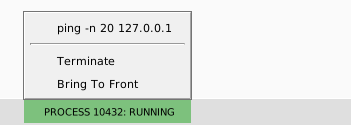
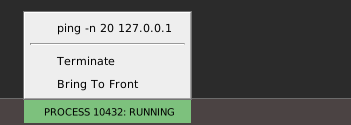
Click a box to open its menu. The first line of the menu is the command line of the process. Under it are two commands:
- Terminate
- Ends the process. The console writes
exited with code 1. - Bring To Front
- Brings the window of the process to the front, and shows it if it was hidden. It writes nothing to the console.
A Shell that runs from a line you type in the console makes a box too, with no program running. Restart the compiler removes the boxes and ends the processes.
What ends a run
- End, or Stop on the toolbar. The console writes
aborted, and the objects held by the procedure’s local variables are released, so theirClass_Terminateprocedures run. A form program closes its windows and runsForm_Terminate, but notForm_Unload. - The program ends by itself. After its last statement, or at an
Endstatement, the run ends. Closing the window of a form program does the same:Form_UnloadandForm_Terminaterun, and the IDE is idle again. - A step out of
Main. Step Out fromMainends the run. - Restart the compiler, from the toolbar or Tools → Restart the compiler, and closing the project. Both end the compiler process at once. A program that is running or paused dies without running
Form_Unload,Class_Terminateor any other of its code, and the IDE asks for no confirmation. Restarting the compiler says what the IDE keeps. - Opening a form designer. The IDE tells the compiler to end the program if it is busy. A form program that is waiting for input ends, with
form terminateand noForm_Unload. A loop with noDoEventskeeps running, and so does a program that is paused. - Editing the code. See the next section.
Note BETA 1010
An End statement in a procedure that LLVM compiles ends the run, and then the console shows restarting from MEMORY [<project>]: the IDE restarts the compiler and compiles the project again. The IDE recovers by itself. Remove the End statement, or compile the procedure without LLVM, to avoid the restart.
Editing while the program runs
Edit and Continue is not supported. The IDE does not make the editor read-only while a program runs or is paused, but any edit of the code ends the run:
- While the program is paused, an edit anywhere, including a line below the arrow, a line above it, another procedure and a line that does not compile, writes
[EDIT & CONTINUE] not yet supported. Aborting.to the console. The objects held by the local variables are released, thenabortedand[DEBUGGER] global variables have been cleared. No dialog opens, and the tab of the file shows its unsaved dot. A breakpoint moves with the text, as it does in any edit. - While a form program runs, an edit ends it too, with
(time taken: …)andform terminateand noAbortingline.
The next F5 starts a new run of the edited code. At the panel that a run-time error opens, an edit does not end the program as it should; see Editing at the error panel.
Restarting the compiler
Restart the compiler starts a new compiler process and loads the project into it from the IDE’s memory, so unsaved edits survive. The console writes restarting from MEMORY [<path>]. The IDE clears the Call Stack, the Variables panel, the Memory panel and the list of running processes. It keeps the breakpoints, including those you set since you last saved, and the watches. After a restart, F5 stops again at the same breakpoint, the watches have values again, and a watch that was expanded is still expanded.
Closing a project that has unsaved changes asks You’ve made changes to this project. Save now? and offers Save, Discard Changes and Cancel. Setting or clearing a breakpoint counts as a change. A project with nothing changed closes with no prompt, and the console is cleared.
See Also
- Breakpoints and stepping – what happens when the program pauses
- Run menu – the three commands of the menu
- Project Settings – Startup Object, Runtime Command Line Args and Compiler Options (DEBUG)