Project Menu
The Project menu holds the commands that add to the project, change its references and settings, and open its folders. Projects and files explains them.
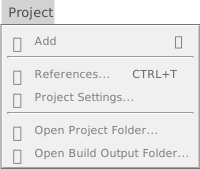
Every command needs an open project, and is greyed out until one is.
Add
- Add
- Opens the submenu of things to add: a folder, forms and other designers, modules and classes, other files, imports and three resources. It lists the same items as the Add entry of the right-click menu of the Project Explorer. See Adding files.
References and settings
- References… (Ctrl+T)
- Opens Project Settings with the filter
project.references, so that only the Library References section shows, on its Enabled Libraries tab. See References and packages. - Project Settings…
- Opens the whole Project Settings dialog, with All chosen in its rail. It has no key.
Folders
- Open Project Folder…
- Opens the folder of the project’s
.twinprojfile in Windows Explorer. For a project that has no file yet, it shows the notification Project is not yet saved. Please save the project first. It has no key. - Open Build Output Folder…
- Opens the folder of the file that the Build Output Path names. It does not create the folder. It gives the same notification when the project has no file, and goes on giving it after the first save, and opens the old folder after a change of the path, until the project is opened again or the compiler restarts. It has no key. See Open Build Output Folder.
See Open a folder.