Animation class
An Animation plays a silent AVI clip in a box on the form, such as the moving picture of a file copy or a search in progress.

Dim Clip As String
Clip = WriteSampleClip()                ' a small silent AVI in the temporary folder
Animation1.LoadFile Clip
Animation1.Play                         ' repeats until StopPlay
Debug.Print Animation1.Playing
Animation1.StopPlay
Animation1.Unload                       ' the control lets go of the file
Kill Clip
' Output:
' True
In the samples of this page, WriteSampleClip writes a small silent AVI clip to the temporary folder and returns its path.
The control wraps the animation control of Windows (SysAnimate32), which plays an AVI clip that has no sound and is uncompressed or compressed by run-length encoding. It stands in place of the Animation of MSCOMCT2.OCX: the Open, Close and Stop methods of that control are LoadFile, Unload and StopPlay here.
Of the common members, the control has those under Name and place, Window handles, Mouse, Keyboard and focus, Dragging the control, OLE drag and drop and Right-to-left, RightToLeftLayout included. It has no Font, FontQuality or VisualStyles.
Loading a clip
LoadFile loads a clip from a file, and LoadRes from a resource, either of the program or of a library file. Each shows the first frame of the clip and replaces a clip that was loaded. Unload removes the clip.
LoadFile raises run-time error 53 when Windows cannot open the file as a clip. LoadRes raises run-time error 326 when there is no clip with that identifier, and 53 when the library file cannot be loaded.
Animation1.LoadRes 101                  ' the clip 101 of the program
Animation1.LoadRes 7, "Clips.dll"       ' the clip 7 of a library
While a clip is loaded from a file, the control keeps the file open, and the file cannot be deleted. Unload lets go of it.
Playing the clip
Play starts the clip and StopPlay stops it, and Playing tells which of the two the control is doing. A clip that is loaded and not started is not playing. The event Change is raised each time the clip starts and each time it stops, whether it ended or was stopped, and Playing then has the new state.
Play takes the number of times to play the clip and the frames to play. A clip that is already playing is stopped first.
Private Sub Animation1_Change()
    If Animation1.Playing Then
        Debug.Print "started"
    Else
        Debug.Print "stopped"
    End If
End Sub
AutoPlay makes a clip start as soon as it is loaded.
The look of the control
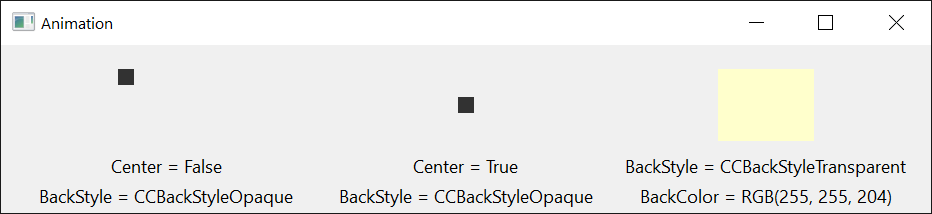
A new control plays nothing, and has AutoPlay and Center set to False and a BackStyle of CCBackStyleTransparent.
With a transparent BackStyle the background color of the clip is not drawn, and the control’s BackColor shows in its place; with an opaque one the clip keeps all its colors. With Center set to True the clip is drawn in the middle of the control, and otherwise at its top left corner. Changing AutoPlay, BackStyle or Center loads the clip again, which stops a clip that was playing.
Properties
AutoPlay
Whether a clip starts to play as soon as it is loaded. Boolean. Default: False.
BackColor
The background color of the control, which a clip with a transparent BackStyle shows. OLE_COLOR. Default: vbButtonFace.
BackStyle
Whether the background of the clip is transparent or the clip keeps its own colors. A member of CCBackStyleConstants. Default: CCBackStyleTransparent. Another value raises run-time error 380.
Center
Whether the clip is drawn in the middle of the control. Boolean. Default: False, with which it is drawn at the top left corner.
Playing
Whether the clip is playing. Boolean, read-only.
Methods
LoadFile
Loads a clip from a file and shows its first frame. A clip that was loaded is removed.
Syntax: object.LoadFile FileName
- FileName
- required A String: the path of the AVI file.
LoadRes
Loads a clip from a resource and shows its first frame. A clip that was loaded is removed.
Syntax: object.LoadRes ResID [ , FileName ]
- ResID
- required An Integer: the identifier of the clip’s resource.
- FileName
- optional A String: the path of a library or program file that has the resource. The default is the program itself.
Play
Plays the loaded clip, after stopping it if it was already playing. A clip that is not loaded plays nothing.
Syntax: object.Play [ RepeatCount ] [ , StartFrame ] [ , EndFrame ]
- RepeatCount
- optional A Long: how many times to play the clip. The default is -1, which plays it until StopPlay. A value of 0 plays nothing.
- StartFrame
- optional An Integer: the number of the first frame to play, counted from 0. The default is 0.
- EndFrame
- optional An Integer: the number of the last frame to play. The default is -1, the last frame of the clip.
StopPlay
Stops the clip, if it is playing.
Syntax: object.StopPlay
Unload
Removes the loaded clip and lets go of its file. The control then shows nothing.
Syntax: object.Unload
Events
Change
Raised when the clip has started playing and when it has stopped, by reaching its end or by StopPlay. Playing has the new state. See Playing the clip.
Syntax: object_Change( )
MouseDown, MouseMove, MouseUp
As the common events of these names; X and Y are in twips, whatever the scale units of the control’s container, measured from the top left corner of the control.
See Also
- Common members – the members this control shares with the package’s other controls