CommonDialog class
A CommonDialog shows the common dialog boxes of Windows: Open, Save As, Color, Font, Print, Page Setup, Browse for Folder, Find and Replace. It also opens a Windows Help file.
Private Sub mnuOpen_Click()
    Dim Dlg As New CommonDialog
    Dlg.Filter = "Text files (*.txt)|*.txt|All files (*.*)|*.*"
    Dlg.Flags = CdlOFNFileMustExist Or CdlOFNHideReadOnly
    If Dlg.ShowOpen Then Debug.Print Dlg.FileName
End Sub
It is a class, not a control: a program makes one with New, sets its properties, and calls one of its Show methods, which returns when the user closes the dialog. The properties then hold what the user chose. It stands in place of the CommonDialog control of COMDLG32.OCX, which is drawn on a form, and adds the Page Setup, Browse for Folder, Find and Replace dialogs.
The same class as VBComDlg’s
The VBComDlg package is the same class, Krool’s, as a package of its own, documented at CommonDialog. The two share their code:
- The same in both: every property, method and event, with the same names, types and defaults, the same values refused with run-time error 380 and the same errors from the dialogs; and every enumeration, with the same members and values.
- The package: this class comes with the package’s controls, and the MCIWnd control uses it for its Open and Save As dialogs. VBComDlg is for a program that needs the dialogs and none of the controls.
In a project that references both packages, a declaration names the package: Dim Dlg As VBCCR18.CommonDialog.
- The same class as VBComDlg’s
- Before and after a dialog
- Cancel and errors
- Owner window
- Events and the hook
- Properties
- Methods
- Events
- CdlBIFConstants
- CdlCCConstants
- CdlCFConstants
- CdlErrorConstants
- CdlFRConstants
- CdlHelpConstants
- CdlOFNConstants
- CdlOFNShareViResultConstants
- CdlPDConstants
- CdlPDResultConstants
- CdlPRBNConstants
- CdlPRCMConstants
- CdlPRDPConstants
- CdlPRORConstants
- CdlPRPQConstants
- CdlPRPSConstants
- CdlPSDConstants
- See Also
Before and after a dialog
The properties that a dialog reads are its starting values, and the dialog writes the user’s choice back to them when the user clicks OK: FileName for the Open dialog, Color for the Color dialog, FontName and the other font properties for the Font dialog. Flags holds the options of the dialog shown next, from the enumeration of that dialog, and holds the flags the dialog returned after it closes. A new object has these values:
Dim Dlg As New CommonDialog
Debug.Print Dlg.MaxFileSize; Dlg.Copies; Dlg.FontSize; Dlg.FontWeight; Dlg.Flags
Dlg.FontBold = True
Debug.Print Dlg.FontWeight
On Error Resume Next
Dlg.FontWeight = 450
Debug.Print Err.Number
' Output:
'  260  1  8  400  0
'  700
'  380
The printer properties, Orientation, PaperSize, PaperBin, PrintQuality, ColorMode and Duplex, change the printer’s settings in the Print dialog only once the program has set them, or a dialog has returned them: until then the dialog starts with the printer’s own.
Cancel and errors
A Show method returns False when the user cancels the dialog. With CancelError True it raises run-time error 32755, CdlCancel, instead. When the dialog fails, the method raises one of the errors of CdlErrorConstants, or for a failure that has no member there, an error whose number is the code of the Windows common dialogs and whose description is Unexpected error.
Owner window
A dialog belongs to the active window of the program or, when that window is an MDI form, to its active child form. While the program has no active window, a dialog belongs to no window, and the class disables the program’s windows while it is shown, as a message box does. The Find and Replace dialogs then belong to a hidden window the class makes for them.
Events and the hook
InitDialog, FileValidate, FileShareViolation, ColorValidate and FontApply are raised only while HookEvents is True when the Show method is called. The Browse for Folder dialog raises InitDialog and FolderBrowserValidateFailed either way, and the Help, FindNext, Replace and ReplaceAll events need no hook. A program that handles the events holds the object WithEvents:
Class ColorPicker
    Private WithEvents Dlg As CommonDialog

    Public Function Pick() As Long
        Set Dlg = New CommonDialog
        Dlg.HookEvents = True
        Dlg.Flags = CdlCCFullOpen
        If Dlg.ShowColor Then Pick = Dlg.Color Else Pick = -1
    End Function

    Private Sub Dlg_ColorValidate(RGBColor As Long, Cancel As Boolean, ByVal hDlg As Long) Handles Dlg.ColorValidate
        Cancel = (RGBColor = vbBlack)            ' black is not allowed: the dialog stays open
    End Sub
End Class
Properties
Action
Shows a dialog by its number: 1 ShowOpen, 2 ShowSave, 3 ShowColor, 4 ShowFont, 5 ShowPrinter, 6 ShowHelp, 7 ShowPageSetup, 8 ShowFolderBrowser, 9 ShowFind and 10 ShowReplace. Integer, write-only. It is the default property.
Reading it raises run-time error 394, and another number raises run-time error 380.
CancelError
Whether a dialog that the user cancels raises run-time error 32755, CdlCancel. Boolean. Default: False.
Color
The color chosen in the Color dialog, and the color of the text chosen in the Font dialog with CdlCFEffects. Long. Default: 0. The Color dialog starts with it when Flags has CdlCCRGBInit. A system color, such as vbButtonFace, is changed to its RGB value when a dialog reads it.
ColorMode
Whether the printer prints in color. A member of CdlPRCMConstants. Default: CdlPRCMColor. Another value raises run-time error 380.
Copies
The number of copies to print. Integer. Default: 1. A value less than 1 raises run-time error 380.
CustomColors
The 16 custom colors of the Color dialog, which the dialog shows and the user changes. Variant: an array of 16 Long RGB values, from index 0. Default: shades of grey from white to near black.
Assigning an array of one dimension sets the colors from its first element on, and keeps the others; elements past the sixteenth are not used, and a system color becomes its RGB value. Empty gives back the shades of grey. Another value that is not an array raises run-time error 380, an array of more dimensions run-time error 5, and an array with no elements run-time error 91.
DefaultExt
The extension that the Save As dialog adds to a file name the user types without one, such as txt. String.
DialogTitle
The title of the Open and Save As dialogs, and the text over the tree of the Browse for Folder dialog. String. Default: empty, with which each dialog has its own title.
Duplex
Whether the printer prints on both sides of the paper. A member of CdlPRDPConstants. Default: CdlPRDPSimplex. Another value raises run-time error 380.
FileName
The file chosen in the Open or the Save As dialog, with its path, and the name the dialog starts with. String. The Browse for Folder dialog sets it to the folder chosen, with a backslash at the end. With CdlOFNAllowMultiSelect and CdlOFNExplorer in Flags, and more than one file chosen, it is the folder and then each file’s name, separated by vbNullChar.
FileOffset
Where the name of the file starts in FileName, counted from 0: the length of the path before it. Integer, read-only: assigning it raises run-time error 383.
FileTitle
The name of the file chosen, without its path. String, read-only: assigning it raises run-time error 383. It is empty when more than one file was chosen, and for a folder.
Filter
The file types of the Open and Save As dialogs: pairs of a description and a pattern, separated by |, such as "Pictures|*.bmp;*.png|All files|*.*". String.
FilterIndex
The file type the dialog starts with, counted from 1, and the one chosen after the dialog. Long. Default: 0, with which the dialog starts with the first type. A negative value raises run-time error 380.
FindWhat
The text to find, in the Find and Replace dialogs, and what the user typed when an event is raised. String.
Flags
The options of the dialog shown next: the sum of the members of the dialog’s enumeration, CdlOFNConstants for Open and Save As, CdlCCConstants for Color, CdlCFConstants for Font, CdlPDConstants for Print, CdlPSDConstants for Page Setup, CdlBIFConstants for Browse for Folder, and CdlFRConstants for Find and Replace. Long. Default: 0. A dialog closed with OK sets it to the flags it returned; the Find and Replace dialogs set it before each event; the Browse for Folder dialog leaves it as it was.
FontBold, FontItalic, FontStrikethru, FontUnderline
The style of the font chosen in the Font dialog, and the style it starts with. Boolean. Default: False. FontBold is True while FontWeight is 600 or more; setting it sets FontWeight to 700 or 400. FontStrikethru and FontUnderline are in the dialog with CdlCFEffects only.
FontCharset
The character set of the font chosen, such as 0 for Western. Integer. Default: 0.
FontName
The name of the font chosen in the Font dialog, and the font it starts with. String. Default: empty.
FontSize
The size of the font chosen, in points. Single. Default: 8.
FontWeight
The weight of the font chosen: 0 for any weight, 100 for thin, 400 for normal, 700 for bold and 900 for heavy, or another hundred between. Integer. Default: 400. Another value raises run-time error 380.
FromPage, ToPage
The first and the last page to print, in the Print dialog with CdlPDPageNums. Long. Default: 0. A negative value raises run-time error 380.
hDC
The device context of the printer chosen in the Print dialog, when Flags has CdlPDReturnDC or CdlPDReturnIC. LongPtr, read-only: assigning it raises run-time error 383. The object deletes it when it is destroyed, and when a later Print dialog returns another one.
HelpCommand
What ShowHelp asks of Windows Help. A member of CdlHelpConstants, or 0. Default: 0, with which ShowHelp does nothing. Another value raises run-time error 380.
HelpContext
The number of the help topic, for the HelpCommand values that name a topic. LongPtr. Default: 0.
HelpFile
The help file that ShowHelp opens. String.
HelpKey
The keyword or the macro that ShowHelp passes, for CdlHelpKey, CdlHelpPartialKey and CdlHelpCommandHelp. String.
HookEvents
Whether the dialog shown next raises the events that need a hook procedure. Boolean. Default: False. See Events and the hook.
InitDir
The folder the Open and Save As dialogs start in, and the folder selected first in the Browse for Folder dialog. String. Default: empty, with which Windows chooses.
Max, Min
The largest and the smallest size the Font dialog offers, in points, with CdlCFLimitSize; and the highest and the lowest page number the Print dialog accepts. Long. Default: 0. A negative value raises run-time error 380.
MaxFileSize
The number of characters the Open and Save As dialogs can return in FileName. Long. Default: 260. A value less than 1 raises run-time error 380.
Object
The object itself. Object, read-only.
Orientation
How the paper is turned. A member of CdlPRORConstants. Default: CdlPRORPortrait. Another value raises run-time error 380.
PageBottomMargin, PageLeftMargin, PageRightMargin, PageTopMargin
The margins of the Page Setup dialog: those it starts with when Flags has CdlPSDMargins, and those the user chose. Long, in thousandths of an inch or hundredths of a millimetre, as CdlPSDInThousandthsOfInches or CdlPSDInHundredthsOfMillimeters says, or else as the user’s locale measures. A negative value raises run-time error 380.
PageBottomMinMargin, PageLeftMinMargin, PageRightMinMargin, PageTopMinMargin
The smallest margins the Page Setup dialog accepts, when Flags has CdlPSDMinMargins. Long, in the unit of the margins. A negative value raises run-time error 380. The dialog does not change them.
PaperBin
The tray the paper comes from. A member of CdlPRBNConstants, or a number of the printer’s own from 1 to 32767. Default: CdlPRBNAuto. Another value raises run-time error 380.
PaperSize
The size of the paper. A member of CdlPRPSConstants, or a number of the printer’s own from 1 to 32767. A new object has CdlPRPSA4 where the user’s locale measures in metric units and CdlPRPSLetter where it measures in inches. Another value raises run-time error 380.
PrinterDefault
Whether a printer the user chooses in the Print dialog becomes the default printer of Windows. Boolean. Default: True.
PrinterDefaultInit
Whether the Print and Page Setup dialogs start with the default printer. Boolean. Default: True. With False they start with PrinterName, or the default printer when there is no printer of that name.
PrinterDriver, PrinterName, PrinterPort
The driver, the name and the port of the printer chosen in the Print dialog. String.
PrintQuality
The resolution of the printer. A member of CdlPRPQConstants, or a number of dots per inch from 0 to 32767. Default: CdlPRPQHigh. Another value raises run-time error 380.
ReplaceWith
The text to put in place of FindWhat, in the Replace dialog. String.
RootFolder
The folder at the top of the tree of the Browse for Folder dialog. Variant: Empty for the desktop (the default), a number for a special folder of Windows (a CSIDL value, such as &H11 for This PC), or the path of a folder. A value of another type raises run-time error 380.
Tag
A string of the program’s own, which the object does not use. String.
Methods
Each Show method shows its dialog and waits until the user closes it, but ShowFind and ShowReplace, which return at once.
ShowColor
Shows the Color dialog. Returns True when the user clicked OK; Color is then the color chosen.
Syntax: object.ShowColor As Boolean
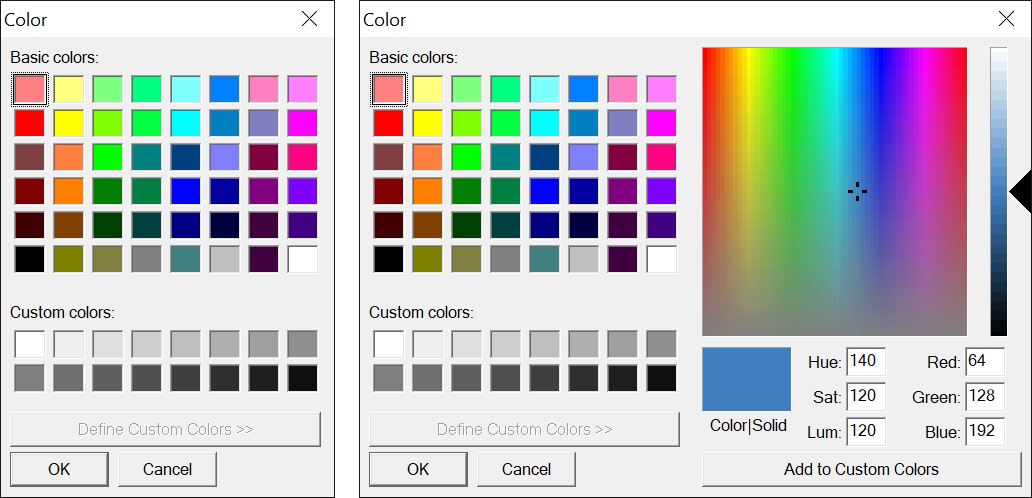
The dialog with Color set to RGB(64, 128, 192) and Flags set to CdlCCRGBInit Or CdlCCPreventFullOpen (left) and to CdlCCRGBInit Or CdlCCFullOpen (right):
ShowFind
Shows the Find dialog, which stays open while the user works in the program, and returns its window handle. LongPtr. Returns 0, and shows nothing, while a Find or Replace dialog of the same object is open. The dialog raises FindNext each time the user clicks Find Next, and closes when the user cancels it. When Windows cannot make the dialog, the method raises an error, as Cancel and errors says.
Syntax: object.ShowFind As LongPtr
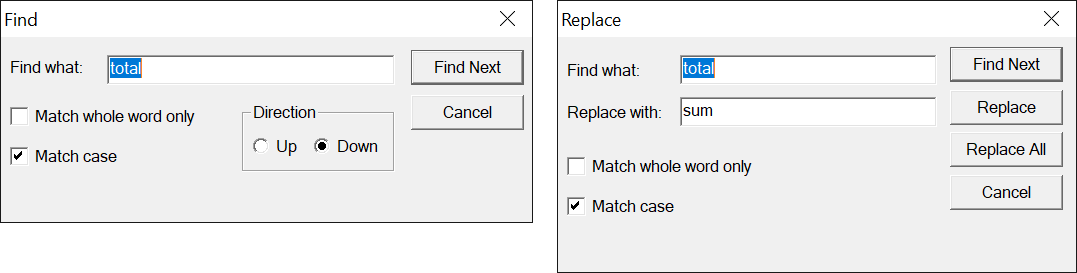
The Find dialog (left) and the Replace dialog that ShowReplace opens (right), with FindWhat total, ReplaceWith sum and Flags set to CdlFRDown Or CdlFRMatchCase:
ShowFolderBrowser
Shows the Browse for Folder dialog, from RootFolder with DialogTitle over the tree and InitDir selected. Returns True when the user chose a folder; FileName is then its path, with a backslash at the end. With CdlBIFBrowseIncludeFiles the user can also choose a file, and FileTitle and FileOffset are then set too.
Syntax: object.ShowFolderBrowser As Boolean
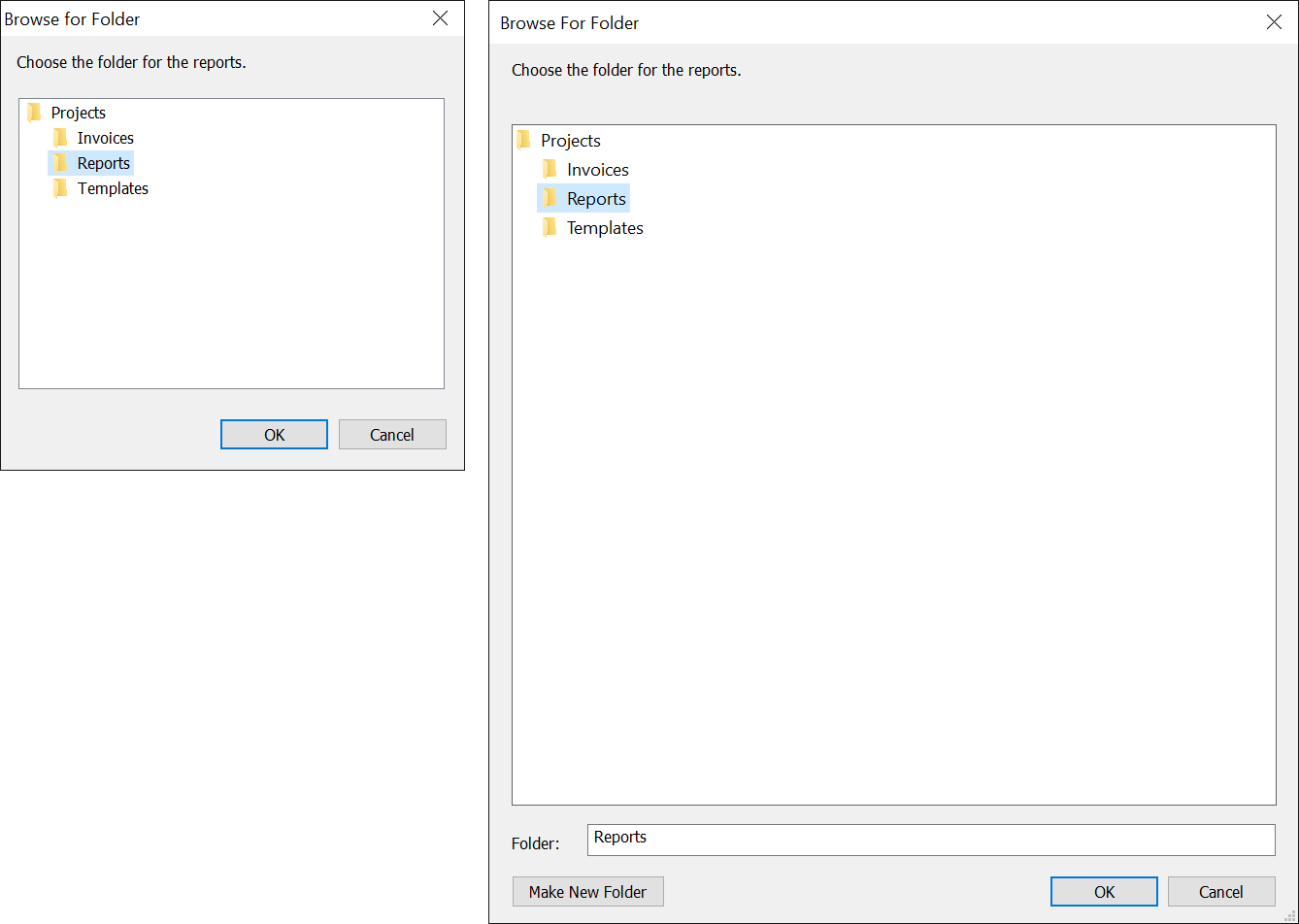
The dialog with RootFolder set to the path of a folder named Projects, InitDir to its folder Reports and DialogTitle to Choose the folder for the reports., with Flags set to CdlBIFReturnOnlyFSDirs (left) and to CdlBIFUseNewUI (right):
ShowFont
Shows the Font dialog, starting with the font properties. Returns True when the user clicked OK; FontName, FontSize, FontWeight, FontItalic and FontCharset are then the font chosen, and with CdlCFEffects also FontStrikethru, FontUnderline and Color. It raises CdlMaxLessThanMin when Max is less than Min with CdlCFLimitSize, and CdlNoFonts when there is no font to list.
Syntax: object.ShowFont As Boolean
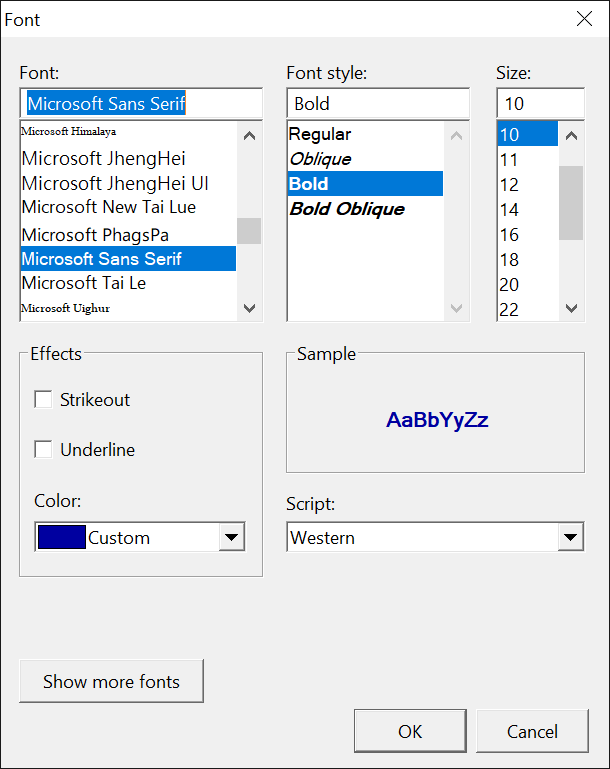
The dialog with FontName Microsoft Sans Serif, FontSize 10, FontBold True, Color RGB(0, 0, 160) and Flags set to CdlCFScreenFonts Or CdlCFEffects:
ShowHelp
Opens HelpFile in Windows Help with HelpCommand, HelpContext and HelpKey. It does nothing while HelpCommand is 0, and raises run-time error 32751, CdlHelp, when Windows Help fails, as it does on a system without the program that shows .hlp files.
Syntax: object.ShowHelp
ShowOpen
Shows the Open dialog. Returns True when the user chose a file; FileName, FileTitle, FileOffset, FilterIndex and Flags then describe it.
Syntax: object.ShowOpen As Boolean
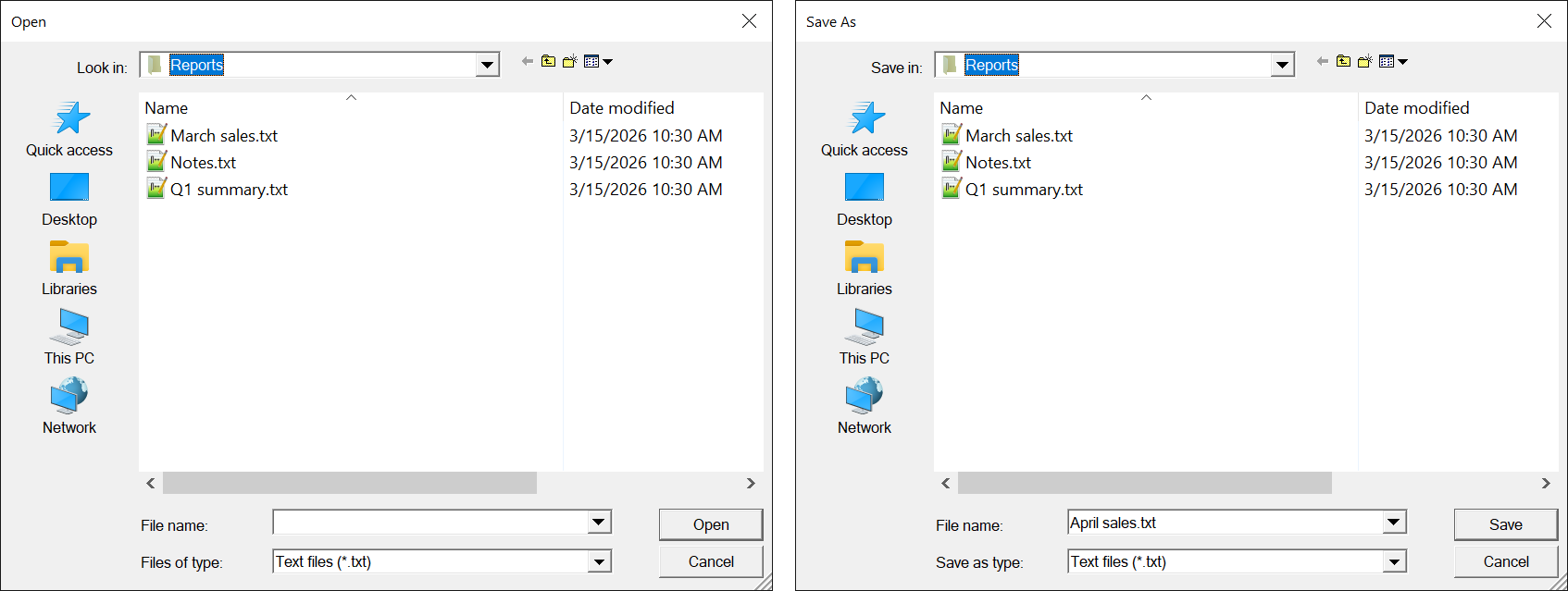
The Open dialog (left) and the Save As dialog that ShowSave opens (right), with InitDir a folder Reports that holds three text files, Filter set to Text files (*.txt)|*.txt|All files (*.*)|*.*, HookEvents True and Flags set to CdlOFNExplorer Or CdlOFNHideReadOnly, and for Save As FileName April sales.txt:
ShowPageSetup
Shows the Page Setup dialog. Returns True when the user clicked OK; the margins, Orientation, PaperSize, PaperBin and Flags are then the user’s.
Syntax: object.ShowPageSetup As Boolean
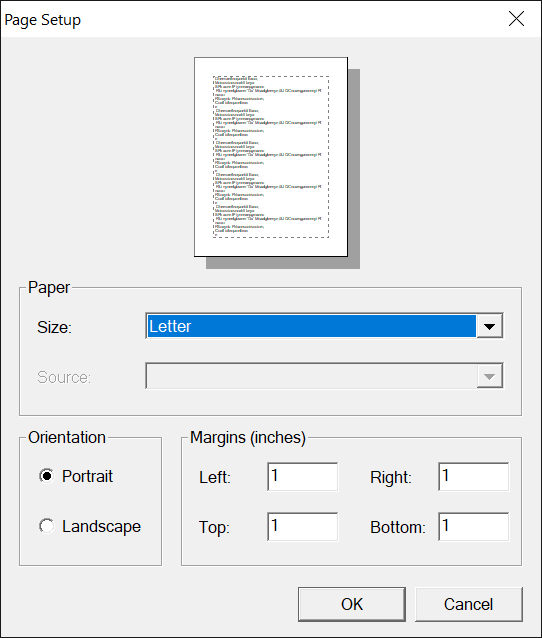
The dialog with PrinterDefaultInit False and PrinterName Microsoft Print to PDF:
ShowPrinter
Shows the Print dialog. Returns True when the user clicked Print or OK; the printer properties, Copies, FromPage, ToPage and Flags are then the user’s, and hDC the printer’s device context when Flags asked for one.
Syntax: object.ShowPrinter As Boolean
ShowPrinterEx
Shows the Print dialog of Windows with its pages of properties and its Apply button. Returns a member of CdlPDResultConstants: what the user clicked. The properties are set as by ShowPrinter, for every result but CdlPDResultCancel. It cannot be shown by Action.
Syntax: object.ShowPrinterEx As CdlPDResultConstants
ShowReplace
Shows the Replace dialog, as ShowFind shows the Find dialog, starting with FindWhat and ReplaceWith. It raises FindNext, Replace and ReplaceAll for the three buttons.
Syntax: object.ShowReplace As LongPtr
ShowSave
Shows the Save As dialog, as ShowOpen shows the Open dialog, and adds DefaultExt to a name typed without an extension.
Syntax: object.ShowSave As Boolean
Events
ColorValidate
Raised when the user clicks OK in the Color dialog, before it closes, while HookEvents is True.
Syntax: object_ColorValidate( RGBColor As Long, Cancel As Boolean, ByVal hDlg As Long )
- RGBColor
- The color chosen. A handler that sets Cancel to True can also change it: the dialog then shows that color.
- Cancel
- False when the event is raised. A handler that sets it to True keeps the dialog open.
- hDlg
- The window handle of the dialog.
FileShareViolation
Raised when the file chosen in the Open or the Save As dialog is open in another program that does not share it, while HookEvents is True.
Syntax: object_FileShareViolation( ByVal FileName As String, Result As CdlOFNShareViResultConstants, ByVal hDlg As Long )
- FileName
- The file.
- Result
- What the dialog does, a member of CdlOFNShareViResultConstants: CdlOFNShareViResultWarn when the event is raised.
- hDlg
- The window handle of the dialog.
FileValidate
Raised when the user clicks OK in the Open or the Save As dialog, before it closes, while HookEvents is True.
Syntax: object_FileValidate( ByVal FileName As String, ByVal FileTitle As String, ByVal FileOffset As Integer, Cancel As Boolean, ByVal hDlg As Long )
- FileName, FileTitle, FileOffset
- The file chosen, as the properties of those names give it.
- Cancel
- False when the event is raised. A handler that sets it to True keeps the dialog open.
- hDlg
- The window handle of the dialog.
FindNext, Replace, ReplaceAll
Raised when the user clicks Find Next in the Find or the Replace dialog, and Replace and Replace All in the Replace dialog. FindWhat, ReplaceWith and Flags then hold what the dialog shows, such as CdlFRMatchCase and CdlFRDown.
Syntax: object_FindNext( )
FolderBrowserValidateFailed
Raised when the user types a name that is not a folder into the box of the Browse for Folder dialog, with CdlBIFEditBox and CdlBIFValidate in Flags.
Syntax: object_FolderBrowserValidateFailed( ByVal Text As String, Cancel As Boolean, ByVal hDlg As Long )
- Text
- What the user typed.
- Cancel
- False when the event is raised, and the dialog then closes. A handler that sets it to True keeps the dialog open.
- hDlg
- The window handle of the dialog.
FontApply
Raised when the user clicks Apply in the Font dialog, with CdlCFApply in Flags and HookEvents True. The properties do not change; the arguments hold the font the dialog shows.
Syntax: object_FontApply( ByVal Flags As Long, ByVal FontName As String, ByVal FontSize As Single, ByVal FontBold As Boolean, ByVal FontItalic As Boolean, ByVal FontStrikethru As Boolean, ByVal FontUnderline As Boolean, ByVal FontCharset As Integer, ByVal RGBColor As Long, ByVal hDlg As Long )
Help
Raised when the user clicks the Help button of a dialog, which a flag such as CdlOFNHelpButton adds, while the dialog belongs to a window.
Syntax: object_Help( Handled As Boolean, ByVal Action As Integer, ByVal hDlg As Long )
- Handled
- False when the event is raised, and the object then calls ShowHelp. A handler that shows its own help sets it to True.
- Action
- Which dialog, by the numbers of Action.
- hDlg
- The window handle of the dialog.
InitDialog
Raised when a dialog has been made and before the user sees it, while HookEvents is True, and always for the Browse for Folder dialog. A handler can change the dialog through its window handle.
Syntax: object_InitDialog( ByVal Action As Integer, ByVal hDlg As Long )
- Action
- Which dialog, by the numbers of Action.
- hDlg
- The window handle of the dialog.
CdlBIFConstants
The flags of the Browse for Folder dialog, in Flags. Each is the BIF_ flag of Windows of that name.
| Member | Value | Description |
|---|---|---|
| CdlBIFReturnOnlyFSDirs | &H1 | Only a folder of the file system can be chosen. |
| CdlBIFDontGoBelowDomain | &H2 | The network folders below the domain are not shown. |
| CdlBIFStatusText | &H4 | A line of status text, for a dialog of the old style. |
| CdlBIFReturnFSAncestors | &H8 | Only a folder that holds file system folders can be chosen. |
| CdlBIFEditBox | &H10 | A box in which the user can type a name. |
| CdlBIFValidate | &H20 | A name typed that is not a folder raises FolderBrowserValidateFailed. |
| CdlBIFNewDialogStyle | &H40 | The dialog of the new style, which can be resized. |
| CdlBIFBrowseIncludeURLs | &H80 | Web addresses are shown too. |
| CdlBIFUseNewUI | &H50 | CdlBIFNewDialogStyle and CdlBIFEditBox. |
| CdlBIFUAHint | &H100 | A hint in place of the edit box, with CdlBIFNewDialogStyle. |
| CdlBIFNoNewFolderButton | &H200 | No Make New Folder button. |
| CdlBIFNoTranslateTargets | &H400 | A shortcut chosen is returned as the shortcut, not as its target. |
| CdlBIFBrowseForComputer | &H1000 | Only a computer can be chosen. |
| CdlBIFBrowseForPrinter | &H2000 | Only a printer can be chosen. |
| CdlBIFBrowseIncludeFiles | &H4000 | Files are shown too, and can be chosen. |
| CdlBIFShareable | &H8000 | The shared folders of remote computers are shown. |
| CdlBIFBrowseFileJunctions | &H10000 | The contents of files that hold folders, such as ZIP files, are shown. |
CdlCCConstants
The flags of the Color dialog, in Flags.
| Member | Value | Description |
|---|---|---|
| CdlCCRGBInit | &H1 | The dialog starts with Color. |
| CdlCCFullOpen | &H2 | The part that defines custom colors is shown at once. |
| CdlCCPreventFullOpen | &H4 | The button that shows that part is disabled. |
| CdlCCHelpButton | &H8 | A Help button. |
| CdlCCSolidColor | &H80 | Only solid colors are offered. |
| CdlCCAnyColor | &H100 | Every color the display can show is offered. |
CdlCFConstants
The flags of the Font dialog, in Flags.
| Member | Value | Description |
|---|---|---|
| CdlCFScreenFonts | &H1 | The fonts of the screen are listed. |
| CdlCFPrinterFonts | &H2 | The fonts of the printer are listed. |
| CdlCFHelpButton | &H4 | A Help button. |
| CdlCFEffects | &H100 | The strikeout, underline and color choices are shown. |
| CdlCFApply | &H200 | An Apply button, which raises FontApply. |
| CdlCFScriptsOnly | &H400 | Fonts of the OEM and the symbol character sets are not listed. |
| CdlCFNoVectorFonts | &H800 | Vector fonts are not listed. |
| CdlCFLimitSize | &H2000 | Only the sizes from Min to Max are offered. |
| CdlCFFixedPitchOnly | &H4000 | Only fonts whose characters all have one width are listed. |
| CdlCFForceFontExist | &H10000 | A font name typed that does not exist is refused. |
| CdlCFScalableOnly | &H20000 | Only fonts that can take any size are listed. |
| CdlCFTTOnly | &H40000 | Only TrueType and OpenType fonts are listed. |
| CdlCFNoFaceSel | &H80000 | The dialog starts with no font selected. |
| CdlCFNoStyleSel | &H100000 | The dialog starts with no style selected. |
| CdlCFNoSizeSel | &H200000 | The dialog starts with no size selected. |
| CdlCFSelectScript | &H400000 | Only fonts of FontCharset are listed, and the script cannot be changed. |
| CdlCFNoScriptSel | &H800000 | The script list is disabled. |
| CdlCFNoVertFonts | &H1000000 | Only fonts written horizontally are listed. |
A flag that the dialog sets, such as CdlCFNoFaceSel when the user leaves the font unselected, keeps the property of that part as it was.
CdlErrorConstants
The run-time errors that the Show methods raise.
| Member | Value | Raised when |
|---|---|---|
| CdlCancel | 32755 | The user cancelled, with CancelError True. |
| CdlBufferTooSmall | 20476 | The files chosen do not fit in MaxFileSize characters. |
| CdlInvalidFileName | 20477 | FileName is not a valid name. |
| CdlSubclassFailure | 20478 | The Open or Save As dialog had too little memory. |
| CdlMaxLessThanMin | 24573 | Max is less than Min, with CdlCFLimitSize. |
| CdlNoFonts | 24574 | The Font dialog has no font to list. |
| CdlPrinterNotFound | 28660 | The printer is not installed. |
| CdlCreateICFailure | 28661 | The dialog could not make the information context of the printer. |
| CdlDndmMismatch | 28662 | The printer’s settings and its name are of two printers. |
| CdlNoDefaultPrn | 28663 | There is no default printer. |
| CdlNoDevices | 28664 | No printer is installed. |
| CdlInitFailure | 28665 | A Print dialog could not start. |
| CdlGetDevModeFail | 28666 | The printer driver did not give its settings. |
| CdlLoadDrvFailure | 28667 | The printer driver could not be loaded. |
| CdlRetDefFailure | 28668 | The default printer could not be returned. |
| CdlParseFailure | 28669 | The printer’s entry in the system could not be read. |
| CdlHelp | 32751 | Windows Help failed. |
| CdlBufferLengthZero | 36848 | The Find or Replace dialog refused the buffer of its text. |
CdlFRConstants
The flags of the Find and Replace dialogs, in Flags.
| Member | Value | Description |
|---|---|---|
| CdlFRDown | &H1 | The search goes down. The dialog sets or clears it. |
| CdlFRWholeWord | &H2 | Match whole word only is checked. |
| CdlFRMatchCase | &H4 | Match case is checked. |
| CdlFRFindNext | &H8 | Set by the dialog: the user clicked Find Next. |
| CdlFRReplace | &H10 | Set by the dialog: the user clicked Replace. |
| CdlFRReplaceAll | &H20 | Set by the dialog: the user clicked Replace All. |
| CdlFRHelpButton | &H80 | A Help button. |
| CdlFRNoUpDown | &H400 | The direction buttons are disabled. |
| CdlFRNoMatchCase | &H800 | Match case is disabled. |
| CdlFRNoWholeWord | &H1000 | Match whole word only is disabled. |
| CdlFRHideUpDown | &H4000 | The direction buttons are hidden. |
| CdlFRHideMatchCase | &H8000 | Match case is hidden. |
| CdlFRHideWholeWord | &H10000 | Match whole word only is hidden. |
CdlHelpConstants
The values of HelpCommand. Each is the HELP_ command of Windows Help of that name.
| Member | Value | Description |
|---|---|---|
| CdlHelpContext | 1 | Shows the topic HelpContext. |
| CdlHelpQuit | 2 | Closes Windows Help. |
| CdlHelpIndex | 3 | Shows the contents topic. The same as CdlHelpContents. |
| CdlHelpContents | 3 | Shows the contents topic. |
| CdlHelpHelpOnHelp | 4 | Shows how to use Windows Help. |
| CdlHelpSetIndex | 5 | Makes HelpContext the contents topic. The same as CdlHelpSetContents. |
| CdlHelpSetContents | 5 | Makes HelpContext the contents topic. |
| CdlHelpContextPopup | 8 | Shows the topic HelpContext in a small window. |
| CdlHelpForceFile | 9 | Makes Windows Help show HelpFile. |
| CdlHelpKey | &H101 | Shows the topic of the keyword HelpKey. |
| CdlHelpCommandHelp | &H102 | Runs the macro HelpKey. |
| CdlHelpPartialKey | &H105 | Shows the topic of the keyword HelpKey, or a list of the topics whose keywords start with it. |
CdlOFNConstants
The flags of the Open and Save As dialogs, in Flags. Each is the OFN_ flag of Windows of that name.
| Member | Value | Description |
|---|---|---|
| CdlOFNReadOnly | &H1 | Open as read-only is checked when the dialog starts; the dialog sets it when the user checked it. |
| CdlOFNOverwritePrompt | &H2 | The Save As dialog asks before it replaces a file. |
| CdlOFNHideReadOnly | &H4 | Open as read-only is hidden. |
| CdlOFNNoChangeDir | &H8 | The current folder of the program stays as it was. |
| CdlOFNHelpButton | &H10 | A Help button. |
| CdlOFNNoValidate | &H100 | A name with characters that a file name cannot have is accepted. |
| CdlOFNAllowMultiSelect | &H200 | More than one file can be chosen. |
| CdlOFNExtensionDifferent | &H400 | Set by the dialog: the extension chosen is not DefaultExt. |
| CdlOFNPathMustExist | &H800 | Only a path that exists is accepted. |
| CdlOFNFileMustExist | &H1000 | Only a file that exists is accepted. |
| CdlOFNCreatePrompt | &H2000 | The Open dialog asks whether to make a file that does not exist. |
| CdlOFNShareAware | &H4000 | A file open in another program is accepted. |
| CdlOFNNoReadOnlyReturn | &H8000 | A read-only file is refused. |
| CdlOFNNoNetworkButton | &H20000 | No Network button, in a dialog of the old style. |
| CdlOFNExplorer | &H80000 | The dialog of the Explorer style. Without it the dialog has the old style when CdlOFNAllowMultiSelect or HookEvents is set. |
| CdlOFNNoDereferenceLinks | &H100000 | A shortcut chosen is returned as the shortcut, not as its target. |
| CdlOFNDontAddToRecent | &H2000000 | The file is not added to the recent files of Windows. |
| CdlOFNForcesShowHidden | &H10000000 | Hidden and system files are shown. |
CdlOFNShareViResultConstants
The values of the Result argument of FileShareViolation.
| Member | Value | Description |
|---|---|---|
| CdlOFNShareViResultWarn | 0 | The dialog tells the user, and refuses the file. |
| CdlOFNShareViResultNoWarn | 1 | The dialog refuses the file and says nothing. |
| CdlOFNShareViResultFallThrough | 2 | The dialog accepts the file. |
CdlPDConstants
The flags of the Print dialogs, in Flags. Each is the PD_ flag of Windows of that name.
| Member | Value | Description |
|---|---|---|
| CdlPDAllPages | &H0 | All is chosen. |
| CdlPDSelection | &H1 | Selection is chosen. |
| CdlPDPageNums | &H2 | Pages is chosen, from FromPage to ToPage. |
| CdlPDNoSelection | &H4 | Selection is disabled. |
| CdlPDNoPageNums | &H8 | Pages is disabled. |
| CdlPDCollate | &H10 | Collate is checked. |
| CdlPDPrintToFile | &H20 | Print to file is checked. |
| CdlPDPrintSetup | &H40 | The Print Setup dialog in place of the Print dialog, for ShowPrinter. |
| CdlPDNoWarning | &H80 | No message when there is no default printer. |
| CdlPDReturnDC | &H100 | hDC is a device context of the printer chosen. |
| CdlPDReturnIC | &H200 | hDC is an information context of the printer chosen. |
| CdlPDReturnDefault | &H400 | No dialog is shown: the properties are set to the default printer’s. |
| CdlPDHelpButton | &H800 | A Help button, for ShowPrinter. |
| CdlPDUseDevModeCopies | &H40000 | The printer makes the copies and collates them, where it can. |
| CdlPDUseDevModeCopiesAndCollate | &H40000 | The same as CdlPDUseDevModeCopies. |
| CdlPDDisablePrintToFile | &H80000 | Print to file is disabled. |
| CdlPDCurrentPage | &H400000 | Current page is chosen, for ShowPrinterEx. |
| CdlPDHidePrintToFile | &H100000 | Print to file is hidden. |
| CdlPDNoNetworkButton | &H200000 | No Network button, for ShowPrinter. |
| CdlPDNoCurrentPage | &H800000 | Current page is disabled, for ShowPrinterEx. |
CdlPDResultConstants
The values that ShowPrinterEx returns.
| Member | Value | Description |
|---|---|---|
| CdlPDResultCancel | 0 | The user clicked Cancel. |
| CdlPDResultPrint | 1 | The user clicked Print. |
| CdlPDResultApply | 2 | The user clicked Apply, then Cancel. |
CdlPRBNConstants
The values of PaperBin. Each has the value of the VBRUN constant whose name has vb in place of Cdl, in PrinterObjectConstants_PaperBin, which describes them.
| Member | Value | Member | Value |
|---|---|---|---|
| CdlPRBNUpper | 1 | CdlPRBNAuto | 7 |
| CdlPRBNLower | 2 | CdlPRBNTractor | 8 |
| CdlPRBNMiddle | 3 | CdlPRBNSmallFmt | 9 |
| CdlPRBNManual | 4 | CdlPRBNLargeFmt | 10 |
| CdlPRBNEnvelope | 5 | CdlPRBNLargeCapacity | 11 |
| CdlPRBNEnvManual | 6 | CdlPRBNCassette | 14 |
CdlPRCMConstants
The values of ColorMode.
| Member | Value | Description |
|---|---|---|
| CdlPRCMMonochrome | 1 | Black and white. |
| CdlPRCMColor | 2 | Color. |
CdlPRDPConstants
The values of Duplex.
| Member | Value | Description |
|---|---|---|
| CdlPRDPSimplex | 1 | One side of the paper. |
| CdlPRDPHorizontal | 2 | Both sides, turned on the short edge. |
| CdlPRDPVertical | 3 | Both sides, turned on the long edge. |
CdlPRORConstants
The values of Orientation.
| Member | Value | Description |
|---|---|---|
| CdlPRORPortrait | 1 | The page is taller than it is wide. |
| CdlPRORLandscape | 2 | The page is wider than it is tall. |
CdlPRPQConstants
The values of PrintQuality that are not a number of dots per inch.
| Member | Value | Description |
|---|---|---|
| CdlPRPQHigh | -4 | High quality. |
| CdlPRPQMedium | -3 | Medium quality. |
| CdlPRPQLow | -2 | Low quality. |
| CdlPRPQDraft | -1 | Draft quality. |
CdlPRPSConstants
The values of PaperSize. Each has the value of the VBRUN constant whose name has vb in place of Cdl, in PrinterObjectConstants_PaperSize, which gives the size of each paper.
| Member | Value | Member | Value |
|---|---|---|---|
| CdlPRPSLetter | 1 | CdlPRPSCSheet | 24 |
| CdlPRPSLetterSmall | 2 | CdlPRPSDSheet | 25 |
| CdlPRPSTabloid | 3 | CdlPRPSESheet | 26 |
| CdlPRPSLedger | 4 | CdlPRPSEnvDL | 27 |
| CdlPRPSLegal | 5 | CdlPRPSEnvC5 | 28 |
| CdlPRPSStatement | 6 | CdlPRPSEnvC3 | 29 |
| CdlPRPSExecutive | 7 | CdlPRPSEnvC4 | 30 |
| CdlPRPSA3 | 8 | CdlPRPSEnvC6 | 31 |
| CdlPRPSA4 | 9 | CdlPRPSEnvC65 | 32 |
| CdlPRPSA4Small | 10 | CdlPRPSEnvB4 | 33 |
| CdlPRPSA5 | 11 | CdlPRPSEnvB5 | 34 |
| CdlPRPSB4 | 12 | CdlPRPSEnvB6 | 35 |
| CdlPRPSB5 | 13 | CdlPRPSEnvItaly | 36 |
| CdlPRPSFolio | 14 | CdlPRPSEnvMonarch | 37 |
| CdlPRPSQuarto | 15 | CdlPRPSEnvPersonal | 38 |
| CdlPRPS10x14 | 16 | CdlPRPSFanfoldUS | 39 |
| CdlPRPS11x17 | 17 | CdlPRPSFanfoldStdGerman | 40 |
| CdlPRPSNote | 18 | CdlPRPSFanfoldLglGerman | 41 |
| CdlPRPSEnv9 | 19 | CdlPRPSUser | 256 |
| CdlPRPSEnv10 | 20 | ||
| CdlPRPSEnv11 | 21 | ||
| CdlPRPSEnv12 | 22 | ||
| CdlPRPSEnv14 | 23 |
CdlPSDConstants
The flags of the Page Setup dialog, in Flags. Each is the PSD_ flag of Windows of that name.
| Member | Value | Description |
|---|---|---|
| CdlPSDDefaultMinMargins | &H0 | The smallest margins are the printer’s. |
| CdlPSDMinMargins | &H1 | The smallest margins are those of the Page…MinMargin properties. |
| CdlPSDMargins | &H2 | The dialog starts with the margin properties. |
| CdlPSDInThousandthsOfInches | &H4 | The margins are in thousandths of an inch. |
| CdlPSDInHundredthsOfMillimeters | &H8 | The margins are in hundredths of a millimetre. |
| CdlPSDDisableMargins | &H10 | The margins cannot be changed. |
| CdlPSDDisablePrinter | &H20 | The Printer button is disabled. |
| CdlPSDNoWarning | &H80 | No message when there is no default printer. |
| CdlPSDDisableOrientation | &H100 | The orientation cannot be changed. |
| CdlPSDDisablePaper | &H200 | The paper size and source cannot be changed. |
| CdlPSDReturnDefault | &H400 | No dialog is shown: the properties are set to the default printer’s. |
| CdlPSDHelpButton | &H800 | A Help button. |
| CdlPSDDisablePagePainting | &H80000 | The sample page is drawn empty. |
| CdlPSDNoNetworkButton | &H200000 | No Network button. |
See Also
- CommonDialog – the same class in the VBComDlg package
- MCIWnd – the control whose ShowOpen and ShowSave show this class’s dialogs
- VBCCR18 Package