ImageList class
An ImageList is a list of pictures of one size, kept for other controls to show: a button takes its picture from it, a list its icons. The control itself shows nothing at run time.
ImageList1.ListImages.Add , "open", ColorSquare(vbRed)
ImageList1.ListImages.Add , "save", ColorSquare(vbBlue)
Debug.Print ImageList1.ListImages.Count
Debug.Print ImageList1.ImageWidth; ImageList1.ImageHeight
Debug.Print ImageList1.ListImages("save").Index
' Output:
'  2
'  16  16
'  2
ColorSquare in the samples of this page is a function of the program’s own. It returns a bitmap of one color, 16 pixels wide and high unless it is given another size. A program takes its pictures from files with LoadPicture, or from the Picture of another control.
The control stands in place of the ImageList of the Microsoft common controls (MSCOMCTL.OCX). The WinNativeCommonCtls package has an ImageList too. This one adds RightToLeftMirror and SystemColorDepth. It differs in three things: a new list keeps 24 bits for each pixel, not 32; it does not scale a bitmap to the size of the list; and a program can clear it while a control shows its pictures.
Of the common members, the control has Name, Parent and Tag alone. It has no window, so it has no place on the form at run time and no mouse or keyboard members.
Its sub-objects have pages of their own:
- ImlListImages – the collection of the pictures, which ListImages returns
- ImlListImage – one picture
- Filling the list
- Transparent parts
- Giving the list to a control
- Pictures made from the list
- Properties
- Methods
- ImlColorDepthConstants
- ImlDrawConstants
- See Also
Filling the list
ListImages returns the collection of the pictures, and its Add method puts a picture into the list, with a key by which the program can name it later. The pictures are numbered from 1.
Every picture of a list has the same size, ImageWidth by ImageHeight pixels. In a new list both are 0, and the first picture added sets them to its own size. A program that wants another size sets both before it adds the first picture. While the list holds a picture, an assignment to either raises run-time error 35611, Property is read-only if image list contains images.
Debug.Print ImageList1.ImageWidth
ImageList1.ListImages.Add , , ColorSquare(vbRed, 24, 24)
Debug.Print ImageList1.ImageWidth
On Error Resume Next
ImageList1.ImageWidth = 32
Debug.Print Err.Number
' Output:
'  0
'  24
'  35611
A picture is an icon or a bitmap. An icon of another size is scaled to the size of the list. A bitmap is not scaled, so a program gives the list bitmaps of the list’s own size.
Warning 1.8.141.0
A bitmap smaller than the pictures of the list is not stored. The collection gets its ImlListImage all the same, and from then on the items and the pictures do not match: that item draws the picture added after it, and the last item draws nothing. A bitmap wider than the pictures of the list is cut: its left part is the picture, and the rest stays in the image list of Windows as further pictures after the last one.
Clear, and a Remove of the only picture left, make the list new again: ImageWidth and ImageHeight are 0, also where the program had set them, and hImageList is 0.
Transparent parts
An icon has its own transparent parts. For a bitmap, the list makes one color transparent as the bitmap is added: every pixel of the color MaskColor, while UseMaskColor is True. Both are read at the time of Add, so a program sets them before it adds a bitmap, and a change does nothing to the pictures already in the list.
ImageList1.MaskColor = vbMagenta                        ' magenta pixels are transparent
ImageList1.ListImages.Add , "open", ColorSquare(vbRed)
ImageList1.UseMaskColor = False                         ' the next bitmap has no transparent part
ImageList1.ListImages.Add , "photo", ColorSquare(vbMagenta)
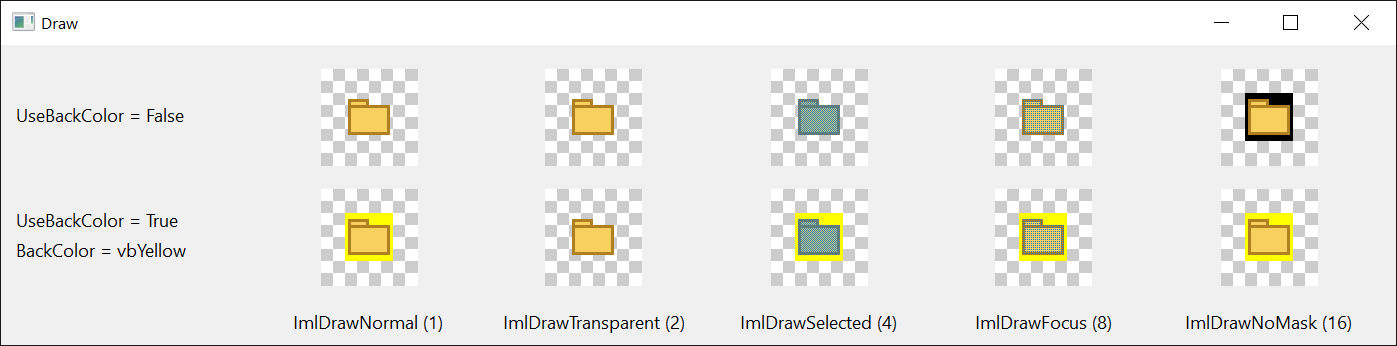
What is behind a picture shows through its transparent parts. With UseBackColor set to True the list fills them with BackColor wherever a picture is drawn, in a control or by Draw.
Giving the list to a control
A control that shows pictures from an image list has a property that takes the list. On CheckBoxW, OptionButtonW, CommandButtonW and CommandLink it is ImageList, and so it is on CoolBar, ImageCombo, TabStrip and TreeView. A ToolBar takes one in each of ImageList, HotImageList, PressedImageList and DisabledImageList. A ListView takes one in each of Icons, SmallIcons, ColumnHeaderIcons and GroupIcons. Such a property takes the ImageList control itself, the name of an ImageList control on the same form as a string, or the handle that hImageList returns.
The other control takes the image list of Windows that the ImageList control holds at the time of the assignment. An empty list holds none, so the program fills the list first and assigns it afterwards. An empty list leaves the other control without an image list, with no error.
CheckBoxW1.ImageList = ImageList1                       ' too early: the list is empty
Debug.Print TypeName(CheckBoxW1.ImageList)
ImageList1.ListImages.Add , , ColorSquare(vbRed)
CheckBoxW1.ImageList = ImageList1
Debug.Print TypeName(CheckBoxW1.ImageList)
' Output:
' Nothing
' ImageList
A picture added to a list that a control already shows is in that control’s list too. Clear, and the removal of the only picture left, destroy the image list of Windows, and the other control is left with a handle that is no longer valid: assign the list to it again once the list has pictures.
Pictures made from the list
The list also gives pictures back. The Draw method of a picture draws it on a device context, the ExtractIcon method returns it as an icon, and Overlay returns an icon of one picture with another drawn over it, such as a file’s icon with the arrow of a shortcut.
Dim Icon As StdPicture
ImageList1.ListImages.Add , "file", ColorSquare(vbWhite)
ImageList1.ListImages.Add , "arrow", ColorSquare(vbBlue)
Set Icon = ImageList1.Overlay("file", "arrow")
Debug.Print Icon.Type = vbPicTypeIcon
' Output:
' True

Properties
BackColor
The color that fills the transparent parts of a picture where it is drawn, while UseBackColor is True. OLE_COLOR. Default: vbWindowBackground.
A value that is not a color, such as -1, raises run-time error 380.
ColorDepth
The number of bits the list keeps for each pixel of a picture. A member of ImlColorDepthConstants. Default: ImlColorDepth24Bit.
Another value raises run-time error 380. While the list holds a picture, an assignment raises run-time error 35611.
hImageList
The handle of the image list of Windows that holds the pictures, for an API function or for the property of a control that takes a handle. LongPtr, read-only. The control owns the image list and destroys it: a program does not.
It is 0 while the list is empty, unless the program has set both ImageWidth and ImageHeight.
ImageHeight
The height of every picture of the list, in pixels. Long. Default: 0, with which the first picture added sets it. See Filling the list.
A negative value raises run-time error 380. While the list holds a picture, an assignment raises run-time error 35611.
ImageWidth
The width of every picture of the list, in pixels. Long. Default: 0, with which the first picture added sets it. See Filling the list.
A negative value raises run-time error 380. While the list holds a picture, an assignment raises run-time error 35611.
ListImages
The pictures of the list. An ImlListImages collection, read-only.
MaskColor
The color of a bitmap that becomes transparent as the bitmap is added, while UseMaskColor is True. OLE_COLOR. Default: &HC0C0C0, a light gray. A system color, such as vbButtonFace, stands for the color it has at the time of the addition.
A change has no effect on the pictures already in the list.
RightToLeftMirror
Whether Windows draws the pictures mirrored in a window that is laid out from right to left, so that a picture that points in a direction of the text still does. Boolean. Default: False. It has an effect when the program has visual styles.
While the list holds a picture, an assignment raises run-time error 35611.
SystemColorDepth
The number of bits for each pixel of the display. ImlColorDepthConstants, read-only. A program can assign it to ColorDepth where it is one of that enumeration’s members.
UseBackColor
Whether the transparent parts of a picture are filled with BackColor where the picture is drawn. Boolean. Default: False, with which they show what is behind the picture. A change applies at once to every picture of the list.
UseMaskColor
Whether the color MaskColor of a bitmap becomes transparent as the bitmap is added. Boolean. Default: True.
With False a bitmap is added whole, with no transparent part.
Methods
Overlay
Returns a new icon: one picture of the list with another drawn over it. The first picture shows through the transparent parts of the second.
Syntax: object.Overlay( Index1, Index2 ) As IPictureDisp
- Index1
- required The number or the key of the picture underneath.
- Index2
- required The number or the key of the picture drawn over it.
The icon has the size of the list’s pictures, and it is the program’s: it does not change when the list does. In an empty list the method returns Nothing. A number or a key that the list does not have raises the error that Item raises for it.
ImlColorDepthConstants
The values of ColorDepth: the number of bits for each pixel.
| Member | Value | Description |
|---|---|---|
| ImlColorDepth4Bit | 4 | 16 colors. |
| ImlColorDepth8Bit | 8 | 256 colors. |
| ImlColorDepth16Bit | 16 | 65,536 colors. |
| ImlColorDepth24Bit | 24 | Every color, a byte each for red, green and blue. |
| ImlColorDepth32Bit | 32 | Every color, and a fourth byte that says how far a pixel is transparent: the depth for icons with soft edges. |
ImlDrawConstants
The values of the Style argument of the Draw method of a picture. The members can be added together.
| Member | Value | Description |
|---|---|---|
| ImlDrawNormal | 1 | The picture as the list holds it: its transparent parts are filled with BackColor while UseBackColor is True. |
| ImlDrawTransparent | 2 | The transparent parts are left as they are on the device context, whatever UseBackColor is. |
| ImlDrawSelected | 4 | The picture mixed half and half with the highlight color of Windows, as a selected icon is shown. |
| ImlDrawFocus | 8 | The picture mixed with a quarter of the highlight color. |
| ImlDrawNoMask | 16 | The picture without its transparent parts: the pixels of a bitmap that had the mask color are drawn black, or in BackColor when UseBackColor is True. |
See Also
- ImlListImages class – the collection of the pictures
- ImlListImage class – one picture
- Common members – the members this control shares with the package’s other controls
- ImageList – the control of the same name in the WinNativeCommonCtls package