WindowedLabel class
A WindowedLabel is a text that the program shows on a form and the user cannot edit, in a window of its own. It is the LabelW control with a window.

WindowedLabel1.AutoSize = False
WindowedLabel1.Width = 600
WindowedLabel1.SingleLine = True
WindowedLabel1.EllipsisFormat = WlbEllipsisFormatEnd
WindowedLabel1.Caption = "A caption that is much too long for a label this narrow"
Debug.Print Right$(WindowedLabel1.DisplayedCaption, 3)
' Output:
' ...
VB6 has no label with a window. The control has the members of LabelW with the same meanings, but Transparent in place of BackStyle, and hWnd as well.
Of the common members, the control has those under Name and place but HelpContextID, hWnd, Font and FontQuality, Mouse, Dragging the control, OLE drag and drop and Right-to-left but RightToLeftLayout. The control is one window, so it has no hWndUserControl: hWnd is the handle of the window on the form. It never takes the focus, so it has no keyboard events.
- WindowedLabel or LabelW
- Lines, wrapping and size
- A caption too long for the label
- Properties
- Events
- WlbEllipsisFormatConstants
- See Also
WindowedLabel or LabelW
A LabelW has no window: its container draws it, behind every control of the container that has a window. A WindowedLabel is for the places where that does not do:
- The label can be in front of a control that has a window, in the order that ZOrder sets.
- hWnd is a handle that a program can pass to an API function.
- The window answers a request for its text with Caption, so a program that reads the text of windows, such as a screen reader or a test tool, finds the label.
The text of the window, as the GetWindowText function of Windows returns it, is Caption, and setting it with SetWindowText sets Caption and raises Change.
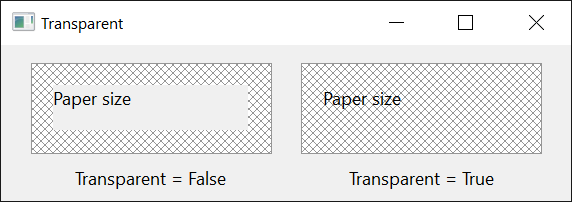
A window cannot let what is behind it show through as a LabelW with a transparent background does. Transparent comes near it: the label copies what its container draws at its place and draws the caption over the copy.
Lines, wrapping and size
The caption is drawn from the top left corner of the label, and a line break in it (vbCrLf) starts a new line. Three properties change that:
- WordWrap also breaks a line between words where the label’s width ends.
- SingleLine draws the whole caption on one line, line breaks included.
- AutoSize changes the label’s size to fit the caption whenever the caption, the font or a property that changes the layout is set.
WordWrap and SingleLine exclude each other. Setting SingleLine to True sets WordWrap to False, and setting WordWrap to True while SingleLine is True raises run-time error 383.
A label with AutoSize takes the width and the height of its caption. With WordWrap as well it keeps its width, unless one word is wider, and takes the height that the wrapped caption needs. The label grows away from the side that Alignment and VerticalAlignment name: a right-aligned label keeps its right edge, and a centered one its middle.
A caption too long for the label
A label without AutoSize shows as much of its caption as fits. EllipsisFormat makes it say that something is missing, by an ellipsis (...) at the end of the caption, in the middle of a file path, or at the end of a word.
DisplayedCaption returns the caption as the label draws it, with the ellipsis. The control draws itself again whenever a property changes, so the value is current at once.
WindowedLabel1.AutoSize = False
WindowedLabel1.Width = 600
WindowedLabel1.SingleLine = True
WindowedLabel1.EllipsisFormat = WlbEllipsisFormatPath
WindowedLabel1.Caption = "C:\Program Files\Some Vendor\Some Product\bin\program.exe"
Debug.Print InStr(WindowedLabel1.DisplayedCaption, "...") > 0
Debug.Print Right$(WindowedLabel1.DisplayedCaption, 11)
' Output:
' True
' program.exe
Properties
Alignment
Where each line of the caption stands in the label’s width. A member of AlignmentConstants: vbLeftJustify (the default), vbRightJustify or vbCenter. Another value raises run-time error 380.
Appearance
The look of the label. A member of CCAppearanceConstants. Default: CCAppearance3D. Another value raises run-time error 380.
An assignment changes a border, if the label has one, to a single line for CCAppearanceFlat and to a sunken edge for CCAppearance3D, and sets ForeColor to vbWindowText or to vbButtonText. A program that wants another border or color sets it after Appearance.
AutoSize
Whether the label changes its size to fit its caption. Boolean. Default: False. See Lines, wrapping and size. The size does not take EllipsisFormat into account.
BackColor
The color behind the caption. OLE_COLOR. Default: vbButtonFace.
BorderStyle
The border of the label’s window. A member of CCBorderStyleConstants. Default: CCBorderStyleNone. Another value raises run-time error 380.
Caption
The text of the label. String. A control newly drawn on a form has its own name. It is the control’s default property.
An assignment of another text raises Change. Assigning the text the label already has does nothing.
DisplayedCaption
The caption as the label draws it: the caption itself, or, with an EllipsisFormat and a caption too long for the label, the caption with the ellipsis in place of what does not fit. String, read-only.
EllipsisFormat
Whether and where the label puts an ellipsis in a caption that is too long for it. A member of WlbEllipsisFormatConstants. Default: WlbEllipsisFormatNone. Another value raises run-time error 380.
ForeColor
The color of the caption. OLE_COLOR. A control newly drawn on a form has black. An assignment to Appearance sets it again. While Enabled is False the caption is drawn in the grey of disabled text.
MimicTextBox
Whether the label lays its caption out as a multi-line text box does: a word too long for a line is broken between characters, and a last line that would show only in part is not drawn. Boolean. Default: False. It has an effect while WordWrap is True.
SingleLine
Whether the whole caption is drawn on one line. Boolean. Default: False. Setting it to True sets WordWrap to False. On one line, VerticalAlignment places the line in the label’s height.
Transparent
Whether the label draws, in place of BackColor, a copy of what its container shows behind it. Boolean. Default: False. The copy is made when the label draws itself, so after the container has changed what it shows there, Refresh brings the label up to date.
UseMnemonic
Whether an ampersand (&) in the caption makes the character after it the label’s access key. Boolean. Default: True, with which that character is underlined, the ampersand is not drawn, and && draws one ampersand. With False the caption is drawn as it is.
VerticalAlignment
Where the caption stands in the label’s height. A member of CCVerticalAlignmentConstants. Default: CCVerticalAlignmentTop. Another value raises run-time error 380.
WordWrap
Whether a line that is too long for the label’s width is broken between words. Boolean. Default: False. Setting it to True while SingleLine is True raises run-time error 383.
Events
Change
Raised when Caption has changed.
Syntax: object_Change( )
WlbEllipsisFormatConstants
The values of EllipsisFormat.
| Member | Value | Description |
|---|---|---|
| WlbEllipsisFormatNone | 0 | No ellipsis: the caption is cut where the label ends. |
| WlbEllipsisFormatEnd | 1 | An ellipsis in place of the end of the caption. |
| WlbEllipsisFormatPath | 2 | An ellipsis in the middle of the caption, so that as much as fits of what follows the last backslash still shows: for a file path. |
| WlbEllipsisFormatWord | 3 | An ellipsis in place of the end of a word that does not fit. |
See Also
- Common members – the members this control shares with the package’s other controls
- LabelW – the same label without a window