Pager class
A Pager shows part of one other control, its buddy, that is larger than the pager. It draws a scroll button at each end where there is more to see, and the user scrolls the buddy into view with them.
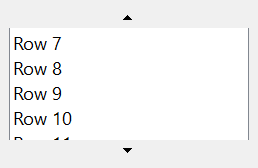
Pager1.Width = 2000: Pager1.Height = 1000
ListBoxW1.Width = 1900: ListBoxW1.Height = 6000
Pager1.BuddyControl = ListBoxW1         ' a buddy six times as high as the pager
Pager1.ReCalcSize
Debug.Print Pager1.GetButtonState(PgrButtonTopOrLeft) = PgrButtonStateInvisible
Debug.Print Pager1.GetButtonState(PgrButtonBottomOrRight) = PgrButtonStateNormal
Pager1.Value = 500
Debug.Print Pager1.GetButtonState(PgrButtonTopOrLeft) = PgrButtonStateNormal
' Output:
' True
' True
' True
The control is the pager control of Windows. The Microsoft common controls of VB6 have no control for it.
Of the common members, the control has those under Name and place but HelpContextID, Window handles, Mouse but its DblClick event, Dragging the control, OLE drag and drop and Right-to-left, RightToLeftLayout included. It has no Font, FontQuality or VisualStyles, because it shows no text. It never takes the focus, so it has no keyboard events.
- The buddy
- Scrolling
- Properties
- Methods
- Events
- PgrOrientationConstants
- PgrDirectionConstants
- PgrButtonConstants
- PgrButtonStateConstants
- See Also
The buddy
A pager holds one control, the buddy, and moves it behind a window of its own that is smaller than the buddy. BuddyControl gives it one, in any of three ways:
- a control, assigned with Set:
Set Pager1.BuddyControl = List1; - the name of a control of the same form as the pager, as a String;
- the handle of a window, as a Long.
The pager makes the buddy’s window its own child window. Assigning Nothing, another buddy or a name that no control has releases the first, which gets its former parent window again.
An object that is not a control raises run-time error 35610, Invalid object, and a value of another type raises 13, Type mismatch.
The pager works out the size it needs from the buddy’s own size when the buddy is given. When the program changes the buddy’s size later, ReCalcSize makes the pager look again, and CalcSize lets a program give the pager another size for the buddy.
Scrolling
A pager shows a button only on a side where the buddy has more to show. A buddy that fits has no button, and one that is larger than the pager has the button at its far end, and at its near end once it has been scrolled. GetButtonState says what each button is. Value is how far the buddy has been scrolled.
Orientation says whether the buddy scrolls up and down or left and right. ButtonSize is the size of the buttons, and BorderWidth the border the pager draws around the buddy. With AutoScroll True the buddy scrolls while the pointer rests on a button, with no click.
Each scroll raises Scroll before it happens, and a handler can change how far it goes.
Properties
Align
The edge of the form that the control is attached to, where it takes the form’s whole width or height. A member of AlignConstants. Default: vbAlignNone.
Note 1.8.141.0 BETA 1042
twinBASIC has not implemented Align: an assignment compiles with the warning TB0009 and changes nothing, and the property goes on returning vbAlignNone. A program places and sizes the pager itself.
AutoScroll
Whether the buddy scrolls while the pointer rests on a button. Boolean. Default: False.
BackColor
The color of the pager behind the buddy and the buttons. OLE_COLOR. Default: vbButtonFace.
BorderWidth
The width of the border that the pager draws around the buddy, in the scale units of the control’s container. Single. Default: 0.
A negative value raises run-time error 380.
BuddyControl
The control that the pager scrolls. A Variant: Nothing where there is none. See The buddy for what can be assigned. Reading it returns the control, or the window handle where one was given.
A new pager has no buddy, scrolls vertically, has no border, does not scroll by itself and starts at the position 0.
ButtonSize
The size of the scroll buttons, in the scale units of the control’s container: their height in a vertical pager and their width in a horizontal one. Single. Default: -1, with which the buttons have the size Windows gives them. Windows has a smallest size for the buttons, and a smaller value gives that size. Another negative value raises run-time error 380.
OLEDragDropScroll
Whether the buddy scrolls while data is dragged over a scroll button during an OLE drag and drop. Boolean. Default: True. A change makes the pager’s window again.
Orientation
The direction in which the buddy scrolls. A member of PgrOrientationConstants. Default: PgrOrientationVertical. A value that is not a member raises run-time error 380. A change makes the pager’s window again, and the buddy stays.
Value
How far the buddy has been scrolled: the scroll position, in the scale units of the control’s container. Single. Default: 0. It is the control’s default property.
A negative value raises run-time error 380, and a value beyond the end of the buddy is cut back to it.
Methods
GetButtonState
Returns the state of one scroll button.
Syntax: object.GetButtonState( Button ) As PgrButtonStateConstants
- Button
- required A member of PgrButtonConstants: the button at the top or the left, or the one at the bottom or the right.
The result is a member of PgrButtonStateConstants, or the sum of several. Another value for Button raises run-time error 380.
ReCalcSize
Makes the pager ask for the size of the buddy again, which raises CalcSize. A program calls it after it changes the buddy’s size.
Syntax: object.ReCalcSize
Events
CalcSize
Raised when the pager needs the size of the buddy, which it asks for along its Orientation only. The arguments hold the buddy’s own size, and a handler can set another to make the pager scroll over a different size. Most programs do not need the event.
Syntax: object_CalcSize( Width As Single, Height As Single )
- Width
- The width of the buddy in the scale units of the control’s container, for a horizontal pager. In a vertical pager it is 0 and a handler’s value is not used.
- Height
- The height of the buddy, for a vertical pager. In a horizontal pager it is 0 and a handler’s value is not used.
A handler that sets a height larger than the buddy’s, before the buddy is given, makes the pager show a scroll button.
HotChanged
Raised when the pointer enters or leaves a scroll button, that is, when the button’s hot state changes.
Syntax: object_HotChanged( )
Scroll
Raised when the pager is about to scroll the buddy, because the user pressed a scroll button or the pointer rested on one with AutoScroll True. A handler can change how far the buddy moves.
Syntax: object_Scroll( Shift As Integer, Direction As PgrDirectionConstants, X As Single, Y As Single, ByRef Delta As Single, ClientLeft As Single, ClientTop As Single, ClientRight As Single, ClientBottom As Single )
- Shift
- The sum of the ShiftConstants members for the Shift, Ctrl and Alt keys held down.
- Direction
- A member of PgrDirectionConstants: which way the buddy moves.
- X, Y
- The scroll position before the move: Y for a vertical pager, X for a horizontal one, and 0 for the other, in the scale units of the control’s container.
- Delta
- How far the buddy will move, in the same units. A handler that sets it makes the buddy move that far.
- ClientLeft, ClientTop, ClientRight, ClientBottom
- The rectangle of the pager’s visible area, in the same units.
A press on the button at the bottom raises it with PgrDirectionDown, and on the button at the right of a horizontal pager with PgrDirectionRight. With the handler’s Delta set to 300 twips, Value is about 300 afterward.
PgrOrientationConstants
The values of Orientation.
| Member | Value | Description |
|---|---|---|
| PgrOrientationVertical | 0 | The buddy scrolls up and down, and the buttons are at the top and the bottom. |
| PgrOrientationHorizontal | 1 | The buddy scrolls left and right, and the buttons are at the left and the right. |
PgrDirectionConstants
The values of the Direction argument of Scroll.
| Member | Value | Description |
|---|---|---|
| PgrDirectionUp | 1 | The buddy moves up, in a vertical pager. |
| PgrDirectionDown | 2 | The buddy moves down, in a vertical pager. |
| PgrDirectionLeft | 4 | The buddy moves left, in a horizontal pager. |
| PgrDirectionRight | 8 | The buddy moves right, in a horizontal pager. |
PgrButtonConstants
The values of the Button argument of GetButtonState.
| Member | Value | Description |
|---|---|---|
| PgrButtonTopOrLeft | 0 | The button at the top of a vertical pager, or at the left of a horizontal one. |
| PgrButtonBottomOrRight | 1 | The button at the bottom of a vertical pager, or at the right of a horizontal one. |
PgrButtonStateConstants
The values that GetButtonState returns, alone or added together.
| Member | Value | Description |
|---|---|---|
| PgrButtonStateInvisible | 0 | The button is not shown: there is nothing to scroll that way. |
| PgrButtonStateNormal | 1 | The button is shown. |
| PgrButtonStateGrayed | 2 | The button is shown grayed. |
| PgrButtonStateDepressed | 4 | The button is pressed. |
| PgrButtonStateHot | 8 | The pointer is on the button. |
See Also
- Common members – the members this control shares with the package’s other controls