TextBoxW class
A TextBoxW is a box in which the user types and edits text, on one line or on several. It can also show a prompt while it is empty, limit what is typed, check a network address, and take text and files that are dragged onto it.

TextBoxW1.Text = "Hello world"
TextBoxW1.SelStart = 6
TextBoxW1.SelLength = 5
TextBoxW1.SelText = "there"            ' replaces the selected "world"
Debug.Print TextBoxW1.Text
Debug.Print TextBoxW1.TextLength
' Output:
' Hello there
'  11
The control stands in place of the TextBox of the VB package, the text box of VB6. It holds its text in Unicode, and adds the clipboard and undo methods, the methods that work on the lines of the text, CharacterCasing, AllowOverType, UseSystemPasswordChar, ShowBalloonTip, the margins, the DropFiles, MaxText and ContextMenu events, and the check of a network address.
Of the common members, the control has those under Name and place, Window handles, Font and visual styles, Mouse, Keyboard and focus, Dragging the control, OLE drag and drop and Right-to-left but RightToLeftLayout. Its OLEDropMode takes another type than the common one, and is on this page.
- Text and what the user may type
- The selection, the clipboard and undo
- Several lines
- A prompt and a balloon tip
- Dragging text and dropping files
- Checking a network address
- Properties
- Methods
- Events
- TxtCharacterCasingConstants
- TxtIconConstants
- TxtNetAddressFormatConstants
- TxtNetAddressTypeConstants
- See Also
Text and what the user may type
Text is the whole text of the box. The control raises Change each time the text changes, whether the user or the program changed it.
MaxLength limits the number of characters. A text that the program assigns is cut to that length. A character that the user types into a full box is refused, and the control raises MaxText.
Three properties limit the user and leave the program free. With Locked the user can select and copy the text and cannot change it. With AllowOnlyNumbers the user can type digits only. In both cases an assignment to Text still sets any text.
CharacterCasing converts the text to capital or to small letters as it goes into the box, typed or assigned. The text that is in the box when the property is set stays as it is.
TextBoxW1.Text = "abc"
TextBoxW1.CharacterCasing = TxtCharacterCasingUpper
Debug.Print TextBoxW1.Text              ' the text already there is not converted
TextBoxW1.Text = "def"
Debug.Print TextBoxW1.Text
TextBoxW1.MaxLength = 2
TextBoxW1.Text = "ghijk"
Debug.Print TextBoxW1.Text
' Output:
' abc
' DEF
' GH
A box for a password shows one character in place of each character of the text: the one in PasswordChar, or the dot that Windows uses when UseSystemPasswordChar is True. Text returns the real text in both cases.
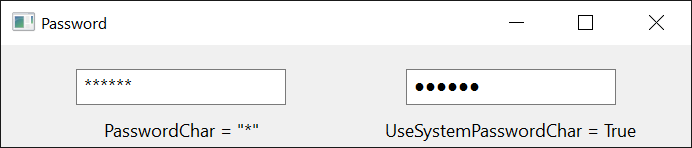
With AllowOverType set to True the Insert key switches OverTypeMode on and off. While it is on, a character that the user types replaces the character after the insertion point; at the end of a line it is added as usual.
The selection, the clipboard and undo
SelStart and SelLength are the place and the length of the selection, counted in characters from 0, and SelText is the selected text. With a SelLength of 0, SelStart is the insertion point. Assigning SelText replaces the selection, or inserts at the insertion point, and leaves the insertion point after the new text.
Copy, Cut, Paste and Clear do to the selection what the commands of the same names do in the menu of the box. Undo takes back the last change made in the box, and CanUndo says whether there is one to take back.
If TextBoxW1.SelLength > 0 Then TextBoxW1.Cut
TextBoxW1.SelStart = TextBoxW1.TextLength     ' the insertion point, to the end
TextBoxW1.Paste
If TextBoxW1.CanUndo Then TextBoxW1.Undo
Modified says whether the text has been changed in the box since the program last assigned Text.
Several lines
With MultiLine set to True the box holds several lines, separated by a carriage return and a line feed (vbCrLf). ScrollBars gives it scroll bars. A box with no horizontal scroll bar wraps a line that is too long, without changing the text.
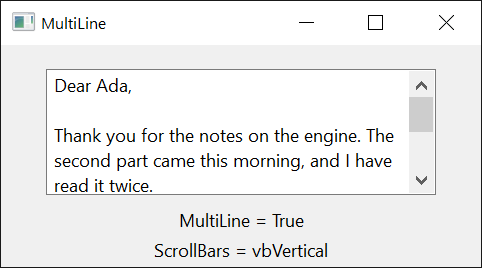
The methods that work on lines count them from 1. GetLineCount returns the number of lines, GetLine the text of one, and GetLineFromChar the line that a character is on. ScrollToLine brings a line to the top of the box. A line here is a line as the box shows it, so a long line that the box has wrapped counts as several.
TextBoxW1.MultiLine = True
TextBoxW1.Text = "one" & vbCrLf & "two" & vbCrLf & "three"
Debug.Print TextBoxW1.GetLineCount
Debug.Print TextBoxW1.GetLine(2)
TextBoxW1.SelStart = 12                  ' in "three"
Debug.Print TextBoxW1.GetLine(0)         ' the line of the insertion point
Debug.Print TextBoxW1.GetLineFromChar(5)
' Output:
'  3
' two
' three
'  2
A program can change MultiLine, ScrollBars, HideSelection, UseSystemPasswordChar and NetAddressValidator while it runs. For each of them the control makes its window again, with the same text and the same selection, so hWnd returns another handle afterwards.
On a form that has a default button, the Enter key presses that button. A multi-line box with WantReturn set to True takes the key itself and starts a new line.
A prompt and a balloon tip
CueBanner is a text that a box of one line shows in grey while it is empty, to say what belongs in it. It is not part of Text. ShowBalloonTip shows a balloon that points at the insertion point, for a message about what the user typed. Both need a program with visual styles.
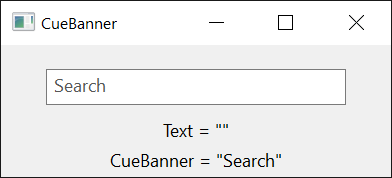
TextBoxW1.CueBanner = "Search"
TextBoxW1.CueBannerAlways = True              ' also while the box has the focus
If Not IsNumeric(TextBoxW1.Text) Then
    TextBoxW1.ShowBalloonTip "Type a number.", "Not a number", TxtIconWarning
End If
Dragging text and dropping files
With OLEDragMode set to vbOLEDragAutomatic the user can drag the selected text out of the box. With OLEDropMode set to vbOLEDropAutomatic the box takes text that is dropped on it and inserts it at the place of the drop. The control still raises the OLE drag-and-drop events, so a handler can look at the data and refuse it. While text is dragged over a box with scroll bars, the box scrolls when the pointer comes near an edge, unless OLEDragDropScroll is False.
Files that the user drags from Explorer are another matter. With AllowDropFiles set to True and OLEDropMode left at vbOLEDropNone, a drop of files raises DropFiles with their paths.
Private Sub TextBoxW1_DropFiles(FileList As Variant, ByVal X As Single, ByVal Y As Single)
    Dim i As Long
    For i = LBound(FileList) To UBound(FileList)
        TextBoxW1.SelText = FileList(i) & vbCrLf
    Next
End Sub
Checking a network address
With NetAddressValidator set to True the box is the network address control of Windows, which can tell whether its text is an IPv4 address, an IPv6 address or a DNS name. It needs a program with visual styles. NetAddressType says which kinds of address the box accepts.
ValidateNetAddress checks the text. When the text is an address of an accepted kind, the method returns and NetAddressFormat, NetAddressString, NetAddressPortNumber and NetAddressPrefixLength hold what it found: for 192.168.0.1:8080, TxtNetAddressFormatIPv4, 192.168.0.1 and 8080. When it is not, the method raises run-time error 5, and ShowNetAddressErrorTip shows the user a balloon that says what is wrong. An empty box raises run-time error 380.
TextBoxW1.NetAddressValidator = True
TextBoxW1.NetAddressType = TxtNetAddressTypeAnyAddress
TextBoxW1.Text = "example.com"
TextBoxW1.ValidateNetAddress
Debug.Print TextBoxW1.NetAddressFormat = TxtNetAddressFormatDNSName
Debug.Print TextBoxW1.NetAddressString
TextBoxW1.Text = "not an address"
On Error Resume Next
TextBoxW1.ValidateNetAddress
Debug.Print Err.Number
' Output:
' True
' example.com
'  5
Properties
Alignment
Where the text stands in the box. A member of AlignmentConstants: vbLeftJustify (the default), vbRightJustify or vbCenter. Another value raises run-time error 380. When RightToLeft takes effect, a left alignment becomes a right one, and the other way round when it stops.
AllowDropFiles
Whether the box takes files that are dragged from Explorer, and raises DropFiles for them. Boolean. Default: False. It has an effect while OLEDropMode is vbOLEDropNone.
AllowOnlyNumbers
Whether the user can type digits only. Boolean. Default: False. A text that the program assigns is not checked.
AllowOverType
Whether the Insert key switches OverTypeMode on and off. Boolean. Default: False. Setting it to False also sets OverTypeMode to False.
BackColor
The color behind the text. OLE_COLOR. Default: vbWindowBackground.
BorderStyle
The border of the box. A member of CCBorderStyleConstants. Default: CCBorderStyleSunken. Another value raises run-time error 380.
CharacterCasing
Whether the box converts text to capital or to small letters. A member of TxtCharacterCasingConstants. Default: TxtCharacterCasingNormal. Another value raises run-time error 380. See Text and what the user may type.
CueBanner
The prompt that the box shows while it is empty. String. Default: empty. It shows in a box of one line, in a program with visual styles.
CueBannerAlways
Whether the prompt of CueBanner stays while the empty box has the focus. Boolean. Default: False, with which the prompt goes when the box gets the focus.
ForeColor
The color of the text. OLE_COLOR. A control newly drawn on a form has black.
HideSelection
Whether the selection stops being shown when the box loses the focus. Boolean. Default: True.
IMEMode
The state of the Input Method Editor while the box has the focus. A member of CCIMEModeConstants. Default: CCIMEModeNoControl. Another value raises run-time error 380.
LeftMargin, RightMargin
The widths of the empty strips at the left and at the right of the text, in the scale units of the control’s container. Single. Assigning -1 gives the margin the width that Windows works out from the font.
Any other negative value raises run-time error 380.
Locked
Whether the user is kept from changing the text. Boolean. Default: False. The user can still select and copy the text, and the program can still change it.
MaxLength
The greatest number of characters the box holds. Long. Default: 0, which sets no limit of the control’s own.
A negative value raises run-time error 380.
Modified
Whether the text has been changed in the box since the program last assigned Text. Boolean. Typing and an assignment to SelText set it to True, and an assignment to Text sets it to False. The program can set it as well.
MultiLine
Whether the box holds several lines. Boolean. Default: False. See Several lines.
NetAddressFormat
The kind of address that the last ValidateNetAddress found. A member of TxtNetAddressFormatConstants, read-only. It is TxtNetAddressFormatNone before the first check and after one that failed.
NetAddressPortNumber
The port number in the text that the last ValidateNetAddress checked, such as 8080 in 192.168.0.1:8080. Integer, read-only. A port number above 32767 is returned as a negative number.
NetAddressPrefixLength
The length of the network prefix in the text that the last ValidateNetAddress checked, such as 8 in 10.0.0.0/8. Byte, read-only. It is 255 when the text has no prefix.
NetAddressString
The address that the last ValidateNetAddress found, without the port number and the prefix: a DNS name as it was typed, an IPv4 address as four numbers with dots between them, an IPv6 address written out in its eight groups. String, read-only.
NetAddressType
The kinds of address that ValidateNetAddress accepts. A member of TxtNetAddressTypeConstants. Default: TxtNetAddressTypeNone. Another value raises run-time error 380.
NetAddressValidator
Whether the box is the network address control of Windows. Boolean. Default: False. See Checking a network address.
OLEDragDropScroll
Whether a box with scroll bars scrolls while data is dragged over it near an edge. Boolean. Default: True.
OLEDragMode
Whether the user can drag the selected text out of the box. A member of OLEDragConstants: vbOLEDragManual (the default), with which only OLEDrag starts a drag, or vbOLEDragAutomatic. Another value raises run-time error 380. Text that the user drags to another place and drops as a move is removed from the box.
OLEDropMode
Whether the box takes data that is dropped on it. A member of OLEDropConstants, not of the OLEDropModeConstants that the other controls take: vbOLEDropNone (the default), vbOLEDropManual or vbOLEDropAutomatic. Another value raises run-time error 380.
With vbOLEDropAutomatic the box takes text: it shows an insertion point under the pointer while text is dragged over it, and inserts the text there when it is dropped. The control raises OLEDragOver and OLEDragDrop as with vbOLEDropManual, with Effect already set to vbDropEffectMove for text and to vbDropEffectNone for anything else. A handler that sets Effect to vbDropEffectNone in OLEDragDrop keeps the text out of the box.
OverTypeMode
Whether a character that the user types replaces the character after the insertion point. Boolean. Default: False. It can be True only while AllowOverType is True: otherwise an assignment of True leaves it False.
PasswordChar
The character that the box shows in place of each character of its text. String. An empty string, the default, shows the text itself.
While the box has no password character, it returns an empty string, as the VB6 text box does. A string of more than one character raises run-time error 380. An assignment does nothing while UseSystemPasswordChar is True.
ScrollBars
The scroll bars of a multi-line box. A member of ScrollBarConstants: vbSBNone (the default), vbHorizontal, vbVertical or vbBoth. Another value raises run-time error 380. A box of one line has none.
SelLength
The number of characters selected. Long. An assignment selects that many characters from SelStart on, or as many as there are.
A negative value raises run-time error 380.
SelStart
The place of the first selected character, counted from 0, or of the insertion point when nothing is selected. Long. An assignment puts the insertion point there, selects nothing, and scrolls the place into view.
A value greater than the length of the text puts the insertion point at the end. A negative value raises run-time error 380.
SelText
The selected text. String. An assignment replaces the selection with the new text, or inserts the text at the insertion point, and raises Change. The user can take the replacement back with Undo.
Text
The text of the box. String. A control newly drawn on a form has its own name. It is the control’s default property.
An assignment raises Change when the new text differs from the old one. It sets Modified to False, empties what Undo can take back, and puts the insertion point at the start.
TextLength
The number of characters in Text. Long, read-only.
UseSystemPasswordChar
Whether the box shows the password dot of Windows in place of each character of its text. Boolean. Default: False. While it is True the control ignores PasswordChar.
WantReturn
Whether the Enter key starts a new line in a multi-line box on a form that has a default button. Boolean. Default: False, with which the key presses the default button.
Methods
CanUndo
Returns whether Undo has a change to take back.
Syntax: object.CanUndo As Boolean
CharFromPos
Returns the place in the text, counted from 0, of the character nearest to a point.
Syntax: object.CharFromPos( X, Y ) As Long
- X, Y
- required The point, measured from the top left corner of the box in the scale units of the control’s container. Single.
The result is right for a text of up to 65,535 characters.
Clear
Deletes the selected text.
Syntax: object.Clear
Copy
Copies the selected text to the clipboard.
Syntax: object.Copy
Cut
Copies the selected text to the clipboard and deletes it from the box.
Syntax: object.Cut
GetLine
Returns the text of one line, without the characters that end it.
Syntax: object.GetLine( LineNumber ) As String
- LineNumber
- required A Long: the number of the line, counted from 1, or 0 for the line of the insertion point.
A negative number, or a number greater than the number of lines, raises run-time error 380.
Note 1.8.141.0
In a 64-bit program a number greater than the number of lines raises run-time error 6, Overflow, in GetLine, and ScrollToLine raises nothing and does not scroll.
GetLineCount
Returns the number of lines in the box. A box that is empty has one line.
Syntax: object.GetLineCount As Long
GetLineFromChar
Returns the number of the line, counted from 1, that a character is on.
Syntax: object.GetLineFromChar( CharIndex ) As Long
- CharIndex
- required A Long: the place of the character in the text, counted from 0, or -1 for the line of the insertion point. A place after the end of the text gives the last line.
A value less than -1 raises run-time error 380.
HideBalloonTip
Takes away the balloon of ShowBalloonTip.
Syntax: object.HideBalloonTip As Boolean
Paste
Puts the text of the clipboard in place of the selection, or at the insertion point.
Syntax: object.Paste
ResetUndoQueue
Forgets the change that Undo would take back, so that CanUndo returns False.
Syntax: object.ResetUndoQueue
ScrollToCaret
Scrolls the box so that the insertion point shows.
Syntax: object.ScrollToCaret
ScrollToLine
Scrolls a multi-line box so that a line is the first one that shows, where the text is long enough for that.
Syntax: object.ScrollToLine LineNumber
- LineNumber
- required A Long: the number of the line, counted from 1.
A negative number, or a number greater than the number of lines, raises run-time error 380. The note under GetLine says what a 64-bit program does.
ShowBalloonTip
Shows a balloon with a message that points at the insertion point, and gives the box the focus. It returns True when the balloon is shown. It needs a program with visual styles.
Syntax: object.ShowBalloonTip( Text [, Title ] [, Icon ] ) As Boolean
- Text
- required A String: the message.
- Title
- optional A String: a title above the message, in bold.
- Icon
- optional A member of TxtIconConstants: the icon beside the title. The default is TxtIconNone.
An Icon that is not a member raises run-time error 380.
ShowNetAddressErrorTip
Shows a balloon that tells the user why the text is not an address of an accepted kind, and gives the box the focus. It does nothing while NetAddressValidator is False.
Syntax: object.ShowNetAddressErrorTip
Undo
Takes back the last change made in the box: what the user typed, deleted or pasted, or an assignment to SelText. A second call puts the change back.
Syntax: object.Undo
ValidateNetAddress
Checks whether the text is a network address of a kind that NetAddressType accepts, and fills the four properties that describe it. See Checking a network address.
Syntax: object.ValidateNetAddress
The method raises run-time error 5 when the text is not such an address, and when NetAddressValidator is False. It raises run-time error 380 when the box is empty.
Events
Change
Raised when the text has changed: the user typed, deleted, pasted or took a change back, or the program assigned another Text or a SelText.
Syntax: object_Change( )
ContextMenu
Raised when the user asks for the menu of the box, with the right mouse button or with Shift+F10, before the box shows the menu that Windows gives every text box.
Syntax: object_ContextMenu( Handled As Boolean, ByVal X As Single, ByVal Y As Single )
- Handled
- False when the event is raised. A handler that sets it to True keeps the box from showing its own menu, to show another one or none.
- X, Y
- The place of the click, measured from the top left corner of the box in the scale units of the control’s container. Both are -1 when the user asked with the keyboard.
Private Sub TextBoxW1_ContextMenu(Handled As Boolean, ByVal X As Single, ByVal Y As Single)
    Handled = TextBoxW1.Locked            ' no menu on a box the user cannot change
End Sub
DropFiles
Raised when the user drops files on the box, while AllowDropFiles is True.
Syntax: object_DropFiles( FileList As Variant, ByVal X As Single, ByVal Y As Single )
- FileList
- An array of String, counted from 0: the full path of each file.
- X, Y
- The place of the drop, measured from the top left corner of the box in the scale units of the control’s container.
MaxText
Raised when the user types or pastes more characters than MaxLength allows. The box keeps what fits and refuses the rest.
Syntax: object_MaxText( )
Scroll
Raised when the text of a multi-line box scrolls: the user moved a scroll bar or moved the insertion point out of view, or the program called ScrollToLine.
Syntax: object_Scroll( )
TxtCharacterCasingConstants
The values of CharacterCasing.
| Member | Value | Description |
|---|---|---|
| TxtCharacterCasingNormal | 0 | The text is kept as it is typed or assigned. |
| TxtCharacterCasingUpper | 1 | Letters become capital letters. |
| TxtCharacterCasingLower | 2 | Letters become small letters. |
TxtIconConstants
The icons of ShowBalloonTip.
| Member | Value | Description |
|---|---|---|
| TxtIconNone | 0 | No icon. |
| TxtIconInfo | 1 | The information icon. |
| TxtIconWarning | 2 | The warning icon. |
| TxtIconError | 3 | The error icon. |
TxtNetAddressFormatConstants
The values of NetAddressFormat.
| Member | Value | Description |
|---|---|---|
| TxtNetAddressFormatNone | 0 | No address was found. |
| TxtNetAddressFormatDNSName | 1 | A DNS name. |
| TxtNetAddressFormatIPv4 | 2 | An IPv4 address. |
| TxtNetAddressFormatIPv6 | 3 | An IPv6 address. |
TxtNetAddressTypeConstants
The values of NetAddressType. An address is a host alone, a service is a host with a port number, and a network is an address with a prefix length, such as 10.0.0.0/8. A member with NoScope in its name refuses an IPv6 address that has a scope, the part after a %.
| Member | Value | Accepts |
|---|---|---|
| TxtNetAddressTypeNone | 0 | Nothing. |
| TxtNetAddressTypeIPv4Address | 1 | An IPv4 address. |
| TxtNetAddressTypeIPv4Service | 2 | An IPv4 address with a port number. |
| TxtNetAddressTypeIPv4Network | 3 | An IPv4 network. |
| TxtNetAddressTypeIPv6Address | 4 | An IPv6 address. |
| TxtNetAddressTypeIPv6AddressNoScope | 5 | An IPv6 address without a scope. |
| TxtNetAddressTypeIPv6Service | 6 | An IPv6 address with a port number. |
| TxtNetAddressTypeIPv6ServiceNoScope | 7 | An IPv6 address without a scope, with a port number. |
| TxtNetAddressTypeIPv6Network | 8 | An IPv6 network. |
| TxtNetAddressTypeDNSName | 9 | A DNS name. |
| TxtNetAddressTypeDNSService | 10 | A DNS name with a port number. |
| TxtNetAddressTypeIPAddress | 11 | An IPv4 or an IPv6 address. |
| TxtNetAddressTypeIPAddressNoScope | 12 | An IPv4 address, or an IPv6 address without a scope. |
| TxtNetAddressTypeIPService | 13 | An IPv4 or an IPv6 address with a port number. |
| TxtNetAddressTypeIPServiceNoScope | 14 | As TxtNetAddressTypeIPService, the IPv6 address without a scope. |
| TxtNetAddressTypeIPNetwork | 15 | An IPv4 or an IPv6 network. |
| TxtNetAddressTypeAnyAddress | 16 | A DNS name, an IPv4 address or an IPv6 address. |
| TxtNetAddressTypeAnyAddressNoScope | 17 | As TxtNetAddressTypeAnyAddress, the IPv6 address without a scope. |
| TxtNetAddressTypeAnyService | 18 | A DNS name, an IPv4 address or an IPv6 address, each with a port number. |
| TxtNetAddressTypeAnyServiceNoScope | 19 | As TxtNetAddressTypeAnyService, the IPv6 address without a scope. |
See Also
- Common members – the members this control shares with the package’s other controls
- TextBox – the text box of the VB package
- OLEDropConstants – the values of OLEDropMode