UpDown class
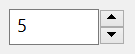
An UpDown is a pair of arrow buttons that raise and lower a number in a range. It draws no number of its own: the program shows the number in another control, or joins the UpDown to a control that does, its buddy.
UpDown1.Min = 0
UpDown1.Max = 10
UpDown1.Increment = 2
UpDown1.Value = 50                         ' above Max
Debug.Print UpDown1.Value
' Output:
'  10
The control stands in place of the UpDown of the Microsoft common controls (MSCOMCT2.OCX). The WinNativeCommonCtls package has an UpDown too; this one adds BuddyControl with BuddyProperty, SyncBuddy and SyncFromBuddy, SetAcceleration, Wrap, HotTracking, NumberStyle, ThousandsSeparator and the event BeforeChange. The SpinBox is an UpDown that comes with a text box of its own.
Of the common members, the control has those under Name and place but HelpContextID, Window handles, VisualStyles, Mouse but its Click and DblClick events, Dragging the control, OLE drag and drop and Right-to-left, RightToLeftLayout included. It shows no text, so it has no Font. It never takes the focus, so it has no keyboard events and no SetFocus.
- The value
- What a click raises
- A buddy
- Properties
- Methods
- Events
- UdnOrientationConstants
- UdnNumberStyleConstants
- See Also
The value
Value is the position, from Min to Max: 0 to 10 for a new control. The user’s click on an arrow adds Increment to it, or subtracts it, and while the button is held the value moves again and again. SetAcceleration makes the value move faster the longer the user holds a button.
A Value outside the range becomes the nearest end of it. A Min above Max, or a Max below Min, raises run-time error 380. A new Min above Value, or a new Max below it, moves Value to that end.
Every change of Value raises Change, whether the user or the program made it. An assignment that leaves Value as it was raises nothing.
At an end of the range, the arrow that would pass it does nothing, unless Wrap is True: then Value goes round to the other end. Orientation says whether the arrows point up and down, or left and right.
The width of a vertical UpDown is that of the arrows of Windows, and an assignment to Width does not change it. A change of Orientation exchanges the control’s width and height.
What a click raises
A click on the up arrow raises BeforeChange, with the position and the amount about to be added, then Change, and, when the user lets the button go, UpClick. A click on the down arrow raises BeforeChange with a negative amount, Change and DownClick.
A handler of BeforeChange that sets Delta to 0 cancels the click, which then raises neither Change nor a click event. At the end of the range UpClick is raised although the value does not change, and with Wrap the value goes to Min.
Private Sub UpDown1_BeforeChange(ByVal Value As Long, Delta As Long)
    If Value >= 5 And Delta > 0 Then Delta = 0     ' the arrows stop at 5
End Sub

Private Sub UpDown1_Change()
    TextBoxW1.Text = UpDown1.Value
End Sub
A buddy
A program that shows the number in another control can join it to the UpDown. BuddyControl names that control, and BuddyProperty the property of it that holds the number. The UpDown then writes Value to that property each time Value changes, as a string, formatted by NumberStyle and ThousandsSeparator, or as a number if the property is a number. A change the user makes in the buddy reaches the UpDown only when the program calls SyncFromBuddy, for example in the buddy’s Change event.
The buddy is on the same form as the UpDown. A control on another form, and the name of a control that is not on the form, leave the UpDown without a buddy and raise no error. The UpDown itself raises run-time error 35610, Invalid object, a value of another type than an object or a name raises 13, and Nothing removes the buddy.
A BuddyProperty, or a SyncBuddy of True, with no buddy raises run-time error 35754, BuddyControl property must be set first. A property that the buddy does not have raises 380. An empty BuddyProperty ends the synchronization. A hexadecimal value is written as 0x and four digits, or eight when it needs more.
Note 1.8.141.0 BETA 1042
BuddyProperty accepts only the properties that every control has on its form, such as Tag, ToolTipText and Width. A property of the buddy’s own class, such as Text of a TextBoxW, raises run-time error 380, and so does SyncBuddy set to True without a BuddyProperty, which should take the buddy’s default property. A program that wants the value in a text box assigns it in the Change event of the UpDown, or uses a SpinBox.
Set UpDown1.BuddyControl = TextBoxW1      ' TextBoxW1 must be on the form of UpDown1
UpDown1.BuddyProperty = "Tag"
UpDown1.Value = 5                         ' TextBoxW1.Tag is now "5"
Properties
BuddyControl
The control that shows the number of the UpDown. A control, or the name of one on the form, as a Variant; reading gives the control, or Nothing. Default: none. See A buddy. In the form designer it is the name of the control, chosen from a list.
BuddyProperty
The property of the buddy that is written with Value and read by SyncFromBuddy. String. Default: empty, with which the buddy is not synchronized. The name _Default stands for the buddy’s default property. See A buddy and its note.
HotTracking
Whether the arrow under the mouse pointer is drawn highlighted. Boolean. Default: True. A theme can override it. A change makes the control draw again from a new window.
Increment
What a click on an arrow adds to or subtracts from Value. Long. Default: 1. It is not checked, so 0 and a negative number are accepted. While SetAcceleration has given a list, it reads the first increment of the list.
Max
The upper end of the range. Long. Default: 10. See The value.
Min
The lower end of the range. Long. Default: 0. See The value.
NumberStyle
How the number is written to the buddy. A member of UdnNumberStyleConstants. Default: UdnNumberStyleDecimal. Any other value raises run-time error 380.
Orientation
The direction of the arrows. A member of UdnOrientationConstants. Default: UdnOrientationVertical. Any other value raises run-time error 380. A change exchanges the width and the height.
SyncBuddy
Whether the control writes Value to a property of its buddy. Boolean: True while BuddyProperty is not empty. Setting it to False empties BuddyProperty, and setting it to True chooses the buddy’s default property when BuddyProperty is empty. See A buddy and its note.
ThousandsSeparator
Whether a number written to the buddy in decimal has the thousands separator of the user’s language, and whether one in the buddy’s text is accepted by SyncFromBuddy. Boolean. Default: True.
Value
The position. Long. Default: 0. It is the control’s default property. See The value. A change raises Change.
Wrap
Whether the value goes round to the other end of the range when an arrow passes one. Boolean. Default: False. A change makes the control draw again from a new window.
Methods
SetAcceleration
Makes the arrows add more the longer the user holds a button.
Syntax: object.SetAcceleration Delays, Increments
- Delays
- required An array of numbers: for each step, the seconds the button has been held before the step’s increment starts.
- Increments
- required An array of numbers of the same size: the increment of each step.
The two arrays have one dimension and the same bounds, or the method raises run-time error 5. An array that is not an array, and is not Empty, raises 380, and an array that is not allocated raises 91. Two Empty values take the list away and bring back Increment.
The delays are 0 or more, each at least the one before it: a negative delay, or one smaller than the delay before it, raises run-time error 381.
UpDown1.SetAcceleration Array(0, 2, 5), Array(1, 5, 20) ' 1 at first, 5 after 2 s, 20 after 5 s
SyncFromBuddy
Reads Value from the property of the buddy that BuddyProperty names. A text that is not a number leaves Value as it was. A text of 0x and hexadecimal digits is a number when NumberStyle is hexadecimal.
Syntax: object.SyncFromBuddy
Events
BeforeChange
Raised when the user’s click is about to change the position, before it does. See What a click raises.
Syntax: object_BeforeChange( ByVal Value As Long, Delta As Long )
- Value
- The position before the click.
- Delta
- What the click will add: Increment for the up arrow, and its negative for the down arrow. A handler changes it, and sets it to 0 to cancel the click.
Change
Raised when Value has changed, by the user or by an assignment.
Syntax: object_Change( )
DownClick
Raised when the user lets go of the down arrow after a click that lowered the position, or tried to.
Syntax: object_DownClick( )
UpClick
Raised when the user lets go of the up arrow after a click that raised the position, or tried to.
Syntax: object_UpClick( )
UdnOrientationConstants
The values of Orientation.
| Member | Value | Description |
|---|---|---|
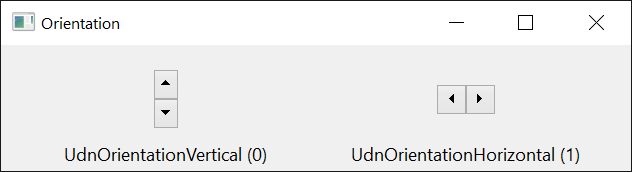
| UdnOrientationVertical | 0 | The arrows point up and down, one above the other. |
| UdnOrientationHorizontal | 1 | The arrows point left and right, side by side. |
UdnNumberStyleConstants
The values of NumberStyle.
| Member | Value | Description |
|---|---|---|
| UdnNumberStyleDecimal | 0 | Decimal, with the thousands separator if ThousandsSeparator is True. |
| UdnNumberStyleHexadecimal | 1 | Hexadecimal, as 0x and four or eight digits. |
See Also
- Common members – the members this control shares with the package’s other controls
- SpinBox – an up-down with a text box of its own
- UpDown – the control of the same name in the WinNativeCommonCtls package