MonthView class
A MonthView is a calendar that stays on the form. It shows one month or several, and the user selects a date, or a range of dates, by clicking it.
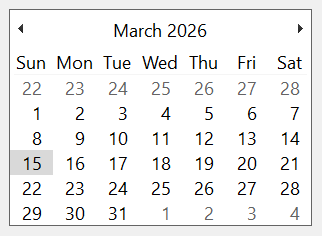
MonthView1.Value = DateSerial(2026, 3, 15) + TimeSerial(10, 20, 30)
Debug.Print Format$(MonthView1.Value, "yyyy-mm-dd")
MonthView1.Month = 11
MonthView1.Day = 30
Debug.Print Format$(MonthView1.Value, "yyyy-mm-dd")
' Output:
'  2026-03-15
'  2026-11-30
The control stands in place of the MonthView of the Microsoft common controls (MSCOMCT2.OCX). The WinNativeCommonCtls package has a MonthView too; this one adds View, Today, UseShortestDayNames, CalendarCount, ComputeControlSize, HitTest, SetSelRange and the event ViewChange.
Of the common members, the control has those under Name and place, Window handles, Font and visual styles, Mouse but its DblClick event, Keyboard and focus, Dragging the control, OLE drag and drop and Right-to-left, RightToLeftLayout included.
- The selected date
- Selecting a range
- Several months
- Views
- Bold days
- What is under the pointer
- Properties
- Methods
- Events
- MvwViewConstants
- MvwHitResultConstants
- See Also
The selected date
Value is the selected date, a Date without a time of day: an assignment keeps the day and drops the time. A new control has the date of the day it is made selected. Year, Month, Day and Week read and change one part of it, and DayCount and DayOfWeek read the length of its month and its weekday.
MinDate and MaxDate limit the dates, from 1 January 1900 to 31 December 9999 by default. A Value outside them raises run-time error 35773. A MinDate after MaxDate raises 35775, a MaxDate before MinDate raises 35774, and a date before 1900 raises 380.
A Month outside 1 to 12, a Day outside the month and a Week outside 1 to 53 raise run-time error 380.
Selecting a range
With MultiSelect set to True the user selects several days in a row, by dragging or with the Shift key, up to MaxSelCount days. SelStart and SelEnd are the first and the last of them, and Value is the first. SetSelRange selects a range from the program.
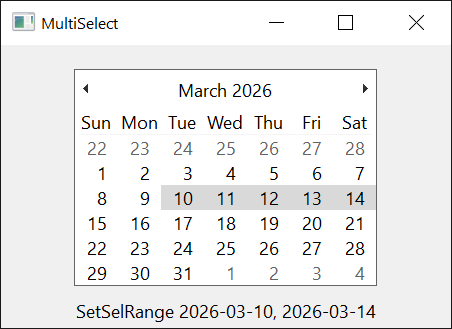
A range of more than MaxSelCount days, or one that has a date outside MinDate and MaxDate, raises run-time error 35770, An invalid date range was specified. Without MultiSelect, SetSelRange selects its first date only, and SelStart and SelEnd are both Value.
MonthView1.MultiSelect = True
MonthView1.SetSelRange DateSerial(2026, 3, 10), DateSerial(2026, 3, 14)
Debug.Print Format$(MonthView1.SelStart, "yyyy-mm-dd"), Format$(MonthView1.SelEnd, "yyyy-mm-dd")
On Error Resume Next
MonthView1.SetSelRange DateSerial(2026, 3, 10), DateSerial(2026, 3, 17)     ' 8 days, MaxSelCount is 7
Debug.Print Err.Number
' Output:
'  2026-03-10    2026-03-14
'  35770
Setting MultiSelect, DayState or BorderStyle makes the control draw again from a new window, and the selection becomes the single date Value.
Several months
MonthColumns and MonthRows say how many months the control shows across and down. The control sets its own size to hold them: an assignment to Width or Height has no lasting effect, and a change of the number of months, of the font, of ShowToday or of ShowWeekNumbers changes the size. ComputeControlSize tells what size a number of months needs, and CalendarCount how many months are shown.
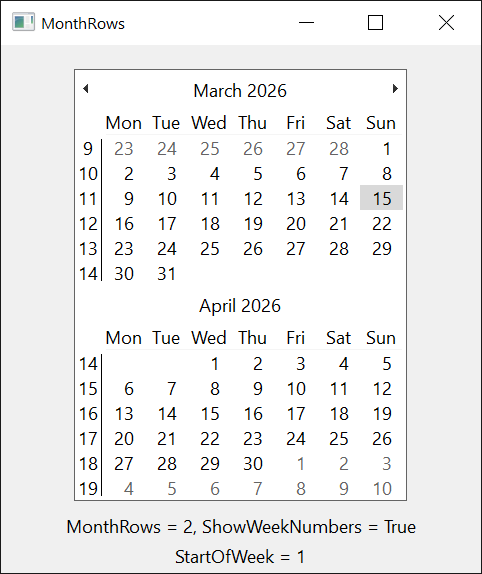
Each of the two is from 1 to 12, and together they make at most 12 months. A value above 12 raises run-time error 35776, a product above 12 raises 35777, and 0 raises 380. ComputeControlSize raises the same two errors.
Dim Before As Single
Before = MonthView1.Height
MonthView1.MonthRows = 3
Debug.Print MonthView1.CalendarCount, MonthView1.Height > Before
' Output:
'  3            True
Warning 1.8.141.0
With visual styles, a MonthColumns of 2 or more can make the control show fewer months across than it says. The control asks Windows for the room of that many months side by side, but leaves out the gap that Windows puts between two months, so Windows may fit one month fewer. Whether it does depends on the font and the scaling of the screen: in a program run from the IDE, 2 shows one month, 3 shows two, and so on, while a built program can show them all, or all but the last for a larger number. Without visual styles the control adds the gaps itself and shows them all. MonthRows is right, and so are the control’s width and the result of ComputeControlSize, which are those of the months shown.
CalendarCount tells how many months are shown. A program that needs n months across sets MonthColumns to n, and to n + 1 if CalendarCount is then short, keeping the product with MonthRows at 12 or less.
MonthView1.MonthColumns = 3
If MonthView1.CalendarCount < 3 Then MonthView1.MonthColumns = 4
Debug.Print MonthView1.CalendarCount       ' three months across
' Output:
'  3
Views
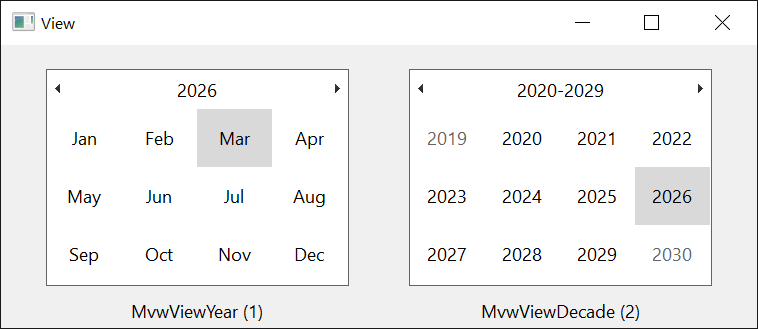
With visual styles, the user clicks the title of the calendar to zoom out, from the days of a month to the months of a year, the years of a decade and the decades of a century. View reads and sets what is shown, and ViewChange is raised when it changes. A program without visual styles has the month view only.
Bold days
With DayState set to True, the control raises GetDayBold before it shows days, and draws in bold those the handler marks:
Private Sub MonthView1_GetDayBold(ByVal StartDate As Date, ByVal Count As Long, State() As Boolean)
    Dim I As Long
    For I = 1 To Count
        If Day(StartDate + I - 1) = 1 Then State(I) = True      ' the first of every month
    Next
End Sub
What is under the pointer
HitTest tells which part of the calendar is at a place, and the date there if it is a day. On a form whose scale is twips, the unit of the mouse events, a handler of MouseMove or MouseDown gives it the place of the event:
Private Sub MonthView1_MouseMove(Button As Integer, Shift As Integer, X As Single, Y As Single)
    Dim Hit As Date
    If MonthView1.HitTest(X, Y, Hit) = MvwHitResultCalendarDate Then Debug.Print Hit
End Sub
Properties
BackColor
The background color of the days. OLE_COLOR. Default: vbWindowBackground. Windows ignores it while the control is drawn with visual styles, so it shows with VisualStyles set to False.
BorderStyle
The border of the control. A member of CCBorderStyleConstants. Default: CCBorderStyleSingle. Any other value raises run-time error 380. A change makes the control draw again from a new window.
CalendarCount
The number of months the control shows. Byte, read-only. It is MonthColumns times MonthRows, but for the warning under Several months.
Day
The day of the month of Value, from 1 to DayCount. Integer.
DayCount
The number of days in the month of Value. Long, read-only.
DayOfWeek
The day of the week of Value, from 0 for Sunday to 6 for Saturday. Integer, read-only.
DayState
Whether the control asks the program which days to draw in bold. Boolean. Default: False. With True it raises GetDayBold. A change makes the control draw again from a new window.
ForeColor
The color of the text of the days. OLE_COLOR. Default: vbButtonText. It shows with visual styles off, as BackColor does.
MaxDate
The last date the control accepts. Date. Default: 31 December 9999. See The selected date.
MaxSelCount
The most days a selected range can have. Integer. Default: 7. A value of 0 or less raises run-time error 380. It has an effect with MultiSelect.
MinDate
The first date the control accepts. Date. Default: 1 January 1900. See The selected date.
Month
The month of Value, from 1 to 12. Integer.
MonthColumns
The number of months to show across. Byte. Default: 1. See Several months, which has a warning about it.
MonthRows
The number of months shown down. Byte. Default: 1. See Several months.
MultiSelect
Whether the user can select a range of days. Boolean. Default: False. See Selecting a range. A change makes the control draw again from a new window.
ScrollRate
The number of months the calendar moves when the user clicks an arrow in the title. Long. Default: 1. A value of 0 gives the number of months the control shows, and a negative value raises run-time error 380.
SelEnd
The last date of the selected range. Date. Without MultiSelect it is Value. An assignment is a SetSelRange from SelStart to the new date.
SelStart
The first date of the selected range. Date. Without MultiSelect it is Value. An assignment is a SetSelRange from the new date to SelEnd.
ShowToday
Whether the control shows a line with the current date at its bottom. Boolean. Default: True.
ShowTodayCircle
Whether the control draws a circle round the current date. Boolean. Default: True.
ShowTrailingDates
Whether the control shows the days of the months before and after the one it displays, in the cells that month leaves free. Boolean. Default: True.
ShowWeekNumbers
Whether the control shows the week numbers at the left of the weeks. Boolean. Default: False.
StartOfWeek
The day shown in the leftmost column. Integer: 0 for the first day of the week of the user’s language (the default), or 1 for Monday to 7 for Sunday. Any other value raises run-time error 380. It reads the day the control shows, from 1 to 7.
SystemStartOfWeek
The first day of the week of the user’s language, from 1 for Monday to 7 for Sunday. Integer, read-only.
Today
The date the control takes for the current day, which it marks with the circle and shows in the line at the bottom. Variant, a Date. A new control has the date of the system. Assigning Null or Empty gives it the date of the system again, and any other value that is not a date or a number raises run-time error 380.
TitleBackColor
The background color of the title, with the month and the year. OLE_COLOR. Default: vbActiveTitleBar. It shows with visual styles off.
TitleForeColor
The color of the text of the title. OLE_COLOR. Default: vbActiveTitleBarText. It shows with visual styles off.
TrailingForeColor
The color of the days of the neighbouring months. OLE_COLOR. Default: vbGrayText. It shows with visual styles off.
UseShortestDayNames
Whether the control writes the names of the weekdays with the shortest form the user’s language has, in place of the short form. Boolean. Default: False.
Value
The selected date; with MultiSelect, the first selected date. Date, without a time of day. It is the control’s default property. See The selected date.
Assigning a date other than the selected one raises SelChange.
View
What the calendar shows. A member of MvwViewConstants. Default: MvwViewMonth. Any other value raises run-time error 380. It has an effect with visual styles. A change by an assignment or by the user raises ViewChange.
Week
The week of the year of Value, from 1 to 53, counted as StartOfWeek says, with the first week the one that has at least four days of the new year. Integer. An assignment moves Value by the number of weeks between the two numbers.
Year
The year of Value. Integer.
Methods
ComputeControlSize
Gives the width and the height the control needs for a number of months.
Syntax: object.ComputeControlSize MonthColumns, MonthRows, Width, Height
- MonthColumns, MonthRows
- required Byte values: the months across and down. See Several months for the errors.
- Width, Height
- required Single variables that receive the size, in the scale units of the control’s container.
GetMonthRange
Gives the first and the last date the control shows, and the number of months they span.
Syntax: object.GetMonthRange( IncludeTrailing, [ StartDate ], [ EndDate ] ) As Long
- IncludeTrailing
- required A Boolean. With False the range is the shown months in full. With True it also covers the days of the neighbouring months that the cells around them show.
- StartDate, EndDate
- optional Date variables that receive the first and the last date.
The result is the number of months the range spans: with True it counts the neighbouring months too.
Dim First As Date, Last As Date
MonthView1.Value = DateSerial(2026, 3, 16)
Debug.Print MonthView1.GetMonthRange(False, First, Last)
Debug.Print Format$(First, "yyyy-mm-dd"), Format$(Last, "yyyy-mm-dd")
' Output:
'  1
'  2026-03-01    2026-03-31
HitTest
Tells which part of the calendar is at a place.
Syntax: object.HitTest( X, Y, [ HitDate ] ) As MvwHitResultConstants
- X, Y
- required Single values: the place, measured from the top left corner of the control in the scale units of the control’s container.
- HitDate
- optional A Date variable that receives the date, when the result is MvwHitResultCalendarDate, MvwHitResultCalendarDay or MvwHitResultCalendarWeekNum.
A place outside the control gives MvwHitResultNoWhere.
SetSelRange
Selects a range of dates. See Selecting a range for the errors.
Syntax: object.SetSelRange StartDate, EndDate
- StartDate, EndDate
- required Date values. The time of day is dropped. With MultiSelect and EndDate before StartDate the control selects one of them.
Raises SelChange when the selection changes.
Events
ContextMenu
Raised when the user asks for the menu of the control, with the right mouse button or with Shift+F10.
Syntax: object_ContextMenu( Handled As Boolean, ByVal X As Single, ByVal Y As Single )
- Handled
- False when the event is raised. A handler that sets it to True keeps the control from going on with the request.
- X, Y
- The place of the click, measured from the top left corner of the control in the scale units of the control’s container. Both are -1 when the user asked with the keyboard.
DateClick
Raised when the user selects a date explicitly, by clicking it or by pressing Enter on it.
Syntax: object_DateClick( ByVal DateClicked As Date )
- DateClicked
- The date selected.
A click on a day raises Click, then SelChange, then DateClick. The last two are raised after the click, when the program next processes messages.
GetDayBold
Raised when the control needs to know which days to draw in bold, with DayState set to True. See Bold days.
Syntax: object_GetDayBold( ByVal StartDate As Date, ByVal Count As Long, State() As Boolean )
- StartDate
- The first day the control shows, which can be a day of the previous month.
- Count
- The number of days.
- State
- An array of Count elements, indexed from 1, one for each day from StartDate. A handler sets an element to True to draw that day in bold.
The control also raises it when DayState is set.
SelChange
Raised when the selected date or range has changed, by an assignment or by the user. Assigning the date that is selected raises nothing.
Syntax: object_SelChange( ByVal StartDate As Date, ByVal EndDate As Date )
- StartDate, EndDate
- The first and the last date selected. Both are the selected date without MultiSelect.
ViewChange
Raised when the view has changed.
Syntax: object_ViewChange( ByVal OldView As MvwViewConstants, ByVal NewView As MvwViewConstants )
A change of View by an assignment raises it too.
MvwViewConstants
The values of View.
| Member | Value | Description |
|---|---|---|
| MvwViewMonth | 0 | The days of a month. |
| MvwViewYear | 1 | The months of a year. |
| MvwViewDecade | 2 | The years of a decade. |
| MvwViewCentury | 3 | The decades of a century. |
MvwHitResultConstants
The values HitTest gives.
| Member | Value | Description |
|---|---|---|
| MvwHitResultNoWhere | 0 | Outside the calendar. |
| MvwHitResultCalendarBack | 1 | The background of the calendar. |
| MvwHitResultCalendarControl | 2 | The calendar of a view other than the month view. |
| MvwHitResultCalendarDate | 3 | A day of the month shown. |
| MvwHitResultCalendarDateNext | 4 | A day of the next month. |
| MvwHitResultCalendarDatePrev | 5 | A day of the previous month. |
| MvwHitResultCalendarDay | 6 | The name of a weekday. |
| MvwHitResultCalendarWeekNum | 7 | A week number. |
| MvwHitResultTitleBack | 8 | The background of the title. |
| MvwHitResultTitleBtnNext | 9 | The arrow that moves to the next months. |
| MvwHitResultTitleBtnPrev | 10 | The arrow that moves to the previous months. |
| MvwHitResultTitleMonth | 11 | The month in the title. |
| MvwHitResultTitleYear | 12 | The year in the title. |
| MvwHitResultTodayLink | 13 | The line with the current date. |
See Also
- Common members – the members this control shares with the package’s other controls
- DTPicker – a box that shows one date and drops a calendar down
- MonthView – the control of the same name in the WinNativeCommonCtls package