ProgressBar class
A ProgressBar is a bar that fills as a task advances through a range. It can also run as a marquee for a task of unknown length, show a normal, an error or a paused state, draw a text over the bar, and repeat its progress on the form’s taskbar button.

ProgressBar1.Min = 0
ProgressBar1.Max = 250
ProgressBar1.Value = 100
ProgressBar1.Text = "{3} %"          ' the bar shows "40 %"
ProgressBar1.Increment 25
Debug.Print ProgressBar1.Value
' Output:
'  125
The control stands in place of the ProgressBar of the Microsoft common controls (MSCOMCTL.OCX). The WinNativeCommonCtls package has a ProgressBar too; this one adds Text, ShowInTaskBar, StepAutoReset and Increment.
Of the common members, the control has those under Name and place but HelpContextID, Window handles, Font and visual styles, Mouse, Dragging the control, OLE drag and drop and Right-to-left, RightToLeftLayout included. It never takes the focus, so it has no keyboard events.
- Range, value and steps
- A task of unknown length
- Text on the bar
- On the taskbar
- Properties
- Methods
- Events
- PrbOrientationConstants
- PrbScrollingConstants
- PrbStateConstants
- See Also
Range, value and steps
Min and Max are the ends of the range, and Value is the position in it. A program sets Value, adds to it with Increment, or calls StepIt once for each part of the task done, which adds Step.
A Value outside the range becomes the nearest end of it. A StepIt that would pass Max starts again from Min, as the progress bar of Windows does, unless StepAutoReset is False: then the bar stops at Max.
ProgressBar1.Min = 0
ProgressBar1.Max = 100
ProgressBar1.Step = 30
ProgressBar1.Value = 500
Debug.Print ProgressBar1.Value
ProgressBar1.Value = 90
ProgressBar1.StepIt                     ' 120 is 20 past Max
Debug.Print ProgressBar1.Value
ProgressBar1.StepAutoReset = False
ProgressBar1.Value = 90
ProgressBar1.StepIt
Debug.Print ProgressBar1.Value
' Output:
'  100
'  20
'  100
A task of unknown length
With Scrolling set to PrbScrollingMarquee the bar shows a block that moves along it again and again, for a task whose length the program does not know. MarqueeAnimation starts and stops the movement, and MarqueeSpeed is the time between its steps.
ProgressBar1.Scrolling = PrbScrollingMarquee
ProgressBar1.MarqueeSpeed = 30
ProgressBar1.MarqueeAnimation = True
Text on the bar
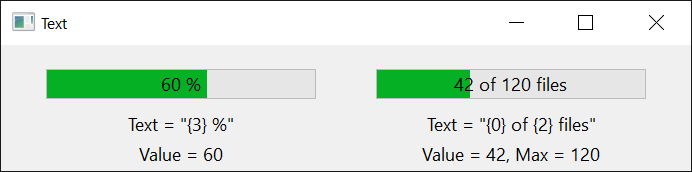
Text is drawn in the middle of the bar, in the control’s Font and in TextColor. Four placeholders in it stand for the bar’s numbers:
| Placeholder | Replaced by |
|---|---|
{0} | Value |
{1} | Min |
{2} | Max |
{3} | the part of the range done, as a whole number from 0 to 100 |
On the taskbar
With ShowInTaskBar set to True, the taskbar button of the window the control is in shows the same progress: the part of the range done, in green, red or yellow by State, or the moving light of a task of unknown length while a marquee is animated.
Properties
Align
The edge of the form that the control is attached to, where it takes the form’s whole width or height. A member of AlignConstants. Default: vbAlignNone.
Note 1.8.141.0 BETA 1042
twinBASIC has not implemented Align: an assignment compiles with the warning TB0009 and changes nothing, and the property goes on returning vbAlignNone. A program places and sizes the bar itself.
BackColor
The color of the track, behind the bar. OLE_COLOR. Default: vbButtonFace. It shows only while the control is drawn without visual styles, with VisualStyles set to False.
BorderStyle
Whether the control has a border of one line. Integer: 0 for none (the default) or 1 for a line. Another value raises run-time error 380.
ForeColor
The color of the bar. OLE_COLOR. Default: vbHighlight. It shows only while the control is drawn without visual styles.
MarqueeAnimation
Whether the marquee’s block is moving. Boolean. Default: False. It has an effect while Scrolling is PrbScrollingMarquee.
MarqueeSpeed
The time between two steps of the marquee, in milliseconds. Long. Default: 80.
A value of 0 or less raises run-time error 380.
Max
The upper end of the range. Long. Default: 100.
A value that is not greater than Min raises run-time error 380, so a program that moves the whole range upward sets Max first.
Min
The lower end of the range. Long. Default: 0.
A value that is not less than Max raises run-time error 380.
Orientation
Whether the bar fills from left to right or from bottom to top. A member of PrbOrientationConstants. Default: PrbOrientationHorizontal. A change exchanges the control’s width and height, unless the control is attached to an edge of the form with Align.
Scrolling
How the bar is drawn. A member of PrbScrollingConstants. Default: PrbScrollingStandard.
ShowInTaskBar
Whether the taskbar button of the control’s window shows the progress as well. Boolean. Default: False. See On the taskbar.
SmoothReverse
Whether the bar, drawn with visual styles, moves back smoothly when Value is made smaller. Boolean. Default: False, with which it jumps back.
State
The state the bar shows. A member of PrbStateConstants. Default: PrbStateNormal. It shows while the control is drawn with visual styles.
Step
What StepIt adds to Value. Long. A control newly drawn on a form has 10.
StepAutoReset
Whether a StepIt that would pass Max starts again from Min. Boolean. Default: True. With False such a call sets Value to Max.
Text
The text drawn in the middle of the bar. String. Default: empty. See Text on the bar for its placeholders.
TextColor
The color of Text. OLE_COLOR. Default: vbWindowText.
Value
The position in the range. Long. Default: 0. It is the control’s default property. A value outside the range becomes the nearest end. A change raises Change. While a marquee is shown the bar does not draw it.
Methods
Increment
Adds an amount to Value, and raises Change if Value changed.
Syntax: object.Increment Delta
- Delta
- required A Long: what to add. A negative amount moves the bar back.
StepIt
Adds Step to Value, and raises Change if Value changed. Range, value and steps says what it does at the end of the range.
Syntax: object.StepIt
Events
Change
Raised when Value has changed, by an assignment, StepIt or Increment. Assigning the value the bar already has raises nothing.
Syntax: object_Change( )
PrbOrientationConstants
The values of Orientation.
| Member | Value | Description |
|---|---|---|
| PrbOrientationHorizontal | 0 | The bar fills from left to right. |
| PrbOrientationVertical | 1 | The bar fills from bottom to top. |
PrbScrollingConstants
The values of Scrolling.
| Member | Value | Description |
|---|---|---|
| PrbScrollingStandard | 0 | A bar of separate blocks where the control is drawn without visual styles. With them it is drawn as PrbScrollingSmooth is. |
| PrbScrollingSmooth | 1 | A bar in one piece. |
| PrbScrollingMarquee | 2 | A block that moves along the bar while MarqueeAnimation is True. |
PrbStateConstants
The values of State.

| Member | Value | Description |
|---|---|---|
| PrbStateNormal | 1 | The task is running: a green bar. |
| PrbStateError | 2 | The task has failed: a red bar. |
| PrbStatePaused | 3 | The task is paused: a yellow bar. |
See Also
- Common members – the members this control shares with the package’s other controls
- ProgressBar – the control of the same name in the WinNativeCommonCtls package