IPAddress class
An IPAddress is a box for an IPv4 address: four fields that each take a number from 0 to 255, with a dot between two fields. A program reads the address as text or as one number, and can limit the numbers each field takes.
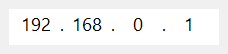
IPAddress1.Text = "192.168.0.1"
Debug.Print IPAddress1.Text
Debug.Print Hex$(IPAddress1.Value)
' Output:
' 192.168.0.1
' C0A80001
VB6 and the Microsoft common controls have no control for an IP address. This one is four text boxes of Windows, drawn as one box, that behave as the IP address control of Windows (SysIPAddress32) does.
It answers the messages of that control, sent to hWnd: IPM_SETADDRESS, IPM_GETADDRESS, IPM_CLEARADDRESS, IPM_SETRANGE and IPM_ISBLANK. IPM_SETFOCUS gives a field the focus.
Of the common members, the control has those under Name and place, hWnd but not hWndUserControl, Font and visual styles, Mouse, Keyboard and focus, Dragging the control, OLE drag and drop and Right-to-left, but not RightToLeftLayout. The window of hWnd holds the four text boxes, and hWndEdit gives the window of each.
- The address as text and as a number
- The limits of a field
- Typing in the fields
- Mouse events
- Properties
- Events
- IpaAutoSelectConstants
- See Also
The address as text and as a number
Text is the four numbers joined by dots. Value is the same address as one Long, with the first number in the highest byte: 192.168.0.1 is &HC0A80001.
The text assigned to Text has four parts of up to three digits, separated by dots. A part may be empty, as the last one is in 1.2.3.. Any other text, such as 1.2.3, 1.2.3.4.5, 1.2.3.x or 1.2.3.1234, raises run-time error 380 and changes nothing. A part is kept as written, leading zeros included, but a number above the Max of its field, or below its Min, is replaced by that limit. An empty string empties the four fields, and a control with four empty fields has an empty Text.
Value counts an empty field as 0. Assigning it fills the four fields, so that &H0A000102 is 10.0.1.2 and -1 is 255.255.255.255. An empty Text gives a Value of 0.
IPAddress1.Value = &H0A000102
Debug.Print IPAddress1.Text
IPAddress1.Text = "300.1.2.3"
Debug.Print IPAddress1.Text
IPAddress1.Text = ""
Debug.Print IPAddress1.Value
' Output:
' 10.0.1.2
' 255.1.2.3
'  0
The limits of a field
Min and Max are the lowest and the highest number each field takes, from 0 to 255 by default. They have an argument, the number of the field from 1 to 4.
The limits apply to a text assigned to Text and, for the user, when the focus leaves a field. A number assigned through Value is not checked against them. A Min above the Max of its field becomes that Max, and a Max below the Min becomes that Min. A field number outside 1 to 4 raises run-time error 5.
IPAddress1.Min(1) = 10
IPAddress1.Max(1) = 20
IPAddress1.Max(2) = 5
IPAddress1.Text = "99.9.0.0"
Debug.Print IPAddress1.Text
IPAddress1.Text = "1.1.0.0"
Debug.Print IPAddress1.Text
' Output:
' 20.5.0.0
' 10.1.0.0
Typing in the fields
A field takes digits only, up to three. After the third digit the focus moves to the next field. A dot or a space typed after at least one digit moves the focus to the next field too, and in the last field it is refused. The arrow keys move between the fields at the end or the start of the text, and with Ctrl held down they move a field at once. Home goes to the first field and End to the last, and Backspace at the start of a field goes back to the one before. A number a field holds when the focus leaves it is brought within its limits.
AutoSelect is the field that gets the focus, with its number selected, when the control gets it. SelectedItem is the number of the field that has the focus, or had it last. The event SelChange is raised when the focus moves to another field. Locked makes the fields read-only.

Mouse events
MouseDown, MouseMove and MouseUp, and Click and DblClick, are raised for the four fields and for the border and the dots around them. Where the position is given, it is measured from the top left corner of the control.
Properties
AutoSelect
Which field gets the focus when the control gets it. A member of IpaAutoSelectConstants. Default: IpaAutoSelectFirst.
Another value raises run-time error 380.
BackColor
The color behind the numbers. OLE_COLOR. Default: vbWindowBackground. A BorderStyle of CCBorderStyleSunken drawn with visual styles is filled with it too.
BorderStyle
The border of the box. A member of CCBorderStyleConstants. Default: CCBorderStyleSunken. Another value raises run-time error 380.
ForeColor
The color of the numbers and the dots. OLE_COLOR. Default: vbWindowText; a control newly drawn on a form has black.
hWndEdit
The handle of the window of one field, the text box of Windows that holds its number. LongPtr, read-only.
Syntax: object.hWndEdit( Index )
- Index
- required An Integer: the number of the field, from 1 to 4.
Another Index raises run-time error 35600, Index out of bounds.
Locked
Whether the user is kept from changing the numbers. Boolean. Default: False. With True the four fields are read-only, and a program can still change the address.
Each field is given the read-only style of the edit control of Windows, ES_READONLY.
The fields keep their background colour: a locked control does not look different.
Max
The highest number a field takes. Byte. Default: 255 for each field. See The limits of a field.
Syntax: object.Max( Item )
- Item
- required An Integer: the number of the field, from 1 to 4.
Min
The lowest number a field takes. Byte. Default: 0 for each field.
Syntax: object.Min( Item )
- Item
- required An Integer: the number of the field, from 1 to 4.
SelectedItem
The number of the field that has the focus, or had it last, from 1 to 4. Integer. Default: 1. While the control has the focus, an assignment moves the focus to that field and selects its number.
A value outside 1 to 4 raises run-time error 380.
Text
The address as text, such as 192.168.0.1. String. Default: empty. It is the control’s default property. See The address as text and as a number for what it accepts.
Value
The address as one number, the first field in the highest byte. Long. Default: 0. A field that is empty counts as 0.
Events
Change
Raised when the text of the address has changed, by the user or by an assignment to Text or Value. An assignment that leaves the text as it was, or empties a control that was already empty, raises nothing.
Syntax: object_Change( )
ContextMenu
Raised when the user presses the right mouse button over a field, or presses Shift+F10 or the menu key in one, so that the program can show a menu of its own.
Syntax: object_ContextMenu( Handled As Boolean, X As Single, Y As Single )
- Handled
- False when the event is raised. A handler that sets it to True keeps Windows from showing the standard menu of the text box.
- X, Y
- The position of the pointer, measured from the top left corner of the control, in the scale units of the container.
When the keyboard asked for the menu, X and Y are both -1.
MouseDown, MouseMove, MouseUp
As the common events of these names. Over a field, X and Y are in twips, whatever the scale units of the control’s container, and are measured from the top left corner of the control.
Warning 1.8.141.0
Over the border of the control and over the dots between the fields, X and Y are in pixels, not in twips. A program that uses the position converts those values itself, or ignores the events there.
SelChange
Raised when the focus moves to another field. SelectedItem already has the number of the new field.
Moving the focus into the field that has it raises nothing.
Syntax: object_SelChange( )
IpaAutoSelectConstants
The values of AutoSelect.
| Member | Value | Description |
|---|---|---|
| IpaAutoSelectNone | 0 | The field of SelectedItem, the one that had the focus last. |
| IpaAutoSelectFirst | 1 | The first field. |
| IpaAutoSelectSecond | 2 | The second field. |
| IpaAutoSelectThird | 3 | The third field. |
| IpaAutoSelectFourth | 4 | The fourth field. |
| IpaAutoSelectBlank | 5 | The first empty field, or the first field when none is empty. |
See Also
- Common members – the members this control shares with the package’s other controls