VirtualCombo class
A VirtualCombo is a combo box that holds no items: the program tells it how many items there are, and supplies the text of an item in an event each time the control shows it.
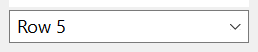
VirtualCombo1.ListCount = 100000
VirtualCombo1.Text = "any text"
Debug.Print VirtualCombo1.ListCount; VirtualCombo1.ListIndex; VirtualCombo1.Text
' Output:
'  100000 -1 any text
It is the ComboBoxW control without a list of its own, and most of its members are the same. VB6 has no such control.
Of the common members, the control has every member under Name and place, Window handles, Font and visual styles, Mouse, Keyboard and focus, Dragging the control, OLE drag and drop and Right-to-left but RightToLeftLayout. Its Click and DblClick have a meaning of their own, and its mouse events give the position in twips.
- Items that the program supplies
- When to choose it
- Searching
- What is shared with ComboBoxW
- Properties
- Methods
- Events
- VcbStyleConstants
- VcbDrawModeConstants
- See Also
Items that the program supplies
The program sets ListCount to the number of items. From then on the list drops down, scrolls and selects as that of any combo box, and the control raises GetVirtualItem whenever it needs the text of an item: to draw it in the list, to put it in the text box when the item is selected, or to return it from List. The handler looks the text up where the program keeps its data, such as an array:
Private Cities() As String          ' filled elsewhere, from index 0

Private Sub VirtualCombo1_GetVirtualItem(ByVal Item As Long, Text As String)
    Text = Cities(Item)
End Sub
The handler is called often, for the items in view each time the list is drawn, so it must be quick and must not change the list.
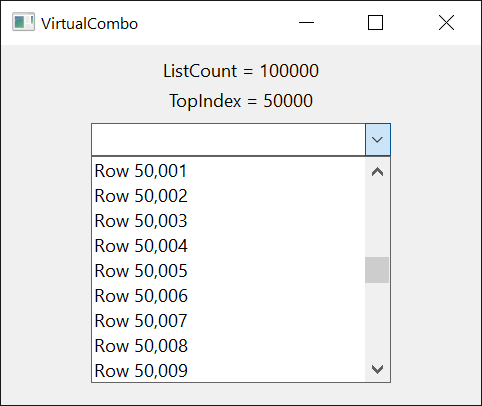
The control keeps no item text. Without a handler every item is empty. When the data changes, the program sets ListCount again if the number of items changed and calls Refresh. An assignment to ListCount leaves no item selected, and leaves the text in the text box as it is.
When to choose it
A ComboBoxW copies the text of every item when it is filled, which takes time and memory in proportion to the list. A VirtualCombo takes the same short time for a hundred items and for a million, since it asks for the few items in view. Choose it for a list of many thousands of items, and for data that the program holds anyway, in an array, a collection or a recordset.
What it gives up follows from having no items: there is no AddItem, RemoveItem or Clear, no ItemData and no Sorted. The order of the items is the order of the program’s data, and searching is the program’s work as well.
Searching
The control cannot search texts that it does not have, so it raises an event for each search and the handler answers with an index.
FindVirtualItem is raised by FindItem and SelectItem, by AutoSelect, by an assignment to Text on a VcbStyleDropDownList control, and when the list opens and looks for the item that matches the text box. The handler receives the text, the item after which to start, and whether the beginning of an item’s text is enough.
Private Sub VirtualCombo1_FindVirtualItem(ByVal StartIndex As Long, ByVal SearchText As String, ByVal Partial As Boolean, FoundIndex As Long)
    Dim Index As Long, Candidate As String
    For Index = StartIndex + 1 To VirtualCombo1.ListCount - 1
        Candidate = VirtualCombo1.List(Index)
        If Partial Then Candidate = Left$(Candidate, Len(SearchText))
        If StrComp(Candidate, SearchText, vbTextCompare) = 0 Then
            FoundIndex = Index
            Exit Sub
        End If
    Next
End Sub
IncrementalSearch is raised when the user types a character while a VcbStyleDropDownList control has the focus, to jump to an item. The control collects the characters typed in quick succession into one search string, and the handler sets the item to select.
What is shared with ComboBoxW
The styles, the selection and the text, the drop-down list and its size and colors work as in ComboBoxW, whose sections explain them: The styles, The selection and the text and The drop-down list. The items of a VirtualCombo all have one height.
With VirtualCombo1
    .ListCount = 50
    .ListIndex = 7               ' no handler supplies a text: the text box is empty
    Debug.Print "["; .Text; "]"; .ListIndex
    .Text = "mauve"
    Debug.Print .Text; .ListIndex
End With
' Output:
' [] 7
' mauve 7
Properties
AlwaysFindExact
Whether the control looks in its list for whole texts only. Boolean. Default: False, with which the list, when it opens, asks FindVirtualItem for the first item that begins with the text in the text box. With True it asks for an item whose whole text is that text.
AutoSelect
Whether the control selects an item as soon as the user has typed its whole text. Boolean. Default: False. After each change that the user makes to the text, the control raises FindVirtualItem for the whole text, and selects the item that the handler found. It has no effect on a VcbStyleDropDownList control.
BackColor
The background color of the control. OLE_COLOR. A new control has vbWindowBackground.
DrawMode
Whether the control or the program draws the items. A member of VcbDrawModeConstants. Default: VcbDrawModeNormal. With VcbDrawModeOwnerDrawFixed the control raises ItemDraw for each item to show, and no GetVirtualItem to draw it.
Unlike that of ComboBoxW, it can be assigned at run time. A value that is not a member raises run-time error 380.
DropDownHeight
The height of the drop-down list, in the scale units of the control’s container. Single. An assignment fixes the height: MaxDropDownItems no longer counts, until it is assigned again, and IntegralHeight becomes False. A value that is not greater than 0 raises run-time error 380. On a VcbStyleSimpleCombo control the property raises run-time error 5.
DropDownWidth
The least width of the drop-down list, in the scale units of the control’s container. Single. The list is never narrower than the control. A negative value raises run-time error 380.
DroppedDown
Whether the drop-down list is open. Boolean. An assignment opens or closes it, and the control raises DropDown or CloseUp.
ExtendedUI
Whether the control uses the extended keyboard interface of the Windows combo box. Boolean. Default: False. With True the Down Arrow key opens the list, the F4 key does not, and the mouse wheel does not change the selection while the list is closed. It has no effect on a VcbStyleSimpleCombo control.
FieldHeight
The height of the text box, or of the field of a VcbStyleDropDownList control, in the scale units of the control’s container. Single. A negative value raises run-time error 380.
ForeColor
The color of the control’s text. OLE_COLOR.
HorizontalExtent
The width over which the list can be scrolled sideways, in the scale units of the control’s container. Single. Default: 0. The list has a horizontal scroll bar while this is greater than its own width. A negative value raises run-time error 380.
hWndEdit
The handle of the text box inside the control. LongPtr, read-only. It is 0 on a VcbStyleDropDownList control.
hWndList
The handle of the list. LongPtr, read-only.
IMEMode
The state of the Input Method Editor while the text box has the focus. A member of CCIMEModeConstants. Default: CCIMEModeNoControl. Another value raises run-time error 380.
IntegralHeight
Whether the list shows whole items only. Boolean. Default: True, with which the list makes itself a little lower so that its last item is not cut.
It is set at design time: an assignment at run time raises run-time error 382. An assignment to DropDownHeight makes it False.
ItemHeight
The height of an item in the list, in the scale units of the control’s container. Single. All items have this height. A negative value raises run-time error 380.
List
The text of an item, as the handler of GetVirtualItem supplies it. String, read-only.
Syntax: object.List( Index )
An Index that is not an item raises run-time error 5.
ListBackColor
The background color of the drop-down list while UseListBackColor is True. OLE_COLOR. Default: vbWindowBackground.
ListCount
The number of items in the list. Long. Default: 0. The program sets it.
A negative value raises run-time error 380.
ListForeColor
The color of the text in the drop-down list while UseListForeColor is True. OLE_COLOR. Default: vbWindowText.
ListIndex
The index of the selected item, or -1 when no item is selected. Long. Default: -1.
An assignment selects the item, puts its text in the text box and raises Click, unless the item is selected already; the text box receives the item’s text in either case. -1 removes the selection and empties the text box. A value that is not an item raises run-time error 380.
Locked
Whether the user is kept from changing the text and the selection. Boolean. Default: False. With True the text box takes no typing, and the list does not respond to the keyboard or to the mouse on its items. The program can still assign Text and ListIndex.
MaxDropDownItems
The greatest number of items that the drop-down list shows without scrolling. Integer. Default: 9.
A value less than 1 or greater than 30 raises run-time error 380.
MaxLength
The greatest number of characters that the user can type in the text box. Long. Default: 0. With 0 the user can type 255 characters, and a text that the program assigns to Text has no limit. With another value the limit is that number of characters for both. A negative value raises run-time error 380.
OLEDragMode
Whether the user can drag the selected text out of the text box. A member of OLEDragConstants. Default: vbOLEDragManual, with which only OLEDrag starts a drag. With vbOLEDragAutomatic a drag that begins on the selected text carries it as text, to copy or to move; the control removes text that was moved. Another value raises run-time error 380.
ScrollTrack
Whether the list scrolls while the user drags the scroll box of its scroll bar. Boolean. Default: True. With False the list scrolls when the user releases the scroll box.
SelLength
The number of characters selected in the text box. Long. A negative value raises run-time error 380.
SelStart
The position where the selection in the text box starts, counted from 0, or the position of the caret when nothing is selected. Long. An assignment puts the caret there and selects nothing. A negative value raises run-time error 380.
SelText
The selected text of the text box. String. An assignment replaces the selection, or inserts the text at the caret. On a VcbStyleDropDownList control the property raises run-time error 380.
Style
What the control is made of. A member of VcbStyleConstants. Default: VcbStyleDropDownCombo. See The styles.
It is set at design time. At run time an assignment raises run-time error 382, and a value that is not a member raises 380.
Text
The text in the text box. String. A control newly drawn on a form has its own name.
On a VcbStyleDropDownList control it is the text of the selected item, and an assignment raises FindVirtualItem for an item with this whole text and selects the item that the handler found; when the handler finds none, the assignment raises run-time error 383.
On the other styles an assignment that changes the text raises Change, and does not change ListIndex.
TopIndex
The index of the item at the top of the list. Long. An assignment scrolls the list. A value that is not an item raises run-time error 380.
UseListBackColor
Whether the drop-down list has ListBackColor as its background color. Boolean. Default: False.
UseListForeColor
Whether the drop-down list has ListForeColor as the color of its text. Boolean. Default: False.
Methods
FindItem
Raises FindVirtualItem and returns the index that its handler found, or -1.
Syntax: object.FindItem( Text [, Index [, Partial ] ] )
- Text
- required A String: the text to look for.
- Index
- optional A Long: the item after which the search starts. The default, -1, searches from the top. A value that is not an item raises run-time error 381.
- Partial
- optional A Boolean: True asks for an item that begins with Text, False (the default) for one whose whole text is Text.
GetIdealHorizontalExtent
Returns the HorizontalExtent with which the widest item can be scrolled into view, as a Single in the scale units of the control’s container. It raises GetVirtualItem for every item of the list, so it is slow on a long one.
Syntax: object.GetIdealHorizontalExtent
SelectItem
Raises FindVirtualItem for an item that begins with a text, selects the item that the handler found, and returns its index, or -1. When it selects another item than before, the text box receives the item’s text and the control raises Click.
Syntax: object.SelectItem( Text [, Index ] )
- Text
- required A String: the beginning of the item’s text.
- Index
- optional A Long: the item after which the search starts, as in FindItem.
Events
Change
Raised when the text in the text box has changed: by the user’s typing, or by an assignment to Text of another text than the box has. Selecting an item raises Click instead.
Syntax: object_Change( )
Click
Raised when another item has been selected: by the user, with the mouse or the keyboard, or by ListIndex, SelectItem or AutoSelect. A mouse click that selects nothing raises no Click.
Syntax: object_Click( )
CloseUp
Raised when the drop-down list has closed.
Syntax: object_CloseUp( )
ContextMenu
Raised when the user asks for the control’s shortcut menu, with the right mouse button or with Shift+F10.
Syntax: object_ContextMenu( Handled As Boolean, ByVal X As Single, ByVal Y As Single )
- Handled
- False when the event is raised. A handler that sets it to True, having shown a menu of its own, keeps the text box from showing the menu of Windows.
- X, Y
- The position of the pointer, measured from the control’s top left corner in the scale units of the control’s container. Both are -1 when the user asked with the keyboard.
DblClick
Raised when the user double-clicks an item in the list of a VcbStyleSimpleCombo control. The other styles do not raise it.
Syntax: object_DblClick( )
DropDown
Raised when the drop-down list is about to open.
Syntax: object_DropDown( )
FindVirtualItem
Raised when an item is to be found by its text. See Searching.
Syntax: object_FindVirtualItem( ByVal StartIndex As Long, ByVal SearchText As String, ByVal Partial As Boolean, FoundIndex As Long )
- StartIndex
- The item after which the search starts, or -1 to search from the top.
- SearchText
- The text to look for.
- Partial
- True when an item that begins with SearchText is asked for, False when the item’s whole text must be SearchText.
- FoundIndex
- -1 when the event is raised. The handler sets it to the index of the item found, and leaves it when there is none.
GetVirtualItem
Raised when the control needs the text of an item. See Items that the program supplies.
Syntax: object_GetVirtualItem( ByVal Item As Long, Text As String)
- Item
- The index of the item, from 0 to ListCount - 1.
- Text
- Empty when the event is raised. The handler sets it to the item’s text.
IncrementalSearch
Raised when the user types a character while a VcbStyleDropDownList control has the focus. See Searching.
Syntax: object_IncrementalSearch( ByVal SearchString As String, ByVal StartIndex As Long, FoundIndex As Long )
- SearchString
- The characters typed. A character typed soon after the one before is added to the string; after a pause the string starts again.
- StartIndex
- The value of ListIndex.
- FoundIndex
- -1 when the event is raised. The handler sets it to the index of the item to select.
ItemDraw
Raised when an item is to be drawn, while DrawMode is VcbDrawModeOwnerDrawFixed. Its arguments are those of the ItemDraw event of ComboBoxW.
Syntax: object_ItemDraw( ByVal Item As Long, ByVal ItemAction As Long, ByVal ItemState As Long, ByVal hDC As Long, ByVal Left As Long, ByVal Top As Long, ByVal Right As Long, ByVal Bottom As Long )
MouseDown, MouseMove, MouseUp
As the common events of these names, but X and Y are in twips, whatever the scale units of the control’s container, and are measured from the top left corner of the control.
Scroll
Raised when the list has scrolled, so that another item is at its top.
Syntax: object_Scroll( )
VcbStyleConstants
The values of Style.
| Member | Value | Description |
|---|---|---|
| VcbStyleDropDownCombo | 0 | A text box and a list that drops down. |
| VcbStyleSimpleCombo | 1 | A text box and a list that is always open. |
| VcbStyleDropDownList | 2 | A list that drops down, and no text box. |
VcbDrawModeConstants
The values of DrawMode.
| Member | Value | Description |
|---|---|---|
| VcbDrawModeNormal | 0 | The control draws the items, with the texts that GetVirtualItem supplies. |
| VcbDrawModeOwnerDrawFixed | 1 | The program draws the items, which all have one height. |
See Also
- Common members – the members this control shares with the package’s other controls
- ComboBoxW – the combo box that holds its items
- VListBox – a list box whose items the program supplies