LinkLabel class
A LinkLabel is a text with links in it, which the user clicks or reaches with the Tab key as on a web page. The program says in an event what a link does.

LinkLabel1.Caption = "Read the <A HREF=""https://example.com/docs"">documentation</A> or <A ID=""ask"">ask a question</A>."
Debug.Print LinkLabel1.Links.Count
Debug.Print LinkLabel1.Links(1).Caption
Debug.Print LinkLabel1.Links(1).URL
Debug.Print LinkLabel1.Links(2).IDName
' Output:
'  2
' documentation
' https://example.com/docs
' ask
VB6 has no such control. It is the link control of Windows, which exists only in a program with visual styles.
Of the common members, the control has those under Name and place, Window handles, Font and visual styles, Mouse but DblClick, Keyboard and focus, Dragging the control, OLE drag and drop and Right-to-left but RightToLeftLayout.
Its sub-objects have pages of their own:
- The caption and its links
- What a link does
- The keyboard
- The look of the links
- Properties
- Methods
- Events
- LlbLinkActivateReasonConstants
- See Also
The caption and its links
Caption holds the text and marks the links in it, as HTML does: the text between <A> and </A> is a link. The opening mark can give the link an address, <A HREF="https://example.com">, a name of the program’s own, <A ID="ask">, or both. The marks are not shown, and capital and small letters in them are the same.
Links returns the links as a collection of LlbLink objects, numbered from 1 in the order of the caption. A link’s URL and IDName are those of the marks, and the program can set them in code as well.
The control makes its links again from the marks whenever its caption changes, by an assignment to Caption or to the Caption of a link. A URL or a name that the program gave a link in code is lost then, and so are the links’ states: every link is enabled again and not visited. A program that changes the caption sets those again afterwards, or keeps them in the marks.
LinkLabel1.Caption = "<A>Open</A> the file"
LinkLabel1.Links(1).URL = "C:\report.txt"       ' set in code, not in the marks
LinkLabel1.Links(1).Caption = "Print"
Debug.Print LinkLabel1.Caption
Debug.Print Len(LinkLabel1.Links(1).URL)
' Output:
' <A>Print</A> the file
'  0
What a link does
The control opens nothing by itself. When the user clicks a link, or presses Enter while a link has the keyboard focus, the control raises LinkActivate with the link, and the handler does the work. A link is not marked as visited until the program sets its Visited.
Private Sub LinkLabel1_LinkActivate(ByVal Link As LlbLink, ByVal Reason As LlbLinkActivateReasonConstants)
    Link.Visited = True
    If Link.IDName = "ask" Then
        TextBoxW1.SetFocus
    Else
        Debug.Print "Open "; Link.URL
    End If
End Sub
A link whose Enabled is False takes neither a click nor the Enter key, and raises no LinkActivate.
The keyboard
The control takes the focus, and one of its links then has a focus rectangle: the selected link, which SelectedItem returns. The Tab key moves the selection to the next link, and leaves the control after the last one. Enter activates the selected link.
Assigning a link to SelectedItem, or setting a link’s Selected to True, selects that link and no other. Assigning Nothing leaves no link selected.
The look of the links
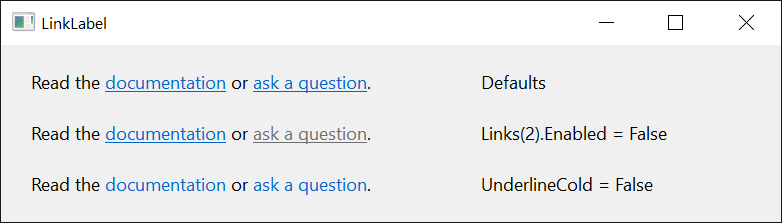
Windows draws a link in its link color, underlined. Three properties and an event change that:
- UnderlineCold and UnderlineHot say whether a link is underlined while the pointer is elsewhere and while it is over the link. The second has an effect only with HotTracking set to True, which makes the link under the pointer the hot one.
- LinkForeColor is raised each time a link is drawn, with its color, which the handler can change.
Private Sub LinkLabel1_LinkForeColor(ByVal Link As LlbLink, RGBColor As Long)
    If Link.Hot Then RGBColor = vbRed
End Sub
With ShowTips set to True a link shows a tooltip while the pointer rests on it, with the text that a LinkGetTipText handler gives.
Private Sub LinkLabel1_LinkGetTipText(ByVal Link As LlbLink, Text As String)
    Text = Link.URL
End Sub
Properties
Alignment
Whether the text stands at the left or at the right of the control. A member of CCLeftRightAlignmentConstants. Default: CCLeftRightAlignmentLeft.
Another value raises run-time error 380. For a change of Alignment or of UseMnemonic the control makes its window again, so hWnd returns another handle afterwards and the links are made again from the marks of the caption.
BackColor
The color behind the text. OLE_COLOR. Default: vbButtonFace.
BorderStyle
The border of the control. A member of CCBorderStyleConstants. Default: CCBorderStyleNone. Another value raises run-time error 380.
Caption
The text, with the marks of its links. String. A control newly drawn on a form has its own name as one link, <A>LinkLabel1</A>. See The caption and its links.
ForeColor
The color of the text. OLE_COLOR. A control newly drawn on a form has black. A link has the link color of Windows, which a LinkForeColor handler can change.
HotTracking
Whether the link under the pointer becomes the hot one, so that its Hot is True and UnderlineHot applies to it. Boolean. Default: False.
hWndToolTip
The handle of the window of the links’ tooltips. LongPtr, read-only. It is 0 while ShowTips is False.
Links
The links of the caption. An LlbLinks collection, read-only.
SelectedItem
The link that has the focus rectangle, or Nothing when no link has it. An LlbLink. Assigned with Set, it selects a link, or none with Nothing.
ShowTips
Whether the links show tooltips, for which the control raises LinkGetTipText. Boolean. Default: False.
Transparent
Whether the control draws, in place of BackColor, a copy of what its container shows behind it. Boolean. Default: False. The copy is made again when the control is resized and on Refresh.
UnderlineCold
Whether a link that is not hot is underlined. Boolean. Default: True.
UnderlineHot
Whether the hot link is underlined. Boolean. Default: True. A link is hot only with HotTracking.
UseMnemonic
Whether an ampersand (&) in the caption makes the character after it the control’s access key. Boolean. Default: True, with which that character is underlined and the ampersand is not drawn. With False the caption is drawn as it is.
Methods
GetIdealHeight
Returns the height the control needs to show its whole caption at its present width, border included, in the scale units of the control’s container.
Syntax: object.GetIdealHeight As Single
GetIdealSize
Gives the width and the height the control needs to show its whole caption without making it wider than it is, border included, in the scale units of the control’s container.
Syntax: object.GetIdealSize Width, Height
- Width, Height
- required Two Single variables, which the method sets.
Dim W As Single, H As Single
LinkLabel1.GetIdealSize W, H
LinkLabel1.Width = W
LinkLabel1.Height = H
HitTest
Returns the link at a point, or Nothing when there is none.
Syntax: object.HitTest( X, Y ) As LlbLink
- X, Y
- required The point, measured from the top left corner of the control in the scale units of the control’s container. Single.
Events
ContextMenu
Raised when the user asks for a menu on the control, with the right mouse button or with Shift+F10. The control has no menu of its own.
Syntax: object_ContextMenu( ByVal X As Single, ByVal Y As Single )
- X, Y
- The place of the click, measured from the top left corner of the control in the scale units of the control’s container. Both are -1 when the user asked with the keyboard.
LinkActivate
Raised when the user clicks a link that is enabled, or presses Enter while it is selected.
Syntax: object_LinkActivate( ByVal Link As LlbLink, ByVal Reason As LlbLinkActivateReasonConstants )
- Link
- The LlbLink that was activated.
- Reason
- A member of LlbLinkActivateReasonConstants: the mouse or the keyboard.
LinkForeColor
Raised each time the control draws a link, for the handler to choose its color.
Syntax: object_LinkForeColor( ByVal Link As LlbLink, RGBColor As Long )
- Link
- The LlbLink that is drawn.
- RGBColor
- The color the link is about to be drawn in, as RGB returns one. A handler that changes it sets the color. A system color, such as vbHighlight, is not a color of this kind.
LinkGetTipText
Raised when a link is about to show its tooltip, while ShowTips is True.
Syntax: object_LinkGetTipText( ByVal Link As LlbLink, Text As String )
- Link
- The LlbLink under the pointer.
- Text
- Empty when the event is raised. The handler sets it to the text of the tooltip; left empty, the link shows none.
LinkMouseEnter, LinkMouseLeave
Raised when the pointer moves onto a link and when it leaves the link, while MouseTrack is True.
Syntax: object_LinkMouseEnter( ByVal Link As LlbLink )
- Link
- The LlbLink that the pointer moved onto, or left.
LlbLinkActivateReasonConstants
The values of the Reason argument of LinkActivate.
| Member | Value | Description |
|---|---|---|
| LlbLinkActivateReasonClick | 0 | The user clicked the link. |
| LlbLinkActivateReasonReturn | 1 | The user pressed Enter while the link was selected. |
See Also
- Common members – the members this control shares with the package’s other controls
- LlbLinks class – the collection of the links
- LlbLink class – one link
- LabelW – a label without links