Common members
The properties, methods and events that the controls of the VBCCR18 package share, and the enumerations that several controls use.
Each member here has the same declaration and does the same on every control that has it. A control’s own page says which of these groups the control has, and documents a member only where the control does something of its own with it.
- Which control has which
- Name and place
- Window handles
- Font and visual styles
- Mouse
- Keyboard and focus
- Dragging the control
- OLE drag and drop
- Right-to-left
- OLEDropModeConstants
- CCFontQualityConstants
- CCMousePointerConstants
- CCRightToLeftModeConstants
- CCAppearanceConstants
- CCBorderStyleConstants
- CCBackStyleConstants
- CCLeftRightAlignmentConstants
- CCVerticalAlignmentConstants
- CCIMEModeConstants
- CCScrollOrientationConstants
- See Also
Which control has which
Two controls show nothing at run time, ImageList and SysInfo: of the members on this page they have Name, Parent and Tag alone. Every other control has every member under Name and place, Mouse, Dragging the control and OLE drag and drop, with these exceptions:
| Members | Controls without them |
|---|---|
| hWnd | LabelW, which has no window |
| hWndUserControl | FrameW, IPAddress, LabelW, WindowedLabel |
| Font, FontQuality | Animation, MCIWnd, Pager, Slider, UpDown |
| VisualStyles | Animation, LabelW, Pager, WindowedLabel |
| Click | SpinBox, TabStrip, UpDown |
| DblClick | CheckBoxW, CommandButtonW, CommandLink, DTPicker, LinkLabel, MonthView, Pager, Slider, SpinBox, TabStrip, UpDown |
| Keyboard and focus, HelpContextID | the controls that never take the focus: CoolBar, FrameW, LabelW, Pager, ProgressBar, StatusBar, ToolBar, UpDown, WindowedLabel |
| RightToLeft, RightToLeftMode | MCIWnd |
RightToLeftLayout is on the controls that Windows can mirror: Animation, CoolBar, DTPicker, ImageCombo, ListView, MonthView, Pager, ProgressBar, Slider, StatusBar, TabStrip, ToolBar, TreeView and UpDown.
Name and place
A control gets these from the form it is on, as every control on a form does. They do what the members of the same names do on a control of the VB package.
Container
The object that holds the control: the form, or a frame or picture box on it. Object. Assigned with Set, it moves the control into another container.
Enabled
Whether the control responds to the mouse and the keyboard. Boolean. Default: True.
Height, Left, Top, Width
The control’s size and its position in its container, in the container’s scale units. Single.
A control on a form also has the Move method and the TabIndex and TabStop properties, which the form gives it. The control’s class does not declare them, so a variable declared as the control’s class, such as Dim Bar As VBCCR18.ProgressBar, does not have them; a variable declared As Object or As Control does.
HelpContextID
The topic of the program’s help file that belongs to the control. Long.
Name
The name the control has on its form, such as ProgressBar1. String, read-only.
Parent
The form the control is on. Object, read-only.
Refresh
Draws the control again, at once.
Syntax: object.Refresh
Tag
A string of the program’s own, which the control does not use. String.
ToolTipText
The text shown in a small window when the mouse rests on the control. String.
Visible
Whether the control is shown. Boolean.
WhatsThisHelpID
The topic of the program’s help file that the What’s This pointer opens for the control. Long.
ZOrder
Puts the control in front of the other controls of its container, or behind them.
Syntax: object.ZOrder [ Position ]
- Position
- optional A member of ZOrderConstants: vbBringToFront (the default) or vbSendToBack.
Window handles
Each control is two windows: a window of Windows’ own control, such as a progress bar, inside a window of twinBASIC that takes the control’s place on the form.
hWnd
The handle of the window of Windows’ own control, the one to pass to an API function that takes a progress bar, a list view and so on. LongPtr, read-only.
hWndUserControl
The handle of the window that holds the control, a child of the control’s container. LongPtr, read-only.
The window of hWnd is a child of the window of hWndUserControl.
Font and visual styles
Font
The font of the control’s text. A StdFont object. A new control has the font of its container.
Assigning Nothing gives the control the font of its container again.
FontQuality
How Windows smooths the edges of the font’s characters. A member of CCFontQualityConstants. Default: CCFontQualityDefault.
Any other value raises run-time error 380, Invalid property value.
VisualStyles
Whether the control is drawn in the visual style of Windows, when the program has visual styles. Boolean. Default: True. With False the control is drawn in the classic style, which is the only one in which some controls show a color the program sets.
Mouse
MouseIcon
The pointer shown over the control when MousePointer is CCMousePointerCustom. A picture that holds an icon or a cursor. A picture of another kind raises run-time error 380.
MousePointer
The pointer shown while the mouse is over the control. A member of CCMousePointerConstants. Default: CCMousePointerDefault, the pointer Windows’ own control shows.
A value that is not a member raises run-time error 380.
MouseTrack
Whether the control raises MouseEnter and MouseLeave. Boolean. Default: False.
Click
Raised when the user presses and releases a mouse button over the control.
Syntax: object_Click( )
DblClick
Raised when the user double-clicks the control.
Syntax: object_DblClick( )
MouseDown, MouseMove, MouseUp
Raised when the user presses a mouse button over the control, moves the mouse over it, and releases the button.
Syntax: object_MouseDown( Button As Integer, Shift As Integer, X As Single, Y As Single )
- Button
- The button, a member of MouseButtonConstants. In MouseMove it is the sum of the buttons held down.
- Shift
- The sum of the ShiftConstants members for the Shift, Ctrl and Alt keys held down.
- X, Y
- The position of the pointer, measured from the control’s top left corner, in twips whatever the scale of the control’s container.
MouseEnter, MouseLeave
Raised when the pointer moves onto the control and when it leaves, while MouseTrack is True.
Syntax: object_MouseEnter( )
Keyboard and focus
The controls that take the focus have these.
SetFocus
Gives the control the focus.
Syntax: object.SetFocus
KeyDown, KeyUp
Raised when the user presses and releases a key while the control has the focus.
Syntax: object_KeyDown( KeyCode As Integer, Shift As Integer )
- KeyCode
- The key, a member of KeyCodeConstants. A handler that changes it gives the control another key, and one that sets it to 0 keeps the key from the control.
- Shift
- The sum of the ShiftConstants members for the Shift, Ctrl and Alt keys held down.
KeyPress
Raised when a key the user presses gives a character.
Syntax: object_KeyPress( KeyChar As Integer )
- KeyChar
- The character’s code, as AscW returns it. A handler that changes it gives the control another character, and one that sets it to 0 keeps the character from the control.
PreviewKeyDown, PreviewKeyUp
Raised before KeyDown and KeyUp, for a key the form would otherwise take for itself.
Syntax: object_PreviewKeyDown( ByVal KeyCode As Integer, IsInputKey As Boolean )
- KeyCode
- The key, a member of KeyCodeConstants.
- IsInputKey
- False when the event is raised. A handler that sets it to True gives the Tab, Enter or Esc key to the control: the form then does not move the focus, press its default button or press its cancel button.
Dragging the control
These are the drag and drop of VB6, in which the user drags a control as a whole and the control under the pointer gets the DragDrop and DragOver events from the form.
Drag
Starts, ends or cancels a drag of the control.
Syntax: object.Drag [ Action ]
- Action
- optional A member of DragConstants. The default is vbBeginDrag.
DragIcon
The pointer shown while the control is dragged. A picture that holds an icon.
DragMode
Whether the user starts a drag by pressing the mouse button on the control, or the program starts it with Drag. A member of DragModeConstants. Default: vbManual.
OLE drag and drop
Data dragged between the control and another control or program.
OLEDropMode
Whether the control takes data that is dropped on it. A member of OLEDropModeConstants. Default: OLEDropModeNone. With OLEDropModeManual the control raises OLEDragOver and OLEDragDrop, and the program takes the data in them.
The enumeration has no member for an automatic drop: the value 2, vbOLEDropAutomatic, raises run-time error 380. TextBoxW is the exception, on its own page.
OLEDrag
Starts a drag with the control as its source. The control raises OLEStartDrag at once.
Syntax: object.OLEDrag
OLEStartDrag
Raised when a drag starts at the control. The handler puts the data, or the formats it offers, into Data.
Syntax: object_OLEStartDrag( Data As DataObject, AllowedEffects As Long )
- Data
- The DataObject that holds what is dragged.
- AllowedEffects
- Set by the handler: the sum of the OLEDropEffectConstants members for what a target may do with the data.
OLESetData
Raised at the source when the target asks for data in a format that OLEStartDrag offered without its data.
Syntax: object_OLESetData( Data As DataObject, DataFormat As Integer )
OLEGiveFeedback
Raised at the source each time the target answers, so that the handler can change the pointer.
Syntax: object_OLEGiveFeedback( Effect As Long, DefaultCursors As Boolean )
- Effect
- What the target would do with the data, a member of OLEDropEffectConstants.
- DefaultCursors
- True when the event is raised. A handler that sets the pointer itself sets it to False.
OLEDragOver
Raised at the target while data is dragged over it.
Syntax: object_OLEDragOver( Data As DataObject, Effect As Long, Button As Integer, Shift As Integer, X As Single, Y As Single, State As Integer )
- Effect
- The effects the source allows when the event is raised. The handler sets it to the one a drop here would have.
- State
- A member of DragOverConstants: the pointer has entered the control, left it, or moved over it.
Data, Button, Shift, X and Y are as in OLEDragDrop.
OLEDragDrop
Raised at the target when the data is dropped on it.
Syntax: object_OLEDragDrop( Data As DataObject, Effect As Long, Button As Integer, Shift As Integer, X As Single, Y As Single )
- Data
- The DataObject that holds what is dropped.
- Effect
- The effects the source allows when the event is raised. The handler sets it to what it did with the data.
- Button, Shift
- The mouse buttons and the keys held down, as in MouseDown.
- X, Y
- The position of the pointer, in the scale units of the control’s container.
OLECompleteDrag
Raised at the source when the drag has ended, dropped or cancelled.
Syntax: object_OLECompleteDrag( Effect As Long )
- Effect
- What the target did with the data, a member of OLEDropEffectConstants. A source that offered a move removes its data when this is vbDropEffectMove.
Right-to-left
RightToLeft
Whether the control lays its text out for a language written from right to left. Boolean. Default: False. Whether True takes effect depends on RightToLeftMode.
RightToLeftLayout
Whether the control is mirrored as a whole while RightToLeft is in effect, so that what was at its left is at its right. Boolean. Default: False.
RightToLeftMode
What decides whether a RightToLeft of True takes effect. A member of CCRightToLeftModeConstants. Default: CCRightToLeftModeVBAME.
OLEDropModeConstants
The values of OLEDropMode.
| Member | Value | Description |
|---|---|---|
| OLEDropModeNone | 0 | The control takes no dropped data. |
| OLEDropModeManual | 1 | The control raises the OLE drop events, and the program takes the data. |
CCFontQualityConstants
The values of FontQuality. Each is the quality of that name that Windows gives a font.
| Member | Value | Description |
|---|---|---|
| CCFontQualityDefault | 0 | The smoothing set for the system. |
| CCFontQualityDraft | 1 | Draft quality. |
| CCFontQualityProof | 2 | Proof quality. |
| CCFontQualityNonAntiAliased | 3 | No smoothing. |
| CCFontQualityAntiAliased | 4 | Smoothing in shades of grey. |
| CCFontQualityClearType | 5 | ClearType. |
| CCFontQualityClearTypeNatural | 6 | ClearType with the character widths of the font’s design. |
CCMousePointerConstants
The values of MousePointer. The members to 15 and CCMousePointerCustom have the values of the MousePointerConstants of the same pointers, but for CCMousePointerHand: it is 4, the value of vbIconPointer, where vbHand is 16. From 16 on, CCMousePointerArrowCD is 16 and CCMousePointerPen is 19, where vbArrowCD is 19 and vbPen is 31. The other members from 17 to 30 have the values of the twinBASIC pointers of the same name.
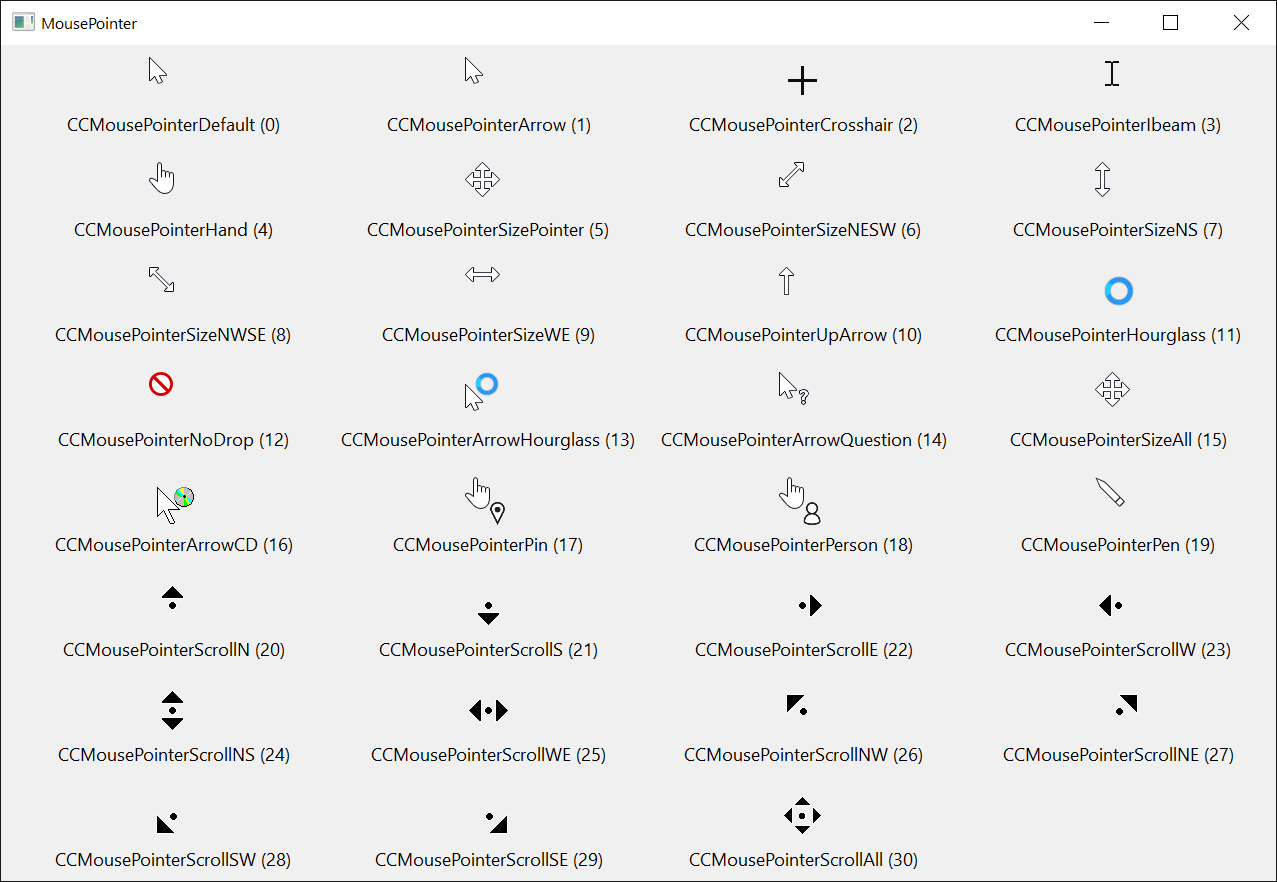
| Member | Value | Member | Value |
|---|---|---|---|
| CCMousePointerDefault | 0 | CCMousePointerArrowCD | 16 |
| CCMousePointerArrow | 1 | CCMousePointerPin | 17 |
| CCMousePointerCrosshair | 2 | CCMousePointerPerson | 18 |
| CCMousePointerIbeam | 3 | CCMousePointerPen | 19 |
| CCMousePointerHand | 4 | CCMousePointerScrollN | 20 |
| CCMousePointerSizePointer | 5 | CCMousePointerScrollS | 21 |
| CCMousePointerSizeNESW | 6 | CCMousePointerScrollE | 22 |
| CCMousePointerSizeNS | 7 | CCMousePointerScrollW | 23 |
| CCMousePointerSizeNWSE | 8 | CCMousePointerScrollNS | 24 |
| CCMousePointerSizeWE | 9 | CCMousePointerScrollWE | 25 |
| CCMousePointerUpArrow | 10 | CCMousePointerScrollNW | 26 |
| CCMousePointerHourglass | 11 | CCMousePointerScrollNE | 27 |
| CCMousePointerNoDrop | 12 | CCMousePointerScrollSW | 28 |
| CCMousePointerArrowHourglass | 13 | CCMousePointerScrollSE | 29 |
| CCMousePointerArrowQuestion | 14 | CCMousePointerScrollAll | 30 |
| CCMousePointerSizeAll | 15 | CCMousePointerCustom | 99 |
CCMousePointerCustom shows the picture in MouseIcon.
CCRightToLeftModeConstants
The values of RightToLeftMode.
| Member | Value | Description |
|---|---|---|
| CCRightToLeftModeNoControl | 0 | RightToLeft takes effect as it is set. |
| CCRightToLeftModeVBAME | 1 | It takes effect where the form’s own controls can be laid out from right to left. |
| CCRightToLeftModeSystemLocale | 2 | It takes effect when the system locale’s language is written from right to left. |
| CCRightToLeftModeUserLocale | 3 | It takes effect when the user locale’s language is written from right to left. |
| CCRightToLeftModeOSLanguage | 4 | It takes effect when the language of Windows’ own windows is written from right to left. |
CCAppearanceConstants
The values of the Appearance property of the controls that have one.
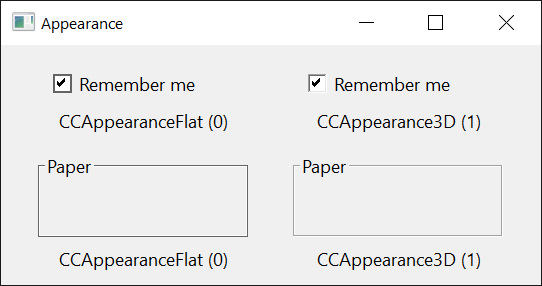
| Member | Value | Description |
|---|---|---|
| CCAppearanceFlat | 0 | A flat border. |
| CCAppearance3D | 1 | A sunken border. |
CCBorderStyleConstants
The values of the BorderStyle property of the controls that offer more than a single line.

| Member | Value | Description |
|---|---|---|
| CCBorderStyleNone | 0 | No border. |
| CCBorderStyleSingle | 1 | A line. |
| CCBorderStyleThin | 2 | A thin sunken edge. |
| CCBorderStyleSunken | 3 | A sunken edge. |
| CCBorderStyleRaised | 4 | A raised edge. |
CCBackStyleConstants
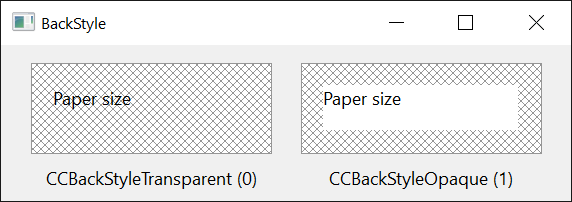
| Member | Value | Description |
|---|---|---|
| CCBackStyleTransparent | 0 | What is behind the control shows through. |
| CCBackStyleOpaque | 1 | The control fills its background with its BackColor. |
CCLeftRightAlignmentConstants
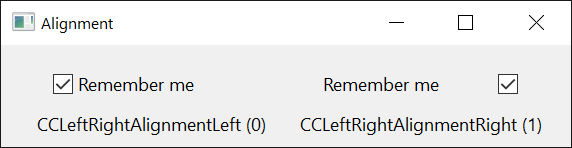
| Member | Value | Description |
|---|---|---|
| CCLeftRightAlignmentLeft | 0 | At the left. |
| CCLeftRightAlignmentRight | 1 | At the right. |
CCVerticalAlignmentConstants
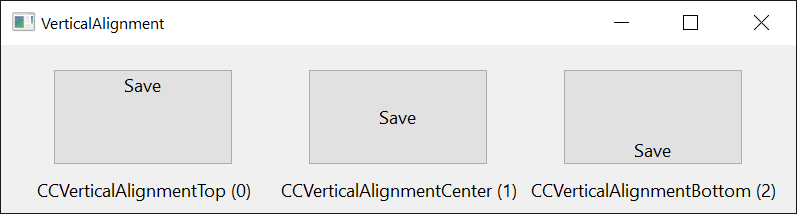
| Member | Value | Description |
|---|---|---|
| CCVerticalAlignmentTop | 0 | At the top. |
| CCVerticalAlignmentCenter | 1 | In the middle. |
| CCVerticalAlignmentBottom | 2 | At the bottom. |
CCIMEModeConstants
The values of the IMEMode property of the controls that take text: the state of the Input Method Editor while the control has the focus.
| Member | Value | Description |
|---|---|---|
| CCIMEModeNoControl | 0 | The control leaves the editor as it is. |
| CCIMEModeOn | 1 | On. |
| CCIMEModeOff | 2 | Off. |
| CCIMEModeDisable | 3 | Off, and the user cannot turn it on. |
| CCIMEModeHiragana | 4 | Full-width hiragana. |
| CCIMEModeKatakana | 5 | Full-width katakana. |
| CCIMEModeKatakanaHalf | 6 | Half-width katakana. |
| CCIMEModeAlphaFull | 7 | Full-width letters and digits. |
| CCIMEModeAlpha | 8 | Half-width letters and digits. |
| CCIMEModeHangulFull | 9 | Full-width hangul. |
| CCIMEModeHangul | 10 | Half-width hangul. |
CCScrollOrientationConstants
| Member | Value | Description |
|---|---|---|
| CCScrollOrientationHorizontal | 0 | Left and right. |
| CCScrollOrientationVertical | 1 | Up and down. |
| CCScrollOrientationBoth | 2 | Both. |
See Also
- VBCCR18 Package
- DataObject class – what the OLE drag-and-drop events carry