FrameW class
A FrameW is a rectangle with a caption in its top edge that holds other controls, to show that they belong together and to move, hide or disable them as one.
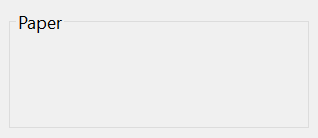
FrameW1.Caption = "Search &options"
Set TextBoxW1.Container = FrameW1        ' the text box is now in the frame
TextBoxW1.Left = 120                     ' measured from the frame's corner
TextBoxW1.Top = 300
FrameW1.Visible = False                  ' hides the text box as well
The control stands in place of the Frame of the VB package, the frame of VB6. It holds its caption in Unicode, and adds Alignment, Picture, Transparent, UseMnemonic and the Resize event.
Of the common members, the control has those under Name and place but HelpContextID, hWnd, Font and visual styles, Mouse, Dragging the control, OLE drag and drop and Right-to-left but RightToLeftLayout. The control is one window, so it has no hWndUserControl: hWnd is the handle of the window on the form. It never takes the focus, so it has no keyboard events.
Holding other controls
A control drawn inside the frame in the form designer, or moved into it with Set control.Container, is a child of the frame. Its Left and Top are measured from the frame’s top left corner, it moves with the frame, and it is hidden with it.
A frame with Enabled set to False draws its caption in the grey of disabled text, and the controls in it take neither the mouse nor the keyboard. Their own Enabled properties keep their values.
The frame raises Resize when its width or its height changes, so that a handler can lay the controls in it out again. Moving the frame raises nothing.
Private Sub FrameW1_Resize()
    TextBoxW1.Width = FrameW1.Width - 2 * TextBoxW1.Left
End Sub
Caption, picture and border
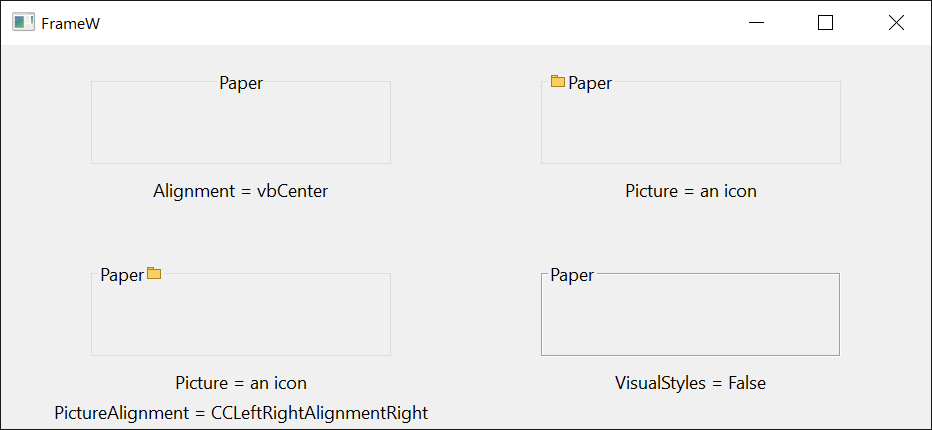
The caption stands in the frame’s top edge, at the left, in the middle or at the right by Alignment. Picture puts a small picture beside it, before or after it by PictureAlignment; with an empty caption the picture stands in the caption’s place.
In a program with visual styles the frame’s line is drawn in the style of Windows, and without them, or with VisualStyles set to False, as an etched line. The caption is drawn in ForeColor either way. With BorderStyle set to 0 the control draws neither the line nor the caption nor the picture, and is a plain container.
The frame fills itself with BackColor, or, with Transparent set to True, with a copy of what its container shows behind it.
Properties
Alignment
Where the caption stands in the frame’s top edge. A member of AlignmentConstants: vbLeftJustify (the default), vbRightJustify or vbCenter. Another value raises run-time error 380. When RightToLeft takes effect, a left alignment becomes a right one, of the caption and of the picture, and the other way round when it stops.
Appearance
The look of the frame. A member of CCAppearanceConstants. Default: CCAppearance3D. Another value raises run-time error 380. With CCAppearanceFlat a frame drawn without visual styles has a line of one color.
An assignment sets ForeColor to vbWindowText for CCAppearanceFlat and to vbButtonText for CCAppearance3D. A program that wants another color sets it after Appearance.
BackColor
The color the frame fills itself with. OLE_COLOR. Default: vbButtonFace.
BorderStyle
Whether the frame draws its line, its caption and its picture. Integer: 1 to draw them (the default) or 0 to draw nothing.
Another value raises run-time error 380.
Caption
The text in the frame’s top edge. String. A control newly drawn on a form has its own name.
ContainedControls
The controls that were put into the frame. A ContainedControls collection, read-only.
ForeColor
The color of the caption. OLE_COLOR. A control newly drawn on a form has black. An assignment to Appearance sets it again.
Picture
A picture shown beside the caption. A picture object, such as LoadPicture returns. Default: Nothing. Assigning Nothing removes the picture.
PictureAlignment
Whether the picture stands before or after the caption. A member of CCLeftRightAlignmentConstants. Default: CCLeftRightAlignmentLeft.
Another value raises run-time error 380.
Transparent
Whether the frame draws, in place of BackColor, a copy of what its container shows behind it. Boolean. Default: False. The copy is made when the frame draws itself, so after the container has changed what it shows there, Refresh brings the frame up to date.
UseMnemonic
Whether an ampersand (&) in the caption makes the character after it the frame’s access key. Boolean. Default: True, with which that character is underlined, the ampersand is not drawn, and && draws one ampersand. With False the caption is drawn as it is.
Events
Resize
Raised when the width or the height of the frame has changed.
Syntax: object_Resize( )
See Also
- Common members – the members this control shares with the package’s other controls
- Frame – the frame of the VB package
- ContainedControls class