TreeView class
A TreeView shows a hierarchy as a tree of nodes. Each node has a label and can hold other nodes. The user opens and closes the branches, selects a node, or several, ticks a check box beside it and edits its label. A node can show pictures from an image list.
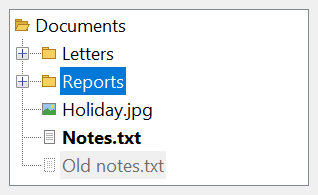
Dim Root As TvwNode
Set Root = TreeView1.Nodes.Add(, , "docs", "Documents")
TreeView1.Nodes.Add Root, TvwNodeRelationshipChild, "letters", "Letters"
TreeView1.Nodes.Add Root, TvwNodeRelationshipChild, "reports", "Reports"
Root.Expanded = True
Debug.Print TreeView1.Nodes.Count
Debug.Print TreeView1.Nodes("reports").FullPath
' Output:
'  3
'  Documents\Reports
ColorSquare in the samples of this page is a function of the program’s own. It returns a bitmap of one color, 16 pixels wide and high.
The control stands in place of the TreeView of the Microsoft common controls (MSCOMCTL.OCX). The WinNativeCommonCtls package has a TreeView too. This one adds MultiSelect with SelectedNodes, a picture for an expanded node (ExpandedImage), a color, a bold or a gray font and a tool tip for each node, the InsertMark, LineColor, LineHeight, Redraw and VisualTheme properties, and the events NodeBeforeCheck, NodeBeforeSelect, NodeDblClick, NodeDrag and NodeRangeSelect.
Of the common members, the control has those under Name and place, Window handles, Font and visual styles, Mouse, Keyboard and focus, Dragging the control, OLE drag and drop and Right-to-left, RightToLeftLayout included.
Its sub-objects have pages of their own:
- TvwNodes – the collection of the nodes, which Nodes returns
- TvwNode – one node
- TvwSelectedNodes – the collection of the selected nodes of a tree that allows several, which SelectedNodes returns
- Nodes and branches
- Pictures
- Opening and closing branches
- Selecting nodes
- Selecting several nodes
- Check boxes
- Editing labels
- Sorting
- Dragging nodes
- Finding a node by position
- Properties
- Methods
- Events
- TvwStyleConstants
- TvwLineStyleConstants
- TvwLabelEditConstants
- TvwNodeRelationshipConstants
- TvwSortOrderConstants
- TvwSortTypeConstants
- TvwMultiSelectConstants
- TvwVisualThemeConstants
- See Also
Nodes and branches
Nodes returns the TvwNodes collection. Its Add method puts a TvwNode into the tree, in the place that its Relationship argument names, counted from a Relative node: the first, the last, the next or the previous node of the same branch, or a child of the Relative. A node needs no Relative to go to the root level. A node has a text, and it can have a key, a string by which the program names it later.
Dim Fruit As TvwNode, Node As TvwNode
Set Fruit = TreeView1.Nodes.Add(, , "fruit", "Fruit")
TreeView1.Nodes.Add Fruit, TvwNodeRelationshipChild, "pear", "Pear"
TreeView1.Nodes.Add Fruit, TvwNodeRelationshipChild, "apple", "Apple"
TreeView1.Nodes.Add "pear", TvwNodeRelationshipPrevious, "fig", "Fig"
Set Node = Fruit.Child
Do While Not Node Is Nothing
    Debug.Print Node.Text
    Set Node = Node.NextSibling
Loop
' Output:
'  Fig
'  Pear
'  Apple
A node with children shows a button that opens and closes its branch, when Style has one. A node can be taken from one place to another with Move, with the children it has, and removed with Remove.
Pictures
A node shows a picture beside its text when the tree has an ImageList and a Style with a picture in its name. ImageList takes the control, the name of a control on the same form, or the handle of an image list of Windows. Each node’s Image is the number or the key of a picture of that list, and its SelectedImage and ExpandedImage are the pictures it shows while it is selected and while it is expanded. A picture number is counted from 1, and 0 means no picture.
ImageList1.ListImages.Add , "folder", ColorSquare(vbYellow)
ImageList1.ListImages.Add , "open", ColorSquare(vbGreen)
ImageList1.ListImages.Add , "file", ColorSquare(vbWhite)
Set TreeView1.ImageList = ImageList1
Dim Folder As TvwNode
Set Folder = TreeView1.Nodes.Add(, , "docs", "Documents", "folder")
Folder.ExpandedImage = "open"
TreeView1.Nodes.Add Folder, TvwNodeRelationshipChild, "readme", "Readme.txt", "file"
Debug.Print Folder.ImageIndex
Debug.Print Folder.ExpandedImageIndex
Debug.Print TreeView1.Nodes("readme").ImageIndex
' Output:
'  1
'  2
'  3
With a Style that has no picture in its name, the tree keeps the image list that was assigned and shows no picture. The control gives the list to the window of Windows when Style changes to one that has a picture.
A key names a picture only while ImageList holds the ImageList control, so that the tree can look the key up. Without it, or with a handle, a picture is named by its number, and a key raises run-time error 35601.
Opening and closing branches
Expanded is whether the branch of a node is open. The user changes it with the button beside the node and with the keyboard, and the program with the property. Each change raises BeforeExpand and Expand or BeforeCollapse and Collapse, also when it comes from the program. An assignment that does not change the state raises nothing. A handler of a Before event refuses the change by setting Cancel to True.
Selecting a node that is inside a closed branch opens the branches above it, and raises their events before NodeSelect.
Private Sub TreeView1_BeforeExpand(ByVal Node As TvwNode, Cancel As Boolean)
    If Node.Tag = "locked" Then Cancel = True
End Sub
A node without children can be set to Expanded at once. It reads True, raises no event, and shows its first child as soon as one is added.
Warning 1.8.141.0
A program that sets Expanded to True on a node with children that has never been open, and whose BeforeExpand handler sets Cancel, is told the node is open. The children stay hidden and Expanded reads True. Setting Expanded to False resets it, without events. A node that was open once and was closed is not affected: its BeforeExpand is honoured.
Selecting nodes
A tree selects one node at a time. SelectedItem is that node, or Nothing, and Selected of a node selects it. A change raises NodeBeforeSelect, which can refuse it, and then NodeSelect.
Selecting the node that is selected raises nothing. A handler of NodeBeforeSelect that sets Cancel to True leaves the selection as it was. Setting Selected of the selected node to False removes its highlight, but SelectedItem still returns it. Setting SelectedItem to Nothing deselects.
Dim Node As TvwNode
Set Node = TreeView1.Nodes.Add(, , "a", "First")
Set Node = TreeView1.Nodes.Add(, , "b", "Second")
Debug.Print TypeName(TreeView1.SelectedItem)
Node.Selected = True
Debug.Print TreeView1.SelectedItem.Text
Set TreeView1.SelectedItem = TreeView1.Nodes("a")
Debug.Print TreeView1.SelectedItem.Key
Set TreeView1.SelectedItem = Nothing
Debug.Print TypeName(TreeView1.SelectedItem)
' Output:
'  Nothing
'  Second
'  a
'  Nothing
Selecting several nodes
With MultiSelect other than TvwMultiSelectNone the user selects several nodes: with the Ctrl key one node at a time, and with the Shift key every node from the AnchorItem to the node clicked. The kinds of range are in TvwMultiSelectConstants. NodeRangeSelect is raised for each node a range adds. SelectedNodes is the collection of the selected nodes, with the node selected last first, and SelectedIndex of a node is its place in it.
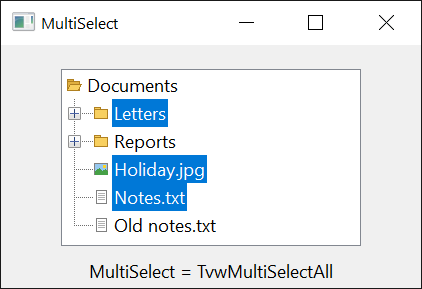
A program selects each node by setting its Selected to True. SelectedItem is the node that has the focus, which a program’s selection does not move: it stays the node that was first selected. Setting MultiSelect deselects every node but the one that has the focus, and SelectedNodes raises run-time error 91 while it is TvwMultiSelectNone.
Dim Node As TvwNode, Chosen As TvwNode
Set Node = TreeView1.Nodes.Add(, , "a", "A")
TreeView1.Nodes.Add , , "b", "B"
TreeView1.Nodes.Add , , "c", "C"
TreeView1.MultiSelect = TvwMultiSelectAll
Node.Selected = True
TreeView1.Nodes("c").Selected = True
TreeView1.Nodes("b").Selected = True
For Each Chosen In TreeView1.SelectedNodes
    Debug.Print Chosen.Text
Next
Debug.Print TreeView1.SelectedItem.Text
' Output:
'  B
'  C
'  A
'  A
Check boxes
With Checkboxes set to True every node has a check box. The user changes it with the mouse and with the space key. Checked of a node is its state, and CheckBox says whether the node has a box.
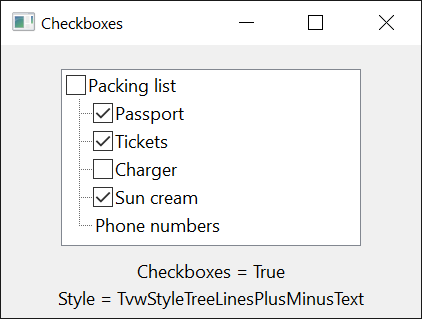
The program changes Checked too, and the change raises NodeBeforeCheck and NodeCheck as the user’s does. A handler of NodeBeforeCheck that sets Cancel to True leaves the box as it was. Assigning the state the box has raises nothing.
Dim Node As TvwNode
TreeView1.Checkboxes = True
Set Node = TreeView1.Nodes.Add(, , "a", "Include")
Debug.Print Node.CheckBox; Node.Checked
Node.Checked = True
Debug.Print Node.Checked
Node.CheckBox = False
Debug.Print Node.CheckBox; Node.Checked
' Output:
'  TrueFalse
'  True
'  FalseFalse
Editing labels
LabelEdit says who may edit a label: the user, the program alone with StartLabelEdit, or nobody. The editing raises BeforeLabelEdit, which can refuse it, and AfterLabelEdit, which can reject the new text. hWndLabelEdit is the window of the edit box while one is open.
StartLabelEdit edits the selected node, and does nothing while no node is selected. With TvwLabelEditDisabled it starts no editing and raises no event.
Sorting
Sorted of the tree sorts the nodes of the root level, by text, in the order of SortOrder and the comparison of SortType. Nodes added afterwards go to their sorted place. The branches below are sorted by the Sorted, SortOrder and SortType of their parent TvwNode, and the tree’s settings do not apply to them.
Dim Node As TvwNode
Set Node = TreeView1.Nodes.Add(, , "p", "pear")
TreeView1.Nodes.Add , , "a", "apple"
TreeView1.Nodes.Add , , "f", "fig"
TreeView1.Nodes.Add Node, TvwNodeRelationshipChild, "k", "kiwi"
TreeView1.Nodes.Add Node, TvwNodeRelationshipChild, "b", "banana"
TreeView1.Sorted = True
Debug.Print TreeView1.Nodes("p").FirstSibling.Text
Debug.Print Node.Child.Text
Node.Sorted = True
Debug.Print Node.Child.Text
TreeView1.SortOrder = TvwSortOrderDescending
Debug.Print TreeView1.Nodes("a").FirstSibling.Text
' Output:
'  apple
'  kiwi
'  banana
'  pear
Dragging nodes
The user starts a drag by pressing the mouse button on a node and moving. The tree raises NodeDrag, with the button, and a program that wants to drag the node to another control calls OLEDrag in that handler. With OLEDragMode set to vbOLEDragAutomatic the tree starts the drag itself and carries the node’s text, to copy, to move or to link. The tree raises the OLE drag-and-drop events as every control does, and OLEDraggedItem is the node being dragged.
A tree that takes drops can show where the node would go: HitTest and HitTestInsertMark give the node under the pointer in the container’s scale units, the DropHighlight is a node drawn as the target of a drop, and the InsertMark is a line drawn above or below a node. While a drag is over the plus button of a closed branch long enough (OLEDragExpandTime) the tree opens it, and while it is near an edge the tree scrolls, unless OLEDragDropScroll is False.
Private Sub TreeView1_OLEDragOver(Data As DataObject, Effect As Long, Button As Integer, Shift As Integer, X As Single, Y As Single, State As Integer)
    Dim After As Boolean
    Set TreeView1.InsertMark(After) = TreeView1.HitTestInsertMark(X, Y, After)
End Sub
Finding a node by position
HitTest gives the node whose label or picture is at a position, measured from the control’s top left corner in the scale units of its container, as the OLE drag-and-drop events give it. At a position where no node is, it returns Nothing. HitTestInsertMark does the same and also says whether the position is in the lower half of the node’s row.
TreeView1.Nodes.Add , , "a", "A first row with a long label to point at"
TreeView1.Nodes.Add , , "b", "A second row with a long label to point at"
Debug.Print TreeView1.HitTest(500, 100).Key
Debug.Print TreeView1.HitTest(500, 350).Key
Debug.Print TypeName(TreeView1.HitTest(500, 3000))
' Output:
'  a
'  b
'  Nothing
Properties
Align
The edge of the form that the control is attached to, where it takes the form’s whole width or height. A member of AlignConstants. Default: vbAlignNone.
Note 1.8.141.0 BETA 1042
twinBASIC has not implemented Align: an assignment compiles with the warning TB0009 and changes nothing, and the property goes on returning vbAlignNone. A program places and sizes the tree itself.
AnchorItem
The node from which a range of nodes is selected with the Shift key. A TvwNode, or Nothing. A program changes it with Set, and a click that is not made with the Shift key sets it again. It matters while MultiSelect is not TvwMultiSelectNone. A change of that property makes the node that has the focus the anchor.
BackColor
The background color of the tree, and of every node that has no BackColor of its own. OLE_COLOR. Default: vbWindowBackground.
BorderStyle
The border of the control. A member of CCBorderStyleConstants. Default: CCBorderStyleSunken. Another value raises run-time error 380.
Checkboxes
Whether every node has a check box. Boolean. Default: False. See Check boxes.
DoubleBuffer
Whether the control draws itself in a buffer first, which keeps it from flickering. Boolean. Default: True. It has an effect when the program has visual styles.
DropHighlight
The node drawn as the target of a drop, in the highlight color. A TvwNode, or Nothing for none. A program changes it with Set.
ForeColor
The color of the nodes’ text, for every node that has no ForeColor of its own. OLE_COLOR. Default: vbWindowText.
FullRowSelect
Whether the highlight of a selected node covers the whole row. Boolean. Default: False. The row is highlighted as a whole only while the tree draws no lines, that is with a Style that has no TreeLines in its name.
HideSelection
Whether the selected node is drawn as not selected while the control does not have the focus. Boolean. Default: True. With False the node stays highlighted.
HotTracking
Whether the node under the pointer is highlighted as the pointer passes over it. Boolean. Default: False.
hWndLabelEdit
The handle of the edit box of Windows in which a label is being edited, or 0 when none is open. LongPtr, read-only.
hWndToolTip
The handle of the tool tip window that Windows’ own control uses for the full text of a label that does not fit and for the ToolTipText of the nodes. LongPtr, read-only.
ImageList
The image list whose pictures the nodes show. See Pictures.
The property takes one of three things:
- an ImageList control of the package. The property then returns the control.
- a String: the name of an ImageList control on the same form. The property then returns the control. A name that no control of the form has leaves the tree without an image list.
- a Long or a LongLong: the handle of an image list of Windows. The property then returns the handle.
An empty image list, one whose hImageList is 0, is not taken. Nothing removes the image list. An object that is not an ImageList raises run-time error 35610, and another type of value, such as a Double, raises run-time error 13.
IMEMode
The state of the Input Method Editor while the tree, or its edit box, has the focus. A member of CCIMEModeConstants. Default: CCIMEModeNoControl. Another value raises run-time error 380.
IncrementalSearchString
The characters the user has typed to find a node by its first letters, or an empty string when the tree is not searching. String, read-only.
Indentation
The width by which each level of the tree is indented, in the scale units of the control’s container. Single. Default: 0, which is the width Windows gives it. A negative value raises run-time error 380.
InsertMark
The node at which the insertion mark is drawn: a line above or below the node, in the color of InsertMarkColor. A TvwNode, or Nothing for no mark. Default: Nothing.
Syntax: object.InsertMark[( After )] [ = value ]
- After
- optional A Boolean variable. In an assignment, True draws the mark below the node and False, the default, above it. When the property is read, the variable receives which of the two the mark is.
A program changes it with Set, as HitTestInsertMark shows in Dragging nodes.
InsertMarkColor
The color of the insertion mark. OLE_COLOR. Default: vbBlack.
LabelEdit
Who may edit the label of a node. A member of TvwLabelEditConstants. Default: TvwLabelEditAutomatic. Another value raises run-time error 380.
LineColor
The color of the lines between the nodes. OLE_COLOR. Default: vbGrayText.
LineHeight
The height of a row, in the scale units of the control’s container. Single. The value -1 gives the height Windows chooses from the font, which is what a new control has. Another negative value raises run-time error 380.
LineStyle
Which nodes are joined by lines. A member of TvwLineStyleConstants. Default: TvwLineStyleTreeLines. It shows with a Style that has TreeLines in its name. Another value raises run-time error 380.
MultiSelect
Whether the user can select several nodes, and which ranges the Shift key selects. A member of TvwMultiSelectConstants. Default: TvwMultiSelectNone. Another value raises run-time error 380. See Selecting several nodes.
Nodes
The nodes of the tree. A TvwNodes collection, read-only.
OLEDragDropScroll
Whether the tree scrolls while data is dragged near its edge. Boolean. Default: True.
OLEDragExpandTime
How long data dragged over the plus button of a closed branch waits before the branch opens, in milliseconds. Long. Default: -1, with which the wait is twice the double-click time of the system. A value of 0 opens no branch. A value below -1 raises run-time error 380.
OLEDragMode
Whether the user can drag nodes out of the tree. A member of OLEDragConstants. Default: vbOLEDragManual, with which only OLEDrag starts a drag. With vbOLEDragAutomatic a drag of a node carries its text, as text and as Unicode text, to copy, to move or to link. The tree removes no node itself. Another value raises run-time error 380.
OLEDraggedItem
The node that a drag started on, while the drag goes on. A TvwNode, or Nothing at other times and while the drag was not started by a node. Read-only.
PathSeparator
The string that FullPath puts between the texts of the nodes. String. Default: \. It can be any string, an empty one included.
Redraw
Whether the tree draws itself while its nodes change. Boolean. Default: True. A program that adds many nodes sets it to False first and to True afterwards, which is faster.
Scroll
Whether the tree has scroll bars and scrolls. Boolean. Default: True.
SelectedItem
The selected node: with MultiSelect, the node that has the focus. A TvwNode, or Nothing. Assigning a node selects it, with the events of Selecting nodes, and Nothing deselects.
SelectedNodes
The selected nodes of a tree that allows several. A TvwSelectedNodes collection, read-only. While MultiSelect is TvwMultiSelectNone it raises run-time error 91.
ShowTips
Whether a node shows its ToolTipText while the pointer rests on it. Boolean. Default: False.
SingleSel
Whether selecting a node opens its branch and closes that of the node selected before. Boolean. Default: False.
Sorted
Whether the nodes of the root level are kept sorted. Boolean. Default: False. See Sorting.
SortOrder
The direction of the sorting of the root level. A member of TvwSortOrderConstants. Default: TvwSortOrderAscending. Another value raises run-time error 380. A change sorts the nodes again when Sorted is True.
SortType
How the texts are compared for the sorting of the root level. A member of TvwSortTypeConstants. Default: TvwSortTypeBinary. Another value raises run-time error 380. A change sorts the nodes again when Sorted is True.
Style
Which of lines, buttons and pictures the tree draws. A member of TvwStyleConstants. Default: TvwStyleTreeLinesPlusMinusPictureText. Another value raises run-time error 380. See Pictures.
TopItem
The node at the top of the visible part of the tree. A TvwNode. A program changes it with Set, which scrolls the tree so that the node is the first one shown. Nothing raises run-time error 380.
VisualTheme
The visual theme of the control, when the program has visual styles. A member of TvwVisualThemeConstants. Default: TvwVisualThemeStandard. Another value raises run-time error 380.
Methods
EndLabelEdit
Ends the editing of a label. With Discard True the text the user typed is thrown away; otherwise it is accepted, as if the user had pressed Enter.
Syntax: object.EndLabelEdit [ Discard ]
- Discard
- optional A Boolean. The default is False.
GetVisibleCount
Returns how many rows of nodes fit in the control without being cut off, as a Long. It does not count the nodes of the tree.
Syntax: object.GetVisibleCount
HitTest
Returns the node whose label or picture is at a position, or Nothing where there is none. See Finding a node by position.
Syntax: object.HitTest( X, Y ) As TvwNode
- X, Y
- required The position as two Single values, measured from the control’s top left corner in the scale units of the control’s container.
HitTestInsertMark
Returns the node at a position, as HitTest does, and says in which half of its row the position is.
Syntax: object.HitTestInsertMark( X, Y [, After ] ) As TvwNode
- X, Y
- required The position, as for HitTest.
- After
- optional A Boolean variable that receives True when the position is in the lower half of the row, where an insertion mark belongs below the node. It is left as it is when no node is at the position.
ResetForeColors
Gives every node the color of the tree’s ForeColor again, taking away the colors set with ForeColor of a node. The nodes’ background colors are not touched.
Syntax: object.ResetForeColors
StartLabelEdit
Starts the editing of the label of the selected node. It raises BeforeLabelEdit and does nothing while no node is selected or LabelEdit is TvwLabelEditDisabled.
Syntax: object.StartLabelEdit
Events
AfterLabelEdit
Raised when the user has finished editing a label, before the node takes the new text.
Syntax: object_AfterLabelEdit( Cancel As Boolean, NewString As String )
- Cancel
- False when the event is raised. A handler that sets it to True throws the new text away: the node keeps its old one.
- NewString
- The text the user typed. The node gets that text: assigning to this argument does not change it.
BeforeCollapse
Raised when a branch is about to be closed. See Opening and closing branches.
Syntax: object_BeforeCollapse( ByVal Node As TvwNode, Cancel As Boolean )
- Node
- The node whose branch closes.
- Cancel
- False when the event is raised. A handler that sets it to True leaves the branch open, and Collapse is not raised.
BeforeExpand
Raised when a branch is about to be opened.
Syntax: object_BeforeExpand( ByVal Node As TvwNode, Cancel As Boolean )
- Node
- The node whose branch opens.
- Cancel
- False when the event is raised. A handler that sets it to True leaves the branch closed, and Expand is not raised.
BeforeLabelEdit
Raised when the editing of a label is about to start, by the user or by StartLabelEdit.
Syntax: object_BeforeLabelEdit( Cancel As Boolean )
- Cancel
- False when the event is raised. A handler that sets it to True keeps the editing from starting. The node being edited is the SelectedItem.
Collapse
Raised when a branch has been closed.
Syntax: object_Collapse( ByVal Node As TvwNode )
Expand
Raised when a branch has been opened.
Syntax: object_Expand( ByVal Node As TvwNode )
NodeBeforeCheck
Raised when the check box of a node is about to change, by the user or by the program.
Syntax: object_NodeBeforeCheck( ByVal Node As TvwNode, Cancel As Boolean )
- Node
- The node whose box changes.
- Cancel
- False when the event is raised. A handler that sets it to True leaves the box as it is, and NodeCheck is not raised.
NodeBeforeSelect
Raised when a node is about to be selected.
Syntax: object_NodeBeforeSelect( ByVal Node As TvwNode, Cancel As Boolean )
- Node
- The node about to be selected.
- Cancel
- False when the event is raised. A handler that sets it to True leaves the selection as it is, and NodeSelect is not raised.
NodeCheck
Raised when the check box of a node has changed.
Syntax: object_NodeCheck( ByVal Node As TvwNode )
NodeClick
Raised when the user clicks the label or the picture of a node, with the left or the right button. A click on a check box or on the button of a branch raises none.
Syntax: object_NodeClick( ByVal Node As TvwNode, ByVal Button As Integer )
- Node
- The node that was clicked.
- Button
- vbLeftButton or vbRightButton.
NodeDblClick
Raised when the user double-clicks the label or the picture of a node, with the left or the right button.
Syntax: object_NodeDblClick( ByVal Node As TvwNode, ByVal Button As Integer )
- Node, Button
- As in NodeClick.
NodeDrag
Raised when the user starts to drag a node with the left or the right button. See Dragging nodes.
Syntax: object_NodeDrag( ByVal Node As TvwNode, ByVal Button As Integer )
- Node, Button
- As in NodeClick.
NodeRangeSelect
Raised for each node that a Shift-selected range would add, except for the first and the last of the range, while MultiSelect is not TvwMultiSelectNone.
Syntax: object_NodeRangeSelect( ByVal Node As TvwNode, Cancel As Boolean )
- Node
- The node that the range holds.
- Cancel
- False when the event is raised. A handler that sets it to True leaves the node out of the selection.
NodeSelect
Raised when a node has been selected.
Syntax: object_NodeSelect( ByVal Node As TvwNode )
TvwStyleConstants
The values of Style. The names that have PlusMinus show a button on each node that has children; TreeLines draws lines between the nodes; Picture shows the pictures of the ImageList.
| Member | Value | Description |
|---|---|---|
| TvwStyleTextOnly | 0 | Text alone. |
| TvwStylePictureText | 1 | A picture and text. |
| TvwStylePlusMinusText | 2 | Buttons and text. |
| TvwStylePlusMinusPictureText | 3 | Buttons, a picture and text. |
| TvwStyleTreeLinesText | 4 | Lines and text. |
| TvwStyleTreeLinesPictureText | 5 | Lines, a picture and text. |
| TvwStyleTreeLinesPlusMinusText | 6 | Lines, buttons and text. |
| TvwStyleTreeLinesPlusMinusPictureText | 7 | Lines, buttons, a picture and text. |
TvwLineStyleConstants
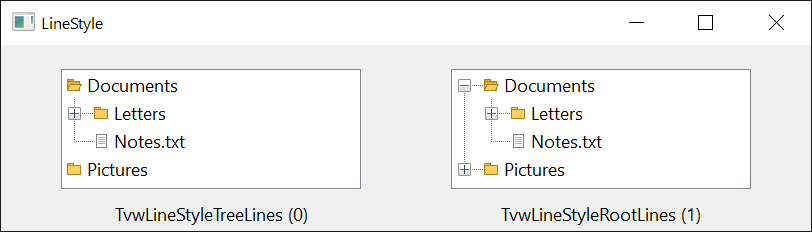
The values of LineStyle.
| Member | Value | Description |
|---|---|---|
| TvwLineStyleTreeLines | 0 | Lines join each node below the root level to its parent. |
| TvwLineStyleRootLines | 1 | As TvwLineStyleTreeLines, and lines join the nodes of the root level as well. |
TvwLabelEditConstants
The values of LabelEdit.
| Member | Value | Description |
|---|---|---|
| TvwLabelEditAutomatic | 0 | The user can edit a label, and the program can with StartLabelEdit. |
| TvwLabelEditManual | 1 | Only StartLabelEdit starts an editing. The user cannot. |
| TvwLabelEditDisabled | 2 | No label can be edited. |
TvwNodeRelationshipConstants
The values of the Relationship argument of Add and Move.
| Member | Value | Description |
|---|---|---|
| TvwNodeRelationshipFirst | 0 | The node becomes the first of the nodes that are at the level of Relative. |
| TvwNodeRelationshipLast | 1 | The node becomes the last of the nodes that are at the level of Relative. |
| TvwNodeRelationshipNext | 2 | The node goes right after Relative, at its level. |
| TvwNodeRelationshipPrevious | 3 | The node goes right before Relative, at its level. |
| TvwNodeRelationshipChild | 4 | The node becomes the last child of Relative. |
TvwSortOrderConstants
The values of SortOrder and of the SortOrder of a TvwNode.
| Member | Value | Description |
|---|---|---|
| TvwSortOrderAscending | 0 | From the smallest text to the greatest. |
| TvwSortOrderDescending | 1 | From the greatest text to the smallest. |
TvwSortTypeConstants
The values of SortType and of the SortType of a TvwNode.
| Member | Value | Description |
|---|---|---|
| TvwSortTypeBinary | 0 | The texts are compared as Windows compares strings, where a capital letter and a small one are different. |
| TvwSortTypeText | 1 | The comparison ignores the difference between capital and small letters. |
TvwMultiSelectConstants
The values of MultiSelect.
| Member | Value | Description |
|---|---|---|
| TvwMultiSelectNone | 0 | One node at a time. |
| TvwMultiSelectAll | 1 | Several nodes. A range selected with the Shift key holds every node between the anchor and the node clicked, in closed branches too. |
| TvwMultiSelectVisibleOnly | 2 | Several nodes. A range holds the nodes that are shown, and none in a closed branch. |
| TvwMultiSelectRestrictSiblings | 3 | Several nodes, but only nodes of one branch. A range holds only the nodes of the anchor’s branch, and a node of another branch starts a new selection. |
TvwVisualThemeConstants
The values of VisualTheme.
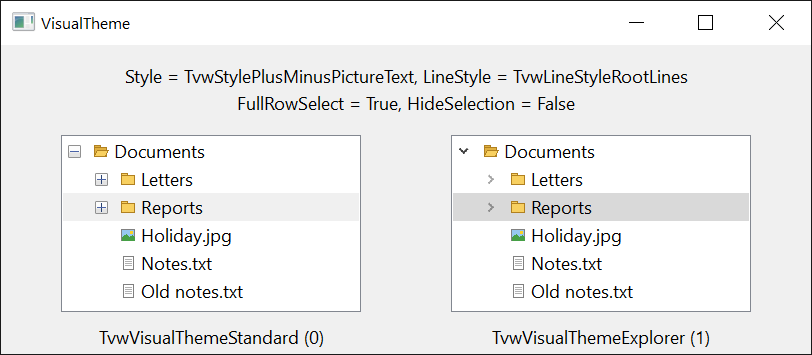
| Member | Value | Description |
|---|---|---|
| TvwVisualThemeStandard | 0 | The visual style of the program. |
| TvwVisualThemeExplorer | 1 | The theme of Windows Explorer’s folder tree. |
See Also
- TvwNodes class – the collection of the nodes
- TvwNode class – one node
- TvwSelectedNodes class – the selected nodes of a tree that allows several
- Common members – the members this control shares with the package’s other controls
- ImageList – the control that holds the pictures of the nodes
- TreeView – the control of the same name in the WinNativeCommonCtls package