Form Features
twinBASIC provides numerous enhancements to forms and form handling.
Modern Image Format Support
You no longer face an incredibly limited format selection for images in tB Forms and Controls; not only do the Bitmap and Icon formats support the full range of formats for those, you can additionally load PNG Images, JPEG Images, Metafiles (.emf/.wmf), and SVG Vector Graphics (.svg).
Improved LoadPicture
Additionally, LoadPicture can load all image types directly from a byte array, rather than requiring a file on disk. You can use this to load images from resource files or other sources. Note that if your projects references stdole2.tlb (most do), currently you must qualify it as Global.LoadPicture to get tB’s custom binding that supports byte arrays.
Transparency and Alpha Blending
Form.TransparencyKey
This new property specifies a color that will be transparent to the window below it in the z-order (all windows, not just in your project). Setting this property will cause the specified color to be 100% transparent. A Shape control with a solid FillStyle is a helpful tool to color the areas of the form in the key color.
Form.Opacity
This sets an alpha blending level for the entire form. Like transparency, this is to all windows immediately underneath it. Note that any areas covered by the TransparencyKey color will remain 100% transparent.
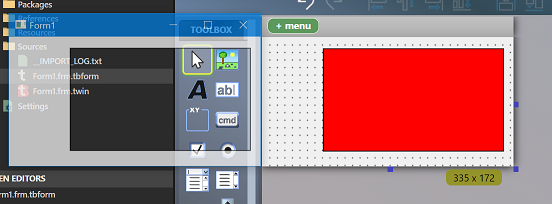
The following image shows a Form with a TransparencyKey of Red, using a Shape control to define the transparent area, while also specifying 75% Opacity for the entire form:
Additional Form Features
In addition to the above, forms have:
DpiScaleX/DpiScaleYproperties to retrieve the current values.MinWidth,.MinHeight,.MaxWidth, and.MaxHeightproperties so subclassing isn’t needed for thisForm.TopMostproperty.- Control anchoring: control x/y/cx/cy can made relative, so they’re automatically moved/resized with the Form. For example if you put a TextBox in the bottom right, then check the Right and Bottom anchors (in addition to Top and Left), the bottom right will size with the form on resize. This saves a lot of boiler-plate sizing code.
- Control docking: Controls can be fixed along one of the sides of the Form (or container), or made to fill the whole Form/container. Multiple controls can be combined and mixed/matched in docking positions.
For more information on Control Anchoring and Control Docking, see the Anchoring and Docking page.
High Quality Scaling in Image Controls
Image controls now offer a StretchMode property that allows you to choose Bilinear, Bicubic, Lanczos3 and Lanczos8 stretching algorithms, which are far superior to the default stretching algorithm. These use built in algorithms so do not add additional dependencies or API calls.
DPI Scaling
PictureDpiScaling property for forms, usercontrols and pictureboxes: PictureDpiScaling property allows you to turn off DPI scaling of images so that they display at 1:1 rather than allowing the OS to stretch them. The idea being you may want to choose a different bitmap manually, rather than apply the somewhat limited OS-stretching.