Attributes
Attributes have two major functions:
- they can act as instructions to compiler to influence how code is generated, or
- to annotate Forms, Modules, Classes, Types, Enums, Declares, and procedures i.e. Subs/Functions/Properties.
Previously in VBx, these attributes, such as the procedure description, hidden, default member, and others, were set via hidden text the IDE’s editor didn’t show you, configured via the Procedure Attributes dialog or some other places. In tB, these are all visible in the code editor. The legacy ones from VBx are supported for compatibility, but new attributes use the following syntax:
[Attribute] or [Attribute(value)]
In attributes that take an optional boolean argument, the value of the argument is taken to be True if no value is provided. This does not mean that the default value of the attribute is True, just that if the attribute is specified within the braces with no value, its value will be set to True. Different boolean-valued attributes have different default values. Those values apply unless the user has explicitly provided the attribute.
Multiple attributes can be specified in the same square braces, separated by comma:
[Attribute1, Attribute2(param), Attribute3]
The available attributes are listed below in alphabetic order. Not every attribute applies to every language element. The applicability of each attribute is given below its syntax.
- AllowUnpopulatedVtableEntry
- AppObject (optional Bool)
- ArrayBoundsChecks (optional Bool)
- BindOnlyIfNoArguments (optional Bool)
- BindOnlyIfStringSuffix (optional Bool)
- ClassId (String)
- ClassInterface
- CoClassCustomConstructor (String)
- CoClassId (String)
- COMControl (optional Bool)
- COMCreatable (optional Bool)
- ComExport (optional Bool)
- COMExtensible (optional Bool)
- ComImport (optional Bool)
- CompileIf (Bool)
- CompilerOptions (String)
- ConstantFoldable (optional Bool)
- ConstantFoldableNumericsOnly (optional Bool)
- CustomControl (String)
- CustomDesigner (String)
- Debuggable (optional Bool)
- DebugOnly (optional Bool)
- Default
- DefaultDesignerEvent
- DefaultMember (optional Bool)
- Description (String)
- DispId (Integer)
- DispInterface
- DllExport (optional Bool)
- DLLStackCheck (optional Bool)
- DualInterface
- EnforceErrors (optional Bool)
- EnforceWarnings (optional Bool)
- Enumerator
- EnumId (String)
- EventInterfaceId (String)
- EventsUseDispInterface (optional Bool)
- Flags (optional Bool)
- FloatingPointErrorChecks (optional Bool)
- FormDesignerId (String)
- IdeButton (String)
- IgnoreWarnings (Warning code list)
- ImplementsViaPrivateFriendlies
- IntegerOverflowChecks (optional Bool)
- InterfaceId (String)
- LibraryId (String)
- MustBeQualified (optional Bool)
- NonBrowsable (optional Bool)
- OleAutomation (optional Bool)
- PackingAlignment (Integer)
- PopulateFrom (…)
- PredeclaredID (optional Bool)
- PreserveSig (optional Bool)
- RedirectToStaticImplementation (String)
- Restricted (optional Bool)
- RunAfterBuild (optional Bool)
- RunBeforeStartupObject
- Serialize (optional Bool)
- SetDllDirectory (optional Bool)
- SimplerByVals (optional Bool)
- Source
- SpecialCompilerBinding (Integer)
- TestCase (optional Bool)
- TestFixture (optional Bool)
- TypeHint (EnumType)
- Unimplemented (optional Bool)
- UseGetLastError (optional Bool)
- UserDefinedTypeIsAnAlias (optional Bool)
- Version (version number)
- WindowsControl (String)
- WithDispatchForwarding
AllowUnpopulatedVtableEntry
Syntax: [AllowUnpopulatedVtableEntry]
Applicable to: procedure prototype in an Interface
Marks a prototype that a class implementing the interface is not obliged to supply.
The twinBASIC packages use it to add members to an interface without breaking code written against an earlier revision of it. ItbHostEventsV2 extends ItbHostEventsV1 and adds one such prototype; ItbHostEventsV3 extends that and adds another. An addin that implements only the V1 members still satisfies V3.
AppObject (optional Bool)
Syntax: [AppObject [ ( True | False ) ] ]
Applicable to: CoClass
Legacy VB attribute: VB_GlobalNameSpace
Indicates the class is part of the global namespace. You should not include this attribute without a full understanding of the meaning. The Global class is an AppObject.
For more details, see this VBA documentation page.
ArrayBoundsChecks (optional Bool)
Syntax: [ArrayBoundsChecks [ ( True | False ) ] ]
Applicable to: Class, Module, procedure
Disables or enables array element access bounds checking within the scope of a class, module, or a single procedure/method. Used on performance-critical routines. ArrayBoundsChecks(False) turns the check off. ArrayBoundsChecks(True) turns it back on where the project setting Disable Array Bounds Checks has turned it off for the whole project.
BindOnlyIfNoArguments (optional Bool)
Syntax: [BindOnlyIfNoArguments [ ( True | False ) ] ]
Applicable to: procedure
Only binds this name to a callsite when no arguments are present. Normally false, but see below for an exception.
This attribute resolves the cases where compiler’s special treatment of certain procedure names conflicts with a procedure of the same name that shouldn’t be treated specially. This currently affects procedures named Left. Such procedures get an implicit [BindOnlyIfNoArguments(True)] assigned by the compiler. If the user wants to have a procedure of this name, it should include [BindOnlyIfNoArguments(False)].
BindOnlyIfStringSuffix (optional Bool)
Syntax: [BindOnlyIfStringSuffix [ ( True | False ) ] ]
Applicable to: procedure
ClassId (String)
Syntax: [ClassId(“ 00000000-0000-0000-0000-000000000000 ”)]
Applicable to: Class
Assigns a COM CLSID to a class. For details, see this COM documentation page.
ClassInterface
twinBASIC doesn’t supports this attribute directly. It supports its values under different names. See:
CoClassCustomConstructor (String)
Syntax: [CoClassCustomConstructor(“ fully qualified path to factory method ”)]
Applicable to: CoClass
Allows custom logic for creating and returning a new instance of the coclass’ implementation.
Example:
[CoClassId("7980D953-10BF-478C-93BB-DD0093315D96")]
[CoClassCustomConstructor("FooFactory.CreateFoo")]
[COMCreatable(True)]
Public CoClass Foo
   ' ...
End CoClass
For an overview of coclasses in tB, see Defining coclasses.
CoClassId (String)
Syntax: [CoClassId(“ 00000000-0000-0000-0000-000000000000 ”)]
Applicable to: CoClass
In addition to interfaces, twinBASIC also allows defining coclasses – creatable classes that implement one or more defined interfaces. Like interfaces, these too must be in .twin files and not legacy .bas/.cls files, and must appear prior to the Class or Module statement. The generic form is:
[CoClassId("00000000-0000-0000-0000-000000000000")]
*<attributes>*
CoClass <name>
    [Default] Interface <interface name>
    *[Default, Source] Interface <event interface name>*
    *<additional Interface items>*
End CoClass
The methods are procedures.
For an overview of coclasses in tB, see Defining coclasses.
COMControl (optional Bool)
Syntax: [COMControl [ ( True | False ) ] ]
Applicable to: Interface
COMCreatable (optional Bool)
Syntax: [COMCreatable [ ( True | False ) ] ]
Indicates whether the class can be created through COM. It does not govern New inside the project: a [COMCreatable(False)] class is created with New as usual. A COM-creatable class needs a constructor that takes no arguments, so a class whose only Sub New has required arguments fails with TB5135 — error generating implicit default constructor … (for COM exposure) — unless it is marked [COMCreatable(False)], is Private, or has a constructor without arguments as well. The first two fixes leave the class with no constructor that takes no arguments, so it still cannot be declared As New: that fails with TB5121. See Parameterized Class Constructors.
ComExport (optional Bool)
Syntax: [ComExport [ ( True | False ) ] ]
Applicable to: Declare (API declaration) and constants, in a Module
The attribute marks a given API for export from the ActiveX control DLL being built from the project the attribute is used in.
The Declare can be a Function or a Sub, including the PtrSafe and DeclareWide forms. The compiler rejects the attribute on a procedure with a body, on a variable, and on a Declare or a constant inside a class.
[ComExport]
Public Declare Function GetTickCount Lib "kernel32" () As Long
See also DllExport.
COMExtensible (optional Bool)
Syntax: [COMExtensible [ ( True | False ) ] ]
Applicable to: Interface
Specifies whether new members added at runtime can be called by name through an interface implementing IDispatch. This attribute is set to False by default.
ComImport (optional Bool)
Syntax: [ComImport [ ( True | False ) ] ]
Applicable to: Interface
Specifies that an interface is an import from an external COM library, for instance, the Windows shell.
CompileIf (Bool)
Syntax: [CompileIf( condition )]
Applicable to: procedure definitions
Controls the conditional compilation of a procedure definition. Has no default value.
CompilerOptions (String)
Syntax: [CompilerOptions( “ options ” )]
Applicable to: procedure definitions
Sets the LLVM compiler options for one procedure, in place of the Compiler Options in Project Settings. options is a comma-separated list of flags; an empty string turns LLVM off for the procedure. Typical use would be [CompilerOptions("+llvm,+optimize,+optimizesize")] to compile the procedure using the built-in LLVM instead of the default compiler, with chosen optimizations. Getting Started with LLVM describes LLVM compilation in full. Compiler options available:
- +llvm - uses LLVM to compile this procedure. This feature is experimental at the moment. The LLVM compiler back-end is built into twinBASIC. It is not necessary to have LLVM separately installed, and any such installation is ignored by twinBASIC.
- +optimize - enables optimization during compilation of this procedure
- +optimizesize - optimize this procedure for small code size, potentially at the expense of slower speed of the procedure
- + and the name of a CPU instruction set, such as +avx2 - lets LLVM use that instruction set in this procedure. The program then does not run on a CPU without it. Per-procedure LLVM options lists the instruction sets.
ConstantFoldable (optional Bool)
Syntax: [ConstantFoldable [ ( True | False ) ] ]
Applicable to: Function in a Module. The compiler rejects it on a method in a Class.
Specify this attribute for functions that, when called with non-variable input, can be computed at compile time rather than at runtime. For example, a function that converts a string literal to ANSI. The result never changes, so the resulting ANSI string is stored rather than recomputed on every run. Such functions are also called pure functions, because their output depends only on the arguments and not on the state of the program.
The restriction to modules is not an oversight. Folding a call to a method would require constant propagation through object state, and a notion of a constant object for the propagation to terminate on. twinBASIC’s object model is dynamic enough to make both hard, so the compiler rejects the attribute there rather than folding a subset of cases that would be difficult to describe.
ConstantFoldableNumericsOnly (optional Bool)
Syntax: [ConstantFoldableNumericsOnly [ ( True | False ) ] ]
Applicable to: Function in a Module. The compiler rejects it on a method in a Class.
A limited case of constant foldable attribute, which applies only if the function was called with a numeric parameter. The restriction to modules is the same one ConstantFoldable carries, and for the same reason.
CustomControl (String)
Syntax: [CustomControl(“ image file name ”)]
Applicable to: Class
CustomDesigner (String)
Syntax: [CustomDesigner(“ designer name ”)]
Applicable to: variables in a Class
Chooses which editor the IDE’s property window offers for one property, instead of the editor it would otherwise pick from the property’s declared type. The argument names an editor built into the IDE.
The editor names the twinBASIC packages use, most-used first. The list is not exhaustive – these are the ones the packages happen to ask for, and the IDE may offer others.
| Name | Applied to |
|---|---|
designer_SpectrumWindows | an OLE_COLOR property: BackColor, ForeColor, MaskColor, BorderColor, FillColor, PaperColor |
designer_SpectrumWindowsOrClear | TransparencyKey, an OLE_COLOR in which -1 means no colour |
designer_IconBytes | an icon held as Byte(): MouseIconINIT, DragIconINIT, IconINIT |
designer_RestrictedOLEDropMode | OLEDropMode |
designer_MultiLineText | a String property holding text that may wrap: ToolTipTextINIT, Caption_INIT |
designer_PictureBytes | an image held as Byte(): PictureINIT, PaletteINIT, ToolboxBitmapINIT, MaskPictureINIT |
designer_ImageList | an image-list reference: Icons_INIT, SmallIcons_INIT, ColumnHeaderIcons_INIT |
designer_Spectrum | a ColorRGBA property |
designer_Grapick | a FillColorPoints gradient property |
designer_PropertyPages | a property-pages reference |
BINARY | InternalImages_INIT |
Debuggable (optional Bool)
Syntax: [Debuggable [ ( True | False ) ] ]
Applicable to: Module, procedure in a Class or Module
When false, turns of breakpoints and stepping for the method or module. The default value is True.
DebugOnly (optional Bool)
Syntax: [DebugOnly [ ( True | False ) ] ]
Applicable to: procedure definitions
Excludes calls to this procedure from the Build. They are only available when running from the IDE, i.e. debugging.
Default
Syntax: [Default]
Applicable to: Interface declaration within a CoClass
Marks which of a CoClass’s interfaces is its default: the one a client binds to when it holds the CoClass without asking for a particular interface.
A CoClass declares one default interface, and separately one default source interface, which also carries Source:
[CoClassId("E7F3D923-475B-4367-B5EF-568FCF3A74B5")]
CoClass CustomControlTimer
    [Default] Interface _CustomControlTimer
    [Default, Source] Interface _CustomControlTimerEvents
End CoClass
DefaultDesignerEvent
Syntax: [DefaultDesignerEvent]
Applicable to: Event declaration in a Class
Marks the one event a control nominates as its primary one. Each control that declares it declares exactly one: Click for CheckBox and CommandButton, Change for ComboBox, Validate for Data.
DefaultMember (optional Bool)
Syntax: [DefaultMember [ ( True | False ) ] ]
Applicable to: procedure in a Class
Default members are accessed under the instance of the object itself, without specifying their name. For example, a class that offers indexable elements may have an Item property that is the default member:
Class MyCollection
    [DefaultMember]
    Property Get Item(ByVal index&) As String
        ' ...
    End Property

    [DefaultMember]
    Property Let Item(ByVal index&, ByVal value$)
        ' ...
    End Property
End Class

Module DefaultMemberDemo
    Sub Example()
        Dim coll As New MyCollection
        Debug.Print "Item #3: ", coll(3)   ' Property Get Item is invoked
        coll(4) = "Item 4"                 ' Property Let Item is invoked
    End Sub
End Module
Description (String)
Syntax: [Description(“ arbitrary text ”)]
Applicable to: Class, CoClass, Const, Declare (API declaration), Interface, Module, procedure, Type (UDT)
Provides a description in information popups in the IDE, and is exported as a helpstring attribute in the type library (if applicable).
The value is a String whose content is Markdown. The IDE renders it when it displays the popup, so headings, code spans and fenced code blocks all work. The attribute takes a single string literal, so a description running to several lines is assembled with & vbCrLf & _ continuations, one source line per line of Markdown.
The packages that ship with twinBASIC follow a consistent shape, shown here on CurrentProjectName from the VBA package’s Compilation module:
[Description("Retrieves the name of the current project as a literal string.  " & vbCrLf & _
             "### Syntax" & vbCrLf & _
             "`projectName = CurrentProjectName()`  " & vbCrLf & _
             "### Parameters" & vbCrLf & _
             "This function does not take any parameters.  " & vbCrLf & _
             "### Return value" & vbCrLf & _
             "Returns the name of the current project as a String.  " & vbCrLf & _
             "### Example" & vbCrLf & _
             "```basic" & vbCrLf & _
             "' Example: Retrieve the current project name" & vbCrLf & _
             "Dim projectName As String" & vbCrLf & _
             "projectName = CurrentProjectName()" & vbCrLf & _
             "MsgBox ""The name of this project is "" & projectName" & vbCrLf & _
             "```")]
' Note, this function uses special internal bindings and so may not behave like a regular function
Public DeclareWide PtrSafe Function CurrentProjectName Lib "<compilation>" Alias "#-33" () As String
Five details of that are easy to get wrong:
-
The member is a
Declare, not an ordinary Function. Nothing about the attribute requires that – it is simply how this particular member happens to be written – but it is worth reading carefully, because a description shaped like a function’s is sitting on an API declaration. -
The two spaces before several of the closing quotes are Markdown hard line breaks. A bare newline is a soft break in Markdown and renders as a space, so removing them runs the lead sentence and the prose under each heading together into one paragraph. They appear on the prose lines only: the
###headings and the lines inside the fenced block are already block-level and do not need them. They read as stray trailing whitespace and are easy to delete by accident. - A literal
"inside the string is doubled, as in""The name of this project is "". That is ordinary twinBASIC string syntax rather than anything Markdown-specific, but it is dense enough here to be misread as part of the description. - The fence tag is
basic, which is what the IDE’s Markdown renderer understands. It has nothing to do with the fence languages this documentation site highlights. - The section order is conventional: a lead sentence, then
### Syntax,### Parameters,### Return valueand### Example. The example above keeps### Parameterseven though the function takes none, and says so in the body.
DispId (Integer)
Syntax: [DispId( 123 )]
Applicable to: procedure in an Interface
Defines a dispatch ID associated with the procedure when exposed via IDispatch.
DispInterface
Syntax: [DispInterface]
Applicable to: Interface in a Library
Note
This attribute is generated in the Library modules that twinBASIC generates for COM references in a project. It cannot be manually created.
Indicates that the interface exposes methods via IDispatch late-binding. This is the default. Note that DualInterface can also be specified, giving much improved performance over that of IDispatch-based interfaces.
It is usually written combined with the other attributes on the interface rather than alone — [Hidden, DispInterface, COMExtensible]. See LibraryId for what a generated Library module looks like.
DllExport (optional Bool)
Syntax: [DllExport [ ( True | False ) ] ]
Applicable to: procedures and constants in a module.
It’s possible to export a function or constant from standard modules. The compiler rejects the attribute on a module-level variable. Example:
[DllExport]
Public Const MyExportedSymbol As Long = &H00000001
DLLStackCheck (optional Bool)
Syntax: [DLLStackCheck [ ( True | False) ] ]
Applicable to: Declare (API declaration)
Gives minor codegen size reduction on 32-bit API calls on the Intel platform. Has no effect on other platforms.
DualInterface
Syntax: [DualInterface]
Applicable to: Interface in a Library
Note
This attribute is generated in the Library modules that twinBASIC generates for COM references in a project. It cannot be manually created.
Indicates that the interface exposes methods through the OLE VTable binding. The latter has much improved performance over that of IDispatch-based interfaces.
See LibraryId for what a generated Library module looks like.
EnforceErrors (optional Bool)
Syntax: [EnforceErrors [ ( True | False ) ] ]
Applicable to: procedures.
EnforceWarnings (optional Bool)
Syntax: [EnforceWarnings [ ( True | False ) ] ]
Applicable to: procedures.
Enumerator
Syntax: [Enumerator]
Applicable to: procedure in a Class or Interface
Marks the member that supplies an enumerator, which is what makes the object usable with For Each. The member is conventionally named _NewEnum and returns stdole.IUnknown or a Variant wrapping one.
Private InternalCollection As New Collection

[Enumerator]
Public Property Get _NewEnum() As Variant
    Return InternalCollection.[_NewEnum]
End Property
This replaces VB6’s hidden VB_UserMemId = -4 procedure attribute, which twinBASIC still accepts for compatibility. Custom Enumerators describes the member’s rules, and how a class can implement the enumerator itself.
EnumId (String)
Syntax: [EnumId(“ 00000000-0000-0000-0000-000000000000 ”)]
Applicable to: Enum
Specifies a GUID to be associated with an enum in type libraries.
EventInterfaceId (String)
Syntax: [EventInterfaceId(“ 00000000-0000-0000-0000-000000000000 ”)]
Applicable to: Class
Assigns a fixed COM IID to the event interface twinBASIC generates for a class from its Event declarations. It is the events-side counterpart of InterfaceId, which fixes the IID of the class’s own interface.
A host may cache the IID, so a generated one that changes between builds or between bitnesses breaks clients that have already stored it. That is what the TB0013 recommendation on a COMControl interface is asking for.
EventsUseDispInterface (optional Bool)
Syntax: [EventsUseDispInterface [ ( True | False ) ] ]
Applicable to: Class
Makes the event interface generated for the class a dispinterface, so events are raised through IDispatch by member id rather than through a vtable. VB6 and VBA event sinks expect a dispinterface, so a control meant to be consumed from either sets this.
Flags (optional Bool)
Syntax: [Flags [ ( True | False ) ] ]
Applicable to: Enum
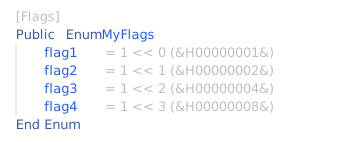
Calculate implicit enum values as a flag set (powers of 2).
Note
To prevent confusion, once an explicit value is used, all remaining values after it must also be explicit)
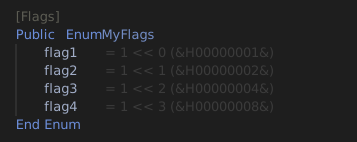
With the IDE option Always show IDE Inline Code Hints on, the editor shows the value of each member:
FloatingPointErrorChecks (optional Bool)
Syntax: [FloatingPointErrorChecks [ ( True | False) ] ]
Applicable to: Class, Module, procedure
Disables or enables floating point error checks within the scope of a class, module, or a single procedure/method. Used on performance-critical routines. FloatingPointErrorChecks(False) turns the checks off. FloatingPointErrorChecks(True) turns them back on where the project setting Disable FPU Error Checks has turned them off for the whole project.
FormDesignerId (String)
Syntax: [FormDesignerId(“ 00000000-0000-0000-0000-000000000000 ”)]
Applicable to: Class
Hidden (optional Bool)
Syntax: [Hidden [ ( True | False ) ] ]
Applicable to: Class, CoClass, Interface, Module, a procedure in a Class or Module, a procedure in an Interface, a variable in a Class, and an Enum member
Hides the declaration from certain IntelliSense and other lists. It applies to a whole type — a Class, CoClass, Interface or Module — and equally to a single member of one, so a member can be kept out of those lists without hiding the type that declares it. Within a Class that covers procedures, variables, constants and events; within an Interface, the member prototypes; within a Module, procedures, variables, constants and Declare statements.
Note
A CoClass can only be hidden whole. Its body holds nothing but Interface lines, and the attribute is refused there with TB5155 — unlike Default and Source, which are interface-line attributes. It is likewise refused on an Enum or Type declaration, on a Type member, and on a procedure parameter. An individual Enum member is hidden the same way: the Encoding constants of Open are marked [Hidden, Restricted].
IdeButton (String)
Syntax: [IdeButton(“ caption ”)]
Applicable to: procedure definition in a module.
IgnoreWarnings (Warning code list)
Syntax: [IgnoreWarnings ( TBnnnn [ , TBmmmm ]… ) ]
Applicable to: Class, Module, procedure
Suppresses the named warnings within the class, module or procedure the attribute is applied to. The codes are written bare, exactly as the compiler prints them, and are not quoted:
[IgnoreWarnings(TB0001)]
Module MD5
    ' ...
End Module
ImplementsViaPrivateFriendlies
Syntax: [ImplementsViaPrivateFriendlies]
Applicable to: an Implements … Via statement in a Class
Keeps the delegate’s Friend members private to the delegating class. A plain Implements ... Via forwards the delegate’s Public and Friend members, so a Friend member of the delegate becomes callable on the delegating class from anywhere else in the project. With this attribute it stays reachable from inside the class and nowhere else; Public members forward as they always did.
The attribute belongs on the Via form of the statement only. A plain Implements does not take it, and WithDispatchForwarding — which does — is not accepted on the Via form.
Public Class CVehicle
    Public Sub Honk()
    End Sub
    Friend Sub Diagnostics()
    End Sub
End Class

Public Class CCar
    [ImplementsViaPrivateFriendlies] Implements CVehicle Via mBase = New CVehicle
End Class
Elsewhere in the project, Honk is callable on a CCar and Diagnostics is not. Inside CCar, both are.
For an overview of the Implements ... Via mechanism itself, see Implements Via for basic inheritance.
IntegerOverflowChecks (optional Bool)
Syntax: [IntegerOverflowChecks [ ( True | False ) ] ]
Applicable to: Class, Module, procedure
Disables or enables integer overflow checks within the scope of a class, module, or a single procedure/method. Used on performance-critical routines. IntegerOverflowChecks(False) turns the checks off. IntegerOverflowChecks(True) turns them back on where the project setting Disable Overflow Checks has turned them off for the whole project.
Dividing the most negative Integer, Long or LongLong by -1 with \ or Mod raises error 6 whatever this attribute or the project setting says.
InterfaceId (String)
Syntax: [InterfaceId( “00000000-0000-0000-0000-000000000000” )]
Applicable to: Interface
twinBASIC supports defining COM interfaces using BASIC syntax, rather than needing an type library with IDL and C++. These are only supported in .twin files, not in legacy .bas or .cls files. They must appear before the Class or Module statement, and will always have a project-wide scope. the The generic form for is as follows:
[InterfaceId ("00000000-0000-0000-0000-000000000000")]
*<attributes>*
Interface <name> Extends <base-interface>
    *<attributes>*
	<method 1>
	*<attributes>*
	<method 2>
	' ...
End Interface
The methods are procedures.
For an overview of interfaces in tB, see Defining interfaces.
LibraryId (String)
Syntax: [LibraryId( “00000000-0000-0000-0000-000000000000” )]
Applicable to: Library
Note
This attribute is generated in the Library modules that twinBASIC generates for COM references in a project. It cannot be manually created.
The GUID of the type library the Library module was imported from, written without surrounding braces. It is the same GUID the reference itself is recorded under in the project settings.
A Library module is the BASIC form of a referenced type library. Adding a COM reference to a project makes one appear, read-only, under References in the Project Explorer, and it is where DispInterface, DualInterface and Version are met. Its head names the library and says where it came from:
[LibraryId("00020430-0000-0000-C000-000000000046")]
[Version(2.0)]
[Description("OLE Automation")]
Library stdole

    ' Original type library: C:WindowsSysWOW64stdole2.tlb
    ' NOTE: Offsets and lengths calculated for current Win32 target.

    [InterfaceId("4EF6100A-AF88-11D0-9846-00C04FC29993")]
    [Hidden, DispInterface, COMExtensible]
    [Description("Event interface for the Font object")]
    Interface FontEvents Extends stdole.IDispatch
        [DispId(9)]
        Sub FontChanged(ByVal PropertyName As String)
    End Interface

End Library
The Library keyword is not available in project source: Library, End Library and this attribute are each rejected there with TB5182.
MustBeQualified (optional Bool)
Syntax: [MustBeQualified [ (True | False ) ] ]
Applicable to: Module, and to procedures, Declare statements and Enums in a Module
Requires a name to be written with its qualifier, so that names that would otherwise clash stay apart. MustBeQualified and MustBeQualified(True) are the same; MustBeQualified(False) has no effect.
- On a procedure or a Declare statement, code outside its module must call it as module.procedure. A call without the module name is error TB5079, Unrecognized symbol. Inside its own module the procedure can still be called by its name alone.
- On one of a property’s procedures, it applies to the property’s name, so outside the module every use of the property needs the module name: with the attribute on the Property Let alone, a bare read through the Property Get is also TB5079.
- On an Enum, code outside its module must write each member as enum.member; inside its own module the member can still be written alone. The type name itself can still be used alone, as in
Asenum. - On a Module, the module name must itself be qualified by the project or package name: project.module.member. The module’s members can still be used by their names alone.
The Assert package marks all three of its modules this way, and every member in them, which is why its members are called as Assert.Strict.IsTrue: Strict.IsTrue and a bare IsTrue are both TB5079; see Assert. The VBRUN package marks some of its enumerations.
[MustBeQualified]
Public Enum PenStyle
    Solid
    Dashed
End Enum

Public Sub Draw()
    Dim Style As PenStyle = PenStyle.Dashed   ' outside this module, a bare Dashed is TB5079
End Sub
On a class, a member of a class, or an Enum in a class, the attribute is error TB5155, This attribute is not supported in this context.
NonBrowsable (optional Bool)
Syntax: [NonBrowsable [ ( True | False ) ] ]
Applicable to: variables and procedures in a Class
Keeps a member out of the surfaces that list a class’s members, while leaving it callable. The twinBASIC packages apply it to members that exist for the framework’s own use, such as InternalSectionId and hWndHeader.
This is distinct from Hidden, which reaches the same member as well as the whole type, and from Restricted.
OleAutomation (optional Bool)
Syntax: [OleAutomation [ (True | False ) ] ]
Applicable to: Interface
Controls whether this attribute is applied in the typelibrary. This attribute is set to True by default.
PackingAlignment (Integer)
Syntax: [PackingAlignment( 1 | 2 | 4 | 8 | 16 | 32 | 64 )]
Applicable to: Type (UDT)
twinBASIC normally aligns objects naturally within UDTs, e.g. an 8-byte object is aligned at the 8-byte boundary relative to the beginning of the UDT. This can leave gaps between UDT fields. A tighter packing can be achieved with a smaller PackingAlignment:
[PackingAlignment(2)]
Private Type MyUDT
    x As Integer
    y As Long
    z As Integer
End Type

Private Sub CheckPacking()
    Dim t As MyUDT
    Debug.Assert Len(t) = 8 And LenB(t) = 8
End Sub
You’ll now find that both Len(t) and LenB(t) are 8.
Note
Alignment, not packing alignment, is not set this way. Specifying 16 would not get you a 16-byte structure for t. twinBASIC does not currently have an equivalent for __declspec_align(n), but such a feature is planned. This is rare outside kernel mode programming.
For introduction to this feature, see Custom UDT Packing.
PopulateFrom (…)
Syntax: [PopulateFrom( “json”, “internal path to .json”, “ table field ”, “ name field ”, “ value field ” )]
Applicable to: Enum
Populates an Enum with values from a json file bundled with the project.
The path to the .json file, and the field names, are arbitrary. Thus, the json file doesn’t have to be in the Resources folder within the project.
In the future, this attribute may be expanded to allow more data file types, and more context of use besides Enum.
For example, consider this enum declaration in a .twin file:
[PopulateFrom("json", "/Resources/MESSAGETABLE/Strings.json", "events", "name", "id")]
Enum EVENTS
End Enum
Then, there should be a /Resources/MESSAGETABLE/Strings.json file with following structure:
{
    "events":
    [
        {
            "id": -1073610751,
            "name": "service_started",
            "LCID_0000": "%1 service started"
        }
    ]
}
The result is as-if we hand-typed the following Enum definition:
Enum EVENTS
    service_started = -1073610751
End Enum
PredeclaredID (optional Bool)
Syntax: [PredeclaredId [ ( True | False ) ] ]
Applicable to: Class
When set, a global instance of the class is created when the application starts.
This attribute is equivalent to the VB_PredeclaredId attribute in VBx .cls files.
PreserveSig (optional Bool)
Syntax: [PreserveSig [ ( True | False ) ] ]
Applicable to: Method in an Interface, API Declarations.
Default value: False in an Interface, True in an API Declare.
In COM interfaces, the default value of this attribute is False, since normally methods return an HRESULT that the language hides from you. [PreserveSig [ (True) ] ] overrides this behavior and defines the function exactly as you provide. This is necessary if you need to define it as returning something other than a 4-byte Long, or want to handle the result yourself, bypassing the normal runtime error raised if the return value is negative (this is helpful when a negative value indicates an expected, acceptable failure, rather than a true error, like when an enum interface is out of items).
In APIs, the default value of this attribute is True. So therefore, you can specify False to rewrite the last parameter as a return. Example:
Public Declare PtrSafe Function SHGetDesktopFolder Lib "shell32" (ppshf As IShellFolder) As Long
can be rewritten as
[PreserveSig(False)]
Public Declare PtrSafe Function SHGetDesktopFolder Lib "shell32" () As IShellFolder
RedirectToStaticImplementation (String)
Syntax: [RedirectToStaticImplementation(“ fully qualified path to a procedure ”)]
Applicable to: procedure prototype in an Interface
Supplies an implementation for an interface prototype without a class behind it: the interface declares the signature, and the named module-level procedure is what a call reaches.
The App object is built this way, each of its properties naming a procedure in a private module:
Public Interface _App Extends stdole.IUnknown
    [RedirectToStaticImplementation("InternalStuff.GetAppPath")]
    Property Get Path() As String
    [RedirectToStaticImplementation("InternalStuff.GetAppEXEName")]
    Property Get EXEName() As String
End Interface
Restricted (optional Bool)
Syntax: [Restricted [ ( True | False ) ] ]
Applicable to: Interface
Restricts the interface methods from being called in most contexts.
This is attribute has the same function as the restricted MIDL attribute.
RunAfterBuild (optional Bool)
Syntax: [RunAfterBuild [ ( True | False ) ] ]
Specifies a function that runs after your exe is built. There’s App.LastBuildPath to know where it is if you’re e.g. signing the executable.
Only one [RunAfterBuild] is allowed per project. A second one is a compile error.
The procedure runs whatever the project’s modules and procedures are called: a module may have the project’s name, and the module that holds the procedure may also hold a procedure with the module’s own name, such as a Sub Probe in a module Probe.
Note
VB6 refuses a module that has the project’s name, with Name conflicts with existing module, project, or object library. It allows a procedure named like its module.
RunBeforeStartupObject
Syntax: [RunBeforeStartupObject]
Applicable to: Function in a Module, returning a Boolean
Runs the function before the project’s startup object. Returning True suppresses the startup object entirely; returning False lets startup proceed as normal.
The CEF package uses it to intercept the sub-process launches Chromium makes of the host executable, which must not run the application’s own Sub Main:
Private Module PreSubMain
    [RunBeforeStartupObject]
    Function BeforeMain() As Boolean
        If (InStr(Command, "--type=") = 0) Then
            Return False        ' not a CEF sub process, so launch as usual
        Else
            cefPackage.InitializeCef()
            Return True         ' Sub Main / the startup form will NOT be invoked
        End If
    End Function
End Module
Compare RunAfterBuild, which runs in the IDE at build time rather than in the built program.
Serialize (optional Bool)
Syntax: [Serialize [ ( True | False ) ] ]
Applicable to: variables in a Class
SetDllDirectory (optional Bool)
Syntax: [SetDllDirectory [ ( True | False ) ] ]
Applicable to: Declare (API declaration), Module
Allows an explicitly loaded DLL to load its own dependencies from it’s load path. Also has the effect of allowing searching the app path for the DLLs in the base app’s declare statements. It can be used per-declare or within a module.
SimplerByVals (optional Bool)
Syntax: [SimplerByVals [ ( True | False ) ] ]
Applicable to: procedure
Source
Syntax: [Source]
Applicable to: Interface declaration within a CoClass
Marks a CoClass interface as the one the CoClass raises events on, rather than one callable on it. A client implements this interface to receive the events.
Every use in the twinBASIC packages pairs it with Default in one set of braces, which marks the interface as the CoClass’s default source interface:
CoClass CustomControlTimer
    [Default] Interface _CustomControlTimer
    [Default, Source] Interface _CustomControlTimerEvents
End CoClass
The pairing is a convention rather than a requirement – [Source] on its own compiles, and marks the interface as a source of events without making it the default one.
SpecialCompilerBinding (Integer)
Syntax: [SpecialCompilerBinding( n )]
Applicable to: procedure, Declare (API declaration)
Binds the member to one of the compiler’s own internal implementations, selected by number.
Important
This attribute exists for the packages that ship with twinBASIC. The numbers are not a vocabulary a project can choose from: each names one behaviour already built into the compiler, and nothing says what an unlisted number does.
The numbers the VB package uses, should you meet one while reading its source: (1) and (2) on the GlobalLoad and GlobalUnload declares, (3) on a generic Item property, (4) on IdleMessageLoopBreakpoint, and (254) on Form’s Show, where a comment in the source says it “prevents ClassBeforeFirstMemberAccessFunc for this member”.
TestCase (optional Bool)
Syntax: [TestCase [ ( True | False ) ] ]
Applicable to: procedure definition in a module.
TestFixture (optional Bool)
Syntax: [TestFixture [ ( True | False ) ] ]
Applicable to: Module
TypeHint (EnumType)
Syntax: [TypeHint( an enum type )]
Applicable to: procedure parameters
Allows populating Intellisense with an enum for types other than Long.
Unimplemented (optional Bool)
Syntax: [Unimplemented [ ( True | False ) ] ]
Applicable to: procedure definitions
Makes the compiler issue a warning about the procedure being unimplemented wherever it’s called. You can upgrade it to an error too.
UseGetLastError (optional Bool)
Syntax: [UseGetLastError [ ( True | False ) ] ]
Applicable to: Declare (API declaration)
If the declared function indicates an error condition, the compiler won’t automatically call GetLastError to retrieve the error code. The default value of this attribute is True, i.e. Declare-d functions are assumed to set LastError upon error.
UserDefinedTypeIsAnAlias (optional Bool)
Syntax: [UserDefinedTypeIsAnAlias [ ( True | False ) ] ]
Applicable to: Type (UDT)
Version (version number)
Syntax: [Version( major . minor )]
Applicable to: Library
Note
This attribute is generated in the Library modules that twinBASIC generates for COM references in a project. It cannot be manually created.
The version of the imported type library, as a major.minor pair — [Version(2.0)] for version 2.0 of OLE Automation. It matches the version recorded against the reference in the project settings, and is the version shown beside the library in the References dialog.
Not to be confused with the project’s own version, which is set from the project settings rather than by an attribute. See LibraryId for the shape of a generated Library module.
WindowsControl (String)
Syntax: [WindowsControl(“ toolbox image path ”)] or [WindowsControl(“no_designer”)]
Applicable to: Class
Marks a class as a Windows control, one the form designer can place on a form, and says which image represents it in the toolbox. Pass “no_designer” in place of a path for a control that should compile as a control without appearing in the toolbox.
A path is relative to the project root. Where the toolbox wants the image at several sizes, ?? in the path stands for the size and the IDE resolves it against the sizes that are present:
[WindowsControl("/miscellaneous/ICONS??/CheckBox??.png")]
The VB package supplies that one as Miscellaneous/ICONS24/Checkbox24.png and again under ICONS30, ICONS32, ICONS36 and ICONS40. The lookup ignores case, which is why Checkbox24 and CheckBox30 both resolve.
Compare CustomControl, which takes one image path and no size placeholder.
WithDispatchForwarding
Syntax: [WithDispatchForwarding]
Applicable to: an Implements statement in a Class
Routes late-bound calls arriving on the implemented interface to the class’s own default interface. Without it, a host calling through IDispatch reaches the implemented interface and finds nothing there to dispatch to.
The MyCOMAddin sample states the consequence directly: the attribute “is needed so that late-bound calls on the IRibbonExtensibility interface get routed to our MyCOMAddin default interface. Without it, events like OnHelloWorldClicked will not fire.”
[WithDispatchForwarding]
Implements IRibbonExtensibility