Compiler Constants
The constants twinBASIC predefines for conditional compilation, and how to test them with #If.
The list includes the constants that VBA documents, even those twinBASIC does not define: an undefined compiler constant can always be used, and its value is 0.
Predefined constants
Each value below is the one code sees unless a #Const redefines the constant. #Const can redefine any of them. Like C’s #define, the new value applies from the #Const line to the end of the .twin file that holds it, including any modules after it in that file. After #Const Win32 = 0, #If Win32 is false below that line, and still true above it and in every other file. See Predefined compiler constants.
Win16
Purpose: Indicates a 16-bit Windows compatible platform.
Value: Always 0 (False); 16-bit Windows is not supported.
Win32
Purpose: Indicates a 32-bit compatible Windows platform.
Value: Always 1 (True) on supported Windows platforms, for both 32-bit and 64-bit.
Win64
Purpose: Indicates a 64-bit Windows AMD64 platform.
Value: 0 (False) when the compiler is in 32-bit mode, 1 (True) when in 64-bit mode.
VBA6
Purpose: Indicates compatibility with VBA6 syntax.
Value: Always 1 (True).
VBA7
Purpose: Indicates compatibility with VBA7 syntax.
Value: Always 1 (True).
MAC
Purpose: Indicates running on a MacOS platform.
Value: Always 0 (False). Mac is not currently supported, although this will change in the future.
TWINBASIC
Purpose: Indicates compatibility with twinBASIC syntax.
Value: Always 1 (True).
TWINBASIC_BUILD
Purpose: Provides a Long value giving the current twinBASIC Build Number.
Value: Currently this is the same as the “BETA” number, e.g. for Beta 610 it will have a value of 610.
TWINBASIC_BUILD_TYPE
Purpose: Allows conditional compilation based on whether the project is an exe, dll, or ocx.
Value: A String that can be one of “Standard EXE”, “Standard DLL”, “ActiveX DLL”, or “ActiveX Control”, determined by the “Build Type” option in Project Settings.
Usage
A compiler constant is tested with #If, #ElseIf and #Else: the If, ElseIf and Else keywords with a # in front. For example, to tell 32-bit and 64-bit VBA apart from 64-bit twinBASIC:
#If VBA7 Then
    'We're in either VBA7 or twinBASIC
    #If Win64 Then
        'We're in either 64bit VBA7 or 64bit twinBASIC
        #If TWINBASIC Then
            'We're in 64bit twinBASIC
            #If TWINBASIC_BUILD_TYPE = "ActiveX Control" Then
                'And we're building an OCX
            #End If
        #Else
            'We're in 64bit VBA7
        #End If
    #Else
        'We're in either 32bit VBA7 or 32bit twinBASIC
        #If TWINBASIC Then
            'We're in 32bit twinBASIC
        #Else
            'We're in 32bit VBA7
        #End If
    #End If
#Else
    'We're in VB6 or VBA6. Win64 will always be False by default. TWINBASIC will always be False by default.
#End If
Or more simply, to decide whether to use PtrSafe, and then DeclareWide or other twinBASIC features:
#If VBA7 Then
    #If TWINBASIC Then
        'PtrSafe DeclareWide declares, if desired, also inline comments and `[ TypeHint() ]`, and function attributes.
    #Else
        'PtrSafe declares not using DeclareWide or any new syntax
    #End If
#Else
    'Classic VB6/VBA6 declares without PtrSafe or other new syntax
#End If
Important
Compiler constants are numbers, not Boolean values. Win64 is 1 in a 64-bit build, and Not 1 is -2, which counts as true, so #If Not Win64 Then is true in both 32-bit and 64-bit builds. To select 32-bit-only code, compare the constant with 0, as in #If Win64 = 0 Then, or put the code in the #Else branch of #If Win64 Then.
Warning BETA 1010
A function call in an #If, #ElseIf or #Const expression is always 0, with no error or warning. #If CBool(1) Then and #If Len("abc") = 3 Then are both false, and #If Not CBool(Win64) Then is true in a 64-bit build. VB6 evaluates CBool, CLng, Abs and Len there.
Note
vbPtrSize is not a compiler constant. vbPtrSize is a constant of the VBA package, 4 or 8 in code, but #If does not see it: like any name that is not a compiler constant it is 0 there, so #If vbPtrSize = 8 Then is false in a 64-bit build too. To choose code by pointer size, test Win64.
Appearance
The twinBASIC editor shows in real time which compiler constants are active. Code in an #If block that will not run under the current settings is inactive, and appears greyed out. Unlike VBx, twinBASIC does not check inactive code for errors.
For example, in 32-bit mode:
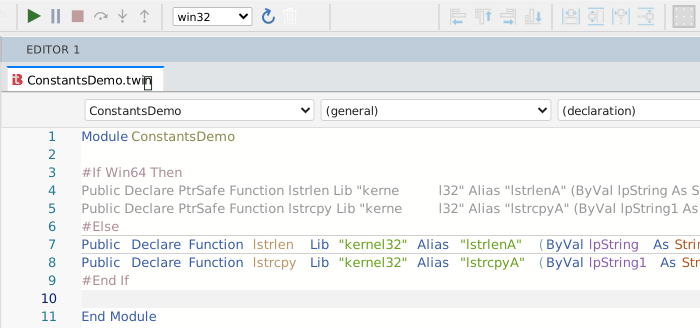
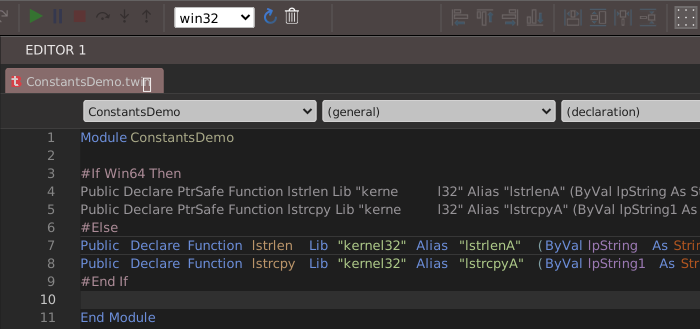
Then after switching to 64-bit mode with the build list on the toolbar:
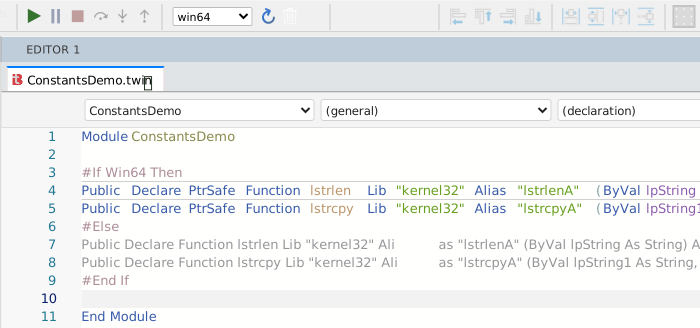
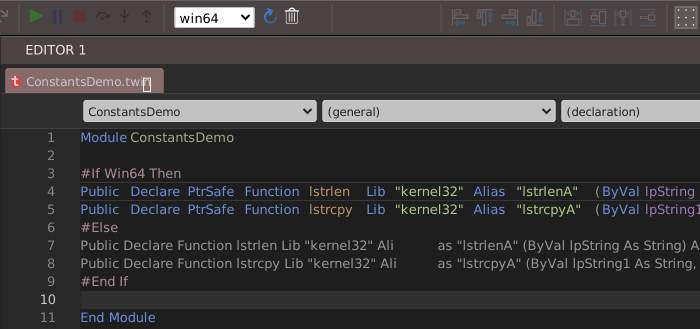
VB6, VBA, VBA6, and VBA7 are trademarks of the Microsoft Corporation.
MacOS is a trademark of Apple, Inc.