Cell Formatting
Alignment, colours, fonts, text style, pictures and flood bars of single cells and whole columns, and the FillStyle property that applies a cell setting to a whole selection.
A cell has the look of the grid until a Cell… property gives it a look of its own. The properties of the grid (BackColor, ForeColor, Font and the others on the Appearance page) are the defaults, and a cell, or a column for the alignment, overrides them. A property that has not been set for a cell returns the value the cell inherits, not a special “unset” value. Setting a colour, an alignment or a text style to -1 returns the cell to the grid’s setting.
The Cell… properties of this page act on the current cell, the one at Row and Col. Set those first, or use Cell, which names the cell in each call and leaves the current cell alone.
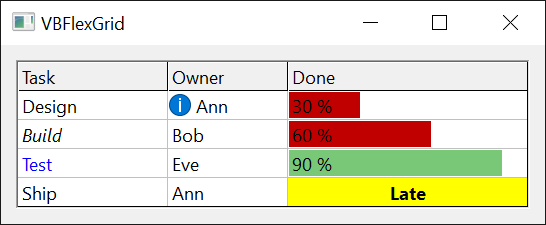
VBFlexGrid1.Rows = 4
VBFlexGrid1.Cols = 3
VBFlexGrid1.Row = 2
VBFlexGrid1.Col = 1
VBFlexGrid1.CellBackColor = vbYellow
VBFlexGrid1.CellFontBold = True
VBFlexGrid1.CellAlignment = FlexAlignmentCenterCenter
Debug.Print VBFlexGrid1.CellBackColor = vbYellow                   ' True
Debug.Print VBFlexGrid1.Cell(FlexCellFontBold, 2, 1)               ' True
Debug.Print VBFlexGrid1.Cell(FlexCellBackColor, 3, 1) = VBFlexGrid1.BackColor ' True
VBFlexGrid1.CellBackColor = -1                                     ' back to the grid's colour
Debug.Print VBFlexGrid1.CellBackColor = VBFlexGrid1.BackColor      ' True
- A block of cells with FillStyle
- Own formatting, and discarding it
- Flood bars
- Pictures
- Properties
- Events
- See Also
A block of cells with FillStyle
FillStyle chooses whether a Cell… property changes one cell or every cell of the selection. With FlexFillStyleSingle, the default, it changes the current cell. With FlexFillStyleRepeat it changes the whole block from Row and Col to RowSel and ColSel. The same holds for Text, CellTag, CellChecked and the other properties that write a cell. Switch it back when the block is done: it stays in force for every later write.
VBFlexGrid1.Rows = 4
VBFlexGrid1.Cols = 4
VBFlexGrid1.Row = 1
VBFlexGrid1.Col = 1
VBFlexGrid1.RowSel = 2
VBFlexGrid1.ColSel = 2
VBFlexGrid1.FillStyle = FlexFillStyleRepeat
VBFlexGrid1.CellFontBold = True
VBFlexGrid1.CellForeColor = vbRed
VBFlexGrid1.FillStyle = FlexFillStyleSingle
Debug.Print VBFlexGrid1.Cell(FlexCellFontBold, 2, 2)  ' True
Debug.Print VBFlexGrid1.Cell(FlexCellFontBold, 3, 3)  ' False
Debug.Print VBFlexGrid1.Cell(FlexCellForeColor, 1, 2) = vbRed ' True
Own formatting, and discarding it
A cell that has had any of its looks changed has custom formatting, which takes a little memory. CellHasCustomFormatting tells whether a cell has it, and setting it to False discards the formatting of the cell, picture and font included, so that the cell looks like the grid again. Clear with FlexClearFormatting does the same for a whole area.
The font of a cell is set as a whole. The first time a program writes CellFontBold, CellFontItalic, CellFontName, CellFontSize, CellFontStrikeThrough, CellFontUnderline or CellFontCharset for a cell, the cell takes a copy of the grid’s Font (or FontFixed for a fixed cell) with that one attribute changed. A later change to the grid’s font then no longer reaches that cell. Setting CellFontName to an empty string gives the cell the grid’s font again, with every attribute.
VBFlexGrid1.Row = 1
VBFlexGrid1.Col = 1
Debug.Print VBFlexGrid1.CellHasCustomFormatting ' False
VBFlexGrid1.CellFontItalic = True
Debug.Print VBFlexGrid1.CellHasCustomFormatting ' True
Debug.Print VBFlexGrid1.CellFontName = VBFlexGrid1.Font.Name ' True
VBFlexGrid1.CellFontName = ""
Debug.Print VBFlexGrid1.CellFontItalic = VBFlexGrid1.Font.Italic ' True
VBFlexGrid1.CellHasCustomFormatting = False
Debug.Print VBFlexGrid1.CellHasCustomFormatting ' False
Flood bars
A cell can show a coloured bar behind its text, as a progress bar does. CellFloodPercent sets how much of the cell’s width the bar covers, and CellFloodColor its colour; the colour of a cell with none of its own is the grid’s FloodColor. A positive percentage fills from the left edge, a negative one from the right edge. 0, the default, draws no bar. The bar is drawn behind the text, inside the grid line.
VBFlexGrid1.Rows = 4
VBFlexGrid1.Cols = 2
Dim r As Long
For r = 1 To 3
    VBFlexGrid1.TextMatrix(r, 1) = CStr(r * 30) & " %"
    VBFlexGrid1.Cell(FlexCellFloodPercent, r, 1) = r * 30
Next r
VBFlexGrid1.Cell(FlexCellFloodColor, 3, 1) = vbGreen
Debug.Print VBFlexGrid1.Cell(FlexCellFloodPercent, 2, 1)             ' 60
Debug.Print VBFlexGrid1.Cell(FlexCellFloodColor, 1, 1) = VBFlexGrid1.FloodColor ' True
Debug.Print VBFlexGrid1.Cell(FlexCellFloodColor, 3, 1) = vbGreen     ' True
Pictures
CellPicture puts a picture in a cell, drawn at the position CellPictureAlignment names. The picture keeps its own size, except with FlexPictureAlignmentStretch, and is cut off at the cell’s edge. The text is drawn over the picture, unless the alignment is one of the NoOverlap values, which move the text clear of it. When many cells show the images of one list, ColImageList is cheaper than a picture in each cell: the cell’s text, or the result of CellImageCallback, is an index into the list.
Properties
CellAlignment
The alignment of the text in the current cell.
Syntax: object.CellAlignment [ = value ]
A FlexAlignmentConstants member, or -1. A cell that has not had one set returns the alignment of its column: ColAlignment for the cells of the scrollable area, FixedAlignment for the fixed cells. Writing -1 returns the cell to that. With FillStyle at FlexFillStyleRepeat it sets every cell of the selection. Raises 30005 for another value, and 30009 or 30010 when there is no current row or column.
CellBackColor
The background colour of the current cell.
Syntax: object.CellBackColor [ = value ]
An OLE_COLOR held in a Long, a colour or a system colour value, or -1. A cell that has not had one set returns the grid’s BackColor, or BackColorFixed for a fixed cell. Writing -1 returns the cell to that. With FillStyle at FlexFillStyleRepeat it sets every cell of the selection. Raises 30009 or 30010 when there is no current row or column.
CellFloodColor
The colour of the flood bar of the current cell.
Syntax: object.CellFloodColor [ = value ]
An OLE_COLOR held in a Long, or -1. A cell that has not had one set returns the grid’s FloodColor. Writing -1 returns the cell to that. The bar is drawn only when CellFloodPercent is not 0. With FillStyle at FlexFillStyleRepeat it sets every cell of the selection.
CellFloodPercent
How much of the current cell its flood bar covers.
Syntax: object.CellFloodPercent [ = value ]
An Integer from -100 to 100. Default: 0, no bar. A positive value fills that percentage of the cell’s width from the left edge and a negative value from the right edge. Raises 380 for a value outside the range, and 30009 or 30010 when there is no current row or column. With FillStyle at FlexFillStyleRepeat it sets every cell of the selection.
CellFontBold
Whether the text of the current cell is bold.
Syntax: object.CellFontBold [ = value ]
A Boolean. A cell with no font of its own returns the bold setting of the grid’s font. Writing it gives the cell its own font: see Own formatting, and discarding it above.
CellFontCharset
The character set of the font of the current cell.
Syntax: object.CellFontCharset [ = value ]
An Integer, a Windows character set number (0 is ANSI, 1 default, 204 Cyrillic). A cell with no font of its own returns the character set of the grid’s font. Setting CellFontName also sets the character set from the font named.
CellFontItalic
Whether the text of the current cell is italic.
Syntax: object.CellFontItalic [ = value ]
A Boolean. A cell with no font of its own returns the italic setting of the grid’s font.
CellFontName
The name of the font of the current cell.
Syntax: object.CellFontName [ = value ]
A String. A cell with no font of its own returns the name of the grid’s font. Writing a name gives the cell its own font, a copy of the grid’s with that name, and sets the character set to the one that font has. Writing an empty string gives the cell the grid’s font again.
CellFontSize
The size in points of the font of the current cell.
Syntax: object.CellFontSize [ = value ]
A Single. A cell with no font of its own returns the size of the grid’s font. A row grows to hold a larger font only when RowHeight or AutoSize is used to size it.
CellFontStrikeThrough
Whether the text of the current cell is struck through.
Syntax: object.CellFontStrikeThrough [ = value ]
A Boolean. A cell with no font of its own returns the strikethrough setting of the grid’s font.
CellFontUnderline
Whether the text of the current cell is underlined.
Syntax: object.CellFontUnderline [ = value ]
A Boolean. A cell with no font of its own returns the underline setting of the grid’s font.
CellForeColor
The colour of the text of the current cell.
Syntax: object.CellForeColor [ = value ]
An OLE_COLOR held in a Long, or -1. A cell that has not had one set returns the grid’s ForeColor, or ForeColorFixed for a fixed cell. Writing -1 returns the cell to that. The colour is not used while the cell is selected and the grid’s UseForeColorSel is True; the grid’s ForeColorSel is used then.
CellHasCustomFormatting
Whether the current cell has formatting of its own.
Syntax: object.CellHasCustomFormatting [ = value ]
A Boolean. It is True once any look of the cell has been written. Setting it to True reserves the memory for formatting without changing any look; setting it to False discards all the formatting of the cell and returns it to the grid’s look. With FillStyle at FlexFillStyleRepeat it applies to every cell of the selection. Raises 30009 or 30010 when there is no current row or column.
CellPicture
The picture of the current cell.
Syntax: object.CellPicture [ = value ]
Syntax: Set object.CellPicture = value
An IPictureDisp. A cell with no picture returns Nothing. Write Nothing to remove it. With FillStyle at FlexFillStyleRepeat it sets every cell of the selection.
VBFlexGrid1.Row = 1
VBFlexGrid1.Col = 1
Set VBFlexGrid1.CellPicture = Picture1.Picture
VBFlexGrid1.CellPictureAlignment = FlexPictureAlignmentLeftCenterNoOverlap
CellPictureAlignment
Where the picture of the current cell is drawn.
Syntax: object.CellPictureAlignment [ = value ]
A FlexPictureAlignmentConstants member. Default: FlexPictureAlignmentLeftTop. FlexPictureAlignmentStretch scales the picture to the cell and FlexPictureAlignmentTile repeats it. Raises 30005 for another value, and 30009 or 30010 when there is no current row or column.
CellTextStyle
The 3D effect of the text of the current cell.
Syntax: object.CellTextStyle [ = value ]
A FlexTextStyleConstants member, or -1. A cell that has not had one set returns the grid’s TextStyle, or TextStyleFixed for a fixed cell. Writing -1 returns the cell to that. Raises 380 for another value.
ColAlignment
The alignment of the text in the scrollable cells of a column.
Syntax: object.ColAlignment(Index) [ = value ]
- Index
- required The column, as a Long. -1 in a write means every column. It is not valid in a read.
A FlexAlignmentConstants member. Default: FlexAlignmentGeneral: numbers and dates are aligned right, other text left. The fixed cells of the column use it too unless FixedAlignment is set. A CellAlignment of a single cell overrides it. The FormatString property sets it for all columns. Raises 30004 when Index is not a column (and not -1 in a write), and 30005 for another value.
VBFlexGrid1.Cols = 3
Debug.Print VBFlexGrid1.ColAlignment(1) = FlexAlignmentGeneral ' True
VBFlexGrid1.ColAlignment(1) = FlexAlignmentRightCenter
VBFlexGrid1.FixedAlignment(1) = FlexAlignmentCenterCenter
Debug.Print VBFlexGrid1.Cell(FlexCellAlignment, 1, 1) = FlexAlignmentRightCenter   ' True
Debug.Print VBFlexGrid1.Cell(FlexCellAlignment, 0, 1) = FlexAlignmentCenterCenter  ' True
Debug.Print VBFlexGrid1.Cell(FlexCellAlignment, 1, 2) = FlexAlignmentGeneral       ' True
ColImageList
The image list whose images a column shows instead of its text.
Syntax: object.ColImageList(Index) [ = value ]
Syntax: Set object.ColImageList(Index) = value
- Index
- required The column, as a Long.
A Variant holding an ImageList object that has a handle (its hImageList property), or the handle of an image list, as a Long or LongLong. Writing Empty or Nothing removes the list. Reading returns the object that was set, the handle that was set, or Empty.
For each cell of the column the grid finds an image index, and draws that image instead of the text when there is one. The index is the value of CellImageCallback when the event sets Handled; otherwise it is the cell’s text read as a number, or, with an ImageList object, as a key of its ListImages. An index that is 0 or beyond the list draws no image, and the text is drawn as usual. The image is aligned by the cell’s alignment: CellAlignment, ColAlignment or FixedAlignment. Raises 30010 when Index is not a column, 13 for a value that is not an object, a Long, a LongLong or Empty, and 35610 for an object that is not an ImageList.
Dim hList As LongPtr                      ' the handle of an image list the program created
VBFlexGrid1.ColImageList(1) = hList
VBFlexGrid1.TextMatrix(1, 1) = "2"        ' shows the second image
FillStyle
Whether a Cell… property or Text changes one cell or the whole selection.
Syntax: object.FillStyle [ = value ]
A FlexFillStyleConstants member. Default: FlexFillStyleSingle. Raises 380 for another value.
FixedAlignment
The alignment of the text in the fixed cells of a column.
Syntax: object.FixedAlignment(Index) [ = value ]
- Index
- required The column, as a Long. -1 in a write means every column. It is not valid in a read.
A FlexAlignmentConstants member, or -1. A column that has not had one set uses ColAlignment for its fixed cells, and reading it returns that. Writing -1 returns the column to that. Raises 30004 when Index is not a column (and not -1 in a write), and 30005 for another value.
FloodColor
The colour of the flood bars of the cells that have no colour of their own.
Syntax: object.FloodColor [ = value ]
An OLE_COLOR. Default: &HC0& (a dark red, RGB(192, 0, 0)). It is the colour of every bar whose cell has no CellFloodColor.
Events
CellImageCallback
Occurs when a cell of a column with a ColImageList needs the index of its image.
Syntax: object_CellImageCallback(Row As Long, Col As Long, Image As Variant, Handled As Boolean)
- Row, Col
- The cell.
- Image
- ByRef, Empty on entry. The program sets it to the index of the image, as a number, or to the key of the image in the ImageList object (a string). A Long, Integer and Byte are taken as an index, a Double or Single is rounded to one.
- Handled
- ByRef, False on entry. Set it to True to use Image. Left False, the grid reads the cell’s text as an index or a key, as it does when the event does not exist. Setting it True with an Image that selects no image is the way to make a cell, for example a fixed cell, show no image.
Private Sub VBFlexGrid1_CellImageCallback(ByVal Row As Long, ByVal Col As Long, ByRef Image As Variant, ByRef Handled As Boolean)
    If Row < VBFlexGrid1.FixedRows Then
        Handled = True          ' no image in the fixed rows
    ElseIf VBFlexGrid1.TextMatrix(Row, Col) = "Yes" Then
        Image = 1
        Handled = True
    End If
End Sub
See Also
- Cell Text – the text of the cells, Cell, formats and lookups
- Appearance – the grid-wide colours, fonts and lines that cells inherit
- Check Boxes – CellChecked
- Drop-Down Lists, Buttons and Calendars – the combo cue of a cell
- FlexAlignmentConstants, FlexPictureAlignmentConstants, FlexTextStyleConstants, FlexFillStyleConstants