Rows and Columns
The members that set the number of rows and columns of a VBFlexGrid, divide them into fixed, frozen and scrollable ones, and add, remove, move, hide and label them.
A grid is a table of Rows rows and Cols columns, numbered from 0. Both counts include the fixed and the frozen ones. A new grid has two rows and two columns.
The rows and the columns fall into three zones:
| Zone | Where | What it does |
|---|---|---|
| Fixed | the first FixedRows rows and the first FixedCols columns | Headers. They do not scroll, and they are drawn with the fixed colors, grid lines and font. A click on one of them selects a whole row or column when AllowBigSelection is on. Default: one row and one column. |
| Frozen | the FrozenRows rows after the fixed rows and the FrozenCols columns after the fixed columns | Cells that the user can select and edit like any other, but that stay in place while the rest scrolls. Default: none. |
| Scrollable | every other row and column | Cells that scroll when the grid is bigger than the control. |
The grid keeps at least one scrollable row and one scrollable column: the fixed and the frozen rows together are at most Rows - 1, and the same holds for columns. Reducing Rows or Cols reduces FixedRows, FixedCols and the frozen counts to fit, and a value that would leave no scrollable row or column raises an error.
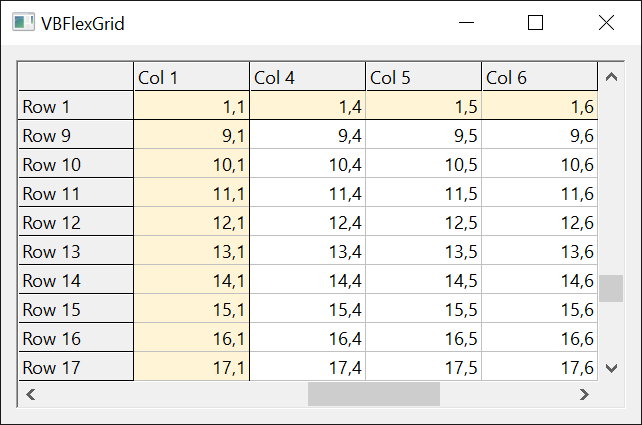
With VBFlexGrid1
    .Rows = 6
    .Cols = 5
    .FixedRows = 1
    .FixedCols = 1
    .FrozenRows = 1
    .FrozenCols = 2
    Debug.Print "Fixed " & .FixedRows & "x" & .FixedCols & ", frozen " & .FrozenRows & "x" & .FrozenCols
    Debug.Print "Row " & .Row & ", Col " & .Col  ' the first cell that scrolls
End With
' Output:
' Fixed 1x1, frozen 1x2
' Row 2, Col 3
Most of the other members work on one row or one column, named by an index. An index that is not a row or a column of the grid raises run-time error 30009 (Invalid Row value) for a row and 30010 (Invalid Col value) for a column. Where a property that takes an index is assigned, the index -1 stands for every row or every column: RowHidden, ColHidden, RowResizable, ColResizable, ColDataCapacity, RowHeight, ColWidth, ClearRowInfo and ClearColInfo take it. The other row and column properties here do not.
Each row and each column can carry data for the program:
- RowData and ColData hold a number, such as a database key.
- RowID holds a whole number that identifies the row, whatever its position, and RowIndex finds the row again from it. ColKey is the same for columns, with a text, and ColIndex finds the column.
- A row that moves, by RowPosition, by sorting or by the user, takes its data and its identifier along.
A row or a column can be hidden. A hidden row or column takes no room, but it stays in the grid and keeps its index; Rows still counts it. The members RowsNonHidden, RowNonHiddenPosition and RowPositionFromNonHidden, and their column counterparts, translate between the index of a row and its position among the rows that are shown. A row whose height is set to 0 looks hidden, but it is not: RowHidden is False for it.
With VBFlexGrid1
    .Rows = 5
    .RowHidden(2) = True
    Debug.Print "Rows " & .Rows & ", shown " & .RowsNonHidden
    Debug.Print "Row 3 is the shown row number " & .RowNonHiddenPosition(3)
    Debug.Print "The shown row number 2 is row " & .RowPositionFromNonHidden(2)
    Debug.Print "Row 2 has no position: " & .RowNonHiddenPosition(2)
End With
' Output:
' Rows 5, shown 4
' Row 3 is the shown row number 2
' The shown row number 2 is row 3
' Row 2 has no position: -1
The text of the header cells can be set in one assignment with FormatString, which also sets the alignment and the width of the columns. The rows below the fixed rows are filled by AddItem, which appends or inserts a row from a tab-separated string, or by the members of Cell Text and Clipboard, Undo and Arrays.
Properties
AllowUserFreezing
Returns or sets whether the user can freeze and unfreeze rows and columns with the mouse. A FlexAllowUserFreezingConstants member. Default: FlexAllowUserFreezingNone.
Syntax: object.AllowUserFreezing [ = value ]
With FlexAllowUserFreezingRows, FlexAllowUserFreezingColumns or FlexAllowUserFreezingBoth, the user can drag the divider between the frozen rows or columns and the scrollable cells to a new row or column. When nothing is frozen, the divider is the edge of the fixed cells. The grid then changes FrozenRows or FrozenCols, moves the current cell to the first scrollable cell, and raises AfterUserFreeze. A value that is not a member of the enumeration raises run-time error 380.
ColData
Returns or sets a number that the program keeps for a column. A LongPtr (a Long in a 32-bit program). Default: 0.
Syntax: object.ColData(Index) [ = value ]
- Index
- required A Long: the column. A column the grid does not have raises run-time error 30010.
The grid does not use the number. It moves with its column when the column is moved, and ClearColInfo resets it to 0.
ColDataCapacity
Returns or sets the data capacity of a column. A Long. Default: 0.
Syntax: object.ColDataCapacity(Index) [ = value ]
- Index
- required A Long: the column. For the assignment, -1 sets every column. A column the grid does not have raises run-time error 30010.
The grid stores the number for the program and does not use it. A grid bound to a recordset (see Data Binding) sets it for each column to the defined size of the field.
ColHidden
Returns or sets whether a column is hidden. Boolean. Default: False.
Syntax: object.ColHidden(Index) [ = value ]
- Index
- required A Long: the column. For the assignment, -1 hides or shows every column. A column the grid does not have raises run-time error 30010.
A hidden column has the width 0 and keeps its index. ColWidth of a hidden column returns 0, whatever its width setting is. A column whose width is set to 0 is not hidden.
ColIndex
Returns the index of the column that has a key. A Long. Read-only: an assignment raises run-time error 383.
Syntax: object.ColIndex(Key)
- Key
- required A String: the key given by ColKey. The comparison ignores the case.
The result is -1 when no column has the key, and for an empty Key. When several columns have the same key, the first one is returned.
ColKey
Returns or sets the key of a column, a name by which a program can find it. A String. Default: an empty string.
Syntax: object.ColKey(Index) [ = value ]
- Index
- required A Long: the column. A column the grid does not have raises run-time error 30010.
A key is a name to use instead of an index that changes when columns are moved: ColIndex returns the current index. A grid bound to a recordset gives each column the name of its field as its key.
ColNonHiddenPosition
Returns the position of a column among the columns that are not hidden. A Long. Read-only.
Syntax: object.ColNonHiddenPosition(Index)
- Index
- required A Long: the column. A column the grid does not have raises run-time error 30010.
The result counts from 0 and skips the hidden columns. It is -1 for a column that is hidden. ColPositionFromNonHidden does the reverse.
ColPosition
Moves a column to a new position. A Long. Write-only: reading it raises run-time error 394.
Syntax: object.ColPosition(Index) = value
- Index
- required A Long: the column to move.
- value
- A Long: the index that the column has after the move. The columns between the old and the new position shift by one.
A column or a value that the grid does not have raises run-time error 381. The column keeps everything that belongs to it: its cells, width, key, alignment, sort settings and data. See also DragCol.
ColPositionFromNonHidden
Returns the index of the column that is at a position among the columns that are not hidden. A Long. Read-only.
Syntax: object.ColPositionFromNonHidden(NonHiddenPosition)
- NonHiddenPosition
- required A Long: a position counted from 0 among the columns that are shown. A value below 0 or past the last column raises run-time error 30010.
The result is -1 when fewer columns than that are shown. ColNonHiddenPosition does the reverse.
Cols
Returns or sets the number of columns, the fixed and the frozen ones included. A Long. Default: 2.
Syntax: object.Cols [ = value ]
Adding columns keeps the cells of the existing ones; removing them loses the cells, the column keys and the formatting of the columns that go. When value is not larger than FixedCols plus FrozenCols, the grid reduces them so that one scrollable column is left: FixedCols becomes value when it is larger than value, and FrozenCols shrinks to fit. The current cell and the selection are moved into the grid when they are past the last column. Setting Cols to 0 removes all the cells and sets FixedCols and FrozenCols to 0; the number of rows does not change. A negative value raises run-time error 30010.
ColsNonHidden
Returns the number of columns that are not hidden. A Long. Read-only.
Syntax: object.ColsNonHidden
FixedCols
Returns or sets the number of fixed columns. A Long. Default: 1.
Syntax: object.FixedCols [ = value ]
Setting it moves the current cell to the first cell that is not fixed or frozen and scrolls the grid to the left. A negative value raises run-time error 30010. A value that leaves no scrollable column, that is a value that is not below Cols minus FrozenCols, raises run-time error 30017 (FixedCols must be at least one less than Cols minus FrozenCols value).
FixedColsVisible
Returns the number of fixed columns that are visible in the control. A Long. Read-only.
Syntax: object.FixedColsVisible [ ( Visibility ) ]
- Visibility
- optional A FlexVisibilityConstants member: FlexVisibilityCompleteOnly (the default) counts only the columns that are shown completely, FlexVisibilityPartialOK counts the ones that are shown in part as well. Another value raises run-time error 380.
When the control is narrower than its fixed columns, the result is smaller than FixedCols.
FixedRows
Returns or sets the number of fixed rows. A Long. Default: 1.
Syntax: object.FixedRows [ = value ]
Setting it moves the current cell to the first cell that is not fixed or frozen and scrolls the grid to the top. A negative value raises run-time error 30009. A value that leaves no scrollable row, that is a value that is not below Rows minus FrozenRows, raises run-time error 30016 (FixedRows must be at least one less than Rows minus FrozenRows value).
FixedRowsVisible
Returns the number of fixed rows that are visible in the control. A Long. Read-only.
Syntax: object.FixedRowsVisible [ ( Visibility ) ]
- Visibility
- optional A FlexVisibilityConstants member: FlexVisibilityCompleteOnly (the default) counts only the rows that are shown completely, FlexVisibilityPartialOK counts the ones that are shown in part as well. Another value raises run-time error 380.
FormatString
Sets up the texts of the fixed row and the fixed column, the alignment of the columns and the widths of the columns in one string. A String. Default: an empty string.
Syntax: object.FormatString [ = value ]
The string has two parts, divided by a semicolon, and each part is a list of entries divided by |:
column headers ; row headers
- The column headers are the texts of row 0, from column 0 on. An entry that starts with
<,^or>aligns the column to the left, center or right (FlexAlignmentLeftCenter, FlexAlignmentCenterCenter, FlexAlignmentRightCenter; see ColAlignment); an entry without one of them leaves the alignment at FlexAlignmentGeneral. The prefix is not part of the text. Each column is made as wide as its entry needs, with the best fit that AutoSize uses, and the grid gets more columns when the string has more entries than the grid has columns. The number of columns is never reduced. - The row headers are the texts of column 0, from row 0 on, and the grid gets more rows when there are more entries than rows. The first entry is the text of the cell in row 0 and column 0, so when the string has a semicolon, the first entry after it replaces the text that the first column header gave to that cell, even if it is empty. Column 0 is widened to fit the longest entry. Entries of this part have no alignment prefixes.
A string without a semicolon sets only the column headers. The string is applied only to a grid that has at least one fixed row; the row headers are applied only when it also has a fixed column. With FixedRows at 0 the string is stored and read back, but nothing is set.
With VBFlexGrid1
    .FormatString = "<Name|^Age|>Score;Table|Ann|Bob"
    Debug.Print .Cols & " columns, " & .Rows & " rows"
    Debug.Print .TextMatrix(0, 0) & "," & .TextMatrix(0, 1) & "," & .TextMatrix(0, 2) & "," & .TextMatrix(1, 0) & "," & .TextMatrix(2, 0)
    Debug.Print .ColAlignment(1) & " " & .ColAlignment(2) & " " & .ColAlignment(0)
End With
' Output:
' 3 columns, 3 rows
' Table,Age,Score,Ann,Bob
' 4 7 1
In the sample, the corner cell holds Table, the first row header, and not Name, the first column header. The alignment < of the first column header still applies to column 0.
FrozenCols
Returns or sets the number of frozen columns. A Long. Default: 0.
Syntax: object.FrozenCols [ = value ]
The frozen columns are the ones after the fixed columns that do not scroll. Setting it moves the current cell to the first scrollable cell. A negative value raises run-time error 30010; a value that leaves no scrollable column raises run-time error 30017 (FrozenCols must be at least one less than Cols minus FixedCols value). See also AllowUserFreezing.
FrozenColsVisible
Returns the number of frozen columns that are visible in the control. A Long. Read-only.
Syntax: object.FrozenColsVisible [ ( Visibility ) ]
- Visibility
- optional As for FixedColsVisible.
FrozenRows
Returns or sets the number of frozen rows. A Long. Default: 0.
Syntax: object.FrozenRows [ = value ]
The frozen rows are the ones after the fixed rows that do not scroll. Setting it moves the current cell to the first scrollable cell. A negative value raises run-time error 30009; a value that leaves no scrollable row raises run-time error 30016 (FrozenRows must be at least one less than Rows minus FixedRows value). See also AllowUserFreezing.
FrozenRowsVisible
Returns the number of frozen rows that are visible in the control. A Long. Read-only.
Syntax: object.FrozenRowsVisible [ ( Visibility ) ]
- Visibility
- optional As for FixedRowsVisible.
RowData
Returns or sets a number that the program keeps for a row. A LongPtr (a Long in a 32-bit program). Default: 0.
Syntax: object.RowData(Index) [ = value ]
- Index
- required A Long: the row. A row the grid does not have raises run-time error 30009.
The grid does not use the number. It moves with its row when the row is moved or sorted, and ClearRowInfo resets it to 0.
RowHidden
Returns or sets whether a row is hidden. Boolean. Default: False.
Syntax: object.RowHidden(Index) [ = value ]
- Index
- required A Long: the row. For the assignment, -1 hides or shows every row. A row the grid does not have raises run-time error 30009.
A hidden row has the height 0 and keeps its index. RowHeight of a hidden row returns 0, whatever its height setting is.
RowID
Returns or sets the identifier of a row. A Variant. Default: 0, which means that the row has no identifier.
Syntax: object.RowID(Index) [ = value ]
- Index
- required A Long: the row. A row the grid does not have raises run-time error 30009.
- value
- A whole number up to 64 bits: a Byte, Integer, Long, Double, Currency or Decimal, or a String that holds a number. A value that does not fit raises run-time error 6, a string that is not a number raises 13 and any other type raises 380. An Empty value sets 0.
The identifier is what RowIndex searches for. It belongs to the row and moves with it. Reading returns a Long when the identifier is in the range of a Long and a Decimal otherwise.
A one-dimensional array assigns the identifiers of several rows at once: its first item goes to row Index, the next one to the next row, and the items that do not fit in the grid are ignored. A multi-dimensional array raises run-time error 5 and an array that has no items yet raises 91.
With VBFlexGrid1
    .Rows = 4
    .RowID(1) = Array(11, 22, 33)
    .TextMatrix(2, 0) = "second"
    .RowPosition(2) = 1       ' row 2 moves up, with its identifier
    Debug.Print .RowIndex(22) & " " & .TextMatrix(1, 0) & " " & .RowID(1)
    Debug.Print .RowIndex(99) & " " & .RowIndex(0)
End With
' Output:
' 1 second 22
' -1 -1
RowIndex
Returns the index of the row that has an identifier. A Long. Read-only: an assignment raises run-time error 383.
Syntax: object.RowIndex(ID)
- ID
- required A Variant: the identifier, a number or a string that holds one, as for RowID.
The result is -1 when no row has the identifier, and for the identifier 0. A value that is not a number raises run-time error 13 and a number that does not fit in 64 bits raises 6.
RowNonHiddenPosition
Returns the position of a row among the rows that are not hidden. A Long. Read-only.
Syntax: object.RowNonHiddenPosition(Index)
- Index
- required A Long: the row. A row the grid does not have raises run-time error 30009.
The result counts from 0 and skips the hidden rows. It is -1 for a row that is hidden. RowPositionFromNonHidden does the reverse.
RowPosition
Moves a row to a new position. A Long. Write-only: reading it raises run-time error 394.
Syntax: object.RowPosition(Index) = value
- Index
- required A Long: the row to move.
- value
- A Long: the index that the row has after the move. The rows between the old and the new position shift by one.
A row or a value that the grid does not have raises run-time error 381. The row keeps everything that belongs to it: its cells, height, hidden state, data and identifier. The fixed rows can be moved too. A multiple selection (see AllowMultiSelection) is cleared. See also DragRow.
With VBFlexGrid1
    .Rows = 4
    .TextMatrix(1, 0) = "one"
    .TextMatrix(2, 0) = "two"
    .TextMatrix(3, 0) = "three"
    .RowPosition(1) = 3
    Debug.Print .TextMatrix(1, 0) & " " & .TextMatrix(2, 0) & " " & .TextMatrix(3, 0)
End With
' Output:
' two three one
RowPositionFromNonHidden
Returns the index of the row that is at a position among the rows that are not hidden. A Long. Read-only.
Syntax: object.RowPositionFromNonHidden(NonHiddenPosition)
- NonHiddenPosition
- required A Long: a position counted from 0 among the rows that are shown. A value below 0 or past the last row raises run-time error 30009.
The result is -1 when fewer rows than that are shown. RowNonHiddenPosition does the reverse.
Rows
Returns or sets the number of rows, the fixed and the frozen ones included. A Long. Default: 2.
Syntax: object.Rows [ = value ]
Adding rows keeps the cells of the existing ones; removing them loses the cells of the rows that go. When value is not larger than FixedRows plus FrozenRows, the grid reduces them so that one scrollable row is left: FixedRows becomes value when it is larger than value, and FrozenRows shrinks to fit. The current cell and the selection are moved into the grid when they are past the last row, and a multiple selection is cleared. Setting Rows to 0 removes all the cells and sets FixedRows and FrozenRows to 0; the number of columns does not change. A negative value raises run-time error 30009.
RowsNonHidden
Returns the number of rows that are not hidden. A Long. Read-only.
Syntax: object.RowsNonHidden
Methods
AddItem
Adds a row to the grid and fills its cells from a string.
Syntax: object.AddItem Item [ , Index ]
- Item
- required A String: the texts of the cells of the new row, from the first column on, divided by the column separator of the grid, a tab character unless ClipSeparatorCol or ClipSeparators says otherwise. A text for a column that the grid does not have is ignored; a column without a text stays empty.
- Index
- optional A Long: the row before which the new row is inserted. The default, and the value Rows, appends the row. A value in the fixed rows raises run-time error 30001 (Cannot use AddItem on a fixed row); a value below 0 or past Rows raises run-time error 30002 (Grid does not contain that row).
The new row has the default height and no identifier, data or formatting. The rows from Index on move down by one, and the numbers of a multiple selection move with them. When ClipMode says so, the entries are converted through the lookups of the columns, and hidden columns are skipped, as Clip does it.
With VBFlexGrid1
    .Rows = 3
    .Cols = 3
    .AddItem "a" & vbTab & "b" & vbTab & "c"                 ' appended as row 3
    .AddItem "x" & vbTab & "y" & vbTab & "z" & vbTab & "w", 1  ' inserted as row 1
    Debug.Print .Rows & " " & .TextMatrix(1, 0) & .TextMatrix(1, 2) & " " & .TextMatrix(4, 1)
    .RemoveItem 1
    Debug.Print .Rows & " " & .TextMatrix(3, 1)
End With
' Output:
' 5 xz b
' 4 b
Clear
Clears the text, the formatting or the user tags of the cells of a part of the grid.
Syntax: object.Clear [ Where [ , What ] ]
- Where
- optional A FlexClearWhereConstants member: the cells to clear. FlexClearEverywhere (the default) is all cells. FlexClearFixed is the fixed rows and the fixed columns, FlexClearScrollable the cells that are neither fixed nor frozen, FlexClearMovable all cells that are not fixed (the frozen ones included), FlexClearFrozen the frozen rows and columns, FlexClearSelection the selected range, and FlexClearClip the cells that Clip covers, which for a hidden row or column depends on ClipMode.
- What
- optional A FlexClearWhatConstants member: what to clear. FlexClearEverything (the default) clears the text, the formatting and the tag. FlexClearText, FlexClearFormatting and FlexClearTag clear one of them.
A value that is not a member of an enumeration raises run-time error 380. The counts of rows and columns, the sizes and the other settings of rows and columns are not changed: ClearRowInfo and ClearColInfo reset those. FlexClearEverything raises run-time error 5 when the grid has a custom data source (see FlexDataSource).
With VBFlexGrid1
    .Rows = 3
    .Cols = 3
    .TextMatrix(0, 1) = "H"
    .TextMatrix(1, 0) = "R"
    .TextMatrix(1, 1) = "a"
    .Clear FlexClearScrollable, FlexClearText
    Debug.Print "[" & .TextMatrix(1, 1) & "][" & .TextMatrix(0, 1) & "][" & .TextMatrix(1, 0) & "]"
    .Clear
    Debug.Print "[" & .TextMatrix(1, 1) & "][" & .TextMatrix(0, 1) & "][" & .TextMatrix(1, 0) & "]"
End With
' Output:
' [][H][R]
' [][][]
ClearColInfo
Resets the settings of a column to their defaults.
Syntax: object.ClearColInfo Index
- Index
- required A Long: the column, or -1 for every column. Any other value that is not a column raises run-time error 30010.
All the settings that the members with a column index keep are reset: the width and the hidden state, ColData, ColKey, the alignment and the formats, the word wrap options, the sort mode and the sort arrow, the combo box and the check box settings, the image list, the lookup and the data type. The cells themselves are not changed.
ClearRowInfo
Resets the settings of a row to their defaults.
Syntax: object.ClearRowInfo Index
- Index
- required A Long: the row, or -1 for every row. Any other value that is not a row raises run-time error 30009.
The height, the hidden state, the setting that tells whether the user can resize the row, RowData and RowID are reset. The cells themselves are not changed.
DragCol
Lets the user drag a column to a new position with the mouse, and returns the position where it was dropped.
Syntax: object.DragCol(Index)
- Index
- required A Long: the column to drag, which must not be a fixed column. A column that is a fixed column or that the grid does not have raises run-time error 381.
This is not an OLE drag-and-drop operation: the method runs its own message loop and returns when the user lets go of the mouse button. Call it while the left or the right mouse button is pressed, for example from the MouseDown event. The drag starts when the mouse has moved a few pixels, and a line shows the position where the column would go. The grid does not move the column. The method returns the index to move it to, which is Index when the mouse button was not pressed, when the user presses the Esc key, and when the button is released outside the control. The result goes to ColPosition: .ColPosition(i) = .DragCol(i).
Calling DragCol or DragRow while another one is still running raises run-time error 5.
DragRow
Lets the user drag a row to a new position with the mouse, and returns the position where it was dropped.
Syntax: object.DragRow(Index)
- Index
- required A Long: the row to drag, which must not be a fixed row. A row that is a fixed row or that the grid does not have raises run-time error 381.
The method works as DragCol does, for a row. The result goes to RowPosition: .RowPosition(i) = .DragRow(i). A multiple selection is cleared by a completed drag.
RemoveItem
Removes a row from the grid.
Syntax: object.RemoveItem Index
- Index
- required A Long: the row to remove. A fixed row raises run-time error 30000 (Cannot do a RemoveItem on a fixed row); a value below 0 or past the last row raises run-time error 30002 (Grid does not contain that row).
The rows below it move up by one and Rows decreases. The current cell and the selection stay inside the grid, and a multiple selection is cleared. Removing the last row removes all the cells.
Events
AfterUserFreeze
Occurs after the user has dragged a freeze divider and the grid has applied the new number of frozen rows or columns. See AllowUserFreezing.
Syntax: object_AfterUserFreeze( )
Private Sub VBFlexGrid1_AfterUserFreeze()
    Debug.Print "Frozen: " & VBFlexGrid1.FrozenRows & " rows, " & VBFlexGrid1.FrozenCols & " columns"
End Sub
See Also
- Sizes and Positions – heights and widths of rows and columns, and best fit
- Selection – the current cell and the selected range
- Scrolling – the scrollable part of the grid
- Sorting and Searching – sorting moves rows and their data
- Clipboard, Undo and Arrays – loading and saving the cells as arrays
- Data Binding – binding a grid to a recordset
- FlexAllowUserFreezingConstants – the freezing modes
- FlexClearWhereConstants – the parts of the grid that Clear works on
- FlexClearWhatConstants – what Clear clears
- FlexVisibilityConstants – complete or partial visibility