Merging Cells
Showing neighbouring cells that hold the same text as one larger cell.
Merging changes only how the grid draws and selects cells. Every cell keeps its own text, and TextMatrix reads and writes the cells one by one as before. Two cells next to each other merge when all of the following hold.
- MergeCells is not FlexMergeCellsNever, which is the default.
- They hold the same text. A cell with no text never merges, and the comparison is case-sensitive.
- For two cells in the same row, the row has MergeRow True. For two cells in the same column, the column has MergeCol True.
The cells that merge form a merged range, a rectangle of cells that the grid draws as one cell. GetMergedRange returns the range that a cell belongs to.
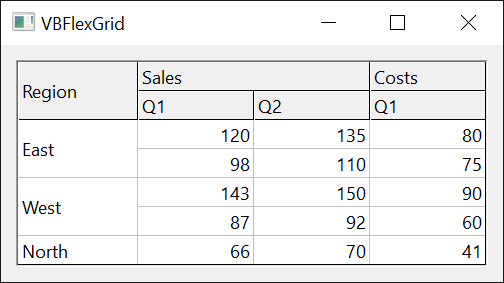
VBFlexGrid1.FixedRows = 1
VBFlexGrid1.FixedCols = 0
VBFlexGrid1.Rows = 4
VBFlexGrid1.Cols = 3
VBFlexGrid1.TextMatrix(0, 0) = "Sales"
VBFlexGrid1.TextMatrix(0, 1) = "Sales"
VBFlexGrid1.TextMatrix(0, 2) = "Costs"
VBFlexGrid1.TextMatrix(1, 0) = "East"
VBFlexGrid1.TextMatrix(2, 0) = "East"
VBFlexGrid1.TextMatrix(3, 0) = "West"
VBFlexGrid1.MergeCells = FlexMergeCellsFree
VBFlexGrid1.MergeRow(0) = True    ' the header row merges across
VBFlexGrid1.MergeCol(0) = True    ' column 0 merges down

Dim r1 As Long, c1 As Long, r2 As Long, c2 As Long
VBFlexGrid1.GetMergedRange 0, 1, r1, c1, r2, c2
Debug.Print r1 & "," & c1 & " to " & r2 & "," & c2   ' 0,0 to 0,1
VBFlexGrid1.GetMergedRange 2, 0, r1, c1, r2, c2
Debug.Print r1 & "," & c1 & " to " & r2 & "," & c2   ' 1,0 to 2,0
VBFlexGrid1.GetMergedRange 3, 0, r1, c1, r2, c2
Debug.Print r1 & "," & c1 & " to " & r2 & "," & c2   ' 3,0 to 3,0
The modes of MergeCells
MergeCells says whether cells merge freely or only where the cells beside them merge as well. The second way groups the cells in a hierarchy, as an outline does. With two columns, Country and City, a row of Paris in France should not merge with a row of Paris in another country, and restricted merging prevents that.
- FlexMergeCellsFree
- Cells of a row with MergeRow merge with equal neighbours in the row, and cells of a column with MergeCol merge with equal neighbours in the column, whatever the cells beside them hold.
- FlexMergeCellsRestrictRows
- Rows merge freely. Two cells of a column merge only if the cells to the left of them are equal too. The first column is never restricted, and neither is the first column after the fixed columns: a scrollable cell is not compared with the fixed cells beside it.
- FlexMergeCellsRestrictColumns
- Columns merge freely. Two cells of a row merge only if the cells above them are equal too. The first row is never restricted, and neither is the first row after the fixed rows: a scrollable cell is not compared with the fixed cells above it.
- FlexMergeCellsRestrictAll
- Both restrictions apply.
- FlexMergeCellsFixedOnly
- Only the fixed cells merge, freely. The scrollable cells never merge.
The following sample shows the merged range of one cell in each mode. The first column holds A, A, B, B and the second column x, y, y, y; both columns have MergeCol. The three y cells merge in the first and third modes. In the second and fourth the y of row 1 stays alone, because the cells to its left, A and B, differ. The last mode merges nothing, since the grid has no fixed rows or columns.
VBFlexGrid1.FixedRows = 0
VBFlexGrid1.FixedCols = 0
VBFlexGrid1.Rows = 4
VBFlexGrid1.Cols = 2
VBFlexGrid1.TextMatrix(0, 0) = "A": VBFlexGrid1.TextMatrix(0, 1) = "x"
VBFlexGrid1.TextMatrix(1, 0) = "A": VBFlexGrid1.TextMatrix(1, 1) = "y"
VBFlexGrid1.TextMatrix(2, 0) = "B": VBFlexGrid1.TextMatrix(2, 1) = "y"
VBFlexGrid1.TextMatrix(3, 0) = "B": VBFlexGrid1.TextMatrix(3, 1) = "y"
VBFlexGrid1.MergeCol(0) = True
VBFlexGrid1.MergeCol(1) = True

Dim mode As Variant, r1 As Long, c1 As Long, r2 As Long, c2 As Long, s As String
For Each mode In Array(FlexMergeCellsFree, FlexMergeCellsRestrictRows, FlexMergeCellsRestrictColumns, FlexMergeCellsRestrictAll, FlexMergeCellsFixedOnly)
    VBFlexGrid1.MergeCells = mode
    VBFlexGrid1.GetMergedRange 2, 1, r1, c1, r2, c2
    s = s & mode & ":" & r1 & "-" & r2 & " "
Next mode
Debug.Print s ' 1:1-3 2:2-3 3:1-3 4:2-3 5:2-2
The modes decide the merging along a row in the same way, with the roles of row and column exchanged. Below a row of three different texts, a row x x x merges in the first two modes, and in the third and fourth it does not, since the cells above it differ.
VBFlexGrid1.FixedRows = 0
VBFlexGrid1.FixedCols = 0
VBFlexGrid1.Rows = 2
VBFlexGrid1.Cols = 3
VBFlexGrid1.TextMatrix(0, 0) = "a": VBFlexGrid1.TextMatrix(0, 1) = "b": VBFlexGrid1.TextMatrix(0, 2) = "c"
VBFlexGrid1.TextMatrix(1, 0) = "x": VBFlexGrid1.TextMatrix(1, 1) = "x": VBFlexGrid1.TextMatrix(1, 2) = "x"
VBFlexGrid1.MergeRow(1) = True

Dim mode As Variant, r1 As Long, c1 As Long, r2 As Long, c2 As Long, s As String
For Each mode In Array(FlexMergeCellsFree, FlexMergeCellsRestrictRows, FlexMergeCellsRestrictColumns, FlexMergeCellsRestrictAll)
    VBFlexGrid1.MergeCells = mode
    VBFlexGrid1.GetMergedRange 1, 1, r1, c1, r2, c2
    s = s & mode & ":" & c1 & "-" & c2 & " "
Next mode
Debug.Print s ' 1:0-2 2:0-2 3:1-1 4:1-1
Fixed rows and columns
A cell of a fixed row or a fixed column merges along its whole row or column. The merging of a fixed header row can therefore span the scrollable columns too, and the merging of a fixed column runs through the fixed rows. A scrollable cell merges only with other scrollable cells, so that a header cell never joins the data below it. The fixed cells follow the modes like the others, and FlexMergeCellsFixedOnly merges them and nothing else. The MergeRow and MergeCol flags are needed for them as well.
VBFlexGrid1.FixedRows = 1
VBFlexGrid1.FixedCols = 1
VBFlexGrid1.Rows = 4
VBFlexGrid1.Cols = 3
Dim i As Long
For i = 0 To 3
    VBFlexGrid1.TextMatrix(i, 0) = "g"   ' the fixed column and its header
    VBFlexGrid1.TextMatrix(i, 1) = "g"
Next i
VBFlexGrid1.MergeCells = FlexMergeCellsFree
VBFlexGrid1.MergeCol(0) = True
VBFlexGrid1.MergeCol(1) = True

Dim r1 As Long, c1 As Long, r2 As Long, c2 As Long
VBFlexGrid1.GetMergedRange 2, 0, r1, c1, r2, c2
Debug.Print r1 & "," & c1 & " to " & r2 & "," & c2   ' 0,0 to 3,0
VBFlexGrid1.GetMergedRange 2, 1, r1, c1, r2, c2
Debug.Print r1 & "," & c1 & " to " & r2 & "," & c2   ' 1,1 to 3,1
Warning 1.8.69.0
With FlexMergeCellsRestrictColumns or FlexMergeCellsRestrictAll, merging along a fixed row, or along a row of a fixed column, compares with the row above the current row (Row) and not with the row above the cell’s own row. When the current row is 0 the restriction is skipped, so that cells merge that the mode should keep apart. When the current row is greater than 0, a cell of row 0 whose neighbour holds the same text makes GetMergedRange raise run-time error 9, Subscript out of range. Use FlexMergeCellsFree or FlexMergeCellsRestrictRows for such a row.
The shape of a range
When a cell merges in its row and in its column, the range is the smallest rectangle that holds both runs. It can include cells with other text. In the next sample the cell at the lower right holds m, and it is inside the range of the cell at the upper left.
VBFlexGrid1.FixedRows = 0
VBFlexGrid1.FixedCols = 0
VBFlexGrid1.Rows = 2
VBFlexGrid1.Cols = 2
VBFlexGrid1.TextMatrix(0, 0) = "k": VBFlexGrid1.TextMatrix(0, 1) = "k"
VBFlexGrid1.TextMatrix(1, 0) = "k": VBFlexGrid1.TextMatrix(1, 1) = "m"
VBFlexGrid1.MergeCells = FlexMergeCellsFree
Dim i As Long
For i = 0 To 1
    VBFlexGrid1.MergeRow(i) = True
    VBFlexGrid1.MergeCol(i) = True
Next i

Dim r1 As Long, c1 As Long, r2 As Long, c2 As Long
VBFlexGrid1.GetMergedRange 0, 0, r1, c1, r2, c2
Debug.Print r1 & "," & c1 & " to " & r2 & "," & c2   ' 0,0 to 1,1
A range that extends over several rows is not extended over several columns through a row that has MergeRow False: MergeCol takes precedence over MergeRow.
VBFlexGrid1.FixedRows = 0
VBFlexGrid1.FixedCols = 0
VBFlexGrid1.Rows = 3
VBFlexGrid1.Cols = 3
VBFlexGrid1.TextMatrix(0, 0) = "z": VBFlexGrid1.TextMatrix(0, 1) = "z"
VBFlexGrid1.TextMatrix(1, 0) = "z": VBFlexGrid1.TextMatrix(1, 1) = "z"
VBFlexGrid1.MergeCells = FlexMergeCellsFree
VBFlexGrid1.MergeRow(0) = True    ' row 1 has no MergeRow
VBFlexGrid1.MergeCol(0) = True
VBFlexGrid1.MergeCol(1) = True

Dim r1 As Long, c1 As Long, r2 As Long, c2 As Long
VBFlexGrid1.GetMergedRange 0, 0, r1, c1, r2, c2
Debug.Print r1 & "," & c1 & " to " & r2 & "," & c2   ' 0,0 to 1,0
VBFlexGrid1.GetMergedRange 1, 1, r1, c1, r2, c2
Debug.Print r1 & "," & c1 & " to " & r2 & "," & c2   ' 0,1 to 1,1
Warning 1.8.69.0
In that situation GetMergedRange gives the cell in row 0 and column 1 the range 0,0 to 1,0, which does not contain it, while the cell below it gets 0,1 to 1,1. To avoid it, give MergeRow True to every row that has cells of a merged column, or to none.
The text of the cells that merge is compared exactly, so that k and K do not merge.
VBFlexGrid1.FixedRows = 0
VBFlexGrid1.FixedCols = 0
VBFlexGrid1.Cols = 2
VBFlexGrid1.TextMatrix(0, 0) = "k": VBFlexGrid1.TextMatrix(0, 1) = "K"
VBFlexGrid1.TextMatrix(1, 0) = "k": VBFlexGrid1.TextMatrix(1, 1) = "k"
VBFlexGrid1.MergeCells = FlexMergeCellsFree
VBFlexGrid1.MergeRow(0) = True
VBFlexGrid1.MergeRow(1) = True
Dim r1 As Long, c1 As Long, r2 As Long, c2 As Long
VBFlexGrid1.GetMergedRange 0, 0, r1, c1, r2, c2
Debug.Print c1 & " to " & c2   ' 0 to 0
VBFlexGrid1.GetMergedRange 1, 0, r1, c1, r2, c2
Debug.Print c1 & " to " & c2   ' 0 to 1
For drawing, a merged range is one cell. Give the formatting to every cell of the range, for example with Cell and its RowSel and ColSel parameters. The grid draws the range with the formatting of its first cell, except that the current cell’s formatting is used while the current cell is inside the range.
Properties
MergeCells
Whether and how cells with the same text are merged.
Syntax: object.MergeCells [ = value ]
A FlexMergeCellsConstants member. Default: FlexMergeCellsNever. Raises 380 for another value. Changing it redraws the grid and changes no text.
MergeCol
Whether the cells of a column merge with the equal cells above and below them.
Syntax: object.MergeCol(Index) [ = value ]
- Index
- required The column, as a Long. Unlike most column properties, -1 is not accepted: set each column.
A Boolean. Default: False. It has an effect only while MergeCells is not FlexMergeCellsNever. Raises 30010 when Index is not a column.
MergeRow
Whether the cells of a row merge with the equal cells to their left and right.
Syntax: object.MergeRow(Index) [ = value ]
- Index
- required The row, as a Long. -1 is not accepted: set each row.
A Boolean. Default: False. It has an effect only while MergeCells is not FlexMergeCellsNever. Raises 30009 when Index is not a row.
Methods
GetMergedRange
Returns the range of merged cells that includes a cell.
Syntax: object.GetMergedRange Row, Col, Row1, Col1, Row2, Col2
- Row, Col
- required The cell, as Long values counted from 0.
- Row1, Col1
- required ByRef Long. Receive the row and column of the top-left cell of the range.
- Row2, Col2
- required ByRef Long. Receive the row and column of the bottom-right cell of the range.
For a cell that is not merged, the range is the cell itself. Raises 381 when Row or Col is outside the grid.
VBFlexGrid1.Rows = 3
VBFlexGrid1.Cols = 3
Dim r1 As Long, c1 As Long, r2 As Long, c2 As Long
VBFlexGrid1.GetMergedRange 2, 1, r1, c1, r2, c2
Debug.Print r1 & "," & c1 & " to " & r2 & "," & c2   ' 2,1 to 2,1
On Error Resume Next
VBFlexGrid1.GetMergedRange 9, 9, r1, c1, r2, c2
Debug.Print Err.Number                                ' 381
See Also
- Cell Text – the text that decides what merges
- Current Cell and Selection – selecting a merged range
- FlexMergeCellsConstants