Check Boxes
Shows a check box in cells, lets the user toggle it, and reports the change.
A cell shows a check box when its state, CellChecked, is not FlexNoCheckBox, or when its column has ColCheckBoxes set. The state is a FlexCheckBoxConstants value:
| State | Value | The cell |
|---|---|---|
| FlexNoCheckBoxEver | -2 | Has no check box, even in a column with ColCheckBoxes. |
| FlexNoCheckBox | -1 | Has no check box of its own. The default. In a column with ColCheckBoxes, the cell shows an unchecked box. |
| FlexUnchecked | 0 | Shows an unchecked box. |
| FlexChecked | 1 | Shows a checked box. |
| FlexGrayed | 2 | Shows a box in the indeterminate state. |
| FlexTextAsCheckBox | 3 | Shows a box that follows the text of the cell: empty text is grayed, any other text is converted to a Boolean and shown checked or unchecked. The text itself is not drawn. |
| FlexDisabledUnchecked, FlexDisabledChecked, FlexDisabledGrayed, FlexDisabledTextAsCheckBox | 4 to 7 | The same four, disabled: the user cannot toggle them. |
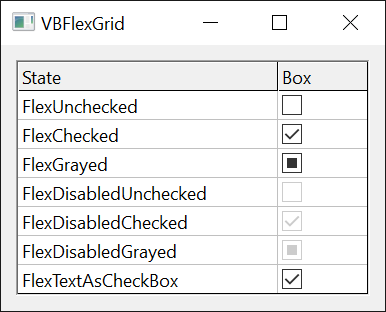
Private Sub Form_Load()
    With VBFlexGrid1
        .ColCheckBoxes(1) = True      ' every cell below the fixed rows of column 1 has a box
        .ColCheckBoxAlignment(1) = FlexCheckBoxAlignmentCenterCenter
    End With
End Sub

Private Sub VBFlexGrid1_CellCheck(ByVal Row As Long, ByVal Col As Long)
    Debug.Print "Row " & Row & " is now " & VBFlexGrid1.TextMatrix(Row, 0)
End Sub
Reading and setting the state
CellChecked reads and sets the state of the current cell, as every property that has “Cell” in its name does. Cell with FlexCellChecked does the same for any cell or range. With FillStyle FlexFillStyleRepeat, an assignment applies to every cell of the selection.
A column with ColCheckBoxes gives the cells of the column below the fixed rows an unchecked box: CellChecked reads 0 for a cell that has no state of its own. A cell of a fixed row has a box only when the program sets its state. Setting the state of a cell to FlexNoCheckBox in such a column puts it back to unchecked, and FlexNoCheckBoxEver removes the box.
A check box can also take its state from a data source: IVBFlexDataSource2 supplies it for the columns that have ColCheckBoxes.
With VBFlexGrid1
    .Rows = 5
    .Cols = 3
    .Row = 1
    .Col = 1
    Debug.Print .CellChecked            ' -1
    .CellChecked = FlexChecked
    Debug.Print .CellChecked            ' 1
    .ColCheckBoxes(2) = True
    .Col = 2
    Debug.Print .CellChecked            ' 0
    .Row = 0
    Debug.Print .CellChecked            ' -1
    .Row = 2
    .CellChecked = FlexNoCheckBoxEver
    Debug.Print .CellChecked            ' -2
    .CellChecked = FlexNoCheckBox
    Debug.Print .CellChecked            ' 0
    .Row = 3
    .CellChecked = FlexDisabledGrayed
    Debug.Print .CellChecked            ' 6
    .FillStyle = FlexFillStyleRepeat
    .Col = 1
    .Row = 3
    .RowSel = 4
    .CellChecked = FlexChecked
    Debug.Print .Cell(FlexCellChecked, 3, 1) & .Cell(FlexCellChecked, 4, 1)   ' 11
    On Error Resume Next
    .CellChecked = 9
    Debug.Print Err.Number              ' 380
End With
What the user does
The user toggles a check box with a click or a double-click on it, or with Space when the cell is the current cell. This needs no AllowUserEditing. A box that is unchecked becomes checked, a checked or grayed box becomes unchecked. A box of FlexTextAsCheckBox keeps its state, because the state is the text: the program changes the text in CellCheck. A disabled box does nothing.
Before the change, the grid raises CellBeforeCheck, which can refuse it. After it, the grid raises CellCheck. A state that code sets with CellChecked raises neither.
The mouse reaches a check box through the hit test (HitTest returns FlexHitResultCheckBox). ColCheckBoxesHitTestInvisible removes the boxes of a column from it: a click on a box is then a click on the cell, and the box is not highlighted when the mouse is over it, but Space still toggles it. The next sample sends Space to the grid’s window with SendKey, a procedure that sends a key-down message in place of the keyboard.
Class CheckWatcher
    Private WithEvents Grid As VBFLXGRD18.VBFlexGrid
    Private mLog As String

    Public Refuse As Boolean    ' CellBeforeCheck refuses the change

    Public Sub Attach(ByVal G As VBFLXGRD18.VBFlexGrid)
        Set Grid = G
    End Sub

    ' Returns the events logged so far, and clears the log.
    Public Function Take() As String
        Take = Trim$(mLog)
        mLog = ""
    End Function

    Private Sub Grid_CellBeforeCheck(ByVal Row As Long, ByVal Col As Long, ByVal Reason As FlexCellCheckReasonConstants, ByRef Cancel As Boolean)
        mLog &= " Before(" & Row & "," & Col & "," & Reason & ")"
        Cancel = Refuse
    End Sub
    Private Sub Grid_CellCheck(ByVal Row As Long, ByVal Col As Long)
        mLog &= " Check(" & Row & "," & Col & ")"
    End Sub
End Class
Form1.Show
DoEvents
Dim W As New CheckWatcher
W.Attach VBFlexGrid1
With VBFlexGrid1
    .Rows = 4
    .Cols = 4
    .ColCheckBoxes(1) = True
    .Row = 1
    .Col = 1
    .SetFocus
    SendKey VBFlexGrid1, vbKeySpace
    Debug.Print .CellChecked & " " & W.Take()   ' 1 Before(1,1,1) Check(1,1)
    SendKey VBFlexGrid1, vbKeySpace
    Debug.Print .CellChecked                    ' 0
    .CellChecked = FlexGrayed
    SendKey VBFlexGrid1, vbKeySpace
    Debug.Print .CellChecked                    ' 0
    W.Take
    W.Refuse = True
    SendKey VBFlexGrid1, vbKeySpace
    Debug.Print .CellChecked & " " & W.Take()   ' 0 Before(1,1,1)
    W.Refuse = False
    .CellChecked = FlexDisabledChecked
    SendKey VBFlexGrid1, vbKeySpace
    Debug.Print .CellChecked & " [" & W.Take() & "]"   ' 5 []
    .TextMatrix(1, 1) = "1"
    .CellChecked = FlexTextAsCheckBox
    SendKey VBFlexGrid1, vbKeySpace
    Debug.Print .CellChecked & .TextMatrix(1, 1) & " " & W.Take()   ' 31 Before(1,1,1) Check(1,1)
    .CellChecked = FlexUnchecked
    .ColCheckBoxesHitTestInvisible(1) = True
    SendKey VBFlexGrid1, vbKeySpace
    Debug.Print .CellChecked & " " & W.Take()   ' 1 Before(1,1,1) Check(1,1)
End With
The last line shows that the key still works in a column whose boxes the mouse cannot reach. When AllowUserEditing is True, Space toggles a cell that has a check box, and starts an edit in a cell that has none.
Properties
CellChecked
The check box state of the current cell. A FlexCheckBoxConstants value. Default FlexNoCheckBox.
Syntax: object.CellChecked [ = value ]
Reading a cell of a column with ColCheckBoxes, below the fixed rows, returns 0 (FlexUnchecked) for a cell with no state of its own. With FillStyle FlexFillStyleRepeat, an assignment applies to the selection. Raises error 30009 or 30010 when there is no current cell, and error 380 for a value that is not a member of the enumeration.
CheckBoxDrawMode
Who draws the check boxes. A FlexCheckBoxDrawModeConstants value. Default FlexCheckBoxDrawModeNormal.
Syntax: object.CheckBoxDrawMode [ = value ]
With FlexCheckBoxDrawModeOwnerDraw, the grid raises CheckBoxOwnerDraw for each check box that it draws. Error 380 for any other value.
ColCheckBoxAlignment
Where the check boxes of a column are in their cells. A FlexCheckBoxAlignmentConstants value. Default FlexCheckBoxAlignmentUsePictureAlignment.
Syntax: object.ColCheckBoxAlignment( Index ) [ = value ]
- Index
- required A Long. The column, or -1 to set every column.
The nine positions put the box at the left, the centre or the right, and at the top, the middle or the bottom of the cell. FlexCheckBoxAlignmentUsePictureAlignment puts it at the left, the centre or the right, in the middle, as the alignment of the picture of the cell says (CellPictureAlignment). Text moves to make room for a box at the left or the right. Error 30004 for an invalid column, error 30005 for an invalid alignment.
ColCheckBoxes
Whether the cells of a column have a check box. Boolean. Default False.
Syntax: object.ColCheckBoxes( Index ) [ = value ]
- Index
- required A Long. The column, or -1 to set every column.
The cells below the fixed rows show an unchecked box unless they have a state of their own, and FlexNoCheckBoxEver removes it. The fixed rows are not affected. Error 30010 for an invalid column.
ColCheckBoxesHitTestInvisible
Whether the mouse ignores the check boxes of a column. Boolean. Default False.
Syntax: object.ColCheckBoxesHitTestInvisible( Index [, DisabledOnly ] ) [ = value ]
- Index
- required A Long. The column, or -1 to set every column.
- DisabledOnly
- optional A Boolean, passed by reference. Reading sets it to the second flag of the column; in an assignment it chooses the second flag. Default False.
The two flags, the value and DisabledOnly, decide which boxes the mouse ignores. A box that the mouse ignores is not highlighted, and a click on it is a click on the cell. The boxes are not hidden, and Space still toggles them.
| Value | DisabledOnly | The mouse ignores |
|---|---|---|
| False | False | None of the boxes. |
| True | False | All of the boxes. |
| True | True | The disabled boxes only. |
| False | True | The boxes that are not disabled only. |
This is useful for boxes that only show a value, such as FlexTextAsCheckBox, where a click should select the cell. The property is for the cells below the fixed rows and right of the fixed columns; ColCheckBoxesHitTestInvisibleFixed is the same for the others. Error 30010 for an invalid column.
Dim DisabledOnly As Boolean
With VBFlexGrid1
    .Cols = 3
    .ColCheckBoxesHitTestInvisible(1, True) = True
    Debug.Print .ColCheckBoxesHitTestInvisible(1, DisabledOnly) & " " & DisabledOnly   ' True True
    .ColCheckBoxesHitTestInvisible(1) = True
    Debug.Print .ColCheckBoxesHitTestInvisible(1, DisabledOnly) & " " & DisabledOnly   ' True False
End With
ColCheckBoxesHitTestInvisibleFixed
Whether the mouse ignores the check boxes of the fixed cells of a column. Boolean. Default False.
Syntax: object.ColCheckBoxesHitTestInvisibleFixed( Index [, DisabledOnly ] ) [ = value ]
As ColCheckBoxesHitTestInvisible, for the cells of the fixed rows and of the fixed columns.
FixedCheckBoxAlignment
Where the check boxes of the fixed cells of a column are in their cells. A FlexCheckBoxAlignmentConstants value, or -1 to follow ColCheckBoxAlignment. Default -1.
Syntax: object.FixedCheckBoxAlignment( Index ) [ = value ]
- Index
- required A Long. The column, or -1 to set every column.
Reading returns the value of ColCheckBoxAlignment while the column has none of its own. Error 30004 for an invalid column, error 30005 for an invalid alignment.
With VBFlexGrid1
    .Cols = 3
    Debug.Print .ColCheckBoxAlignment(1) & " " & .FixedCheckBoxAlignment(1) & " " & .CheckBoxDrawMode   ' 9 9 0
    .ColCheckBoxAlignment(1) = FlexCheckBoxAlignmentRightCenter
    Debug.Print .ColCheckBoxAlignment(1) & " " & .FixedCheckBoxAlignment(1)   ' 7 7
    .FixedCheckBoxAlignment(1) = FlexCheckBoxAlignmentLeftTop
    Debug.Print .ColCheckBoxAlignment(1) & " " & .FixedCheckBoxAlignment(1)   ' 7 0
    On Error Resume Next
    .ColCheckBoxAlignment(1) = 99
    Debug.Print Err.Number   ' 30005
End With
Events
CellBeforeCheck
Occurs when the user is about to toggle a check box.
Syntax: object_CellBeforeCheck( Row As Long, Col As Long, Reason As FlexCellCheckReasonConstants, Cancel As Boolean )
- Row, Col
- The cell.
- Reason
- A FlexCellCheckReasonConstants value: FlexCellCheckReasonMouse or FlexCellCheckReasonKeyboard.
- Cancel
- Set to True to refuse the change. CellCheck is then not raised.
It occurs for a box that can be toggled, and for FlexTextAsCheckBox; a disabled box raises nothing.
CellCheck
Occurs after the user has toggled a check box.
Syntax: object_CellCheck( Row As Long, Col As Long )
For a box of FlexTextAsCheckBox the state did not change, and the handler changes the text of the cell to the new state.
CheckBoxOwnerDraw
Occurs when a check box is to be drawn and CheckBoxDrawMode is FlexCheckBoxDrawModeOwnerDraw.
Syntax: object_CheckBoxOwnerDraw( Row As Long, Col As Long, Cancel As Boolean, ItemState As Long, hDC As Long, Left As Long, Top As Long, Right As Long, Bottom As Long )
- Row, Col
- The cell.
- Cancel
- False, as the event starts, means that the handler draws the check box. Set it to True to let the grid draw it.
- ItemState
- A bit mask of the Windows
ODS_flags:ODS_CHECKED(8) for a checked box,ODS_GRAYED(2) for a grayed one,ODS_DISABLED(4) for a disabled one,ODS_HOTLIGHT(&H40) while the mouse is over the box. A FlexTextAsCheckBox box is passed in the state that its text gives. - hDC
- The device context to draw in. Its origin is the top left corner of the box.
- Left, Top, Right, Bottom
- The rectangle of the box, in pixels.
See Also
- Editing Cells – Space starts an edit in a cell that has no check box
- Drop-Down Lists, Buttons and Calendars
- Cell Text – Cell with FlexCellChecked
- FlexCheckBoxConstants enumeration
- FlexCheckBoxAlignmentConstants enumeration
- FlexCheckBoxDrawModeConstants enumeration
- FlexCellCheckReasonConstants enumeration