Sorting and Searching
Sorting the rows of a grid by code, drawing sort arrows in the column headers, comparing rows with a handler of your own, finding a cell by its text or its tag, and the search that the user starts by typing.
Sorting rows
The control sorts when the program asks it to, by setting Sort. It never sorts because the user clicked a header: a program that wants that handles the click (CellClick), sorts the rows and sets the sort arrow of the column itself.
Sort works on the current selection:
- The rows to sort are those from Row to RowSel. When both are the same row, which is the case after any assignment to Row, the sort covers all rows that are not fixed rows.
- The keys are the columns from Col to ColSel. The leftmost column is the primary key; rows that are equal in it are ordered by the next column, and so on.
- The sort is stable: rows that are equal in every key column keep their order, also in a descending sort.
- A row moves with everything it holds: its text, its cell formatting, its tags, its RowData value, its height and whether it is hidden.
An assignment to Row also sets RowSel, and an assignment to Col also sets ColSel. To sort a range of rows, assign Row and Col first and RowSel and ColSel after them, or use SelectRange, which sets all four.
With VBFlexGrid1
    .FixedRows = 1: .FixedCols = 0
    .Rows = 5: .Cols = 2
    .TextMatrix(0, 0) = "Name": .TextMatrix(0, 1) = "Qty"
    .TextMatrix(1, 0) = "bolt": .TextMatrix(1, 1) = "10"
    .TextMatrix(2, 0) = "washer": .TextMatrix(2, 1) = "9"
    .TextMatrix(3, 0) = "gear": .TextMatrix(3, 1) = "100"
    .TextMatrix(4, 0) = "nut": .TextMatrix(4, 1) = "2"

    .SelectRange 1, 1, 1, 1             ' one row, so all rows that are not fixed
    .Sort = FlexSortNumericAscending     ' the key is column 1

    Dim Row As Long
    For Row = 1 To 4
        Debug.Print .TextMatrix(Row, 0) & " " & .TextMatrix(Row, 1)
    Next
End With
' Output:
' nut 2
' washer 9
' bolt 10
' gear 100
The table lists the sort modes. Ascending and Descending modes are pairs of values of FlexSortConstants.
| Mode | The cells are compared as |
|---|---|
| FlexSortGenericAscending, FlexSortGenericDescending | Numbers when both cells of a pair are numeric, otherwise text by character code, so that uppercase letters come before lowercase ones. |
| FlexSortNumericAscending, FlexSortNumericDescending | Numbers. A cell that is not a number counts as 0. |
| FlexSortStringAscending, FlexSortStringDescending | Text, by the Windows rules for the language of the user, with case taken into account (so that a comes before A). |
| FlexSortStringNoCaseAscending, FlexSortStringNoCaseDescending | Text, by the same rules, with case ignored. |
| FlexSortCurrencyAscending, FlexSortCurrencyDescending | Currency values. A cell that is not a number counts as 0. |
| FlexSortDateAscending, FlexSortDateDescending | Dates. A cell that is not a date counts as 0, which is the earliest. |
| FlexSortCustom | The Compare event decides, for two rows. |
| FlexSortCustomText | The CompareText event decides, for the text of two cells. |
| FlexSortUseColSort | The mode that ColSort gives each key column. |
Numbers are read with the decimal separator of the user, so a decimal number in a cell can be 0 on a computer with another language setting. The same applies to dates written in a form other than year-month-day.
Dim Modes As Variant, Names As Variant, i As Long, Row As Long, Line As String
Modes = Array(FlexSortGenericAscending, FlexSortStringAscending, FlexSortNumericDescending, FlexSortDateAscending)
Names = Array("generic", "string", "numeric desc", "date")

With VBFlexGrid1
    .FixedRows = 0: .FixedCols = 0
    .Rows = 4: .Cols = 1
    For i = 0 To 3
        ' Numbers that look like dates: the text "2026-11-12" is a date, "100" a number
        If i < 3 Then
            .TextMatrix(0, 0) = "10": .TextMatrix(1, 0) = "9": .TextMatrix(2, 0) = "100": .TextMatrix(3, 0) = "2"
        Else
            .TextMatrix(0, 0) = "2026-11-12": .TextMatrix(1, 0) = "2025-03-01": .TextMatrix(2, 0) = "2026-01-30": .TextMatrix(3, 0) = "n/a"
        End If
        .SelectRange 0, 0, 0, 0
        .Sort = Modes(i)
        Line = ""
        For Row = 0 To 3: Line = Line & .TextMatrix(Row, 0) & " ": Next
        Debug.Print Names(i) & ": " & Line
    Next
End With
' Output:
' generic: 2 9 10 100
' string: 10 100 2 9
' numeric desc: 100 10 9 2
' date: n/a 2025-03-01 2026-01-30 2026-11-12
Note 1.8.69.0
FlexSortGenericAscending and FlexSortGenericDescending compare strings and numbers only. Dates are compared as text, which MSFlexGrid does not do; use FlexSortDateAscending or FlexSortDateDescending for a column of dates. A column that mixes numbers and text has no reliable order in a generic sort, since a number is compared with a number as a number and with text as text.
Sorting by several columns
With more than one key column, the leftmost is the primary key.
With VBFlexGrid1
    .FixedRows = 0: .FixedCols = 0
    .Rows = 4: .Cols = 2
    .TextMatrix(0, 0) = "b": .TextMatrix(0, 1) = "1"
    .TextMatrix(1, 0) = "a": .TextMatrix(1, 1) = "2"
    .TextMatrix(2, 0) = "a": .TextMatrix(2, 1) = "1"
    .TextMatrix(3, 0) = "b": .TextMatrix(3, 1) = "2"

    .SelectRange 0, 0, 3, 1                  ' all rows, key columns 0 and 1
    .Sort = FlexSortStringAscending

    Dim Row As Long
    For Row = 0 To 3
        Debug.Print .TextMatrix(Row, 0) & .TextMatrix(Row, 1)
    Next
End With
' Output:
' a1
' a2
' b1
' b2
To sort only some rows, select them. The rows outside the selection stay where they are.
With VBFlexGrid1
    .FixedRows = 0: .FixedCols = 0
    .Rows = 5: .Cols = 1
    .TextMatrix(0, 0) = "e": .TextMatrix(1, 0) = "d": .TextMatrix(2, 0) = "c": .TextMatrix(3, 0) = "b": .TextMatrix(4, 0) = "a"

    .SelectRange 1, 0, 3, 0                  ' rows 1 to 3
    .Sort = FlexSortStringAscending

    Dim Row As Long, Line As String
    For Row = 0 To 4: Line = Line & .TextMatrix(Row, 0): Next
    Debug.Print Line
End With
' Output:
' ebcda
Sorting each column in its own way
A different mode for each key column is set with ColSort, and FlexSortUseColSort makes Sort use it.
With VBFlexGrid1
    .FixedRows = 0: .FixedCols = 0
    .Rows = 4: .Cols = 2
    .TextMatrix(0, 0) = "b": .TextMatrix(0, 1) = "1"
    .TextMatrix(1, 0) = "a": .TextMatrix(1, 1) = "2"
    .TextMatrix(2, 0) = "a": .TextMatrix(2, 1) = "1"
    .TextMatrix(3, 0) = "b": .TextMatrix(3, 1) = "2"

    .ColSort(0) = FlexSortStringAscending     ' column 0 up
    .ColSort(1) = FlexSortNumericDescending   ' column 1 down

    .SelectRange 0, 0, 3, 1
    .Sort = FlexSortUseColSort

    Dim Row As Long
    For Row = 0 To 3
        Debug.Print .TextMatrix(Row, 0) & .TextMatrix(Row, 1)
    Next
End With
' Output:
' a2
' a1
' b2
' b1
Sorting what the user sees
A column can hold values that its ColLookup or ColFormat shows as other text. The sort compares the stored text, unless the column’s ColSortMode is FlexSortModeTextDisplay, which compares the displayed text.
With VBFlexGrid1
    .FixedRows = 0: .FixedCols = 0
    .Rows = 3: .Cols = 1
    .ColLookup(0) = "1;zebra|2;ant|3;mule"     ' the cells hold 1, 2 and 3
    .TextMatrix(0, 0) = "1": .TextMatrix(1, 0) = "2": .TextMatrix(2, 0) = "3"

    .SelectRange 0, 0, 0, 0
    .Sort = FlexSortStringAscending             ' by stored text: 1 2 3
    Debug.Print .TextMatrix(0, 0) & .TextMatrix(1, 0) & .TextMatrix(2, 0)

    .ColSortMode(0) = FlexSortModeTextDisplay
    .Sort = FlexSortStringAscending             ' by displayed text: ant, mule, zebra
    Debug.Print .TextMatrix(0, 0) & .TextMatrix(1, 0) & .TextMatrix(2, 0)
End With
' Output:
' 123
' 231
Sorting with a handler of your own
FlexSortCustom raises Compare for pairs of rows, and FlexSortCustomText raises CompareText for the text of two cells. The handler sets Cmp: a negative number puts the first of the two before the second, a positive number puts it after, and 0 means they are equal. The sort is a merge sort that makes about n times log n comparisons, and it does not change the grid until it has finished, so a Compare handler can read the text of both rows with TextMatrix.
Class LengthSorter
    Private WithEvents Grid As VBFLXGRD18.VBFlexGrid

    Public Sub Attach(ByVal G As VBFLXGRD18.VBFlexGrid)
        Set Grid = G
    End Sub

    ' Short text first; text of the same length in alphabetical order.
    Private Sub Grid_Compare(ByVal Row1 As Long, ByVal Row2 As Long, ByVal Col As Long, Cmp As Long)
        Dim A As String, B As String
        A = Grid.TextMatrix(Row1, Col)
        B = Grid.TextMatrix(Row2, Col)
        If Len(A) <> Len(B) Then
            Cmp = Len(A) - Len(B)
        Else
            Cmp = StrComp(A, B, vbTextCompare)
        End If
    End Sub

    ' Used by FlexSortCustomText: long text first.
    Private Sub Grid_CompareText(ByVal Text1 As String, ByVal Text2 As String, ByVal Col As Long, Cmp As Long)
        Cmp = Len(Text2) - Len(Text1)
    End Sub
End Class
Dim Sorter As New LengthSorter
Sorter.Attach VBFlexGrid1

With VBFlexGrid1
    .FixedRows = 0: .FixedCols = 0
    .Rows = 5: .Cols = 1
    .TextMatrix(0, 0) = "ccc": .TextMatrix(1, 0) = "a": .TextMatrix(2, 0) = "bb": .TextMatrix(3, 0) = "dddd": .TextMatrix(4, 0) = "aa"
    .SelectRange 0, 0, 0, 0

    Dim Row As Long, Line As String
    .Sort = FlexSortCustom
    For Row = 0 To 4: Line = Line & .TextMatrix(Row, 0) & " ": Next
    Debug.Print Line

    Line = ""
    .Sort = FlexSortCustomText
    For Row = 0 To 4: Line = Line & .TextMatrix(Row, 0) & " ": Next
    Debug.Print Line
End With
' Output:
' a aa bb ccc dddd
' dddd ccc aa bb a
The second line shows that the sort is stable: after the first sort aa stood before bb, and the two have the same length, so CompareText leaves them in that order.
In the form of a program, the handler belongs to the grid on the form:
Private Sub VBFlexGrid1_Compare(ByVal Row1 As Long, ByVal Row2 As Long, ByVal Col As Long, Cmp As Long)
    Cmp = StrComp(VBFlexGrid1.TextMatrix(Row1, Col), VBFlexGrid1.TextMatrix(Row2, Col), vbTextCompare)
End Sub
Sort arrows
A sort arrow is a small triangle in a column header that shows the direction in which the column is sorted. The control draws it where the program asks and never sets it by itself: ColSortArrow chooses the arrow of a column and RowSortArrows the fixed row that holds the arrows (row 0 unless it is changed). ColSortArrowAlignment puts it at the right or at the left of the text, and SortArrowColor and ColSortArrowColor set its color.
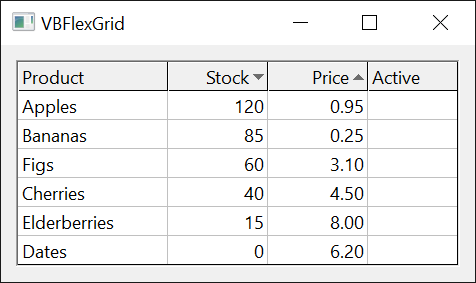
With VBFlexGrid1
    .FixedRows = 1: .FixedCols = 0
    .Rows = 5: .Cols = 3
    .TextMatrix(0, 0) = "Name": .TextMatrix(0, 1) = "Qty": .TextMatrix(0, 2) = "Price"

    .SelectRange 1, 1, 1, 1
    .Sort = FlexSortNumericDescending          ' sorts by column 1

    .ColSortArrow(-1) = FlexSortArrowNone      ' -1 is every column
    .ColSortArrow(1) = FlexSortArrowDescending
    .SortArrowColor = vbBlue
End With
Sort errors
Sort raises error 380 for a value that is not in FlexSortConstants, and error 5 when the grid shows a FlexDataSource. It does nothing, and raises no error, when the grid has no cells.
Finding cells
FindItem finds a cell by its text and FindTag by its tag. Each searches along one column (down or up, from a row) or along one row (right or left, from a column) and returns the row or column number of the first match, or -1. They do not move the selection or scroll the grid.
With VBFlexGrid1
    .FixedRows = 1: .FixedCols = 0
    .Rows = 6: .Cols = 2
    .TextMatrix(1, 0) = "Apple": .TextMatrix(2, 0) = "pear": .TextMatrix(3, 0) = "APPLE": .TextMatrix(4, 0) = "plum": .TextMatrix(5, 0) = "apple"

    Debug.Print .FindItem("apple")                                  ' not case sensitive
    Debug.Print .FindItem("apple", , , , True)                      ' case sensitive
    Debug.Print .FindItem("pl", , , FlexFindMatchStartsWith)
    Debug.Print .FindItem("pear", 3)                                ' from row 3 down: not there
    Debug.Print .FindItem("pear", 3, , , , , True)                  ' with wrap, it starts again at the top
    Debug.Print .FindItem("apple", 5, , , , , , FlexFindDirectionUp) ' up from row 5
End With
' Output:
' 1
' 5
' 4
' -1
' 2
' 5
Tags are stored with CellTag. A tag of a number type is found by a number, so that FindTag can find the row of a record by its key.
With VBFlexGrid1
    .FixedRows = 1: .FixedCols = 0
    .Rows = 4: .Cols = 1
    .Cell(FlexCellTag, 1, 0) = 1001
    .Cell(FlexCellTag, 2, 0) = 1002
    .Cell(FlexCellTag, 3, 0) = "invoice"

    Debug.Print .FindTag(1002)
    Debug.Print .FindTag("invoice")
    Debug.Print .FindTag(1002.5)
End With
' Output:
' 2
' 3
' -1
Searching by typing
When AllowIncrementalSearch is True, the characters that the user types in the grid search the column of the current cell. Each character is added to the search text, which can be read in IncrementalSearchString, and the current cell moves to the first cell, at or below the current one and wrapping at the end of the column, whose text starts with the search text. The matching start of the text is highlighted. Backspace removes the last character. Enter, Escape, a click, a movement key and the loss of the focus end the search, and so does a pause of IncrementalSearchTime. A space does not begin a search, but is part of the search text once the search has begun.
In a grid whose SelectionMode is by column, the search goes along the current row to the right. When AllowIncrementalSearch is False and AllowUserEditing is True, a character typed in the grid starts the editing of the cell instead.
Three events follow a search. BeginIncrementalSearch comes with the first character, and can set where the search starts and how it compares. IncrementalSearch comes with each character, and EndIncrementalSearch when the search is over.
Class SearchLog
    Private WithEvents Grid As VBFLXGRD18.VBFlexGrid
    Public Log As String

    Public Sub Attach(ByVal G As VBFLXGRD18.VBFlexGrid)
        Set Grid = G
    End Sub

    Private Sub Grid_IncrementalSearch(ByVal Row As Long, ByVal Col As Long, ByVal CharCode As Long, ByVal CaseSensitive As Boolean, ByVal NoWrap As Boolean, ByVal Direction As FlexFindDirectionConstants, ByVal FoundIndex As Long)
        Log = Log & "[" & ChrW(CharCode) & " found " & FoundIndex & "] "
    End Sub

    Private Sub Grid_EndIncrementalSearch(ByVal Row As Long, ByVal Col As Long)
        Log = Log & "[end " & Row & "," & Col & "] "
    End Sub
End Class

Module SearchKeys
    Private Declare PtrSafe Function SendMessageW Lib "user32" (ByVal hWnd As LongPtr, ByVal Msg As Long, ByVal wParam As LongPtr, ByVal lParam As LongPtr) As LongPtr
    Private Declare PtrSafe Sub Sleep Lib "kernel32" (ByVal Milliseconds As Long)

    ' Sends the character to the control as if the user had typed it.
    Public Sub TypeChar(ByVal hWnd As LongPtr, ByVal Ch As String)
        Const WM_CHAR As Long = &H102
        SendMessageW hWnd, WM_CHAR, AscW(Ch), 0
    End Sub

    Public Sub WaitFor(ByVal Milliseconds As Long)
        Dim i As Long
        For i = 1 To Milliseconds \ 20
            DoEvents
            Sleep 20
        Next
    End Sub
End Module
Dim Watcher As New SearchLog
Watcher.Attach VBFlexGrid1

With VBFlexGrid1
    .FixedRows = 1: .FixedCols = 0
    .Rows = 6: .Cols = 1
    .TextMatrix(1, 0) = "apple": .TextMatrix(2, 0) = "apricot": .TextMatrix(3, 0) = "banana": .TextMatrix(4, 0) = "cherry": .TextMatrix(5, 0) = "cranberry"
    .AllowIncrementalSearch = True
    .IncrementalSearchTime = 400
    .SelectRange 1, 0, 1, 0

    TypeChar .hWnd, "c"
    Debug.Print .Row & " " & .IncrementalSearchString
    TypeChar .hWnd, "r"
    Debug.Print .Row & " " & .IncrementalSearchString
    TypeChar .hWnd, "x"                       ' nothing starts with "crx"
    Debug.Print .Row & " " & .IncrementalSearchString

    WaitFor 1200                              ' longer than IncrementalSearchTime
    Debug.Print .Row & " [" & .IncrementalSearchString & "] " & .IncrementalSearchRow
End With
Debug.Print Watcher.Log
' Output:
' 4 c
' 5 cr
' 5 cr
' 5 [] -1
' [c found 4] [r found 5] [x found -1] [end 5,0]
Private Sub VBFlexGrid1_BeginIncrementalSearch(Row As Long, Col As Long, CaseSensitive As Boolean, NoWrap As Boolean, Direction As FlexFindDirectionConstants, Cancel As Boolean)
    CaseSensitive = True        ' "A" no longer finds "apple"
    NoWrap = True               ' the search does not start again at the top
End Sub
Properties
AllowIncrementalSearch
Whether typing searches the grid.
Syntax: object.AllowIncrementalSearch [ = value ]
A Boolean. Default: False. Setting it to False while a search is running ends the search. See Searching by typing.
ColSort
The sort mode of a column, used when Sort is FlexSortUseColSort.
Syntax: object.ColSort ( Index ) [ = value ]
- Index
- required A Long, the column. When -1 is used to set the property, every column is set. The property cannot be read with -1.
A value of FlexSortConstants other than FlexSortUseColSort, which is an error (380). Default: FlexSortNone, which leaves the order of the rows as it is for that key. An Index outside the columns raises error 30010.
ColSortArrow
The sort arrow in the header of a column.
Syntax: object.ColSortArrow ( Index ) [ = value ]
- Index
- required A Long, the column. -1 sets every column.
A value of FlexSortArrowConstants: FlexSortArrowNone (the default), FlexSortArrowAscending or FlexSortArrowDescending. The arrow is drawn in the row given by RowSortArrows, and only when that row is a fixed row. It does not change the order of the rows.
ColSortArrowAlignment
Whether the sort arrow of a column is drawn at the right or at the left of the header text.
Syntax: object.ColSortArrowAlignment ( Index ) [ = value ]
- Index
- required A Long, the column. -1 sets every column.
A value of FlexLeftRightAlignmentConstants. Default: FlexLeftRightAlignmentRight.
ColSortArrowColor
The color of the sort arrow of a column.
Syntax: object.ColSortArrowColor ( Index ) [ = value ]
- Index
- required A Long, the column. -1 sets every column.
A Long color. A column that has no color of its own, which is the case until a value is set, shows and returns the color of SortArrowColor. Setting the value -1 gives a column back to SortArrowColor.
ColSortMode
Whether a sort of the column compares the text that is stored in the cells or the text that the column shows.
Syntax: object.ColSortMode ( Index ) [ = value ]
- Index
- required A Long, the column. -1 sets every column.
A value of FlexSortModeConstants. FlexSortModeNormal (the default) compares the stored text. FlexSortModeTextDisplay compares the text after ColLookup and ColFormat have been applied to it. The mode applies to every sort except FlexSortCustom, where the Compare event decides.
IncrementalSearchCol
The column of the cell that shows the highlight of a search.
Syntax: object.IncrementalSearchCol
A read-only Long: the column of the cell that holds the text found by the running search, or -1 when no search is running.
IncrementalSearchRow
The row of the cell that shows the highlight of a search.
Syntax: object.IncrementalSearchRow
A read-only Long: the row of the cell that holds the text found by the running search, or -1 when no search is running.
IncrementalSearchString
The text that the user has typed in the running search.
Syntax: object.IncrementalSearchString
A read-only String, empty when no search is running.
IncrementalSearchTime
The time in milliseconds that a search waits for the next character before it ends.
Syntax: object.IncrementalSearchTime [ = value ]
A Long from 0 to 65535, or -1 (the default), which is twice the double-click time of the user, normally 1000 milliseconds. A value outside the range raises error 380.
RowSortArrows
The row that holds the sort arrows.
Syntax: object.RowSortArrows [ = value ]
A Long. Default: 0, the first row. The arrows are drawn only when this row is a fixed row. A negative value raises error 380.
Sort
Sorts the selected rows. The property can only be set.
Syntax: object.Sort = value
A value of FlexSortConstants. FlexSortNone does nothing. Reading the property raises error 394, and a value that is not in the enumeration raises error 380. When a FlexDataSource is set and its flags do not include FlexDataSourceNoData, the property raises error 5. See Sorting rows.
Setting Cell with FlexCellSort does the same as setting this property.
A sort clears a selection of several separate rows (see AllowMultiSelection).
SortArrowColor
The color of the sort arrows.
Syntax: object.SortArrowColor [ = value ]
An OLE_COLOR. Default: vbGrayText. A column with a color of its own, set by ColSortArrowColor, uses that.
Methods
FindItem
Finds a cell by its text, in one column or one row.
Syntax: object.FindItem ( Text [, Row [, Col [, Match [, CaseSensitive [, ExcludeHidden [, Wrap [, Direction [, TextDisplay ]]]]]]]] ) As Long
- Text
- required A String, the text to find.
- Row
- optional A Long, the row at which the search starts. Default: -1, which means the first row that is not fixed for a search down, and the last row for a search up. With a search to the right or the left, Row is the row that is searched.
- Col
- optional A Long, the column at which the search starts. Default: -1, which means the first column that is not fixed for a search to the right, and the last column for a search to the left. With a search down or up, Col is the column that is searched.
- Match
- optional A FlexFindMatchConstants value: FlexFindMatchExact (the default), FlexFindMatchPartial (the text is anywhere in the cell), FlexFindMatchStartsWith or FlexFindMatchEndsWith. The value True is accepted as FlexFindMatchPartial.
- CaseSensitive
- optional A Boolean. Default: False.
- ExcludeHidden
- optional A Boolean. When True, hidden rows and columns are skipped. Default: False.
- Wrap
- optional A Boolean. When True, a search that reaches the end continues at the other end and stops at the cell before the starting cell. Default: False.
- Direction
- optional A FlexFindDirectionConstants value: FlexFindDirectionDown (the default), FlexFindDirectionUp, FlexFindDirectionRight or FlexFindDirectionLeft.
- TextDisplay
- optional A Boolean. When True, the text that the cell shows, after ColLookup and ColFormat, is compared, not the stored text. Default: False.
Returns the row of the first match for a search down or up, the column for a search to the right or left, and -1 when there is none. The search starts at Row and Col itself. Raises error 380 for a Row or Col below -1, or a value outside the enumerations, error 381 for a cell outside the grid, and error 30003 when the row at which a search down or up starts, or the column at which a search to the right or left starts, is fixed.
When the grid has a FlexDataSource, the text is asked for from the data source.
FindTag
Finds a cell by its tag, in one column or one row.
Syntax: object.FindTag ( Value [, Row [, Col [, Match [, CaseSensitive [, ExcludeHidden [, Wrap [, Direction [, AllowCoercing ]]]]]]]] ) As Long
- Value
- required A Variant, the tag to find. It must not be an array.
- Row, Col, Match, CaseSensitive, ExcludeHidden, Wrap, Direction
- optional As for FindItem.
- AllowCoercing
- optional A Boolean. When True, a tag of another type than Value is compared by value, as a number and a string with the same value are. Default: False, when only a tag of the same type matches.
Returns the row (or column) of the first cell whose tag matches, or -1. A string is compared as text, an object by identity, and any other type by value. FlexFindMatchPartial, FlexFindMatchStartsWith and FlexFindMatchEndsWith need a string for Value (error 5 otherwise) and look only at tags that are strings. The errors are those of FindItem.
Warning 1.8.69.0
With FlexFindMatchStartsWith and a Direction of FlexFindDirectionRight or FlexFindDirectionLeft, FindTag compares the start of each tag with the Tag property of the control and not with Value. It returns -1 for a tag that does start with Value, and the column of a cell whose tag starts with the text of Tag. Search down or up, or use a Match other than FlexFindMatchStartsWith, until this is fixed.
With VBFlexGrid1
    .FixedRows = 1: .FixedCols = 0
    .Rows = 2: .Cols = 3
    .Cell(FlexCellTag, 1, 1) = "t1"
    .Cell(FlexCellTag, 1, 2) = "t2"

    Debug.Print .FindTag("t", 1, 1, FlexFindMatchStartsWith)                                     ' down
    Debug.Print .FindTag("t", 1, 1, FlexFindMatchStartsWith, , , , FlexFindDirectionRight)       ' to the right
    .Tag = "t2"
    Debug.Print .FindTag("zzz", 1, 1, FlexFindMatchStartsWith, , , , FlexFindDirectionRight)
End With
' Output:
' 1
' -1
' 2
Events
BeginIncrementalSearch
Raised when the first character of a search is typed.
Syntax: Event object_BeginIncrementalSearch ( Row As Long, Col As Long, CaseSensitive As Boolean, NoWrap As Boolean, Direction As FlexFindDirectionConstants, Cancel As Boolean )
- Row, Col
- The cell at which the search starts. They hold the current cell, with Row moved to the first row that is not fixed when the current cell is in a fixed row. A handler can change them.
- CaseSensitive
- False. A handler can set True to make the search case sensitive.
- NoWrap
- False. A handler can set True so that the search does not start again at the other end.
- Direction
- FlexFindDirectionDown, or FlexFindDirectionRight when the selection is by column. A handler can set another direction. A value that does not fit the selection mode is changed to one that does.
- Cancel
- A handler sets True to start no search for this character. When AllowUserEditing is True, the character then starts an edit.
EndIncrementalSearch
Raised when a search has ended.
Syntax: Event object_EndIncrementalSearch ( Row As Long, Col As Long )
- Row, Col
- The cell that was found last. Both are -1 when the first character of the search found nothing, which ends the search at once.
IncrementalSearch
Raised for each character of a search, after the control has looked for the new search text.
Syntax: Event object_IncrementalSearch ( Row As Long, Col As Long, CharCode As Long, CaseSensitive As Boolean, NoWrap As Boolean, Direction As FlexFindDirectionConstants, FoundIndex As Long )
- Row, Col
- The cell found. For the direction down or up Row is -1 when nothing was found, and for the direction right or left Col is.
- CharCode
- The code of the typed character, 8 for Backspace.
- CaseSensitive, NoWrap, Direction
- The settings of the search, as the BeginIncrementalSearch handler left them.
- FoundIndex
- The row (or column) of the match, or -1.
A character that finds no match does not change the search text of a search that is already running.
Compare
Raised during a sort with FlexSortCustom, to compare two rows.
Syntax: Event object_Compare ( Row1 As Long, Row2 As Long, Col As Long, Cmp As Long )
- Row1, Row2
- The two rows, numbered as they are before the sort. The sort does not change the grid until it has finished, so TextMatrix and other members read the rows as they were.
- Col
- The key column that is being sorted.
- Cmp
- Set by the handler: a negative number if Row1 comes before Row2, a positive number if it comes after, and 0 if they are equal. It is 0 when the handler is entered.
See Sorting with a handler of your own.
CompareText
Raised during a sort with FlexSortCustomText, to compare the text of two cells.
Syntax: Event object_CompareText ( Text1 As String, Text2 As String, Col As Long, Cmp As Long )
- Text1, Text2
- The text of the two cells: the stored text, or the displayed text when the ColSortMode of the column is FlexSortModeTextDisplay.
- Col
- The key column that is being sorted.
- Cmp
- As for Compare, for Text1 and Text2.
See Also
- Current Cell and Selection – Row, RowSel, Col, ColSel and SelectRange, which choose the rows and the keys of a sort
- Cell Text – ColLookup, ColFormat and CellTag
- Mouse, Keyboard and Drag and Drop – the click on a header that a program sorts by
- Editing Cells – what a typed character does when no search is allowed
- FlexSortConstants, FlexSortModeConstants, FlexSortArrowConstants, FlexLeftRightAlignmentConstants, FlexFindMatchConstants, FlexFindDirectionConstants enumerations