Current Cell and Selection
The current cell, the range of selected cells around it, the selection modes, multiple selection, and the events raised when the current cell or the selection changes.
A grid has one current cell, given by Row and Col. It has the focus rectangle, the keyboard acts on it, and an edit starts in it. The selected range is the rectangle of cells that has the current cell at one corner and the cell at RowSel and ColSel at the opposite corner. The opposite corner can lie above or to the left of the current cell, so GetSelRange returns the four edges in order: the top row, the left column, the bottom row and the right column.
- The current cell and the selected range
- Selection modes
- Highlighting and the focus rectangle
- Multiple selection
- The order of the events
- Keyboard navigation
- Properties
- Methods
- Events
- See Also
The current cell and the selected range
Assigning Row or Col moves the current cell and collapses the range to that one cell. Assigning RowSel or ColSel moves only the opposite corner, so it grows or shrinks the range and leaves the current cell where it is. SelectRange sets all four values in one call, which raises the events once instead of once for each property. A fixed cell can be the current cell: Row = 0 is legal.
Dim g As VBFLXGRD18.VBFlexGrid
Set g = VBFlexGrid1
g.Rows = 8: g.Cols = 6

g.Row = 2: g.Col = 3
Debug.Print g.Row & "," & g.Col & " range " & g.RowSel & "," & g.ColSel

g.RowSel = 5                        ' grow the range downwards
Debug.Print g.Row & "," & g.Col & " range " & g.RowSel & "," & g.ColSel

g.ColSel = 1                        ' and to the left of the current cell
Debug.Print g.Row & "," & g.Col & " range " & g.RowSel & "," & g.ColSel

Dim Row1 As Long, Col1 As Long, Row2 As Long, Col2 As Long
g.GetSelRange Row1, Col1, Row2, Col2
Debug.Print "rows " & Row1 & " to " & Row2 & ", columns " & Col1 & " to " & Col2

g.Row = 4                           ' moving the current cell drops the range
Debug.Print g.Row & "," & g.Col & " range " & g.RowSel & "," & g.ColSel

g.SelectRange 1, 1, 3, 2
Debug.Print g.Row & "," & g.Col & " range " & g.RowSel & "," & g.ColSel

g.SelectAll                         ' every cell that is not fixed
Debug.Print g.Row & "," & g.Col & " range " & g.RowSel & "," & g.ColSel
' Output:
' 2,3 range 2,3
' 2,3 range 5,3
' 2,3 range 5,1
' rows 2 to 5, columns 1 to 3
' 4,3 range 4,3
' 1,1 range 3,2
' 1,1 range 7,5
With AllowSelection set to False the range cannot grow: the user cannot drag out a range, and in the modes that select single cells an assignment to RowSel or ColSel is ignored, so the range always stays the current cell. By-row mode does not restrict ColSel, and by-column mode does not restrict RowSel. AllowBigSelection controls the other end of the scale: when it is True, a click on a fixed row or column heading selects the whole column or row.
Selection modes
SelectionMode decides what a click or a key selects and which cells are drawn as selected. The mode does not limit what code can assign: RowSel and ColSel accept any cell in every mode. It does decide what SelectRange uses when its last two arguments are left out.
| Mode | A click selects | Cells drawn selected |
|---|---|---|
| FlexSelectionModeFree | The cell clicked. Shift+click or a drag extends the range to a rectangle. A fixed heading selects its whole column or row when AllowBigSelection is True. | The cells of the range. |
| FlexSelectionModeByRow | The whole row: the current cell goes to the first column that is not fixed and the opposite corner to the last column. | The cells of the range. |
| FlexSelectionModeByColumn | The whole column, in the same way. | The cells of the range. |
| FlexSelectionModeFreeByRow | The cell clicked, as in free mode. A click on a column heading selects no column: the current column changes and the selected rows stay. | Every cell of every row that the range touches. |
| FlexSelectionModeFreeByColumn | The cell clicked. A click on a row heading selects no row. | Every cell of every column that the range touches. |
The first three modes are those of the MSFlexGrid control; the last two are new.
The default is free selection. Switching to any mode except by-row or free-by-row turns AllowMultiSelection off.
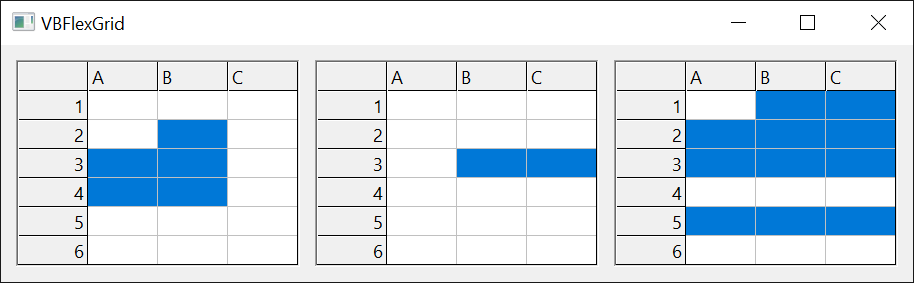
Dim g As VBFLXGRD18.VBFlexGrid
Set g = VBFlexGrid1
g.Rows = 8: g.Cols = 5

g.SelectionMode = FlexSelectionModeByRow
g.SelectRange 2, 1                  ' the last two arguments follow the mode
Debug.Print "by row: " & g.Row & "," & g.Col & " range " & g.RowSel & "," & g.ColSel

g.SelectionMode = FlexSelectionModeByColumn
g.SelectRange 2, 1
Debug.Print "by column: " & g.Row & "," & g.Col & " range " & g.RowSel & "," & g.ColSel

g.SelectionMode = FlexSelectionModeFreeByRow
g.SelectRange 2, 1
Debug.Print "free by row: " & g.Row & "," & g.Col & " range " & g.RowSel & "," & g.ColSel

g.SelectionMode = FlexSelectionModeFree
g.SelectRange 3, 2
g.AllowSelection = False
g.RowSel = 6                        ' ignored
Debug.Print "no selection: " & g.Row & "," & g.Col & " range " & g.RowSel & "," & g.ColSel
' Output:
' by row: 2,1 range 2,4
' by column: 2,1 range 7,1
' free by row: 2,1 range 2,1
' no selection: 3,2 range 3,2
Highlighting and the focus rectangle
HighLight chooses when selected cells are drawn in the selection colours: never, always, or only while the grid has the focus. FocusRect chooses how the current cell is outlined. The colours are BackColorSel and ForeColorSel. Rows flagged by RowSelected are drawn selected as well.
Multiple selection
With AllowMultiSelection set to True the user can select several rows that are not next to each other. Ctrl+click toggles one row, and Ctrl+Shift+click adds the rows from the current row to the one clicked. Every other click, and every assignment to Row or RowSel, discards the extra rows and selects only the new range.
Each row carries a selected flag, and three properties read and write them:
- RowSelected reads or sets the flag of one row, or of every row when the index is -1.
- SelectedRows counts the flagged rows.
- SelectedRow returns the number of the n-th flagged row, counting from 0 in row order.
Multiple selection exists only in FlexSelectionModeByRow and FlexSelectionModeFreeByRow; in any other mode, setting AllowMultiSelection to True raises error 383. The flags work without AllowMultiSelection too: code can set them in any mode, and the rows are drawn selected. The MultiSelChange event reports a change of the set of rows.
Dim g As VBFLXGRD18.VBFlexGrid
Set g = VBFlexGrid1
g.Rows = 8: g.Cols = 3
g.SelectionMode = FlexSelectionModeByRow
g.AllowMultiSelection = True         ' flags the current row, 1

g.RowSelected(5) = True
g.RowSelected(2) = True
g.RowSelected(3) = True
Debug.Print g.SelectedRows & " rows: " & g.SelectedRow(0) & " " & g.SelectedRow(1) & " " & g.SelectedRow(2) & " " & g.SelectedRow(3)
Debug.Print "after the last: " & g.SelectedRow(4)

g.RowSelected(3) = False
Debug.Print g.SelectedRows & " rows, row 2 selected: " & g.RowSelected(2)

g.RowSelected(-1) = True            ' every row, the fixed one included
Debug.Print g.SelectedRows & " rows"
g.RowSelected(-1) = False
Debug.Print g.SelectedRows & " rows"

g.RowSelected(4) = True
g.Row = 6                           ' a move of the current cell starts over
Debug.Print g.SelectedRows & " row: " & g.SelectedRow(0)

g.SelectionMode = FlexSelectionModeFree
Debug.Print "multi selection after the mode change: " & g.AllowMultiSelection
' Output:
' 4 rows: 1 2 3 5
' after the last: -1
' 3 rows, row 2 selected: True
' 8 rows
' 0 rows
' 1 row: 6
' multi selection after the mode change: False
The order of the events
A change of the current cell and a change of the selected range raise six events, and one assignment can raise several. The order is fixed:
| # | Event | Raised | What a handler sees |
|---|---|---|---|
| 1 | BeforeRowColChange | Only when the current cell would move. | Row and Col still have the old cell. |
| 2 | BeforeSelChange | Whenever the range would change. A move of the current cell always changes it. | RowSel and ColSel still have the old corner. |
| 3 | LeaveCell | Only when the current cell moves. | Everything is still old. |
| 4 | SelChange | When the range has changed. | Row, Col, RowSel and ColSel are all new. |
| 5 | MultiSelChange | When AllowMultiSelection is True and the set of selected rows has changed. | The new state. |
| 6 | EnterCell | Only when the current cell has moved. | The new cell is current. |
| 7 | RowColChange | After EnterCell. | The same as EnterCell. |
The two Before events can be cancelled and the others cannot. The class below prints the state at each event; the samples that follow use it.
Class SelectionTrace
    Private WithEvents Grid As VBFLXGRD18.VBFlexGrid

    Public CancelRowCol As Boolean
    Public CancelSel As Boolean

    Public Sub Attach(ByVal G As VBFLXGRD18.VBFlexGrid)
        Set Grid = G
    End Sub

    Private Function Where() As String
        Where = "cell " & Grid.Row & "," & Grid.Col & " range " & Grid.RowSel & "," & Grid.ColSel
    End Function

    Private Sub Grid_BeforeRowColChange(ByVal NewRow As Long, ByVal NewCol As Long, Cancel As Boolean)
        Debug.Print "BeforeRowColChange " & NewRow & "," & NewCol & " | " & Where()
        Cancel = CancelRowCol
    End Sub

    Private Sub Grid_BeforeSelChange(ByVal NewRowSel As Long, ByVal NewColSel As Long, Cancel As Boolean)
        Debug.Print "BeforeSelChange " & NewRowSel & "," & NewColSel & " | " & Where()
        Cancel = CancelSel
    End Sub

    Private Sub Grid_LeaveCell()
        Debug.Print "LeaveCell | " & Where()
    End Sub

    Private Sub Grid_SelChange()
        Debug.Print "SelChange | " & Where()
    End Sub

    Private Sub Grid_MultiSelChange()
        Debug.Print "MultiSelChange | " & Where()
    End Sub

    Private Sub Grid_EnterCell()
        Debug.Print "EnterCell | " & Where()
    End Sub

    Private Sub Grid_RowColChange()
        Debug.Print "RowColChange | " & Where()
    End Sub
End Class
Moving the current cell raises all of them; moving only the opposite corner raises BeforeSelChange and SelChange:
VBFlexGrid1.Rows = 6: VBFlexGrid1.Cols = 4
Dim t As New SelectionTrace
t.Attach VBFlexGrid1

Debug.Print "-- Row = 3"
VBFlexGrid1.Row = 3
Debug.Print "-- RowSel = 5"
VBFlexGrid1.RowSel = 5
' Output:
' -- Row = 3
' BeforeRowColChange 3,1 | cell 1,1 range 1,1
' BeforeSelChange 3,1 | cell 1,1 range 1,1
' LeaveCell | cell 1,1 range 1,1
' SelChange | cell 3,1 range 3,1
' EnterCell | cell 3,1 range 3,1
' RowColChange | cell 3,1 range 3,1
' -- RowSel = 5
' BeforeSelChange 5,1 | cell 3,1 range 3,1
' SelChange | cell 3,1 range 5,1
A move of the current cell always raises BeforeSelChange and SelChange as well, because the range moves with it. With AllowMultiSelection set, MultiSelChange comes between SelChange and EnterCell:
VBFlexGrid1.Rows = 6: VBFlexGrid1.Cols = 4
VBFlexGrid1.SelectionMode = FlexSelectionModeByRow
VBFlexGrid1.AllowMultiSelection = True
Dim t As New SelectionTrace
t.Attach VBFlexGrid1

VBFlexGrid1.Row = 2
Debug.Print "-- RowSelected(4) = True"
VBFlexGrid1.RowSelected(4) = True   ' sets the flag and raises no event
Debug.Print VBFlexGrid1.SelectedRows & " rows"
' Output:
' BeforeRowColChange 2,1 | cell 1,1 range 1,1
' BeforeSelChange 2,1 | cell 1,1 range 1,1
' LeaveCell | cell 1,1 range 1,1
' SelChange | cell 2,1 range 2,1
' MultiSelChange | cell 2,1 range 2,1
' EnterCell | cell 2,1 range 2,1
' RowColChange | cell 2,1 range 2,1
' -- RowSelected(4) = True
' 2 rows
Cancelling a change
Cancel in BeforeRowColChange keeps Row and Col where they are. Cancel in BeforeSelChange keeps RowSel and ColSel. Each cancels only its own pair: a move that one event refuses and the other allows leaves the current cell and the opposite corner apart, and the range between them is selected. To refuse a move completely, cancel both, as the second sample below does.
Warning 1.8.69.0
Cancelling BeforeRowColChange does not stop the selection. The current cell stays, but BeforeSelChange follows and SelChange is raised, and RowSel and ColSel move to the cell that was refused, so the range then runs from the old cell to it. A click on a cell that the handler refuses selects the same range. Cancel BeforeSelChange as well, when the new cell is also refused.
VBFlexGrid1.Rows = 6: VBFlexGrid1.Cols = 4
Dim t As New SelectionTrace
t.Attach VBFlexGrid1

t.CancelRowCol = True
VBFlexGrid1.Row = 4
Debug.Print "now: cell " & VBFlexGrid1.Row & "," & VBFlexGrid1.Col & " range " & VBFlexGrid1.RowSel & "," & VBFlexGrid1.ColSel
' Output:
' BeforeRowColChange 4,1 | cell 1,1 range 1,1
' BeforeSelChange 4,1 | cell 1,1 range 1,1
' SelChange | cell 1,1 range 4,1
' now: cell 1,1 range 4,1
VBFlexGrid1.Rows = 6: VBFlexGrid1.Cols = 4
Dim t As New SelectionTrace
t.Attach VBFlexGrid1

t.CancelRowCol = True
t.CancelSel = True
VBFlexGrid1.Row = 4
Debug.Print "now: cell " & VBFlexGrid1.Row & "," & VBFlexGrid1.Col & " range " & VBFlexGrid1.RowSel & "," & VBFlexGrid1.ColSel

t.CancelRowCol = False
t.CancelSel = True
VBFlexGrid1.Row = 4
Debug.Print "now: cell " & VBFlexGrid1.Row & "," & VBFlexGrid1.Col & " range " & VBFlexGrid1.RowSel & "," & VBFlexGrid1.ColSel
' Output:
' BeforeRowColChange 4,1 | cell 1,1 range 1,1
' BeforeSelChange 4,1 | cell 1,1 range 1,1
' now: cell 1,1 range 1,1
' BeforeRowColChange 4,1 | cell 1,1 range 1,1
' BeforeSelChange 4,1 | cell 1,1 range 1,1
' LeaveCell | cell 1,1 range 1,1
' EnterCell | cell 4,1 range 1,1
' RowColChange | cell 4,1 range 1,1
' now: cell 4,1 range 1,1
Keyboard navigation
TabBehavior, WrapCellBehavior and DirectionAfterReturn decide where the Tab and Enter keys take the current cell. By default Tab leaves the grid for the next control and Enter does nothing. With the arrow keys, Home, End, Page Up and Page Down the current cell moves inside the grid; Shift extends the range, unless AllowSelection is False. The keys raise the same events as an assignment. Keyboard events and key codes are on the Mouse, Keyboard and Drag and Drop page.
Properties
Row
Returns or sets the row of the current cell.
Syntax: object.Row [ = value ]
- value
- A Long, from 0 to Rows - 1. Fixed rows are allowed.
Assigning a value moves the current cell to that row of the current column, collapses the range to the cell, and raises the events in the order above. Assigning a row outside the grid raises error 30009, Invalid Row value, and so does assigning any value to a grid that has no rows. In a grid with no rows Row reads -1.
Col
Returns or sets the column of the current cell.
Syntax: object.Col [ = value ]
- value
- A Long, from 0 to Cols - 1. Fixed columns are allowed.
Works as Row does, for the column. An invalid column raises error 30010, Invalid Col value.
RowSel
Returns or sets the row of the corner of the range that is opposite the current cell.
Syntax: object.RowSel [ = value ]
- value
- A Long, from 0 to Rows - 1.
The current cell does not move. A value outside the grid raises error 30009. See AllowSelection for when the assignment has no effect.
ColSel
Returns or sets the column of the corner of the range that is opposite the current cell.
Syntax: object.ColSel [ = value ]
- value
- A Long, from 0 to Cols - 1.
A value outside the grid raises error 30010.
SelectionMode
Returns or sets what a click or a key selects. A FlexSelectionModeConstants member. Default: FlexSelectionModeFree.
Syntax: object.SelectionMode [ = value ]
Any other value raises error 380. The modes are described under Selection modes. Switching to a mode other than FlexSelectionModeByRow or FlexSelectionModeFreeByRow sets AllowMultiSelection to False and clears the selected flags of the rows.
AllowSelection
Returns or sets whether the user can select a range of more than one cell. Boolean. Default: True.
Syntax: object.AllowSelection [ = value ]
When False, a click selects its cell only and Shift+click moves the current cell. In the modes that select single cells, an assignment to RowSel or ColSel has no effect, as a range of one cell is all that exists. By-row mode does not restrict ColSel and by-column mode does not restrict RowSel. Changing the value does not change the range that is already selected.
With AllowMultiSelection set and AllowSelection False, AllowBigSelection decides whether Ctrl+click and Ctrl+Shift+click can add rows.
AllowBigSelection
Returns or sets whether a click on a column heading or a row heading selects the whole column or row. Boolean. Default: True.
Syntax: object.AllowBigSelection [ = value ]
The headings are the fixed rows and columns. Clicking the corner cell, where a fixed row and a fixed column cross, selects every cell that is not fixed. With AllowMultiSelection set and AllowSelection False, setting this to False makes selection strictly single: SelectedRows then returns 0 or 1.
AllowMultiSelection
Returns or sets whether the user can select several rows that are not next to each other. Boolean. Default: False.
Syntax: object.AllowMultiSelection [ = value ]
Setting it to True in a mode other than FlexSelectionModeByRow or FlexSelectionModeFreeByRow raises error 383. Setting it to True flags the current range as selected; setting it to False clears all the flags. See Multiple selection.
SelectedRow
Returns the number of one of the selected rows.
Syntax: object.SelectedRow ( Index ) As Long
- Index
- required A Long from 0 to SelectedRows - 1. The selected rows are in order, from the top.
Returns -1 for an index that is outside that range. While the user drags the mouse, the rows covered so far are counted as selected, or as not selected when the drag started on a selected row.
SelectedRows
Returns the number of selected rows. Long, read-only.
Syntax: object.SelectedRows
It counts the rows whose flag is set, so it can be used without AllowMultiSelection. With multiple selection off and no flag set it returns 0, even though a range is selected.
RowSelected
Returns or sets the selected flag of a row.
Syntax: object.RowSelected ( Index ) [ = value ]
- Index
- required A Long, the row number. A Let also accepts -1 for every row, the fixed rows included.
- value
- A Boolean.
An index outside the grid raises error 30009, and so does reading with -1. Assigning the flag raises no event, but it redraws the grid and makes SelectedRows count again. A later change of the selection, by the user or by code, replaces the flags when AllowMultiSelection is True.
MultiSelChangeTime
Returns or sets how long, in milliseconds, the control waits before it raises MultiSelChange after the user changed the set of selected rows with the mouse or the keyboard. Long. Default: 0.
Syntax: object.MultiSelChangeTime [ = value ]
- value
- A Long from 0 to 65535. With 0 the event is raised at once. Another value raises error 380.
A change made by code is reported at once, whatever this value is.
HighLight
Returns or sets when selected cells are drawn in the selection colours. A FlexHighLightConstants member. Default: FlexHighLightAlways.
Syntax: object.HighLight [ = value ]
FlexHighLightNever never draws the selection. FlexHighLightAlways draws it even when the grid does not have the focus. FlexHighLightWithFocus draws it only while the grid has the focus. FlexHighLightAlwaysFocusRect differs from FlexHighLightAlways only while the grid does not have the focus: the current cell is then drawn highlighted like the rest of the range. The first three have the values of MSFlexGrid’s constants. Any other value raises error 380.
FocusRect
Returns or sets how the current cell is outlined. A FlexFocusRectConstants member. Default: FlexFocusRectLight.
Syntax: object.FocusRect [ = value ]
FlexFocusRectNone draws nothing. FlexFocusRectLight draws one dotted focus rectangle, FlexFocusRectHeavy draws a second one inside the first, and FlexFocusRectFlat draws a solid rectangle of FocusRectWidth pixels in the colour BackColorSel. Any other value raises error 380.
FocusRectWidth
Returns or sets the width in pixels of the solid focus rectangle. Integer. Default: -1, the width of the system’s focus border.
Syntax: object.FocusRectWidth [ = value ]
It affects only FlexFocusRectFlat. Reading it returns the width in use, not -1. A value below 1 other than -1 raises error 380.
DirectionAfterReturn
Returns or sets where the current cell goes when the user presses Enter. A FlexDirectionAfterReturnConstants member. Default: FlexDirectionAfterReturnNone.
Syntax: object.DirectionAfterReturn [ = value ]
With FlexDirectionAfterReturnNone the key does nothing; Up, Down, Left and Right move the current cell one step. FlexDirectionAfterReturnEdit starts an edit instead (see AllowUserEditing). The grid also moves the current cell in this direction after an edit that was closed with Enter. WrapCellBehavior decides what happens at the edge. Any other value raises error 380.
TabBehavior
Returns or sets what the Tab key does. A FlexTabBehaviorConstants member. Default: FlexTabControls.
Syntax: object.TabBehavior [ = value ]
FlexTabControls leaves the grid for the next control on the form, as for any control. FlexTabCells keeps the focus in the grid and moves the current cell to the next cell, or to the previous one with Shift. FlexTabNext moves the current cell as long as there is a cell to move to, and then leaves for the next control. Any other value raises error 380.
WrapCellBehavior
Returns or sets what the grid does when the Tab or Enter key moves past the last or first cell of a row. A FlexWrapCellBehaviorConstants member. Default: FlexWrapNone.
Syntax: object.WrapCellBehavior [ = value ]
With FlexWrapNone the current cell stays at the edge. FlexWrapRow continues in the next row, or the previous one, and stops at the first and last cells of the grid. FlexWrapGrid also wraps from the last cell of the grid to the first and back. Any other value raises error 380.
WantReturn
Returns or sets whether the grid receives the Enter key when the form has a default button. Boolean. Default: False.
Syntax: object.WantReturn [ = value ]
With False, Enter presses the form’s default button. With True the grid handles the key, and the button is not pressed. It makes a difference only when the form has a default button.
Methods
SelectRange
Selects a range of cells, or one cell, with one call and one set of events.
Syntax: object.SelectRange ( Row, Col [, RowSel [, ColSel]] )
- Row, Col
- required Long The current cell.
- RowSel, ColSel
- optional Long The opposite corner. When omitted (or -1), RowSel is Row and ColSel is Col, except that in FlexSelectionModeByRow ColSel is the last column and in FlexSelectionModeByColumn RowSel is the last row.
A value outside the grid raises error 381, Subscript out of range.
SelectAll
Selects every cell that is not fixed.
Syntax: object.SelectAll
The current cell is the first cell after the fixed rows and columns, and the opposite corner is the last cell of the grid. A grid with no rows or no columns is left alone. A key handler can call it to give Ctrl+A its usual meaning.
GetSelRange
Returns the edges of the selected range, ordered.
Syntax: object.GetSelRange ( Row1, Col1, Row2, Col2 )
- Row1, Col1, Row2, Col2
- required Long variables passed by reference. They receive the top row, the left column, the bottom row and the right column, so Row1 <= Row2 and Col1 <= Col2, whichever corner is the current cell.
Events
BeforeRowColChange
Occurs before the current cell changes.
Syntax: Private Sub object_BeforeRowColChange ( ByVal NewRow As Long, ByVal NewCol As Long, Cancel As Boolean )
- NewRow, NewCol
- The cell that is about to become current.
- Cancel
- Set to True to keep the current cell where it is.
Row and Col still have the old values in the handler. The event is raised only when the cell really changes. For what a cancel leaves behind, see Cancelling a change.
RowColChange
Occurs when the current cell has changed.
Syntax: Private Sub object_RowColChange ( )
The last event of a change of the current cell. The edit of a cell and the hit test of a click are available as usual.
BeforeSelChange
Occurs before the selected range changes.
Syntax: Private Sub object_BeforeSelChange ( ByVal NewRowSel As Long, ByVal NewColSel As Long, Cancel As Boolean )
- NewRowSel, NewColSel
- The corner that is about to become the opposite one.
- Cancel
- Set to True to keep RowSel and ColSel where they are.
SelChange
Occurs when the selected range has changed.
Syntax: Private Sub object_SelChange ( )
Row, Col, RowSel and ColSel have their new values. Use GetSelRange to read the range in order.
EnterCell
Occurs when the current cell has moved, before RowColChange.
Syntax: Private Sub object_EnterCell ( )
LeaveCell
Occurs when the current cell moves, while Row and Col still have the old cell.
Syntax: Private Sub object_LeaveCell ( )
It is raised after the Before events have allowed the move and before the new cell is stored, so it is the place to read the old cell.
MultiSelChange
Occurs when the set of selected rows changes.
Syntax: Private Sub object_MultiSelChange ( )
Raised only with AllowMultiSelection. A change that the user makes with the mouse is reported after MultiSelChangeTime milliseconds; every other change is reported at once. Setting RowSelected raises no event.
Private Sub VBFlexGrid1_BeforeRowColChange(ByVal NewRow As Long, ByVal NewCol As Long, Cancel As Boolean)
    ' Refuse a move to a cell that cannot be used, and keep the selection too.
    If NewCol = 3 Then Cancel = True
End Sub

Private Sub VBFlexGrid1_BeforeSelChange(ByVal NewRowSel As Long, ByVal NewColSel As Long, Cancel As Boolean)
    If NewColSel = 3 Then Cancel = True
End Sub

Private Sub VBFlexGrid1_MultiSelChange()
    Debug.Print VBFlexGrid1.SelectedRows & " rows selected"
End Sub
See Also
- VBFlexGrid – the control
- Scrolling – the visible part of the grid
- Mouse, Keyboard and Drag and Drop – clicks, keys and hit testing
- Editing Cells – an edit starts in the current cell
- FlexSelectionModeConstants, FlexHighLightConstants, FlexFocusRectConstants, FlexTabBehaviorConstants, FlexDirectionAfterReturnConstants, FlexWrapCellBehaviorConstants