Cell Text
Reading and writing the text of cells, and the properties that change how the text is shown: formats, data types, lookups, tags, tool tips, wrapping and ellipsis.
Every cell of a VBFlexGrid holds one String, and the fixed rows and columns are cells like any other. Four properties reach that string: Text for the current cell, TextMatrix for the cell at a row and a column, TextArray for the cell at a position counted row by row, and Cell with FlexCellText for a cell or a block of cells.
VBFlexGrid1.Rows = 3
VBFlexGrid1.Cols = 3
VBFlexGrid1.TextMatrix(1, 1) = "Alpha"
VBFlexGrid1.Row = 2
VBFlexGrid1.Col = 2
VBFlexGrid1.Text = "Beta"
VBFlexGrid1.TextArray(1 * VBFlexGrid1.Cols + 2) = "Gamma"   ' row 1, column 2
Debug.Print VBFlexGrid1.TextMatrix(1, 1) ' Alpha
Debug.Print VBFlexGrid1.TextMatrix(2, 2) ' Beta
Debug.Print VBFlexGrid1.Text             ' Beta
Debug.Print VBFlexGrid1.TextArray(5)     ' Gamma
A row, a column or an index outside the grid raises run-time error 381 (Subscript out of range). Text raises 30009 or 30010 when the current row or column is -1.
- Writing a block of cells
- Showing text differently from how it is stored
- Data types of a column
- Wrapping and ellipsis
- Tags and tool tips
- Properties
- Methods
- Events
- See Also
Writing a block of cells
Text and every other property that sets a cell’s formatting (the Cell… properties of Cell Formatting) apply to the current cell only, unless FillStyle is FlexFillStyleRepeat. Then they apply to every cell of the selection. Cell has two more parameters, RowSel and ColSel, that name the block directly. It leaves the current cell and the selection as they were.
VBFlexGrid1.Rows = 4
VBFlexGrid1.Cols = 4
VBFlexGrid1.Cell(FlexCellText, 1, 1, 2, 2) = "x"          ' a block of four cells
VBFlexGrid1.Row = 3: VBFlexGrid1.Col = 3
VBFlexGrid1.RowSel = 3: VBFlexGrid1.ColSel = 3
Debug.Print VBFlexGrid1.TextMatrix(1, 1) & VBFlexGrid1.TextMatrix(2, 2) & VBFlexGrid1.TextMatrix(3, 3) ' xx
Debug.Print VBFlexGrid1.Row & " " & VBFlexGrid1.Col ' 3 3
VBFlexGrid1.FillStyle = FlexFillStyleRepeat
VBFlexGrid1.Row = 1: VBFlexGrid1.Col = 1
VBFlexGrid1.RowSel = 3: VBFlexGrid1.ColSel = 3
VBFlexGrid1.Text = "y"                                   ' the whole selection
Debug.Print VBFlexGrid1.TextMatrix(3, 3) & VBFlexGrid1.TextMatrix(1, 3) ' yy
Showing text differently from how it is stored
The text a cell holds is not always the text a user should see. A column can have a format and a lookup, and both change only what is drawn. TextMatrix and Text always return the stored string; Cell(FlexCellTextDisplay) returns the string as drawn, after the lookup and then the format.
- ColFormat is a format string for the Format$ function. It applies to the cells of the scrollable area, and to the fixed cells too unless FixedFormat is set.
- ColLookup maps stored keys to displayed values, the way a database stores
3and a user reads Contractor. The lookup is applied first, so a format sees the value.
VBFlexGrid1.Rows = 3
VBFlexGrid1.Cols = 3
VBFlexGrid1.ColFormat(1) = "000"
VBFlexGrid1.TextMatrix(1, 1) = "7"
Debug.Print VBFlexGrid1.TextMatrix(1, 1)                  ' 7
Debug.Print VBFlexGrid1.Cell(FlexCellTextDisplay, 1, 1)   ' 007

VBFlexGrid1.ColLookup(2) = "1;Full time|2;Part time|3;Contractor"
VBFlexGrid1.TextMatrix(1, 2) = "3"
VBFlexGrid1.TextMatrix(2, 2) = "9"
Debug.Print VBFlexGrid1.TextMatrix(1, 2)                  ' 3
Debug.Print VBFlexGrid1.Cell(FlexCellTextDisplay, 1, 2)   ' Contractor
Debug.Print VBFlexGrid1.Cell(FlexCellTextDisplay, 2, 2)   ' 9
A key with no entry in the lookup is shown as it is, as the last line shows. LookupConv does the conversion in code, in either direction. When a column has a lookup, the user-visible editing and the clipboard use it as well: a drop-down list of values puts the key in the cell (see Drop-Down Lists, Buttons and Calendars), and Clip returns the values rather than the keys while ClipMode is FlexClipModeLookupConv or FlexClipModeLookupConvExcludeHidden.
Data types of a column
ColDataType, ColNumericPrecision, ColNumericScale and ColNullable describe what a column holds. They do not restrict what can be typed into it, and nothing is converted when a cell is written: the cell still holds a string. Binding the control to an ADO recordset with DataSource fills them in from the fields. The one place that acts on them is SaveArray with UseColDataType True, which returns the cells of a column as values of the column’s type.
VBFlexGrid1.Rows = 4
VBFlexGrid1.Cols = 2
VBFlexGrid1.ColDataType(1) = vbLong
VBFlexGrid1.TextMatrix(1, 1) = "42"
VBFlexGrid1.TextMatrix(2, 1) = "text"
Dim v As Variant
v = VBFlexGrid1.SaveArray(FlexRowMajor, UseColDataType:=True)
Debug.Print TypeName(v(0, 0)) ' Long
Debug.Print IsNull(v(1, 0))   ' True
Debug.Print TypeName(v(2, 0)) ' Empty
The conversion keeps an empty cell empty. A text that cannot be converted becomes Null, or stays a string when the column is not nullable and UseColNullable is True.
Wrapping and ellipsis
By default a cell starts a new line at each line break in its text and cuts every line off at the cell’s edge. Three grid-wide settings change that.
- WordWrap also breaks a line that is wider than the cell.
- SingleLine draws the text on one line, so that line breaks in it do not start a new line.
- EllipsisFormat ends a line that does not fit with an ellipsis (…), placing it at the end of the line, in the middle as a path is shortened, or at the end of a word.
EllipsisFormatFixed is the same setting for the fixed cells. MimicTextBox draws the text as a multi-line text box draws it.
Each of these can be overridden for one column. ColWordWrapOption combines wrapping, single line and ellipsis in one value, and ColMimicTextBox is the column’s own mimic setting; both have a Fixed form for the fixed cells. A column that has not been overridden reports the value that results from the grid-wide settings.
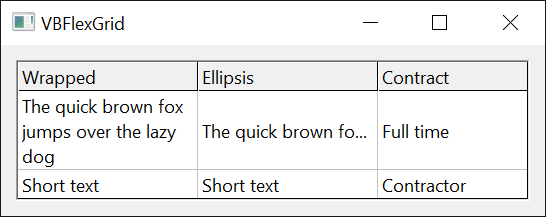
VBFlexGrid1.Cols = 3
Debug.Print VBFlexGrid1.ColWordWrapOption(1) = FlexWordWrapNone  ' True
VBFlexGrid1.WordWrap = True
VBFlexGrid1.EllipsisFormat = FlexEllipsisFormatEnd
Debug.Print VBFlexGrid1.ColWordWrapOption(1) = FlexWordBreakEndEllipsis ' True
VBFlexGrid1.ColWordWrapOption(2) = FlexSingleLine                ' column 2 only
Debug.Print VBFlexGrid1.ColWordWrapOption(2) = FlexSingleLine    ' True
Debug.Print VBFlexGrid1.ColWordWrapOption(1) = FlexWordBreakEndEllipsis ' True
VBFlexGrid1.ColWordWrapOption(-1) = -1                           ' every column follows the grid again
Debug.Print VBFlexGrid1.ColWordWrapOption(2) = FlexWordBreakEndEllipsis ' True
WordWrap and SingleLine exclude each other. Setting SingleLine to True sets WordWrap to False, and setting WordWrap to True while SingleLine is True raises run-time error 383.
VBFlexGrid1.WordWrap = True
VBFlexGrid1.SingleLine = True
Debug.Print VBFlexGrid1.WordWrap ' False
On Error Resume Next
VBFlexGrid1.WordWrap = True
Debug.Print Err.Number           ' 383
Tags and tool tips
Each cell can carry a tag, a Variant that the control stores and never reads: a key, an object, a record. CellTag reads and writes the tag of the current cell. A cell has no tag, and uses no memory for one, until a tag is stored; CellHasTag tells which, and setting it to False discards the tag.
VBFlexGrid1.Row = 1
VBFlexGrid1.Col = 1
Debug.Print VBFlexGrid1.CellHasTag     ' False
VBFlexGrid1.CellTag = 12345
Debug.Print VBFlexGrid1.CellHasTag     ' True
Debug.Print VBFlexGrid1.CellTag        ' 12345
Debug.Print VBFlexGrid1.Cell(FlexCellTag, 1, 1) ' 12345
VBFlexGrid1.CellHasTag = False
Debug.Print IsEmpty(VBFlexGrid1.CellTag) ' True
CellToolTipText gives a cell a tool tip. It is shown only while ShowInfoTips is True. ShowLabelTips shows the whole text of a cell that is cut off, in a tool tip, when the cell has no tool tip text of its own.
VBFlexGrid1.ShowInfoTips = True
VBFlexGrid1.ShowLabelTips = True
VBFlexGrid1.TextMatrix(1, 1) = "A text that is much longer than its cell"
VBFlexGrid1.Row = 1
VBFlexGrid1.Col = 1
VBFlexGrid1.CellToolTipText = "Shown for this cell instead of its own text"
Properties
Cell
Reads or writes one setting of a cell or of a block of cells.
Syntax: object.Cell(Setting, [ Row, [ Col, [ RowSel, [ ColSel ] ] ] ]) [ = value ]
- Setting
- required A FlexCellSettings member naming the setting. It is the one parameter that is not optional.
- Row, Col
- optional The cell, as a Long. -1, or omitted, means the current row or the current column.
- RowSel, ColSel
- optional The opposite corner of a block of cells, as a Long. -1, or omitted, means the same as Row or Col, so that the property reads or writes one cell. The selection of the grid is not used.
Each setting is the property of the same name: FlexCellText is Text, FlexCellBackColor is CellBackColor, and so on. Reading returns the setting of the cell named by Row and Col. Writing sets it in every cell of the block. The current cell and the selection are the same afterwards, and no event is raised for the moves in between. The grid is redrawn once.
A value of the wrong kind for the setting raises the error its property raises. FlexCellLeft, FlexCellTop, FlexCellWidth, FlexCellHeight, FlexCellTextDisplay and FlexCellTextHidden are read-only, and writing them raises 383. FlexCellSort is write-only, and reading it raises 394. Settings that hold an object, FlexCellPicture and FlexCellTag, are written with Set when the value is an object.
VBFlexGrid1.Rows = 3
VBFlexGrid1.Cols = 3
VBFlexGrid1.Cell(FlexCellBackColor, 1, 1, 2, 2) = vbYellow
Debug.Print VBFlexGrid1.Cell(FlexCellBackColor, 2, 2) = vbYellow ' True
Debug.Print VBFlexGrid1.Cell(FlexCellBackColor, 1, 1) = vbYellow ' True

On Error Resume Next
VBFlexGrid1.Cell(FlexCellWidth, 1, 1) = 100
Debug.Print Err.Number ' 383
Err.Clear
Debug.Print VBFlexGrid1.Cell(FlexCellSort, 1, 1)
Debug.Print Err.Number ' 394
CellHasTag
Whether the current cell has a tag.
Syntax: object.CellHasTag [ = value ]
A Boolean. Setting it to True gives the cell an empty tag, and setting it to False discards the tag, so that CellTag returns Empty again and the cell uses no memory for it. With FillStyle at FlexFillStyleRepeat it applies to the whole selection. Raises 30009 or 30010 when there is no current row or column.
CellTag
A value the program stores in the current cell.
Syntax: object.CellTag [ = value ]
A Variant, any value including an object, which is written with Set. The control never interprets it. A cell that has no tag returns Empty. With FillStyle at FlexFillStyleRepeat, writing it stores the same value in every cell of the selection. Raises 30009 or 30010 when there is no current row or column.
CellToolTipText
The tool tip text of the current cell.
Syntax: object.CellToolTipText [ = value ]
A String. It is shown only when ShowInfoTips is True. With FillStyle at FlexFillStyleRepeat, writing it sets the text of every cell of the selection. A cell with no tool tip text of its own shows its whole text in a tool tip when it is cut off and ShowLabelTips is True. Raises 30009 or 30010 when there is no current row or column.
ColDataType
The data type of a column.
Syntax: object.ColDataType(Index) [ = value ]
- Index
- required The column, as a Long. -1 in a write means every column.
An Integer. It is a VarType value or an ADO data type code, and is not restricted to the members of an enumeration. Default: 0, no data type. It describes the column and changes no cell; SaveArray with UseColDataType True uses it to convert. The types it converts to are Byte, Integer, Long, Single, Double, Currency, Decimal, Date, Boolean and Error, with the ADO codes of the same kinds (the larger integer types become Decimal, the date and time types Date); with any other value, a Variant column included, the cells stay strings. DataSource sets it from the type of each field.
Raises 30010 when Index is not -1 and not a column.
ColFormat
The format that shows the text of a column.
Syntax: object.ColFormat(Index) [ = value ]
- Index
- required The column, as a Long. -1 in a write means every column.
A String in the format of the Format$ function, as for numbers, dates and text ("000", "#,##0.00", "dd/mm/yyyy", ">"). Default: an empty string, which shows the text as stored. The format is applied to the stored text each time a cell is drawn, using the system’s day of the week and the system’s locale, and it does not change the stored text. It applies to the scrollable cells, and to the fixed cells of the column unless FixedFormat has been set. The formatted text is Cell(FlexCellTextDisplay).
Raises 30010 when Index is not -1 and not a column.
ColLookup
The table that maps the stored text of a column to the text that is shown.
Syntax: object.ColLookup(Index) [ = value ]
- Index
- required The column, as a Long. -1 in a write means every column.
A String of entries separated by |, each of the form key;value. Default: an empty string, no lookup. An entry with no semicolon has an empty key. A cell whose text equals a key, ignoring case, is shown as the key’s value; any other text is shown as it is. An empty key matches an empty cell, so that ";(none)|1;Yes" shows an empty cell as (none). Reading the property returns the string as it was written.
VBFlexGrid1.Cols = 3
VBFlexGrid1.ColLookup(1) = ";(none)|0;No|1;Yes"
VBFlexGrid1.TextMatrix(1, 1) = "1"
Debug.Print VBFlexGrid1.Cell(FlexCellTextDisplay, 1, 1) ' Yes
VBFlexGrid1.TextMatrix(1, 1) = ""
Debug.Print VBFlexGrid1.Cell(FlexCellTextDisplay, 1, 1) ' (none)
VBFlexGrid1.ColLookup(2) = "a;Alpha"
VBFlexGrid1.TextMatrix(1, 2) = "A"
Debug.Print VBFlexGrid1.Cell(FlexCellTextDisplay, 1, 2) ' Alpha
The editing of a column with a lookup, its drop-down list and the clipboard use the lookup too: see the introduction of this page. Raises 30010 when Index is not -1 and not a column.
ColMimicTextBox
Whether the wrapped text of a column breaks as a multi-line text box breaks it.
Syntax: object.ColMimicTextBox(Index) [ = value ]
- Index
- required The column, as a Long. -1 in a write means every column.
A FlexMimicTextBoxConstants member: FlexMimicTextBoxOn (0) or FlexMimicTextBoxOff (1). Writing -1 makes the column follow the grid-wide MimicTextBox again, which is also what a column that was never set does; reading returns the value that results.
Debug.Print VBFlexGrid1.ColMimicTextBox(1) = FlexMimicTextBoxOff ' True
VBFlexGrid1.MimicTextBox = True
Debug.Print VBFlexGrid1.ColMimicTextBox(1) = FlexMimicTextBoxOn  ' True
VBFlexGrid1.ColMimicTextBox(1) = FlexMimicTextBoxOff
VBFlexGrid1.MimicTextBox = False
VBFlexGrid1.ColMimicTextBox(1) = -1
VBFlexGrid1.MimicTextBox = True
Debug.Print VBFlexGrid1.ColMimicTextBox(1) = FlexMimicTextBoxOn  ' True
Raises 30010 when Index is not -1 and not a column, and 380 for another value.
ColMimicTextBoxFixed
The same as ColMimicTextBox, for the fixed cells of the column.
Syntax: object.ColMimicTextBoxFixed(Index) [ = value ]
ColNullable
Whether the column may hold a null value.
Syntax: object.ColNullable(Index) [ = value ]
- Index
- required The column, as a Long. -1 in a write means every column.
A Boolean. Default: False. It describes the column and changes no cell. SaveArray with UseColNullable True keeps a text that cannot be converted to the column’s data type as a string when the column is not nullable. DataSource sets it from the field. Raises 30010 when Index is not -1 and not a column.
ColNumericPrecision
The number of digits of the numbers of a column.
Syntax: object.ColNumericPrecision(Index) [ = value ]
- Index
- required The column, as a Long. -1 in a write means every column.
A Byte. Default: 0. Information only: it changes no cell and no other property. DataSource sets it from the field, and a program can use it to choose a ColFormat or an edit limit. Raises 30010 when Index is not -1 and not a column.
ColNumericScale
The number of digits after the decimal separator in the numbers of a column.
Syntax: object.ColNumericScale(Index) [ = value ]
- Index
- required The column, as a Long. -1 in a write means every column.
A Byte. Default: 0. Information only, as ColNumericPrecision is. Raises 30010 when Index is not -1 and not a column.
ColTextIndent
Whether the program sets an indent for the text of each cell of a column.
Syntax: object.ColTextIndent(Index) [ = value ]
- Index
- required The column, as a Long. -1 in a write means every column.
A Boolean. Default: False. While it is True, the grid raises CellTextIndent for each cell of the column it draws, edits or measures. Raises 30010 when Index is not -1 and not a column.
ColWordWrapOption
How the text of a column is wrapped, shortened and limited to one line.
Syntax: object.ColWordWrapOption(Index) [ = value ]
- Index
- required The column, as a Long. -1 in a write means every column.
A FlexWordWrapOptions member, which combines the three grid-wide settings WordWrap, SingleLine and EllipsisFormat in one value: FlexWordBreakEndEllipsis is wrapped with an ellipsis at the end, FlexSingleLinePathEllipsis is one line with the ellipsis in the middle of a path, and so on. Writing -1 makes the column follow the three grid-wide settings again, which is also what a column that was never set does. Reading a column that follows them returns the member that they make up.
Raises 30010 when Index is not -1 and not a column, and 380 for another value.
ColWordWrapOptionFixed
The same as ColWordWrapOption, for the fixed cells of the column. A column that follows the grid-wide settings uses EllipsisFormatFixed for its ellipsis.
Syntax: object.ColWordWrapOptionFixed(Index) [ = value ]
EllipsisFormat
Whether and where an ellipsis ends a text that does not fit its cell.
Syntax: object.EllipsisFormat [ = value ]
A FlexEllipsisFormatConstants member. Default: FlexEllipsisFormatNone. FlexEllipsisFormatEnd replaces the end of a line that does not fit with an ellipsis, FlexEllipsisFormatPath replaces characters in the middle, as a path is shortened, and FlexEllipsisFormatWord shortens the word that does not fit. The settings are those of the Windows DrawText flags of the same names. Raises 380 for another value.
EllipsisFormatFixed
The same as EllipsisFormat, for the fixed cells. Default: FlexEllipsisFormatNone.
Syntax: object.EllipsisFormatFixed [ = value ]
FixedFormat
The format that shows the text of the fixed cells of a column.
Syntax: object.FixedFormat(Index) [ = value ]
- Index
- required The column, as a Long. -1 in a write means every column.
A String in the format of Format$. A column that has not had it set uses ColFormat for its fixed cells as well, and reading it returns that format. Setting it to an empty string gives the fixed cells no format while the other cells keep theirs.
VBFlexGrid1.ColFormat(1) = ">"
Debug.Print VBFlexGrid1.FixedFormat(1) = ">"  ' True
VBFlexGrid1.FixedFormat(1) = ""
VBFlexGrid1.TextMatrix(0, 1) = "abc"
VBFlexGrid1.TextMatrix(1, 1) = "abc"
Debug.Print VBFlexGrid1.Cell(FlexCellTextDisplay, 0, 1) ' abc
Debug.Print VBFlexGrid1.Cell(FlexCellTextDisplay, 1, 1) ' ABC
Raises 30010 when Index is not -1 and not a column.
MimicTextBox
Whether wrapped text breaks as a multi-line text box breaks it.
Syntax: object.MimicTextBox [ = value ]
A Boolean. Default: False. When True, the text is drawn with the Windows DT_EDITCONTROL format, as a multi-line text box draws it: the average character width is calculated as a text box calculates it, and a last line that would show only in part is left out. A column’s ColMimicTextBox overrides it.
ShowInfoTips
Whether the tool tips of the cells are shown.
Syntax: object.ShowInfoTips [ = value ]
A Boolean. Default: False. The tool tip of a cell is its CellToolTipText, or the text that a bound data source supplies through IVBFlexDataSource2.
ShowLabelTips
Whether a cell whose text is cut off shows the whole text in a tool tip.
Syntax: object.ShowLabelTips [ = value ]
A Boolean. Default: False. Only a cell with no tool tip text of its own shows its text this way.
SingleLine
Whether a cell shows only one line of its text.
Syntax: object.SingleLine [ = value ]
A Boolean. Default: False. When True, the text is drawn on one line and its line breaks do not start a new line. Setting it to True sets WordWrap to False. Combined with EllipsisFormat the line ends with an ellipsis when it is too long.
Text
The text of the current cell, or the text to write to the selection.
Syntax: object.Text [ = value ]
A String. Reading returns the text of the cell at Row and Col, and an empty string when either is -1. Writing sets the text of that cell; when FillStyle is FlexFillStyleRepeat it sets the text of every cell of the selection. The grid is redrawn once.
Raises 30009 when the current row is -1 and 30010 when the current column is -1.
TextArray
The text of a cell, addressed by a single index.
Syntax: object.TextArray(Index) [ = value ]
- Index
- required A Long: the row times Cols plus the column, counted from 0, so that the cells are numbered row by row.
A String. Raises 381 when Index is negative or is not less than the number of rows times the number of columns.
TextMatrix
The text of the cell at a row and a column.
Syntax: object.TextMatrix(Row, Col) [ = value ]
- Row, Col
- required The cell, as Long values counted from 0. They address the fixed rows and columns as well.
A String. It does not use or change the current cell. Raises 381 when Row or Col is outside the grid.
WordWrap
Whether the text of a cell wraps onto several lines.
Syntax: object.WordWrap [ = value ]
A Boolean. Default: False. Wrapping happens at the width of the cell. A row is made taller to show the lines only by AutoSize or by a program that sets RowHeight. Raises 383 when SingleLine is True.
Methods
LookupConv
Converts a text with the lookup of a column.
Syntax: object.LookupConv(Text, Conversion, [ Col ])
- Text
- required The String to convert.
- Conversion
- required A FlexLookupConvConstants member. FlexLookupConvValue converts a key to its value, as drawing does, ignoring case. FlexLookupConvKey converts a value to its key, and compares exactly.
- Col
- optional The column, as a Long. -1, or omitted, means the current column.
Returns a String. It returns an empty string, not Text, when the column has no lookup or has no entry that matches. Raises 380 for another Conversion, and 381 when Col is not a column.
VBFlexGrid1.ColLookup(1) = "1;Full time|2;Part time|3;Contractor"
Debug.Print VBFlexGrid1.LookupConv("2", FlexLookupConvValue, 1)           ' Part time
Debug.Print VBFlexGrid1.LookupConv("Contractor", FlexLookupConvKey, 1)   ' 3
Debug.Print "[" & VBFlexGrid1.LookupConv("9", FlexLookupConvValue, 1) & "]" ' []
Events
CellTextIndent
Occurs when the grid needs the indent of the text of a cell whose column has ColTextIndent True.
Syntax: object_CellTextIndent(Row As Long, Col As Long, Left As Long, Right As Long)
- Row, Col
- The cell.
- Left, Right
- ByRef Long values, in twips, both 0 on entry. A program sets them to the space to leave at the left and at the right of the text. A negative value is treated as 0.
Private Sub VBFlexGrid1_CellTextIndent(ByVal Row As Long, ByVal Col As Long, ByRef Left As Long, ByRef Right As Long)
    ' Indent the text of the scrollable cells by 240 twips (a sixth of an inch) on the left
    If Row >= VBFlexGrid1.FixedRows Then Left = 240
End Sub
See Also
- Cell Formatting – alignment, colours, fonts, pictures and FillStyle
- Clipboard, Undo and Arrays – Clip and SaveArray
- Editing Cells – the text the user types
- Sizes and Positions – AutoSize and TextWidth
- Data Binding
- FlexCellSettings, FlexWordWrapOptions, FlexEllipsisFormatConstants, FlexMimicTextBoxConstants, FlexLookupConvConstants